1. Product Overview
The VILINICE Mini Projector Model T21 is designed to provide a versatile and immersive home cinema experience. Featuring 7500 lumens brightness and supporting 1080P Full HD resolution, it delivers clear and vibrant images with a high contrast ratio of 9000:1. Its compact and portable design makes it suitable for various environments, from home entertainment to small presentations.
Equipped with a robust cooling system, the projector ensures a long lamp life of up to 90,000 hours, offering continuous and reliable performance for over 15 years. It supports a wide projection size range from 30 to 240 inches, with an optimal viewing distance of 3 meters for a 120-inch display. The projector includes multiple connectivity options, such as HDMI, USB, VGA, and AV, ensuring compatibility with a broad array of devices including smartphones, PCs, laptops, gaming consoles, and TV sticks. Built-in dual speakers provide excellent sound quality, eliminating the need for external audio devices in many scenarios.
1.1 What's in the Box
- 1 x VILINICE Mini Projector
- 1 x Remote Control
- 1 x HDMI Cable
- 1 x Power Cable
- 1 x 3-in-1 AV Cable
- 1 x User Manual

Image: Overview of the VILINICE Mini Projector and its included accessories, such as the remote control, HDMI cable, power cable, and AV cable.
2. Setup Guide
2.1 Power Connection
Connect the power cable to the projector's power input port and then plug the other end into a standard electrical outlet. The power indicator light on the projector will illuminate.
2.2 Placement and Screen Size Adjustment
Place the projector on a stable, flat surface or mount it to the ceiling. Ensure there is adequate ventilation around the projector. Adjust the distance between the projector and the projection surface (screen or wall) to achieve your desired screen size. The projector supports screen sizes from 30 to 240 inches, with an optimal projection distance of 3 meters for a 120-inch display.
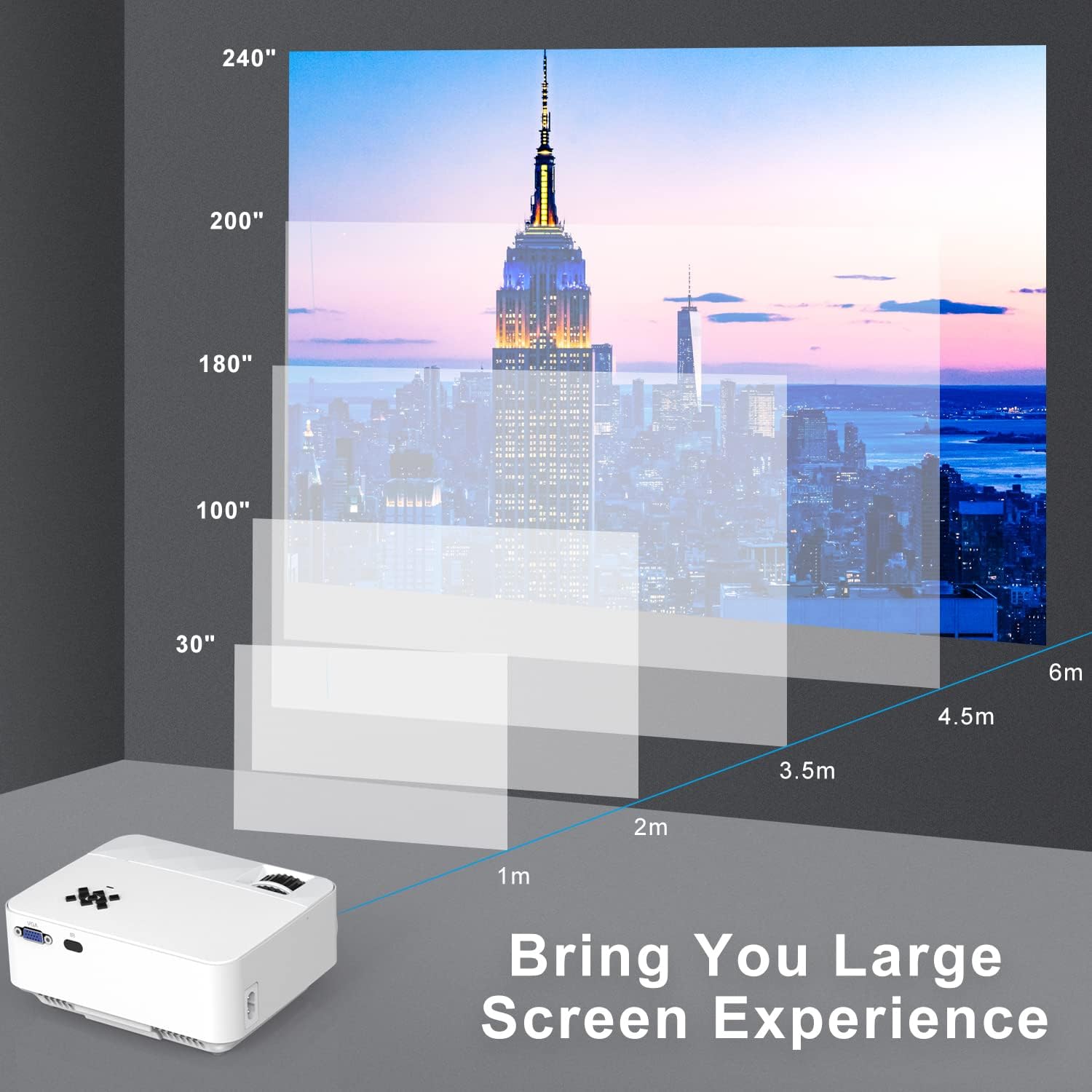
Image: Guide for projector placement, illustrating how projection distance (1m to 6m) affects screen size (30" to 240").

Image: Demonstrates flexible mounting options for the projector, including ceiling and table-top setups.
2.3 Focus and Keystone Correction
After positioning the projector, adjust the focus and keystone to ensure a clear and rectangular image.
- Focus Adjustment: Rotate the focus ring on the projector lens until the image appears sharp and clear.
- Keystone Correction: If the projected image appears trapezoidal (wider at the top or bottom), use the keystone correction dial to adjust it until the image is rectangular.

Image: Detailed view of the projector's manual focus and keystone correction controls, essential for image clarity and shape.

Image: The adjustable foot pad on the projector's base, allowing for fine-tuning of the projection angle.
3. Operating Instructions
3.1 Connecting Devices
The VILINICE Mini Projector offers a variety of input ports for connecting different devices.
- HDMI: Connect laptops, PCs, gaming consoles (PS4, Xbox), TV sticks (Fire TV Stick, Roku), and DVD players.
- USB: Insert USB flash drives to play media files directly.
- VGA: Connect older PCs or laptops.
- AV: Use the included 3-in-1 AV cable to connect devices with RCA outputs.
- Audio Out (3.5mm): Connect external speakers or headphones for enhanced audio.

Image: Overview of the projector's multiple connection ports (HDMI, USB, VGA, AV, Audio Out) and a range of compatible devices.

Image: Demonstrates connecting a tablet to the projector via the USB port, highlighting the various available input interfaces.
3.2 Mobile Device Connection
To connect smartphones or tablets, additional adapters may be required:
- For iOS Devices: You will need a Lightning to HDMI adapter (not included) or an Airplay/Miracast dongle for wireless connection.
- For Android Phones: You will need an MHL to HDMI adapter or a Miracast dongle for wireless connection.
- Note: Due to app copyright restrictions, streaming services like Netflix, Prime Video, and Hulu cannot be directly mirrored from smartphones. Please connect a laptop, Chromecast, wireless dongle, or TV stick to watch these services.

Image: Illustrates the necessary adapters (Lightning to HDMI, MHL to HDMI) for connecting Apple and Android mobile devices to the projector.

Image: Comprehensive guide on connecting various devices, including iOS (via adapter or Airplay), Android (via adapter or Miracast), and PC/Laptop/PS4/TV-Box (via HDMI cable).
3.3 Basic Operation
- Power On/Off: Press the power button on the projector or the remote control to turn the unit on or off.
- Input Source Selection: Use the "Source" button on the remote or projector to cycle through available input sources (HDMI1, HDMI2, USB, VGA, AV).
- Volume Control: Adjust the volume using the volume buttons on the remote control. The projector features built-in dual speakers for clear audio.

Image: Highlights the projector's excellent built-in sound quality, suitable for various audio experiences.

Image: Depicts diverse home cinema experiences, showcasing the projector's versatility for watching sports, movies, and animated content in different settings.

Image: Illustrates various practical applications of the projector, from outdoor movie nights and indoor gaming to educational and business presentations.
4. Maintenance
4.1 Cleaning
Regularly clean the projector lens with a soft, lint-free cloth specifically designed for optical surfaces. Do not use abrasive cleaners or solvents. Keep the projector's ventilation vents clear of dust and debris to ensure proper airflow and cooling.
4.2 Lamp Life
The VILINICE Mini Projector features an LED lamp with an impressive lifespan of up to 90,000 hours. This means the lamp is designed to last for over 15 years with typical usage, significantly reducing the need for lamp replacement.
5. Troubleshooting
If you encounter any issues with your projector, please refer to the following common problems and their solutions:
| Problem | Possible Cause & Solution |
|---|---|
| No Power |
|
| No Image / "No Signal" Message |
|
| Blurry Image |
|
| Image is Trapezoidal |
|
| No Sound |
|
6. Technical Specifications
| Parameter | Value |
|---|---|
| Brand | VILINICE |
| Model Number | T21 |
| Brightness | 7500 Lumens |
| Contrast Ratio | 9000:1 |
| Native Resolution | 1920 x 1080 (Supports 1080P Full HD) |
| Display Type | LCD |
| Lamp Life | Up to 90,000 hours |
| Projection Size | 30 - 240 inches |
| Projection Distance | 1m - 6m (Optimal 3m for 120 inches) |
| Connectivity | HDMI, USB, VGA, AV, 3.5mm Audio Out |
| Form Factor | Portable |
| Item Weight | 1.34 Kilograms |
| Dimensions (Packaging) | 28.9 x 21.9 x 10.7 cm |
Image: Visual summary of the projector's basic specifications, including brightness, contrast ratio, and multimedia connectivity.
7. Warranty and Support
VILINICE offers a 2-year free repair service for this projector. Additionally, lifetime professional technical support is provided to assist you with any questions or issues you may encounter during the product's lifespan. If you have any problems, please do not hesitate to contact customer support.


