Introduction
This manual provides comprehensive instructions for the SIKAI CASE Silicone Remote Cover. This product is designed to offer protection and enhanced grip for compatible Samsung SolarCell Remotes, ensuring durability and ease of use.

Image: The SIKAI CASE Silicone Remote Cover (black) shown alongside a compatible Samsung SolarCell Remote, highlighting its form-fitting design.
Compatibility
The SIKAI CASE Silicone Remote Cover is specifically designed for the following Samsung SolarCell Remote models:
- 2022 Samsung SolarCell Remote: TM2280E, BN59-01386, BN68-13841G, BN59-01385A
- Additional Compatible Models: TM2240A (2023), BN59-01386B, BN59-01386C, BN59-01385B, BN59-01391A, RMCSPB1EP1, BN68-13841C, BN68-14529B, BN59-01426A, BN59-01391D series
- 2021 Samsung SolarCell Remote: TM2180E, BN59-01357A, BN59-01357B, BN59-01357C, BN59-01357D, BN59-01357E, BN59-01357F, BN59-01357L
Ensure your remote control matches one of the listed models for proper fit and function.

Image: A visual guide illustrating compatible Samsung SolarCell Remote models (TM2280E/TM2281E) and examples of incompatible remote designs.
Setup and Installation
- Prepare the Remote: Ensure your Samsung SolarCell Remote is clean and free of debris.
- Insert the Remote: Gently slide the remote control into the silicone cover from the top opening.
- Adjust for Fit: Carefully adjust the cover to ensure it fits snugly around the remote, aligning all buttons, ports, and the solar panel cutout.
- Attach Lanyard (Optional): If desired, attach the included lanyard to the designated loop on the cover for added security and to prevent loss.

Image: A hand demonstrating the comfortable grip of the Samsung SolarCell Remote with the SIKAI CASE Silicone Cover installed.
Operating Features
The SIKAI CASE Silicone Remote Cover enhances the functionality and protection of your Samsung SolarCell Remote through several design features:
- Shock Protection: The durable silicone material provides protection against drops from heights of up to 2 meters.
- Anti-Slip Texture: The textured sides improve grip, reducing the likelihood of accidental drops.
- Precise Cutouts: Custom-designed openings ensure full access to the solar charging panel, USB-C charging port, and IR sensor without removing the cover.
- Raised Bezel: A raised edge around the buttons helps prevent accidental presses and offers additional protection.
- Lanyard: The included lanyard can be attached to the cover, allowing you to secure the remote to your wrist or a convenient location, minimizing loss.
- Glow-in-the-Dark (Specific Colors): Certain color variants of the cover feature a glow-in-the-dark property, making the remote easier to locate in low-light conditions.
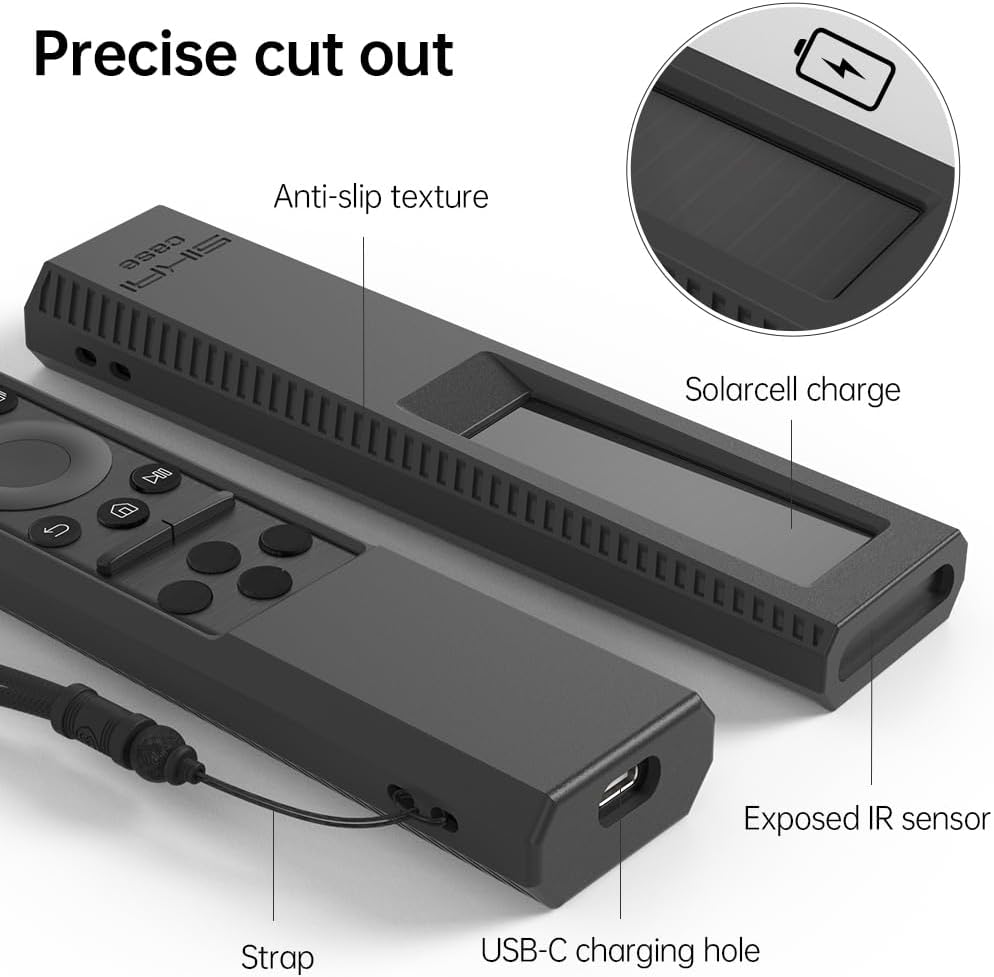
Image: Detailed view of the SIKAI CASE Silicone Remote Cover, highlighting the precise cutouts for the solar cell, USB-C charging hole, exposed IR sensor, and the anti-slip texture.

Image: An illustration demonstrating the "Extreme protection" features of the cover, including a raised bezel for button protection and shock absorption.
Maintenance
To maintain the quality and appearance of your SIKAI CASE Silicone Remote Cover:
- Cleaning: Wipe the cover with a soft, damp cloth. For stubborn dirt, a mild soap solution can be used. Rinse thoroughly and allow to air dry completely before re-installing the remote.
- Avoid Harsh Chemicals: Do not use abrasive cleaners, solvents, or harsh chemicals, as these may damage the silicone material.
- Storage: Store the cover in a cool, dry place away from direct sunlight when not in use for extended periods.
Troubleshooting
| Problem | Solution |
|---|---|
| Remote does not fit into the cover. | Verify that your remote control model is listed in the "Compatibility" section. Gently re-insert the remote, ensuring proper alignment. |
| Buttons are difficult to press or unresponsive. | Ensure the cover is correctly aligned with the remote's buttons. Remove and re-install the cover, making sure no part of the silicone is obstructing the buttons. |
| Glow-in-the-dark feature is not visible. | For glow-in-the-dark covers, expose the cover to a light source (natural or artificial) for a period to "charge" the luminous material. The glow intensity and duration depend on exposure time and light source strength. |
| Cover feels loose or slips off. | Confirm compatibility with your remote model. The cover is designed for a snug fit. If it feels loose, it might be for a different remote model. |
Specifications
- Product Dimensions: 7.09 x 3.94 x 0.79 inches
- Item Weight: 1.41 ounces
- Material: High-quality Silicone
- Color: Black (This specific variant)
- Compatible Remote Model (Primary): TM2280E
- Manufacturer: Hangzhou Hang Kai Technology Co., Ltd
- Date First Available: August 17, 2022

Image: Technical drawing showing the dimensions of the SIKAI CASE Silicone Remote Cover (164.5mm length, 40mm width, 20mm thickness).
Warranty Information
Specific warranty details for the SIKAI CASE Silicone Remote Cover are not provided in the product information. Please refer to the retailer's return policy or contact the manufacturer directly for warranty inquiries.
Support
For further assistance or questions regarding your SIKAI CASE Silicone Remote Cover, please contact the manufacturer or your point of purchase. Contact information was not available in the provided product details.


