
Eacam T97
Eacam T97 Hands-Free USB Barcode Scanner User Manual
Model: T97
Introduction
The Eacam T97 Hands-Free USB Barcode Scanner is an innovative, elegant, and affordable solution designed for convenient retail and various other applications where counter space may be limited. Its large scanning window facilitates hands-free scanning of both standard and bulky items. The adjustable scanning head can be tilted to accommodate objects of different sizes and shapes, ensuring versatile and efficient operation.
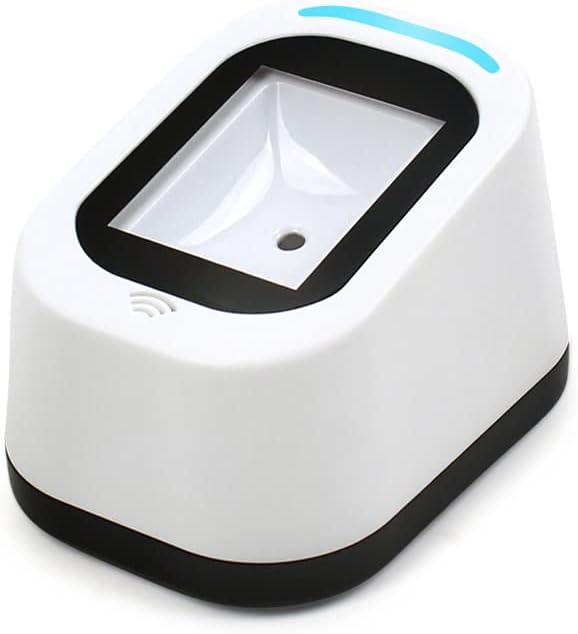
Figure 1: Eacam T97 Hands-Free USB Barcode Scanner (White model).
Safety Information
- Do not expose the scanner to extreme temperatures or humidity.
- Avoid dropping or subjecting the scanner to severe impact.
- Do not attempt to disassemble or repair the scanner yourself. Refer to qualified service personnel.
- Keep the scanning window clean to ensure optimal performance.
- Do not stare directly into the scanning light.
Package Contents
Please check the package contents upon unboxing to ensure all items are present and undamaged:
- 1 x Eacam Wired Barcode Scanner
- 1 x USB Cable (1.5 meters)
- 1 x User Manual

Figure 2: Contents of the Eacam T97 package, including the scanner, USB cable, and user guide.
Product Overview
The Eacam T97 scanner features a compact design with key functional elements:
- Scanning Window: Large area for hands-free scanning.
- Adjustable Head: The scanning head can be tilted to optimize scanning angle for various items.
- USB Interface: Standard USB port for power and data transmission.
- Anti-Slip Footpad: Ensures stability during operation.
- Indicator Light: A blue light indicates successful scanning.
- Audible Beeper: Provides an audible confirmation for successful scans.

Figure 3: Bottom view of the Eacam T97 scanner highlighting the anti-slip footpad and the USB interface for connection.

Figure 4: Visual guide showing scanning tips (blue light and beeps for successful scanning) and the wall-mountable design of the Eacam T97 scanner.
Setup
- Unpack the Scanner: Carefully remove the scanner and USB cable from the packaging.
- Connect the USB Cable: Insert the USB cable into the designated port on the back of the scanner.
- Connect to Host Device: Plug the other end of the USB cable into a standard USB port on your computer, POS system, or other compatible device. No additional drivers or software are typically required for most operating systems (Plug and Play).
- Position the Scanner: Place the scanner on a stable, flat surface. You can also utilize its wall-mountable design to save space.
- Adjust Scanning Head: Tilt the scanning head to your preferred angle for comfortable and efficient scanning.
Operating Instructions
The Eacam T97 scanner operates in a hands-free, automatic detection mode:
- Power On: Once connected via USB, the scanner will power on automatically.
- Automatic Scanning: Simply present the barcode or QR code to the scanning window. The scanner will automatically detect and read the code.
- Confirmation: Upon a successful scan, the blue indicator light will illuminate, and an audible beep will sound. The scanned data will be transmitted to your connected device as keyboard input.
- Supported Codes: The scanner supports a wide range of 1D and 2D barcodes, including those displayed on phone and computer screens.

Figure 5: The Eacam T97 scanner being used in a retail environment, demonstrating its hands-free operation for scanning QR codes from mobile phones.

Figure 6: Close-up view of the Eacam T97 scanner successfully reading a barcode displayed on a smartphone screen.
The Eacam T97 is suitable for various applications:
- Supermarket Cashiers
- Restaurant Cashiers
- Ticket Offices
- Costume Sector (Retail)
- And more...

Figure 7: Examples of sectors where the Eacam T97 scanner can be effectively used, including supermarkets, restaurants, ticket offices, and retail costume shops.
Maintenance
- Cleaning: Use a soft, dry cloth to clean the exterior of the scanner. For the scanning window, use a lint-free cloth and a mild glass cleaner if necessary. Avoid abrasive materials or harsh chemicals.
- Storage: When not in use, store the scanner in a clean, dry environment away from direct sunlight and extreme temperatures.
- Cable Care: Avoid bending or twisting the USB cable excessively to prevent internal damage.
Troubleshooting
| Problem | Possible Cause | Solution |
|---|---|---|
| Scanner not responding. | USB cable not properly connected or power issue. | Ensure the USB cable is securely plugged into both the scanner and the host device. Try a different USB port. |
| Cannot scan barcodes. | Barcode is damaged, poorly printed, or not supported. Scanning window is dirty. | Ensure the barcode is clear and undamaged. Clean the scanning window. Verify the barcode type is supported by the scanner. Adjust the scanning angle. |
| Scanned data is incorrect. | Incorrect keyboard layout setting on the host device. | Check the keyboard language settings on your computer/POS system. |
| No blue light or beep after scanning. | Scan unsuccessful. | Reposition the barcode within the scanning window. Ensure sufficient lighting. |
Specifications
| Feature | Detail |
|---|---|
| Model | T97 |
| Color | White / Orange |
| Scanning Type | Optical Imaging |
| 1D Code Support | Code 39, Code 32, Code 128, UPC/EAN/JAN, Code 93, Interleaved 2 of 5, Codabar, Matrix 2 of 5, Industrial 2 of 5, China Post (Hong Kong 2 of 5), NEC 2 of 5, Code 11, MSI Plessey, GS1 Databar(RSS), Korea Post, Trioptic code39, GS1 CompositeCode, Telepen, etc. |
| 2D Code Support | QR Code, Data Matrix, PDF417, MicroPDF417, Aztec Code, Codablock, MaxiCode, Chinese Sensible Code, etc. |
| Screen Scanning | Supported (Phone and Computer Screens) |
| Transmission Type | Wired Transmission |
| Interface Type | USB |
| Cable Length | 1.5 meters |
| Sensor | CMOS Sensor, 640*480 pixels, 120 frames per second |
| Operating Voltage | 3V DC ±5% |
| Operating Current | 390 mA (max), 220 mA (typical) |
| Compatible OS | Android, Switch, and other systems supporting USB HID (Human Interface Device) |
| Scanning Speed | Max 180 cm/second |
| Product Dimensions (L*W*H) | 9 * 8.2 * 7.5 cm / 3.54 * 3.23 * 2.95 inches |
| Product Weight | Approx 148 grams / 5.22 ounces |

Figure 8: The Eacam T97 scanner is available in both white and orange color variants.
Warranty and Support
For warranty information and technical support, please refer to the contact details provided with your purchase or visit the official Eacam website. Keep your purchase receipt as proof of purchase for warranty claims.
Ask a question about this manual
Ask about setup, troubleshooting, compatibility, parts, safety, or missing instructions. Manuals+ will review the question and use this page’s manual context to help answer it.