Introduction
The Newisdomake Multifunction Tracing Tool, Model NM-ST01, is designed for precise marking and contouring in various applications, particularly woodworking and renovation projects. Constructed from durable aluminum alloy, this versatile tool offers multiple tracing modes and features a deep-hole pencil for accurate marking. This manual provides detailed instructions to help you effectively use and maintain your tracing tool.

Image: The Newisdomake Multifunction Tracing Tool, including its packaging and a case of colored pencil refills.
Product Overview
The NM-ST01 tracing tool is engineered for durability and precision. Key features include:
- Durable Construction: Made from high-quality aluminum alloy with an anodized surface, ensuring strength and longevity. The enlarged nut and threaded structure enhance stability during pencil locking.
- Compact and Portable: With a folded size of approximately 15 x 2.4 x 3 cm, it is designed for easy storage and transport.
- Multifunctional Adjustment: Features an adjustable handle for increased flexibility. Different shapes can be achieved by adjusting the tightness of the pen holder and nut, which can then be locked for precision.
- Deep Hole Pencil: Includes a deep-hole pencil with an extended 45mm tip for precise marking in hard-to-reach areas.
- Assorted Refills: Comes with a box of refills, including 2 black, 2 yellow, and 2 red leads, for various marking needs.

Image: A comparison highlighting the aluminum alloy construction of the Newisdomake tool versus an ABS plastic alternative, emphasizing durability.

Image: The tracing tool in its folded state, illustrating its compact dimensions (5.0 inches) and portability, ready for storage.
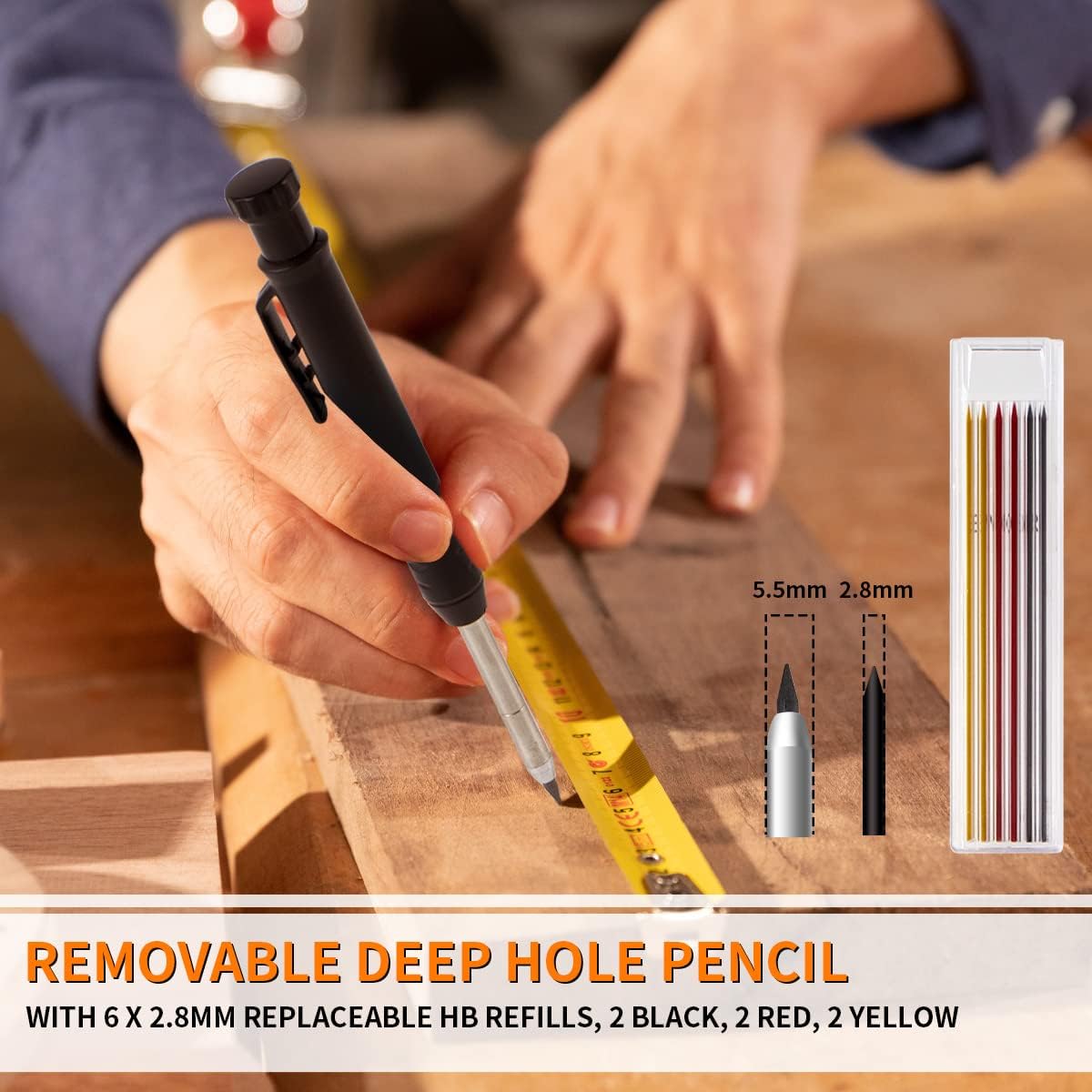
Image: The removable deep-hole pencil component, shown with a case containing 6 replaceable HB refills (2 black, 2 red, 2 yellow) of 2.8mm thickness.
Setup
Before using your Newisdomake Multifunction Tracing Tool, ensure the pencil is correctly installed and secured.
- Pencil Installation: Insert the deep-hole pencil into the designated holder on the tracing tool. Ensure it is seated firmly.
- Secure the Pencil: Tighten the small thumb screw on the pencil holder to secure the pencil in place. This prevents movement during use and ensures marking accuracy.
- Adjusting the Tool: Loosen the main adjustment nuts to unfold the tool and position it for your desired tracing mode. Once the desired angle or configuration is achieved, tighten the nuts to lock the tool securely.

Image: A visual guide demonstrating the initial installation of the pencil, multi-angle placement of the tool, the process of line drawing, and achieving a seamless cut.
Operating Instructions
The Newisdomake Multifunction Tracing Tool supports various modes for different marking requirements. Adjust the tool's configuration to select the appropriate mode.
Available Modes:
- Scribe Mode: Ideal for marking parallel lines along an edge. Adjust the tool to the desired offset and slide it along the surface.
- Small Compass Mode: Use for drawing smaller circles or arcs. Adjust the tool to form a compass shape with a smaller radius.
- Contour Mode: Perfect for replicating complex profiles, such as those found on countertops, flooring, or tiles. Position the tool to trace the irregular shape.
- Big Compass Mode: For drawing larger circles or arcs. Configure the tool to achieve a wider compass span.
General Usage Steps:
- Select Mode: Determine the required marking mode (Scribe, Compass, Contour).
- Adjust and Lock: Loosen the adjustment nuts, configure the tool to the desired shape or angle, and then firmly tighten the nuts to lock the setting.
- Position Tool: Place the tool on the workpiece, ensuring the pencil tip is in contact with the surface and the guide is stable.
- Trace: Carefully move the tool along the desired path, applying consistent pressure to the pencil for a clear mark.

Image: Visual examples demonstrating the tool's versatility across four modes: Scribe Mode for parallel lines, Small Compass Mode for small arcs, Contour Mode for irregular shapes, and Big Compass Mode for large circles.

Image: Demonstrations of the tool's multi-application capabilities, including use in wooden floor laying, fitting cabinet trims, ceramic floor tile laying, and carpet laying.
Maintenance
Proper maintenance ensures the longevity and accuracy of your tracing tool.
- Cleaning: After each use, wipe the tool with a clean, dry cloth to remove any dust, pencil residue, or debris.
- Storage: Store the tool in a dry place, away from moisture and extreme temperatures, to prevent corrosion or damage. The folding design allows for compact storage.
- Pencil Refills: Replace pencil leads when they become dull or run out. Use the provided 2.8mm refills for optimal performance.
- Check Fasteners: Periodically check all nuts and screws to ensure they are tight. Loose fasteners can affect the tool's stability and accuracy.
Troubleshooting
If you encounter issues with your tracing tool, refer to the following common problems and solutions:
| Problem | Possible Cause | Solution |
|---|---|---|
| Tool does not hold its position/is floppy. | Adjustment nuts are not sufficiently tightened. | Ensure all adjustment nuts are firmly tightened after setting the desired angle or shape. The enlarged nut and threaded structure are designed for stability. |
| Pencil mark is inconsistent or faint. | Dull pencil lead; insufficient pressure; pencil not securely held. | Replace the pencil lead with a new one. Apply consistent, firm pressure during tracing. Ensure the pencil's thumb screw is tight. |
| Difficulty reaching deep areas for marking. | Incorrect pencil type or positioning. | Utilize the provided deep-hole pencil with its extended 45mm tip, specifically designed for such applications. Ensure the pencil is extended as far as needed. |
Specifications
| Feature | Detail |
|---|---|
| Brand | Newisdomake |
| Model Number | NM-ST01 |
| Material | Aluminum Alloy |
| Product Dimensions (L x W x H) | Approx. 2.79 x 2.41 x 14.99 cm (folded) |
| Item Weight | Approx. 141 grams |
| Pencil Lead Size | 2.8mm (HB) |
| Included Items | 1x Multifunction Tracing Tool, 1x Deep Hole Pencil, 6x Pencil Refills (2 black, 2 yellow, 2 red) |
| Orientation | Ambidextrous |
Warranty and Support
Newisdomake provides a 24-month warranty for this Multifunction Tracing Tool. This warranty covers manufacturing defects and ensures the product meets its intended quality and performance standards.
For any questions, concerns, or support needs regarding your Newisdomake NM-ST01 tracing tool, please do not hesitate to contact our customer service. We are committed to providing assistance and ensuring your satisfaction.
Contact information (e.g., email, website) would typically be provided here by the manufacturer.


