
1. Introduction
The Maclean Energy Twilight Sensor MCE35 is an electrical device designed for automated control of lighting and other electrical appliances. It functions by detecting ambient light levels, switching connected devices on when light intensity falls below a set threshold (dusk) and off when it rises above it (dawn). This automation helps in saving electricity and provides convenience for outdoor lighting, security systems, and other applications. The MCE35 features an external probe for optimal light detection and is compatible with LED lighting.

Image: The Maclean Energy Twilight Sensor MCE35, showing the main control unit and the separate external light sensor probe.
2. Product Features
- Sensor IP Rating: IP65 (Dust tight and protected against water jets).
- Rated Load: Up to 3450W.
- Rated Current: 15A.
- Ambient Light Adjustment: Adjustable from <2 to 100 LUX.
- Working Temperature: -20°C to +40°C.
- Power Source: 220-240VAC/50Hz.
- Operating Humidity: <93%RH.
- Compatible with LED lighting.
3. Package Contents
Please check the package for the following items:
- Maclean Energy Twilight Sensor MCE35 Main Unit
- External Light Sensor Probe
- Mounting Screws and Wall Anchors
- Instruction Manual

Image: Included mounting hardware, consisting of screws and wall anchors.
4. Safety Information
WARNING: Risk of electric shock. Installation should only be performed by a qualified electrician or competent person.
- Ensure the power supply is disconnected before installation, maintenance, or adjustment.
- Do not exceed the maximum rated load of 3450W or 15A.
- This device is designed for outdoor use with an IP65 rating, but ensure all connections are properly sealed to maintain water resistance.
- Do not immerse the device in water.
- Keep out of reach of children.
5. Setup and Installation
5.1 Mounting the Sensor
Choose a suitable location for the main unit and the external probe. The probe should be placed where it can accurately detect ambient light without being directly exposed to artificial light sources (e.g., the light it controls) or shadows that might interfere with its operation.
- Mark the desired mounting points for the main unit.
- Drill holes and insert wall anchors if necessary.
- Secure the main unit to the wall using the provided screws.
- Mount the external probe in a location that receives natural light.

Image: Installation diagram illustrating how to mount the sensor unit to a surface using screws.
5.2 Wiring Instructions
Before wiring, ensure the main power supply is OFF at the circuit breaker.
- Open the terminal cover on the main unit.
- Connect the Live (L) wire from your power supply to the 'L' terminal on the sensor.
- Connect the Neutral (N) wire from your power supply to the 'N' terminal on the sensor.
- Connect the Neutral (N) wire for the load (e.g., light fixture) to the 'N' terminal (shared with input neutral).
- Connect the Live output wire for the load to the terminal marked with a light bulb symbol (output).
- Connect the external light sensor probe to the dedicated terminals, ensuring correct polarity if indicated.
- Secure all wire connections firmly and replace the terminal cover.
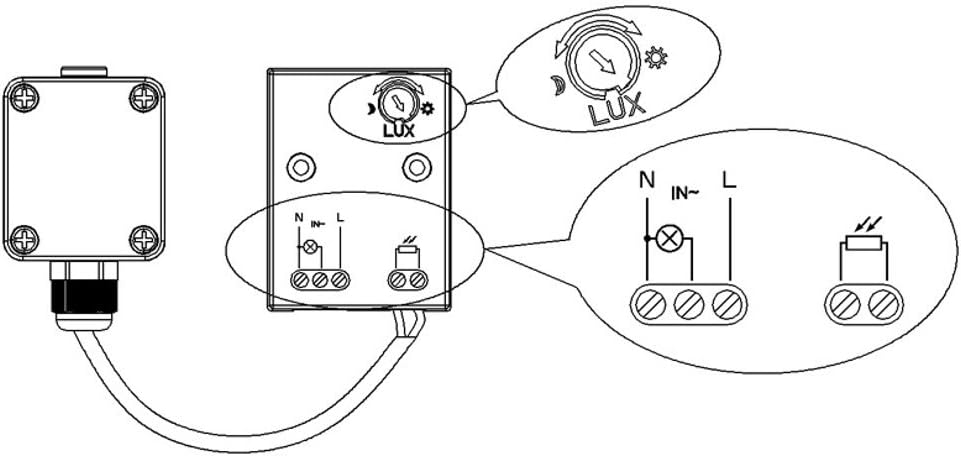
Image: Detailed wiring diagram showing connections for Live (L), Neutral (N), and the load output, along with the external probe connection.
6. Operating Instructions
Once installed and wired correctly, the Maclean Energy Twilight Sensor MCE35 operates automatically. When the ambient light level detected by the external probe falls below the set LUX threshold, the sensor will activate, turning on the connected lighting or appliance. When the ambient light level rises above the threshold, the sensor will deactivate, turning off the connected device.
7. Adjustment of Light Sensitivity (LUX)
The sensor features an adjustable LUX setting to determine the light level at which the connected device will switch on or off. This allows customization based on your specific environment and preference.
- Locate the 'LUX' adjustment knob on the main unit.
- Turn the knob towards the 'moon' symbol (
 ) for lower light sensitivity (device turns on when it's darker).
 - Turn the knob towards the 'sun' symbol () for higher light sensitivity (device turns on when it's lighter).
- Test the setting by observing the sensor's behavior at different times of day or by temporarily covering the external probe.

Image: The main unit with a visible 'LUX' adjustment dial, allowing users to set the desired light sensitivity for activation.
8. Maintenance
The Maclean Energy Twilight Sensor MCE35 requires minimal maintenance.
- Periodically clean the external light sensor probe with a soft, damp cloth to ensure it is free from dirt, dust, or debris that could obstruct light detection.
- Inspect wiring connections annually to ensure they remain secure and free from corrosion.
- Do not use abrasive cleaners or solvents on the device.
9. Troubleshooting
| Problem | Possible Cause | Solution |
|---|---|---|
| Light does not turn on at dusk. |
|
|
| Light stays on during the day. |
|
|
| Light flickers or cycles rapidly. |
|
|
10. Specifications
- Model: MCE35
- Power Source: 220-240VAC / 50Hz
- Rated Load: 3450W
- Rated Current: 15A
- Ambient Light Adjustment: <2 - 100 LUX (adjustable)
- Working Temperature: -20°C to +40°C
- Operating Humidity: <93%RH
- IP Rating: IP65
- Material: Plastic
- Product Dimensions: Approximately 2.76 x 2.36 x 3.15 inches (main unit)
- Item Weight: Approximately 0.12 Kilograms (4.2 ounces)
11. Warranty
This Maclean Energy Twilight Sensor MCE35 comes with a 24-month warranty from the date of purchase. The warranty covers defects in materials and workmanship under normal use. It does not cover damage caused by improper installation, misuse, accidents, unauthorized repairs, or acts of nature. Please retain your proof of purchase for warranty claims.
12. Support
If you encounter any issues or have questions regarding the installation, operation, or maintenance of your Maclean Energy Twilight Sensor MCE35 that are not covered in this manual, please contact your retailer or the manufacturer's customer support for assistance. Provide your product model (MCE35) and a detailed description of the issue when seeking support.
