
1. Introduction
Thank you for choosing the COLBOR PL8B Pocket LED Video Light. This manual provides essential information for the safe and effective operation of your device. Please read it thoroughly before use and retain it for future reference.
2. Package Contents
Verify that all items listed below are included in your package. If any items are missing or damaged, please contact your retailer.

Image: Contents of the COLBOR PL8B package, including the LED light, diffuser, cold shoe adapter, 1/4 inch extended connector, USB charging cable, and user manual.
- 1 x COLBOR PL8B LED Video Light
- 1 x Cold Shoe Adapter
- 1 x Light Diffuser
- 1 x 1/4 Inch Extended Connector
- 1 x USB Charging Cable
- 1 x User Manual (English)
3. Product Overview
Key Features
- Bi-color Temperature & Dimmable: Adjustable color temperature from 2700K to 6500K and brightness from 0% to 100% for versatile lighting.
- Multiple Scene Lighting Modes: Features 10 built-in scene lighting modes, offering 27 distinct lighting effects such as Fire, TV, Strobe, and SOS.
- Integrated Power Bank Function: Equipped with a 5000mAh rechargeable battery and a USB output port, allowing it to charge mobile devices.
- APP Remote Control: Supports remote control via a dedicated application, enabling synchronized light effect control and customized scene settings.
- Magnetic Design & Universal Setup: Magnetic backside for direct attachment to metal surfaces. Includes dual 1/4 inch screw holes and a cold shoe adapter for flexible mounting options. An inbuilt cold shoe mount is provided for attaching microphones.
Component Identification

Image: Front and back view of the COLBOR PL8B LED video light, showing the LED panel, control dials (CCT, DIM, FN), DC OUT, and DC IN ports.
- LED Panel: Contains 60 LED beads for illumination.
- CCT Dial: Adjusts color temperature.
- DIM Dial: Adjusts brightness.
- FN Button: Function button for mode selection.
- DC IN Port: For charging the device.
- DC OUT Port: For using the device as a power bank.
- Cold Shoe Mount: Integrated mount for accessories like microphones.
- 1/4 Inch Screw Holes: Two threaded holes for mounting on tripods or other accessories.
- Magnetic Back: Allows attachment to metal surfaces.
4. Setup
4.1 Initial Charging
Before first use, fully charge the COLBOR PL8B. Connect the provided USB charging cable to the DC IN port on the light and to a USB power adapter (not included). The charging indicator will show the charging status.
4.2 Mounting the Light
The COLBOR PL8B offers several mounting options:
- Cold Shoe Adapter: Attach the cold shoe adapter to the 1/4 inch screw hole on the light, then slide it into a camera's hot shoe or a cold shoe mount on a rig.
- 1/4 Inch Extended Connector: Use the 1/4 inch extended connector with the 1/4 inch screw holes to mount the light onto tripods, light stands, or other compatible accessories.
- Magnetic Back: The magnetic back allows direct attachment to any ferrous metal surface, such as light stands, railings, or metal shelves.
- Inbuilt Cold Shoe Mount: Use the integrated cold shoe mount on the light to attach a microphone or other small accessories.

Image: Demonstrates the magnetic back of the COLBOR PL8B attaching to a metal surface and the inbuilt cold shoe mount for accessories.
5. Operating Instructions
5.1 Power On/Off
Press and hold the power button (usually integrated with one of the dials) to turn the light on or off.
5.2 Adjusting Color Temperature
Rotate the CCT dial to adjust the color temperature between 2700K (warm light) and 6500K (cool light).

Image: Illustrates the adjustable color temperature range of the COLBOR PL8B from 2700K to 6500K.
5.3 Adjusting Brightness
Rotate the DIM dial to adjust the brightness level from 0% to 100%.
5.4 Scene Lighting Effects
Press the FN button to cycle through the 10 built-in scene lighting modes. Once a mode is selected, use the CCT and DIM dials to fine-tune specific parameters, unlocking up to 27 different effects.
5.5 APP Remote Control
Download the COLBOR lighting application from your device's app store. Follow the in-app instructions to pair your PL8B light. The app allows for precise control over color temperature, brightness, and scene effects, as well as access to the COLBOR lighting ecosystem for synchronized control.

Image: Shows the COLBOR PL8B mounted on a camera, with a smartphone displaying the COLBOR app for remote control.
5.6 Using as a Power Bank
To use the PL8B as an emergency power bank, connect your mobile phone or other USB-powered device to the DC OUT port using a compatible USB cable. The 5000mAh internal battery will provide power to your device.
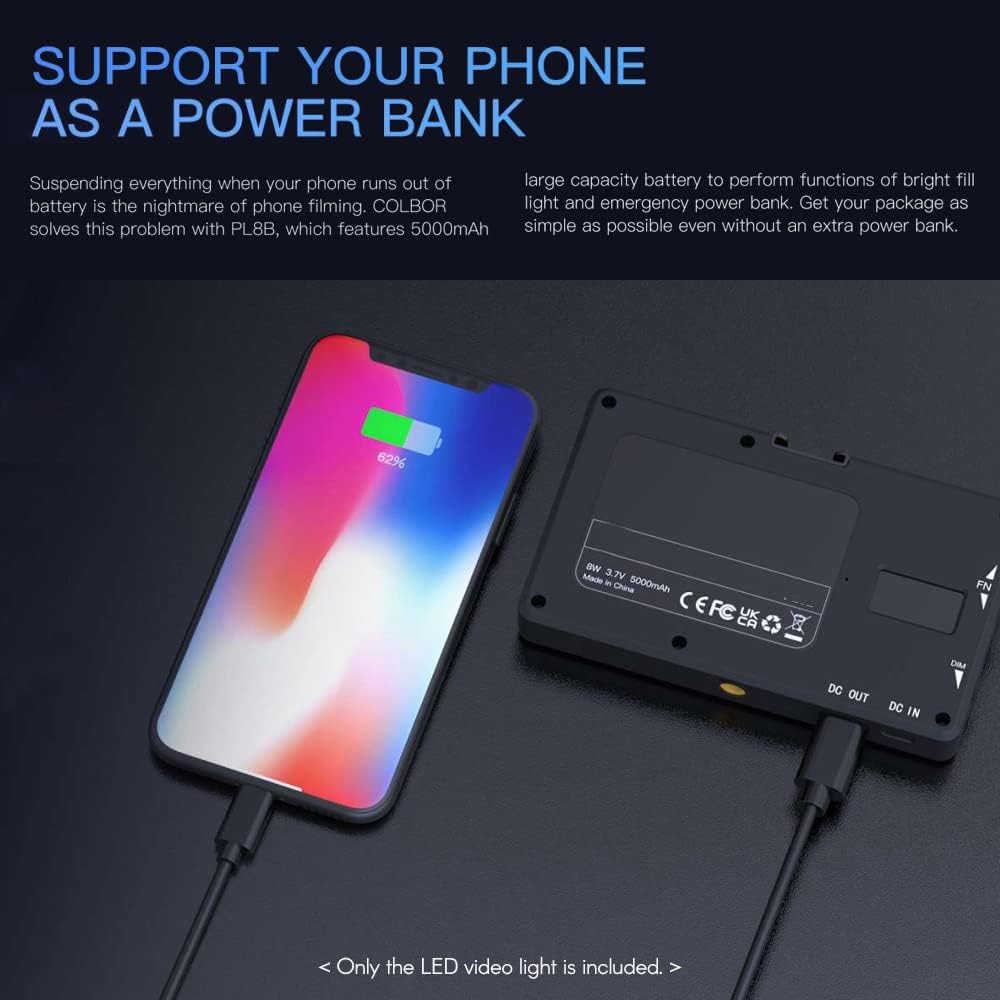
Image: The COLBOR PL8B connected via USB cable to a smartphone, demonstrating its power bank functionality.
6. Maintenance
- Cleaning: Use a soft, dry cloth to clean the surface of the light. Do not use harsh chemicals or abrasive materials.
- Storage: Store the light in a cool, dry place away from direct sunlight and extreme temperatures.
- Battery Care: To prolong battery life, avoid fully discharging the battery frequently. Charge the device regularly, even if not in use, to maintain battery health.
- Avoid Water: This device is not waterproof. Keep it away from water and high humidity.
7. Troubleshooting
- Light does not turn on: Ensure the battery is charged. Connect the light to a power source using the USB charging cable.
- Light not charging: Check the USB cable and power adapter for damage. Ensure the cable is securely connected to the DC IN port.
- APP control not working: Ensure Bluetooth is enabled on your smartphone. Restart the app and the light. Try re-pairing the device within the app.
- Light output is inconsistent: Check for any obstructions on the LED panel. Ensure the brightness and color temperature settings are stable.
- Power bank function not working: Ensure the light has sufficient battery charge. Check the USB cable connecting to your phone and ensure it's plugged into the DC OUT port.
If you encounter issues not covered here, please contact COLBOR customer support.
8. Specifications
| Parameter | Value |
|---|---|
| Brand | COLBOR |
| Model | PL8B |
| LED Beads | 60 pcs |
| Power | 8W |
| Color Temperature | 2700K-6500K |
| Brightness Adjustment | 0%-100% |
| Battery Capacity | 5000mAh |
| Item Size | 12.5 x 7.5 x 1.7 cm (4.9 x 3 x 0.7 in) |
| Item Weight | Approx. 183g (6.5oz) |
| Connectivity Technology | USB |
| Hardware Interface | USB |
9. Warranty and Support
COLBOR products are manufactured to high quality standards. For warranty information and customer support, please refer to the warranty card included with your product or visit the official COLBOR website. If you require assistance, please contact COLBOR customer service with your product model and purchase details.