
Introduction
The DOOGEE S61 Pro is a rugged smartphone designed for durability and performance in challenging environments. It combines advanced camera capabilities, robust construction, and efficient processing to provide a reliable mobile experience for outdoor enthusiasts and professionals.
Key Features
- Display: 6.0-inch HD+ IPS LCD with Corning Gorilla Glass protection.
- Processor: MediaTek Helio G35 Octa Core Chipset.
- Memory & Storage: 8GB RAM + 128GB ROM, expandable up to 512GB via microSD.
- Cameras: 48MP Ultra-clear Main Camera, 20MP Night Vision Camera with 4 Infrared Emitters, 16MP Front Camera.
- Battery: 5180mAh Li-ion battery for extended usage.
- Durability: IP68/IP69K water and dust resistance, MIL-STD-810H compliant for drop protection and extreme temperatures.
- Operating System: Android 12.
- Connectivity: Dual SIM 4G Global Network, NFC (Google Pay supported), OTG, GPS.
Setup
What's in the Box
The DOOGEE S61 Pro package includes the smartphone and a USB Cable. Additional accessories like a power adapter, screen protector, and lanyard may also be included depending on the specific package variant.
SIM and SD Card Installation
The device supports Dual SIM 4G functionality and expandable storage. Locate the SIM/SD card tray on the side of the phone. Use the provided SIM tray tool to eject the tray. Carefully place your Nano-SIM cards and/or a microSD card (up to 512GB) into the designated slots. Ensure proper orientation before reinserting the tray firmly into the device.
Initial Power On and Setup
To power on your DOOGEE S61 Pro, press and hold the power button located on the side of the device until the DOOGEE logo appears. Follow the on-screen prompts to complete the initial setup, including language selection, Wi-Fi connection, and Google account setup. The phone runs on Android 12, offering a personal and secure user experience.
Operating the Device
Basic Navigation
The DOOGEE S61 Pro operates on Android 12, providing intuitive gesture navigation and a customizable interface. Swipe up from the bottom to access the app drawer, swipe down from the top for quick settings and notifications. The side-mounted fingerprint sensor integrated into the power button allows for quick and secure unlocking.
Camera Usage
The S61 Pro features a versatile camera system for various photography needs.
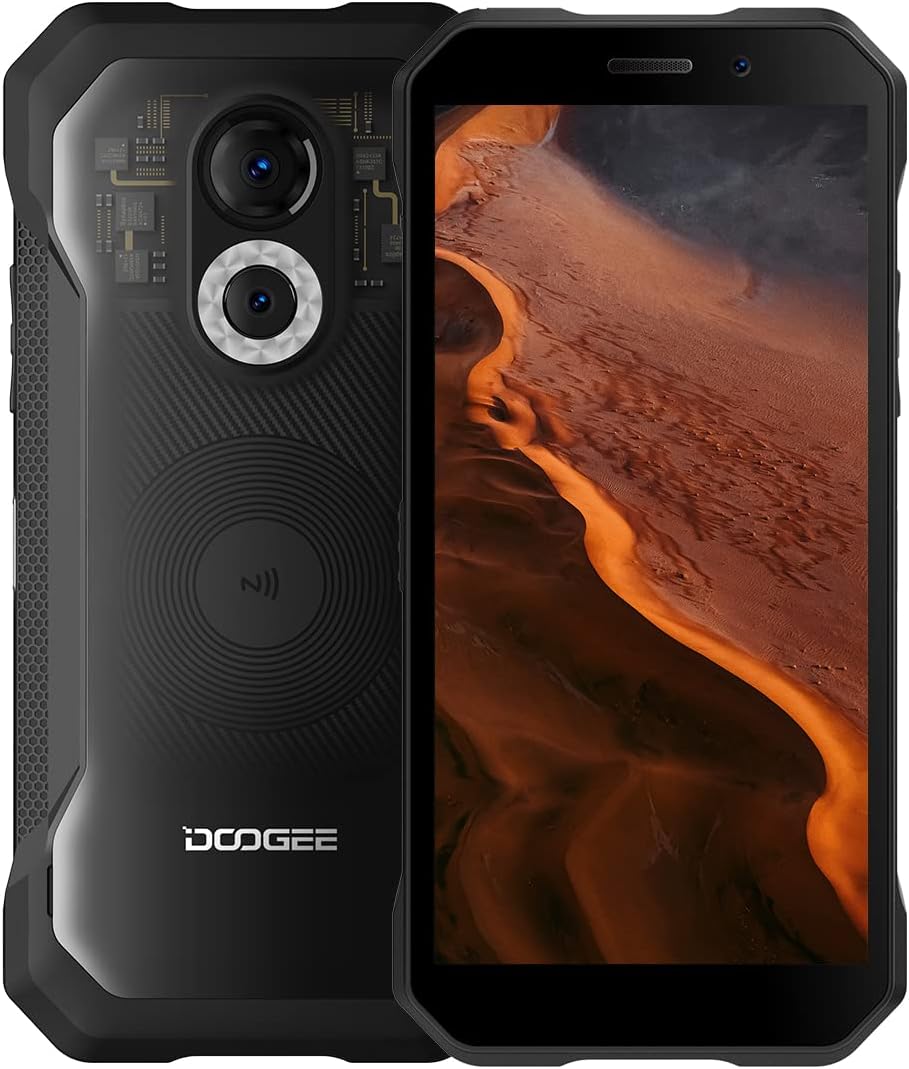
- 48MP Main Camera: Capture high-resolution photos with the primary rear camera.
- 20MP Night Vision Camera: Equipped with four powerful infrared emitters, this camera allows for clear photography and video recording in complete darkness up to 20 meters.

- 16MP Front Camera: Enhance your selfies and video calls with the high-resolution front camera.
The camera app offers various modes including Photo, Video, Portrait, UHD, Night Mode, GIF, Panorama, Time-Lapse, and Intelligent Scanning for barcodes.
Battery Management
The 5180mAh Li-ion battery provides up to 2 days of power depending on usage habits. The device includes energy-saving features to prolong battery life. Charge the device using the USB-C port located at the bottom.
Connectivity
The S61 Pro supports Dual SIM 4G for global network compatibility. It also features Wi-Fi, Bluetooth, GPS for navigation, and NFC for contactless payments via Google Pay.
Ruggedness
Built to withstand harsh conditions, the S61 Pro is IP68/IP69K rated, meaning it is highly resistant to water and dust. It can withstand water immersion for 30 minutes at 1.5m depth and 24 hours in 1m depth of concrete. It is also MIL-STD-810H compliant, offering robust protection against drops and extreme temperatures (70°C to -55°C).

Custom Button
The device features a customizable side button that can be programmed for quick access to frequently used functions or apps.
Outdoor Tools
The S61 Pro comes with a suite of pre-installed outdoor tools, including a Height Meter, Compass, Gradienter, Flashlight, Hanging Painting assistant, Magnifier, Alarm Bell, Plumb Bob, Protractor, Noise Test, and Pedometer.
Maintenance
Cleaning
Due to its rugged nature, the S61 Pro can accumulate dirt and debris. Regularly clean the device, especially the charging port and speaker grilles, using a soft, dry cloth. For stubborn dirt, a slightly damp cloth can be used, ensuring all ports are sealed before cleaning.
Software Updates
Ensure your device is running the latest software version for optimal performance and security. Check for updates periodically through the phone's settings menu (Settings > System > System update).
Troubleshooting
- Device not powering on: Ensure the battery is charged. Connect to a power adapter and wait a few minutes before attempting to power on again.
- Screen unresponsive: Perform a forced restart by holding the power button for about 10-15 seconds.
- App crashes/freezes: Clear the app's cache (Settings > Apps > [App Name] > Storage > Clear cache) or reinstall the app.
- Network issues: Check SIM card insertion, restart the device, or reset network settings (Settings > System > Reset options > Reset Wi-Fi, mobile & Bluetooth).
Specifications
| Feature | Specification |
|---|---|
| Product Dimensions | 6.3 x 3.94 x 1.18 inches |
| Item Weight | 1.08 pounds |
| Item Model Number | doogee s61 pro |
| OS | Android 12.0 |
| RAM | 8 GB |
| Memory Storage Capacity | 128 GB |
| Wireless Communication Technologies | NFC |
| Connectivity Technologies | Bluetooth, Wi-Fi, USB, NFC |
| GPS | True |
| Special Features | Rugged body, USB OTG support, Built-in GPS, Dual SIM, Waterproof |
| Human Interface Input | Touchscreen |
| Scanner Resolution | 1440 x 720 pixels |
| Other Camera Features | Rear, Front |
| Audio Jack | 3.5 mm |
| Form Factor | Smartphone |
| Color | S61 Pro Transparent Black |
| Battery Power Rating | 5180 mAh |
| Phone Talk Time | 72 Hours |
| Manufacturer | DOOGEE |
| Date First Available | August 15, 2022 |
| Standing Screen Display Size | 6 Inches |
| Battery Capacity | 5180 Milliamp Hours |
| Operating System | Android 12.0 |
| Screen Size | 6 Inches |
| Resolution | 1440 x 720 pixels |
| Refresh Rate | 120 Hz |
| Model Name | DOOGEE S61 pro |
| Wireless Carrier | T-Mobile |
| Cellular Technology | 4G |
Warranty and Support
The DOOGEE S61 Pro comes with a 12-month warranty. For any questions or support needs, please refer to the contact information provided in your product packaging or visit the official DOOGEE website.


