XTRONS Double Din DVD Car Stereo User Manual
Model: Double Din 10.1 Inch
Brand: XTRONS
1. Introduction
This manual provides detailed instructions for the installation, operation, and maintenance of your XTRONS Double Din DVD Car Stereo. Please read this manual thoroughly before using the product to ensure proper functionality and safety. This unit combines advanced features such as Android 13 OS, Octa Core processing, 4G LTE connectivity, Wireless CarPlay, Android Auto, and a high-resolution 10.1-inch touch screen to enhance your in-car entertainment and navigation experience.
2. Product Overview & Setup
2.1 What's in the Box
Please verify that all components are present before beginning installation:
- 1 × ISO Wiring Harness
- 1 × RCA Cable
- 1 × GPS Antenna
- 1 × Camera Cable
- 2 × USB Cable
- 1 × CANbus Cable
- 2 × Fitting Kits & 8 x Screws
- 2 × Installation Plug
- 1 × User Manual

Figure 2.1: Included Accessories and Main Unit Dimensions.
2.2 Physical Installation
Before installation, ensure the vehicle's battery is disconnected. Refer to the wiring diagram for correct connections. Professional installation is recommended.
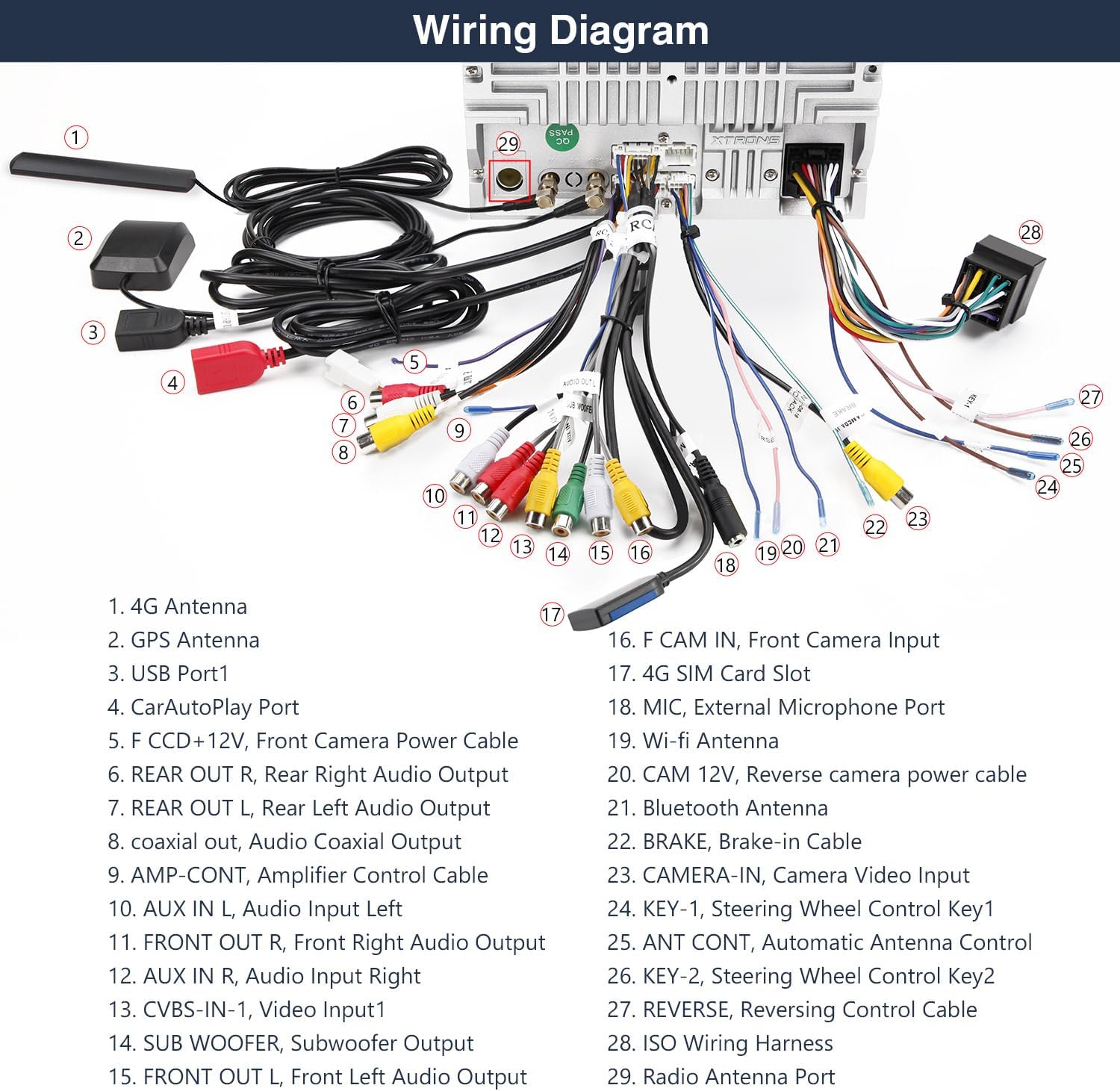
Figure 2.2: Wiring Diagram for the XTRONS Car Stereo.
- 1. 4G Antenna
- 2. GPS Antenna
- 3. USB Port1
- 4. CarAutoPlay Port
- 5. F CCD +12V, Front Camera Power Cable
- 6. REAR OUT R, Rear Right Audio Output
- 7. REAR OUT L, Rear Left Audio Output
- 8. coaxial out, Audio Coaxial Output
- 9. AMP-CONT, Amplifier Control Cable
- 10. AUX IN L, Audio Input Left
- 11. FRONT OUT R, Front Right Audio Output
- 12. AUX IN R, Audio Input Right
- 13. CVBS-IN-1, Video Input1
- 14. SUB WOOFER, Subwoofer Output
- 15. FRONT OUT L, Front Left Audio Output
- 16. F CAM IN, Front Camera Input
- 17. 4G SIM Card Slot
- 18. MIC, External Microphone Port
- 19. Wi-Fi Antenna
- 20. CAM 12V, Reverse camera power cable
- 21. Bluetooth Antenna
- 22. BRAKE, Brake-in Cable
- 23. CAMERA-IN, Camera Video Input
- 24. KEY-1, Steering Wheel Control Key1
- 25. ANT CONT, Automatic Antenna Control
- 26. KEY-2, Steering Wheel Control Key2
- 27. REVERSE, Reversing Control Cable
- 28. ISO Wiring Harness
- 29. Radio Antenna Port
2.3 Initial Power On
After successful installation, turn on your vehicle's ignition. The unit should power on automatically. Follow the on-screen prompts for initial setup, including language selection and time zone settings.
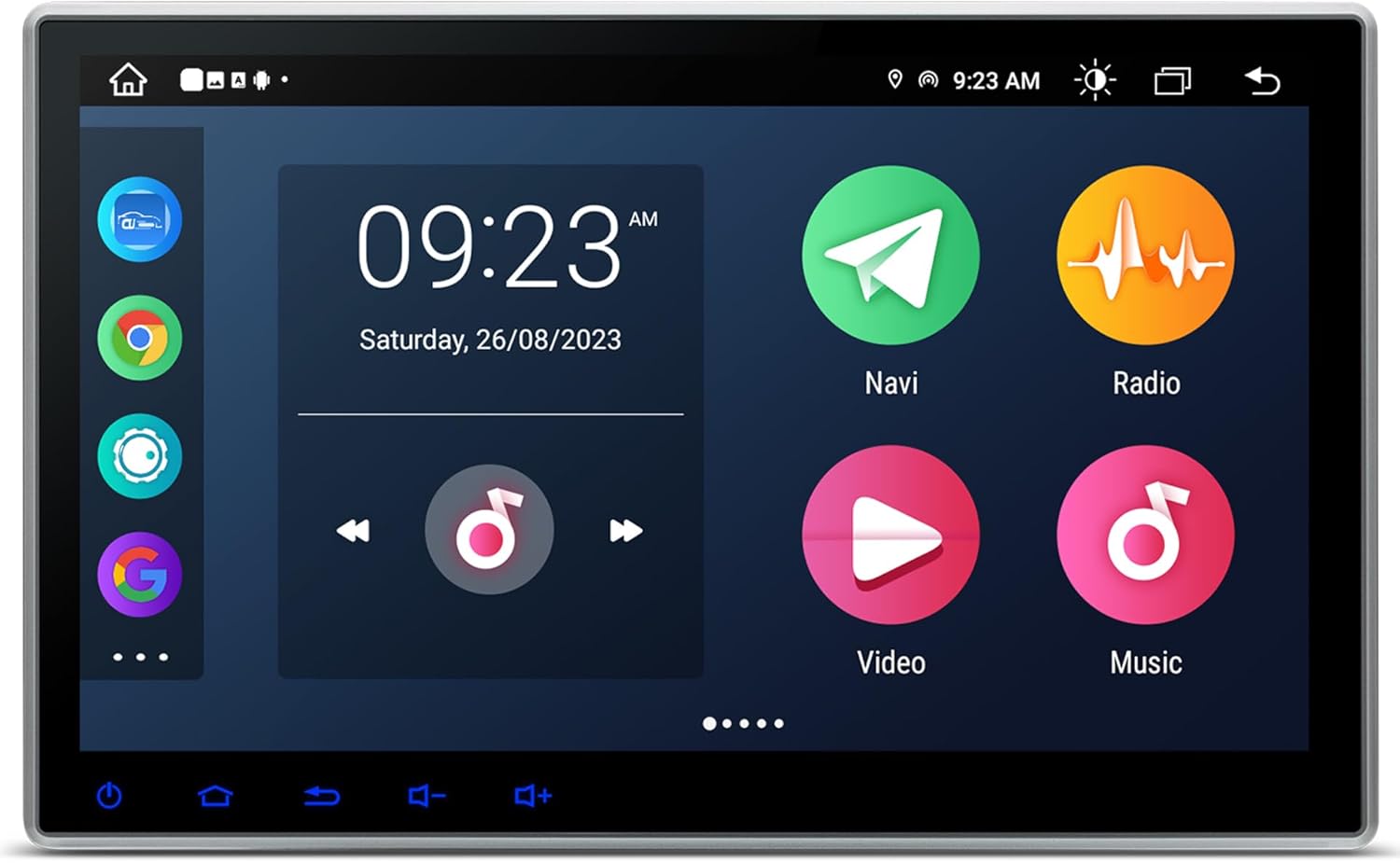
Figure 2.3: Main User Interface.
3. Operating Instructions
3.1 User Interface and Display
The unit features a 10.1-inch IPS touch screen with 1024x600 resolution, providing clear visuals and wide viewing angles. The dual UI theme allows for personalized interface customization.
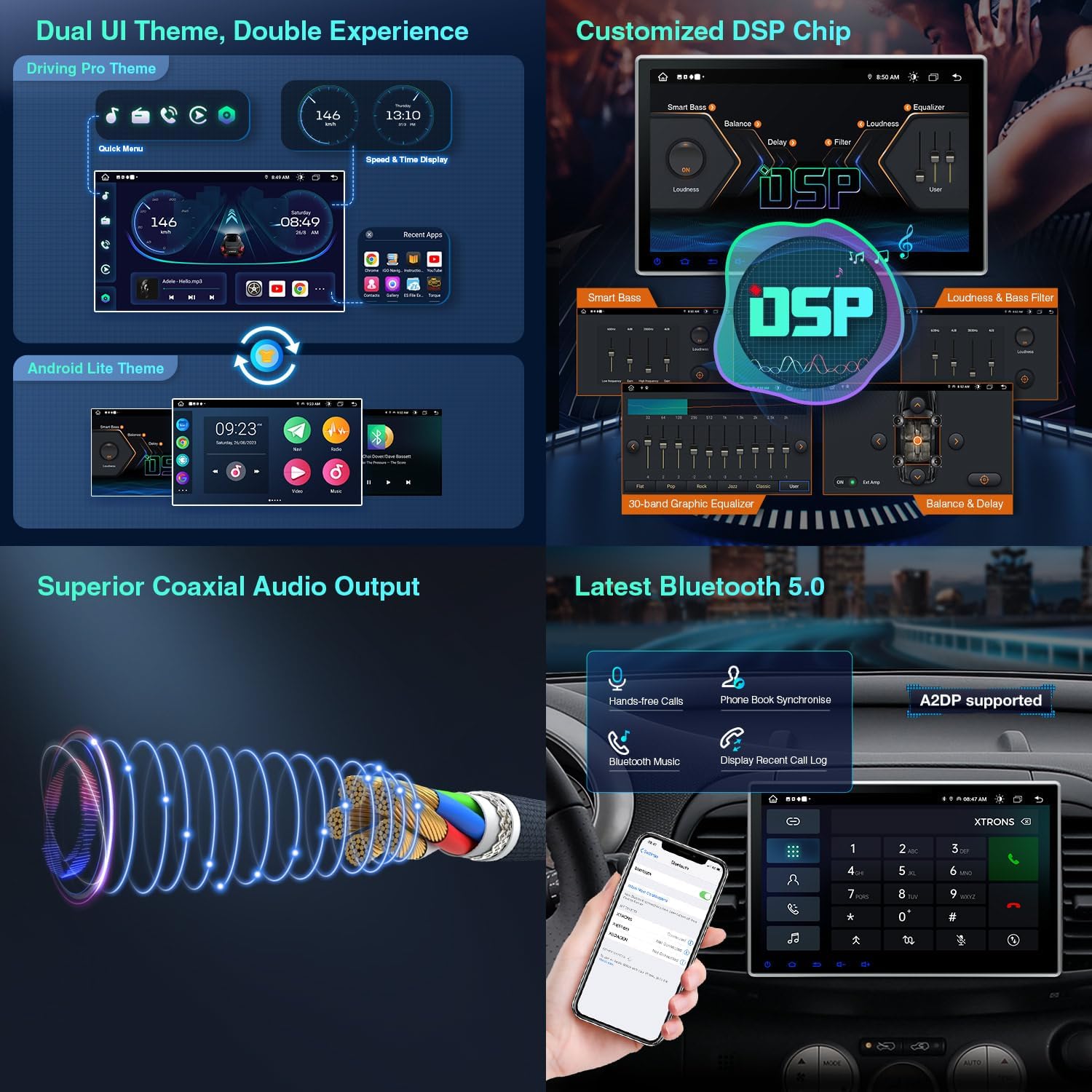
Figure 3.1: Dual UI Themes and Key Features.
3.2 Key Features
3.2.1 Android 13 OS & Performance
Powered by the latest Android 13 OS with an Octa Core CPU, 2GB RAM, and 32GB ROM, this unit offers a fast and smooth user experience. You can download and install applications directly from the Play Store.
3.2.2 Global 4G LTE Connectivity
Insert a Micro-SIM card to enjoy 4G mobile broadband connection, supporting 99% of carriers worldwide for seamless online access.
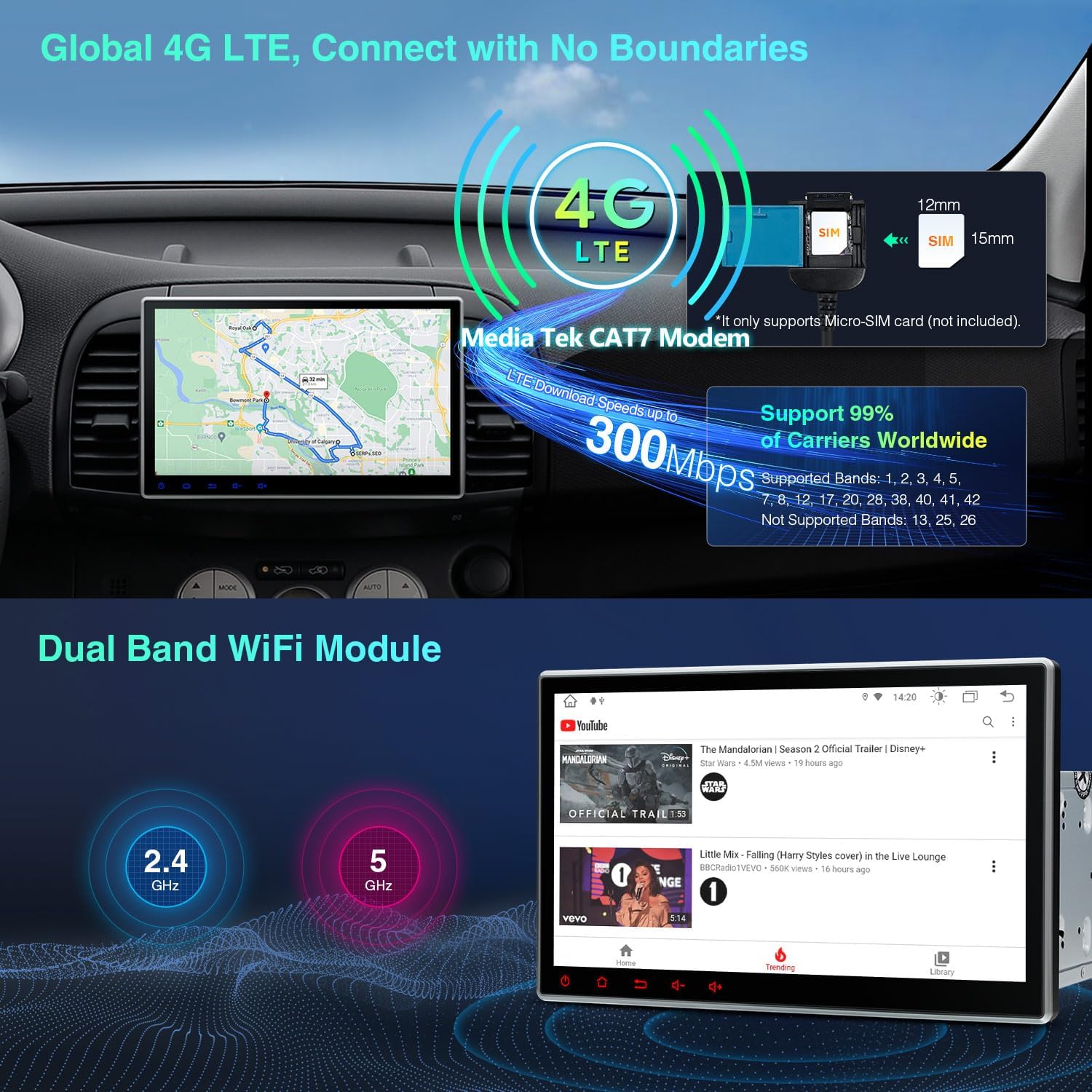
Figure 3.2: Global 4G LTE and Dual Band WiFi.
3.2.3 Wireless CarPlay & Android Auto
Enhance driving safety and convenience with Wireless CarPlay and Wireless/Wired Android Auto. Access voice commands directly from the head unit by saying “Hey Siri” or “OK Google”.

Figure 3.3: Smartphone Connection Options.
Video 3.1: Demonstration of XTRONS Android Car Stereo features including CarPlay and Android Auto.
3.2.4 Built-in DVD Player
The unit includes a built-in multi-region DVD player compatible with most available DVD and CD formats, offering a wide range of entertainment options.

Figure 3.4: Built-in DVD Player and Adjustable Viewing Angles.
3.2.5 Built-in DSP (Digital Sound Processor)
Experience enhanced audio quality with the built-in DSP, designed to optimize your music listening experience with features like smart bass, delay, and filter adjustments.
3.2.6 Radio with RDS
The unit features a built-in ST TDA7708 radio chip, covering AM/FM bands and offering state-of-the-art performance with multipath noise mitigation and RDS decoding.
3.2.7 Dual Band WiFi
Supports both 2.4GHz and 5GHz Wi-Fi bands, providing faster speed and flexibility for internet connectivity.
3.2.8 Bluetooth 5.0
Connect your mobile phone via Bluetooth 5.0 for hands-free calls, access to your phone book, call logs, contact search, and music streaming.
3.2.9 GPS Navigation
Supports various Android navigation software including Sygic, IGO, Waze, Google Maps, and more, providing reliable guidance for your journeys.
3.2.10 PIP Mode (Picture-in-Picture)
PIP is a floating video player that sticks to the foreground of your screen, allowing you to watch videos while multitasking with other applications.
3.2.11 Multi-window View
Run two applications on screen side by side. For example, you can open a navigation map on the left while using a music app on the right.
3.2.12 Optional Features (Sold Separately)
- DAB+ Tuner: Enjoy DAB radio in your car by connecting an XTRONS USB DAB radio receiver stick via the USB port.
- OBD2 Support: With the OBD2 function, you can retrieve real-time data and trouble codes from your vehicle's computer.
4. Maintenance
To ensure the longevity and optimal performance of your XTRONS car stereo, follow these maintenance guidelines:
- Cleaning: Use a soft, dry cloth to clean the screen and unit. Avoid abrasive cleaners or solvents.
- Temperature: Do not expose the unit to extreme temperatures or direct sunlight for prolonged periods.
- Moisture: Keep the unit dry. Moisture can damage internal components.
- Software Updates: Periodically check the XTRONS official website for software updates to ensure the best performance and access to new features.
5. Troubleshooting
If you encounter issues with your unit, refer to the following common problems and solutions:
| Problem | Possible Cause | Solution |
|---|---|---|
| Unit does not power on. | Loose power connection, blown fuse, vehicle battery issue. | Check power cables, inspect fuses, verify vehicle battery. |
| No sound. | Volume too low, incorrect audio settings, speaker wiring issue. | Increase volume, check DSP/audio settings, verify speaker connections. |
| Touch screen unresponsive. | Software glitch, screen calibration needed. | Restart the unit, perform screen calibration if available in settings. |
| GPS signal lost or inaccurate. | GPS antenna obstructed or improperly installed. | Ensure GPS antenna has a clear view of the sky and is securely connected. |
| Bluetooth connection issues. | Device not in pairing mode, interference, outdated firmware. | Ensure device is discoverable, move away from interference, check for firmware updates. |
For persistent issues not covered here, please contact XTRONS customer support.
6. Specifications
Key technical specifications for the XTRONS Double Din DVD Car Stereo:
| Feature | Detail |
|---|---|
| Operating System | Android 13 |
| Processor | Octa Core |
| RAM | 2GB DDR4 |
| ROM | 32GB |
| Display Size | 10.1 Inches |
| Display Resolution | 1024x600 |
| Display Type | IPS LED |
| Connectivity | Global 4G LTE, Dual Band Wi-Fi (2.4GHz/5GHz), Bluetooth 5.0 |
| Features | Wireless CarPlay, Wireless/Wired Android Auto, Built-in DSP, Built-in DVD Player, GPS Navigation, PIP Mode, Multi-window View |
| Manufacturer | XTRONS |
| First Available | August 15, 2022 |
7. Warranty & Support
7.1 Warranty Information
XTRONS backs this unit with a 1-year warranty. This warranty covers manufacturing defects and ensures the product functions as intended under normal use. Please retain your proof of purchase for warranty claims.
7.2 Customer Support
For technical assistance, troubleshooting, or warranty inquiries, please do not hesitate to contact XTRONS customer support. You can typically reach us via the Amazon email system for prompt replies and to ensure your rights and interests are protected.


