
1. Introduction
This manual provides detailed instructions for the proper use, installation, and maintenance of your POWERTEC 48-inch Miter T-Track (4-Pack), Model 71167-P4. These T-tracks are designed to enhance the functionality of various woodworking setups, including router tables, table saws, and workbenches, by providing a versatile channel for miter gauges, featherboards, and other accessories.
The T-tracks are constructed from anodized aluminum, ensuring durability and precision for consistent performance in your workshop. Each track is precisely machined to accommodate standard 3/4 inch x 3/8 inch T-bars.
2. Product Overview
The POWERTEC 48-inch Miter T-Track set includes four individual aluminum T-tracks, each 48 inches in length. These tracks are designed for integration into custom woodworking jigs, fixtures, and work surfaces.

Figure 1: Four POWERTEC 48-inch Miter T-Tracks included in the package.
2.1 Key Features
- Material: High-quality anodized aluminum for strength and corrosion resistance.
- Dimensions: Each track measures 48 inches in length, designed for 3/4 inch x 3/8 inch T-bars.
- Versatility: Compatible with a wide range of woodworking accessories, including miter gauges, featherboards, and hold-down clamps.
- Customizable: Tracks can be cut to specific lengths to suit individual project requirements.
2.2 T-Track Profile and Dimensions
Understanding the precise dimensions of the T-track is crucial for proper integration and compatibility with accessories.

Figure 2: Cross-sectional view with detailed dimensions of the T-track profile. The track is designed for 3/4 inch wide by 3/8 inch deep miter bars.
2.3 Compatibility with Miter T-Bolts
The T-tracks are compatible with various miter T-bolts, allowing for secure fastening of jigs and fixtures.

Figure 3: Examples of compatible POWERTEC miter T-bolts (models 71613, 71614, 71612, 71611) with varying thread sizes and lengths.
3. Specifications
| Attribute | Detail |
|---|---|
| Manufacturer | POWERTEC |
| Part Number | 71167-P4 |
| Item Weight | 5.99 pounds |
| Product Dimensions (each track) | 48 x 1.5 x 2 inches |
| Item Model Number | 71167-P4 |
| Size | 48 inches, 4-Pack |
| Style | 48" Miter T Track (4PCs) |
| Material | Aluminum |
| Item Package Quantity | 1 (containing 4 tracks) |
| Included Components | (4) 48” Miter T-Tracks |
| Batteries Required? | No |
4. Setup and Installation
The POWERTEC Miter T-Tracks are designed for integration into custom woodworking surfaces. Installation typically involves routing a channel into your workbench, router table, or table saw extension to precisely fit the T-track profile.
4.1 Preparing the Mounting Surface
- Measure and Mark: Carefully measure and mark the desired location and length for your T-track installation on your woodworking surface.
- Route the Channel: Using a router with an appropriate bit, create a channel that matches the T-track's dimensions (refer to Figure 2 for precise measurements). Ensure the channel depth allows the T-track to sit flush with the surface.
- Clean the Channel: Remove any sawdust or debris from the routed channel to ensure a clean fit.
4.2 Installing the T-Track
- Test Fit: Gently place the T-track into the routed channel to verify the fit. Adjust the channel as necessary for a snug, flush installation.
- Secure the Track: The T-tracks feature pre-drilled holes for mounting. Use appropriate screws (not included) to secure the track to your surface. Ensure the screw heads sit below the track surface to avoid interference with accessories.
- Customization: If a shorter length is required, the aluminum T-tracks can be cut using a suitable metal-cutting saw blade. Deburr any cut edges to prevent injury and ensure smooth operation.

Figure 4: Example of a POWERTEC T-track installed flush within a wooden workbench surface.
5. Operating Instructions and Applications
Once installed, the POWERTEC Miter T-Tracks provide a versatile platform for various woodworking operations. They are designed to work seamlessly with accessories that utilize a standard 3/4 inch x 3/8 inch miter bar or T-bolt system.
5.1 Common Applications
- Table Saws and Router Tables: Integrate T-tracks into your table saw sleds, router table fences, or extension wings to guide miter gauges, featherboards, and hold-down clamps.
- Jigs and Fixtures: Create custom jigs for repetitive cuts, dadoes, or routing operations by incorporating T-tracks for adjustable stops and clamps.
- Workbenches: Enhance your workbench with T-tracks to secure workpieces using hold-down clamps or to guide various tools.
- Band Saws and Drill Press Tables: Utilize T-tracks to create adjustable fences and stops for precise cutting and drilling.
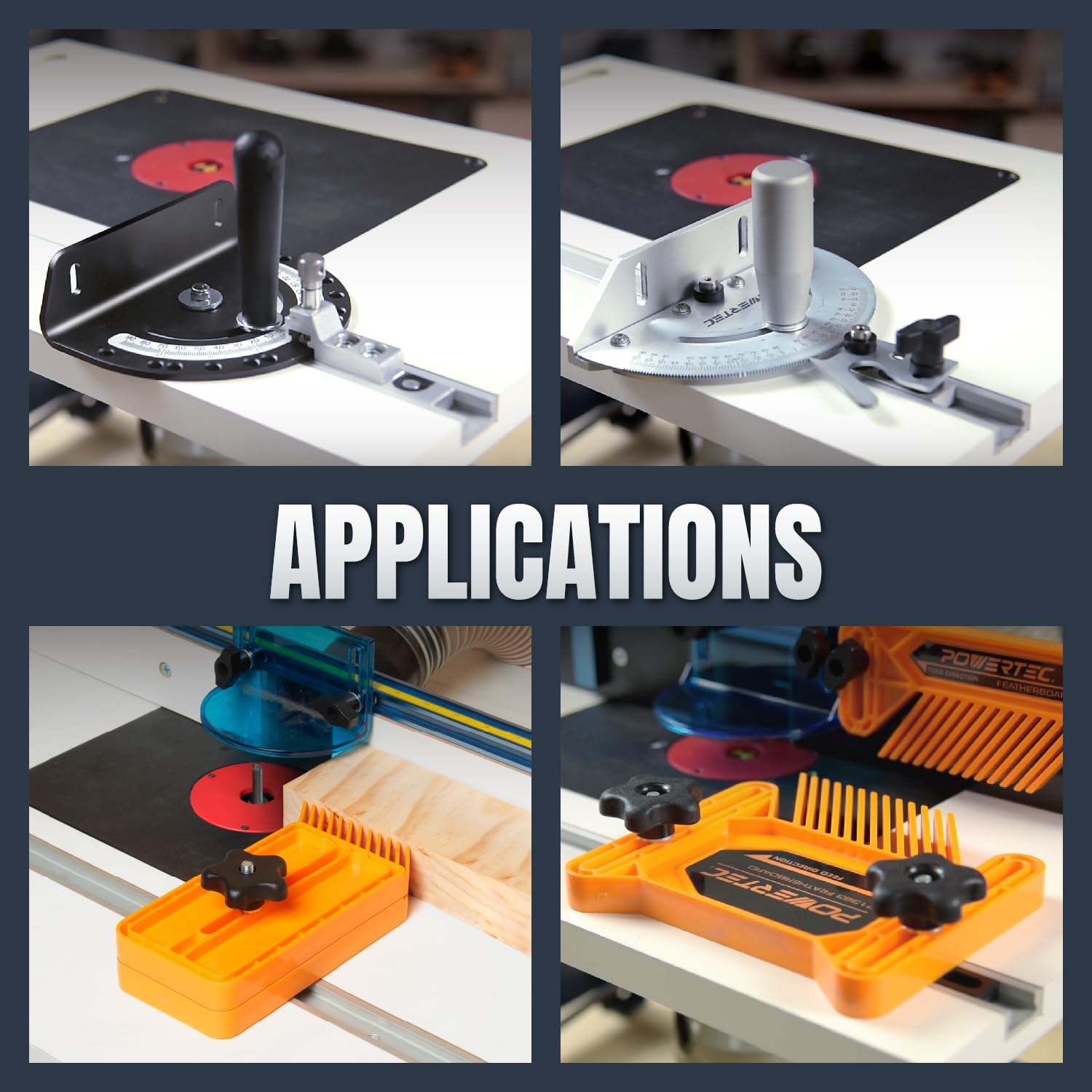
Figure 5: Examples of T-track applications, demonstrating use with miter gauges and featherboards on a router table.
5.2 Using Accessories with T-Tracks
- Miter Gauges: Insert the miter bar of your miter gauge into the T-track for accurate crosscuts and angled cuts.
- Featherboards: Position featherboards in the T-track to apply consistent pressure against workpieces, ensuring safer and cleaner cuts.
- Hold-Down Clamps: Utilize T-slot hold-down clamps to secure workpieces firmly to your table, preventing movement during operations.

Figure 6: A hold-down clamp securely fastened within the T-track, demonstrating workpiece stabilization.
6. Maintenance
Proper maintenance ensures the longevity and optimal performance of your POWERTEC Miter T-Tracks.
- Cleaning: Regularly clean the T-tracks to remove sawdust, wood chips, and debris. A brush or compressed air can be used. Ensure the channels are clear for smooth movement of accessories.
- Inspection: Periodically inspect the tracks for any signs of damage, bending, or wear. While the anodized aluminum is durable, heavy impacts can cause deformation.
- Lubrication (Optional): For extremely smooth operation, a dry lubricant (e.g., PTFE spray) can be lightly applied to the inside of the T-track, though it is generally not required for aluminum tracks. Avoid oil-based lubricants that can attract sawdust.
7. Troubleshooting
Most issues with T-tracks are related to installation or compatibility.
- Accessories not sliding smoothly:
- Check the T-track channel for debris and clean thoroughly.
- Verify that the accessory's miter bar or T-bolt dimensions match the T-track specifications (3/4 inch x 3/8 inch).
- Inspect the T-track for any physical damage or deformation that might impede movement.
- T-track not sitting flush:
- Ensure the routed channel depth and width precisely match the T-track dimensions.
- Check for any obstructions or unevenness in the routed channel.
- Screws not holding securely:
- Ensure appropriate screw size and type are used for your mounting surface.
- Avoid over-tightening, which can strip the wood or damage the track.
8. Warranty and Support
POWERTEC products are manufactured to high-quality standards. For specific warranty information, please refer to the documentation included with your purchase or visit the official POWERTEC website.
For technical assistance, replacement parts, or any other inquiries, please contact POWERTEC customer support through their official channels. When contacting support, please have your product model number (71167-P4) and purchase details available.


