1. Introduction
Thank you for choosing the GameSir X2 Pro Mobile Game Controller. This manual provides detailed instructions on how to set up, operate, and maintain your controller to ensure optimal performance and an enhanced mobile gaming experience. The GameSir X2 Pro is an officially licensed Xbox controller designed for Android smartphones, offering precision controls and a comfortable grip for extended gaming sessions.
2. Product Overview
2.1 Key Features
- Officially licensed Xbox controller for Android smartphones (Android 8.0 or above).
- Direct Type-C connection for ultra-low latency.
- Alps 3D Joysticks for smooth, precise 360° control.
- Hall Effect Analog Triggers for accurate acceleration and braking.
- Kailh Microswitches for durable and responsive face buttons and D-pad.
- Mappable Back Buttons (M1/M2) for advanced customization.
- Switchable ABXY Layouts (Xbox/Switch) with magnetic, detachable buttons.
- Pass-through charging for compatible Android phones.
- Supports Xbox Game Pass, Xbox Remote Play, Steam Link, Rainway, Moonlight, and controller-supported Android games.
2.2 Package Contents
- GameSir X2 Pro-Xbox Controller x 1
- Xbox Game Pass Ultimate Card x 1 (for new users only)
- Concave Thumbstick x 2
- Convex Thumbstick x 2
- Carry Case x 1
- User Manual x 1
2.3 Component Identification
Familiarize yourself with the various components of your GameSir X2 Pro controller:

Figure 1: Front view of the GameSir X2 Pro controller with a smartphone.
- Left Side: Left Analog Joystick, D-pad, View button, Share button.
- Right Side: Right Analog Joystick, ABXY Buttons (A, B, X, Y), Menu button, Xbox button.
- Top: Left Bumper (LB), Left Trigger (LT), Right Bumper (RB), Right Trigger (RT).
- Bottom: USB Type-C connector for phone, USB Type-C port for pass-through charging.
- Back: Mappable Back Buttons (M1, M2).
3. Setup
3.1 Connecting Your Smartphone
- Gently pull the right side of the GameSir X2 Pro controller to extend it.
- Carefully align your Android smartphone's USB Type-C port with the controller's Type-C connector.
- Insert the phone into the connector and then release the extended side of the controller to secure your phone in place. Ensure the phone is firmly seated.

Figure 2: The adjustable Type-C connector for easy phone insertion.
3.2 Initial Setup and App Installation
For full functionality and customization, it is recommended to install the GameSir App. Search for 'GameSir App' on your device's app store or visit the official GameSir website for the latest version. The app allows for firmware updates, button mapping, and other settings adjustments.
4. Operating Instructions
4.1 Gaming with GameSir X2 Pro
Once your smartphone is securely connected, the GameSir X2 Pro will be recognized as a controller. You can now launch your favorite controller-supported Android games or cloud gaming services.

Figure 3: Play a wide range of controller-compatible games.
4.2 Xbox Game Pass and Cloud Gaming
The GameSir X2 Pro is designed for seamless integration with Xbox Game Pass and various cloud gaming platforms. Simply open the respective app on your phone and start playing.

Figure 4: Access cloud gaming services with ease.
4.3 Mappable Back Buttons (M1/M2)
The M1 and M2 back buttons can be customized using the GameSir App to perform various functions, providing an edge in competitive gaming. Refer to the GameSir App for detailed instructions on mapping these buttons.

Figure 5: Mappable back buttons for enhanced control.
4.4 Switchable ABXY Layouts
The ABXY buttons feature a magnetic, detachable design, allowing you to easily switch between the standard Xbox layout and a Nintendo Switch-style layout to suit your preference or game requirements.

Figure 6: Customize your button layout and thumbsticks.
4.5 Pass-Through Charging
The GameSir X2 Pro supports pass-through charging for certain compatible Android phone models. This allows you to charge your phone while gaming without interruption. Connect your phone's charging cable to the Type-C port on the bottom of the controller.
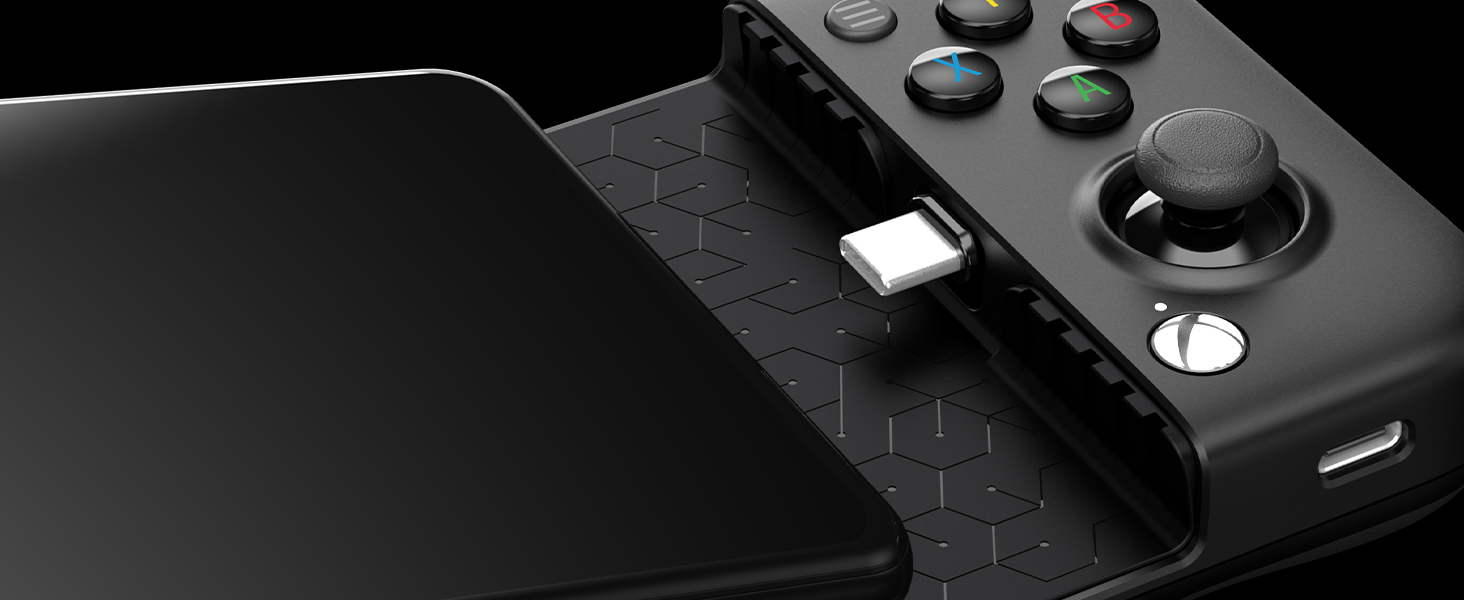
Figure 7: Convenient pass-through charging.
5. Maintenance
To ensure the longevity and optimal performance of your GameSir X2 Pro controller, follow these maintenance guidelines:
- Cleaning: Use a soft, dry cloth to wipe down the controller. Avoid using harsh chemicals or abrasive materials.
- Storage: When not in use, store the controller in its provided carry case to protect it from dust, scratches, and accidental damage.
- Handling: Avoid dropping the controller or exposing it to extreme temperatures or humidity.
6. Troubleshooting
If you encounter any issues with your GameSir X2 Pro controller, please refer to the following common solutions:
- Controller Not Recognized: Ensure your smartphone is running Android 8.0 or above. Verify that the USB Type-C connector is fully and correctly inserted into your phone. Some phones may require enabling OTG (On-The-Go) functionality in their settings.
- App Functionality Issues: If the GameSir App from the Play Store is not functioning correctly or requests unusual permissions (e.g., USB debugging, wireless debugging), consider downloading the APK directly from the official GameSir website. Be aware that your phone's security features might flag non-Play Store apps.
- Input Lag: Ensure your phone's software is up to date. Close any unnecessary background applications that might be consuming system resources.
- Pass-Through Charging Not Working: Verify that your phone model is listed as compatible with pass-through charging. Not all Android phones support this feature.
- Xbox Game Pass Code Already Used: The included Xbox Game Pass Ultimate code is typically for new subscribers only. If you have an existing subscription, you may need to let it expire and cancel it before redeeming the new code.
7. Specifications
| Feature | Detail |
|---|---|
| Model Number | GameSir X2 Pro |
| Product Dimensions | 7.24 x 3.35 x 1.46 inches |
| Item Weight | 14.1 ounces |
| Connectivity | USB Type-C (Direct Connection) |
| Compatibility | Android 8.0 or above |
| Analog Sticks | Alps 3D Joysticks |
| Triggers | Hall Effect Analog Triggers |
| Buttons | Kailh Microswitches, Mappable Back Buttons |
8. Warranty and Support
The GameSir X2 Pro-Xbox Controller comes with a 1-year warranty. SDNTECH Team provides 24-hour customer service, 30-day worry-free refund, and 365-day return and exchange service. Please contact them without hesitation if you have any questions about the product.
For further assistance, you may refer to the official GameSir website or contact their customer support directly.
Video 1: Official product overview of the GameSir X2 Pro Mobile Game Controller, demonstrating its features and usage.


