1. Introduction
The Beelink EQI12 Mini PC is a compact and powerful computing solution designed for various applications, from office productivity and design work to home entertainment and light gaming. Equipped with a 12th Generation Intel Core i5-12450H Processor, 24GB LPDDR5 RAM, and a 500GB M.2 PCIe 4.0 SSD, it offers robust performance in a small form factor. This manual provides essential information for setting up, operating, maintaining, and troubleshooting your Beelink EQI12 Mini PC.

Figure 1.1: Beelink EQI12 Mini PC. This image shows the compact design of the mini PC from a top-front angle, highlighting its sleek appearance and small footprint.
2. Setup
2.1 What's in the Box
- 1 x EQI12 I5 12450H 24G 500GB Mini PC
- 1 x HDMI Cable (100cm)
- 1 x AC Cable (150cm)
- 1 x User Manual

Figure 2.1: Included Accessories. This image displays all components typically found in the product packaging, including the mini PC unit, HDMI cable, AC power cable, and the user manual.
2.2 Initial Connection
- Connect Display: Connect your monitor(s) to the HDMI ports on the back of the Mini PC using the provided HDMI cable. The device supports dual 4K@60Hz display output.
- Connect Peripherals: Plug in your keyboard, mouse, and any other USB devices into the available USB 2.0, USB 3.2, or USB-C ports.
- Connect Power: Connect the AC power cable to the Mini PC and then to a power outlet. The built-in 85W power supply simplifies cable management.
- Power On: Press the power button located on the front of the Mini PC. The white light indicator will illuminate when the power is on.
3. Operating Instructions
3.1 Power Management
- Power On: Press the power button once.
- Shut Down: Use the operating system's shutdown procedure (e.g., Start > Power > Shut down in Windows).
- Restart: Use the operating system's restart procedure.
- Sleep: Use the operating system's sleep function.
3.2 Display Configuration
The Beelink EQI12 supports dual 4K@60Hz display output via its two HDMI ports, enabling efficient multitasking and enhanced productivity. You can configure display settings through your operating system's display options.

Figure 3.1: Dual-Screen Display Setup. This image illustrates the mini PC connected to two external monitors, demonstrating its capability for dual-screen output for improved workflow.
3.3 Network Connectivity
- Wi-Fi 6: The Mini PC features built-in dual-band Wi-Fi 6 (2.4G/5G, Intel AX101) for faster data transfer speeds, higher security, and better stability. Connect to your wireless network through the operating system's network settings.
- Bluetooth 5.2: Integrated Bluetooth 5.2 allows for stable connections with various Bluetooth devices such as keyboards, mice, and headphones.
- Dual Gigabit Ethernet: Two 1000Mbps LAN ports are available for wired network connections, enhancing data security and providing a remarkably faster internet experience.

Figure 3.2: Wireless Connectivity. This diagram highlights the Wi-Fi 6 and Bluetooth 5.2 capabilities of the mini PC, indicating fast and stable wireless connections.

Figure 3.3: Dual Gigabit Ethernet Ports. This image shows the rear of the mini PC with two Ethernet ports, emphasizing its dual LAN capability for robust wired networking.
3.4 Available Interfaces
The Beelink EQI12 Mini PC is equipped with a variety of ports for comprehensive connectivity:
- 1 x USB-C (10Gbps data transfer)
- 2 x HDMI (max 4K 60Hz)
- 3 x USB 3.2 (10Gbps)
- 1 x USB 2.0 (480Mbps)
- 2 x Gigabit Ethernet (LAN 1000M)
- 1 x 3.5mm Audio Jack
- Power Button
- CLR CMOS (Clear CMOS)

Figure 3.4: Rich Interfaces. This image provides a detailed view of all input/output ports on the Beelink EQI12 Mini PC, including USB, HDMI, LAN, and audio jacks.
4. Maintenance
4.1 Cooling System
The Beelink EQI12 incorporates an advanced MSC2.0 Vapor Chamber Technology cooling system, featuring a silent fan, SSD heat sink, and a dustproof design. Air intake from the bottom efficiently dissipates internal heat, reducing temperatures of the CPU, SSD, and DDR memory to minimize hardware loss. The operating noise is as low as 32dB for daily use, ensuring a quiet environment.

Figure 4.1: MSC2.0 Cooling System. This diagram illustrates the internal airflow and components of the cooling system, including the heat pipe, silent fan, and SSD heatsink, designed for efficient heat dissipation.

Figure 4.2: Quiet Operation. This image highlights the low noise level of the mini PC (32dB), comparing it to other common ambient sounds to emphasize its quiet performance.
4.2 Storage Expansion
The Mini PC is installed with a 500GB M.2 PCIe 4.0x4 2280 SSD and supports dual-channel M.2 PCIe 4.0x4 up to a maximum of 4TB (2x2TB, additional drives not included). This allows for significant storage expansion if needed.
5. Troubleshooting
- Q: What should I do if I find the small PC is defective?
A: Please contact Beelink technical support immediately. They will provide a satisfied solution for you. - Q: What should I do if I need to update the mini computer?
A: Please contact Beelink support, and they will send you the necessary tutorial files for updates. - Q: How to enter BIOS?
A: To enter the BIOS settings, press the "Delete" key repeatedly during startup. To enter the boot options menu, press "F7" continuously immediately after booting. - Q: How to enable Auto Power On?
A: The Mini PC supports Wake On LAN, PXE Boot, RTC Wake, and Auto Power On. If you wish to enable auto power on, please send the barcode on the bottom of the machine to Beelink support, and they will provide the corresponding tutorial file.
6. Specifications

Figure 6.1: Intel Core i5-12450H Processor Details. This image provides a visual summary of the processor's key specifications, including turbo frequency, core/thread count, and L3 cache.
| Feature | Specification |
|---|---|
| Processor | Intel 12th Gen Core i5-12450H (8 Cores/12 Threads, up to 4.4GHz, L3 12MB Cache) |
| RAM | 24GB LPDDR5 5200MHz |
| Storage | 500GB M.2 PCIe 4.0x4 2280 SSD (Supports dual-channel M.2 PCIe 4.0x4 up to 4TB) |
| Graphics | Intel UHD Graphics 48EUs (1.2GHz) |
| Display Output | 2 x HDMI (Max 4K@60Hz, Dual Display Support) |
| Operating System | Windows 11 Pro |
| Wireless Connectivity | Dual-Band Wi-Fi 6 (Intel AX101), Bluetooth 5.2 |
| Wired Connectivity | 2 x Gigabit Ethernet (LAN 1000Mbps) |
| USB Ports | 1 x USB-C (10Gbps), 3 x USB 3.2 (10Gbps), 1 x USB 2.0 (480Mbps) |
| Audio | 1 x 3.5mm Audio Jack |
| Cooling System | MSC2.0 Vapor Chamber Technology + Silent Fan + SSD Heat sink + Dustproof Design |
| Dimensions | Approximately 4.96 x 4.96 x 1.74 inches |
| Weight | Approximately 2.03 pounds |
| Power Supply | Built-in 85W |
7. Warranty and Support
Beelink provides comprehensive support for your Mini PC:
- Warranty: All products come with a 12-month warranty. Beelink provides new replacements for mini PCs during the warranty period.
- Technical Support: Lifetime technical support is available.
- Customer Service: 7 days/24 hours service is provided.
For any technical assistance or warranty claims, please contact Beelink customer service through the platform where you purchased the product or visit the official Beelink website for contact information.
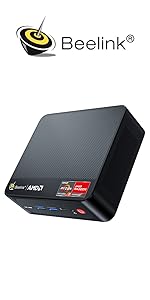
Figure 7.1: Beelink Support. This image summarizes the support options available, including fulfillment by Amazon, customer service, lifetime technical support, and warranty information.


