
1. Introduction
The Irinox Fresco is a versatile multi-function countertop appliance designed to enhance food preservation and preparation in your home kitchen. This unit offers nine distinct functions, including blast chilling, shock freezing, gentle freezing, customized preservation, controlled thawing, drinks cooling, low-temperature cooking, natural proofing, and ready meals. Its internal chamber is constructed from stainless steel and can manage temperatures ranging from -31°F to +167°F (-35°C to +75°C). This manual provides essential information for the safe and efficient operation of your Fresco appliance.

Image 1.1: The Irinox Fresco Multi-Function Countertop Blast Chiller/Flash Freezer, showcasing its sleek design.
2. Safety Information
Please read all safety instructions carefully before operating the appliance to prevent injury or damage. Keep this manual for future reference.
- Electrical Safety: Ensure the appliance is connected to a grounded outlet with the correct voltage. Do not use extension cords or adapters. Disconnect power before cleaning or maintenance.
- Placement: Place the unit on a stable, level, heat-resistant surface. Ensure adequate ventilation around the appliance; do not block air vents. Keep away from heat sources and direct sunlight.
- Temperature Extremes: The internal chamber operates at extreme temperatures. Use caution when loading or unloading food. Avoid direct contact with cold surfaces to prevent frostbite.
- Cleaning: Always unplug the unit before cleaning. Do not immerse the appliance in water. Use only mild detergents and soft cloths.
- Children and Pets: Keep children and pets away from the appliance during operation. This appliance is not intended for use by persons with reduced physical, sensory, or mental capabilities unless supervised.
- Damage: Do not operate the appliance if it has a damaged power cord or plug, or if it has been dropped or damaged in any way. Contact customer support for assistance.
3. Product Overview
The Irinox Fresco features a compact countertop design with an intuitive control panel. The internal cavity is designed to accommodate various food items on its adjustable racks.
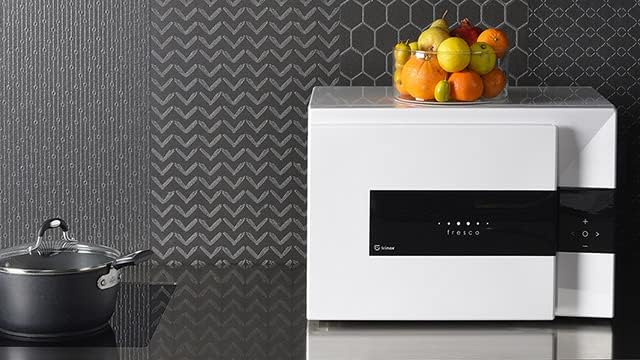
Image 3.1: The Irinox Fresco positioned on a kitchen countertop, demonstrating its compact size.
Key Components:
- Control Panel: Located on the front, featuring touch controls for function selection, temperature adjustment, and timing.
- Internal Chamber: Stainless steel interior designed for optimal temperature transfer and easy cleaning.
- Removable Racks/Shelves: For organizing food items within the chamber.
- Door: Insulated door with a secure latch mechanism.
- Air Vents: Located on the sides or rear for proper heat dissipation.
4. Setup
- Unpacking: Carefully remove the appliance from its packaging. Retain packaging materials for future transport or storage.
- Placement: Position the Fresco on a flat, stable, and heat-resistant countertop. Ensure there is at least 4 inches (10 cm) of clearance on all sides and the rear for adequate ventilation. Do not place near direct heat sources or in direct sunlight.
- Initial Cleaning: Before first use, wipe the interior and exterior surfaces with a damp cloth and mild detergent. Dry thoroughly.
- Power Connection: Plug the power cord into a grounded electrical outlet. Ensure the voltage matches the appliance's requirements.
5. Operating Instructions
The Irinox Fresco offers nine distinct functions. Familiarize yourself with the control panel before operation.

Image 5.1: The interior of the Irinox Fresco, showing a plate placed on a rack, ready for processing.
General Operation:
- Power On/Off: Press the power button on the control panel to turn the unit on or off.
- Function Selection: Use the function selection buttons (often indicated by symbols or text) to cycle through the available programs.
- Temperature/Time Adjustment: Use the '+' and '-' buttons to adjust desired temperature or time settings for the selected function.
- Start/Pause: Press the start button to begin the selected program. Press again to pause.
Detailed Functions:
- Blast Chilling:
Rapidly cools freshly cooked foods to 3°C (37.4°F). This process helps to block the evaporation of nutrients and preserves the quality, texture, and taste of food. Chilled food can be stored for up to 7 days.
Usage: Place hot food directly into the chamber. Select the Blast Chilling function and set the desired time. The unit will rapidly cool the food to a safe storage temperature.
- Shock Freezing:
Quickly freezes food to low temperatures, typically -18°C (-0.4°F). This rapid freezing ensures that when food is defrosted, it retains its original freshness and texture.
Usage: Prepare food for freezing. Place it in suitable containers within the chamber. Select Shock Freezing and initiate the cycle.
- Gentle Freezing:
A controlled freezing process that first lowers the temperature to 3°C (37°F) and then gradually to -18°C (-0.4°F) in the food's core. This method provides rapid yet non-aggressive freezing, ideal for delicate items.
Usage: For sensitive foods, select Gentle Freezing. The appliance manages the temperature transition for optimal results.
- Customized Preservation:
Allows users to set specific temperature and humidity conditions for preserving various food types, extending their shelf life while maintaining quality.
Usage: Select Customized Preservation, then adjust temperature and humidity settings according to the food type being stored.
- Controlled Thawing:
Thaws frozen food gradually and evenly, preventing bacterial growth and preserving the food's texture and flavor. This is a safer alternative to room temperature thawing.
Usage: Place frozen food in the chamber. Select Controlled Thawing and the unit will manage the thawing process.
- Drinks Cooling:
Rapidly chills beverages at a rate of approximately 1°C (1.8°F) per minute. Achieve ideal drink temperatures in less than 20 minutes.
Usage: Place bottles or cans into the chamber. Select Drinks Cooling and set the desired chilling time or target temperature.
- Low-Temperature Cooking:
Cooks meat and fish at precise low temperatures, ensuring the internal temperature never exceeds 70°C (158°F). This method enhances flavors, maintains uniform consistency, and prevents overcooking.
Usage: Prepare food for low-temperature cooking. Place it in the chamber. Select Low-Temperature Cooking and set the desired cooking time and temperature.
- Natural Proofing:
Provides an optimal environment for dough proofing, controlling temperature and humidity to ensure consistent and effective rising for baked goods.
Usage: Place dough in a suitable bowl within the chamber. Select Natural Proofing and allow the unit to create the ideal conditions.
- Ready Meals:
A function designed for the rapid preparation or regeneration of pre-cooked meals, ensuring they are heated or cooled to the perfect serving temperature efficiently.
Usage: Place ready meals in the chamber. Select Ready Meals function and follow on-screen prompts for heating or cooling.

Image 5.2: The interior of the Irinox Fresco, showing multiple racks holding fruit skewers, demonstrating capacity.

Image 5.3: The Irinox Fresco alongside several small dishes of prepared food, highlighting its culinary applications.
6. Maintenance and Cleaning
Regular maintenance ensures optimal performance and longevity of your Irinox Fresco.
Daily Cleaning:
- Interior: After each use, wipe the stainless steel interior with a damp cloth and a mild, food-safe detergent. Rinse with a clean damp cloth and dry thoroughly to prevent water spots and odors.
- Exterior: Wipe the exterior surfaces, including the control panel, with a soft, damp cloth. Avoid abrasive cleaners or solvents.
- Racks/Shelves: Remove and wash racks and shelves with warm soapy water. Dry completely before returning them to the unit.
Periodic Maintenance:
- Defrosting: If ice buildup occurs, unplug the unit and allow it to defrost naturally. Once defrosted, clean and dry the interior.
- Door Seal: Regularly inspect the door seal for any signs of wear or damage. Clean the seal with a damp cloth to ensure a tight closure.
Important: Always unplug the appliance from the power outlet before performing any cleaning or maintenance tasks.
7. Troubleshooting
Refer to the following table for common issues and their potential solutions.
| Problem | Possible Cause | Solution |
|---|---|---|
| Appliance does not power on. | Not plugged in; power outlet malfunction; tripped circuit breaker. | Ensure power cord is securely plugged in. Test the outlet with another appliance. Check and reset the circuit breaker. |
| Unit is not cooling/freezing effectively. | Door not closed properly; vents blocked; excessive food load; high ambient temperature. | Ensure door is fully closed. Check and clear any obstructions from air vents. Reduce food load if overloaded. Ensure appliance is in a suitable environment. |
| Unusual noises during operation. | Normal operational sounds (compressor); unit not level; internal component issue. | Some operational sounds are normal. Ensure the unit is on a level surface. If noises are loud or unusual, contact customer support. |
| Error code displayed. | Specific internal malfunction. | Note the error code and refer to the full product manual (if available) or contact customer support with the code. |
If the problem persists after attempting these solutions, please contact Irinox customer support.
8. Specifications
| Feature | Detail |
|---|---|
| Brand | Irinox |
| Model | Fresco |
| Color | White |
| Form Factor | Countertop |
| Internal Chamber Material | Stainless Steel |
| Temperature Range | -31°F to +167°F (-35°C to +75°C) |
| Power Source | Electric |
| Dimensions | 23-Inches (Approximate, based on product title) |
| Number of Functions | 9 |
| UPC | 008600090896 |
| ASIN | B0B9HTFQHN |
9. Warranty and Support
Irinox products are manufactured to high-quality standards. For warranty information, please refer to the warranty card included with your purchase or visit the official Irinox website.
For technical assistance, troubleshooting beyond this manual, or to inquire about replacement parts, please contact Irinox customer support. Have your model number (Fresco) and purchase date available when contacting support.
Customer Support: Please refer to the contact information provided in your product packaging or on the official Irinox website.


