
Audiovance Audiovance 1+1 (SP301+IF301)
Audiovance Wireless Earbuds User Manual: Infinit 301 & Speed 301
Models: Audiovance 1+1 (SP301+IF301)
Introduction
Thank you for choosing Audiovance wireless earbuds. This manual provides detailed instructions for the Audiovance Infinit 301 and Speed 301 models, designed to offer versatile audio experiences for different activities. The Infinit 301 is optimized for immersive music and clear calls in daily use, while the Speed 301 is engineered for secure fit and durability during workouts and sports.
What's in the Box
Your Audiovance package includes the following items:
- 1 set of Infinit 301 Wireless Earbuds
- 1 set of Speed 301 Earhooks Bluetooth Headphones
- 2 Charging Cases (one for each earbud set)
- 2 USB-C Charging Cables
- 2 User Manuals (this document)
- 2 sets of S/M/L Eartips (for both SP301 & IF301)

Image: Contents of the Audiovance earbud package, showing both Infinit 301 and Speed 301 earbuds, their respective charging cases, USB-C cables, user manuals, and multiple sizes of eartips.
Product Overview
The Audiovance SPIF 301 package provides two distinct types of wireless earbuds to suit various listening needs:
Infinit 301 Earbuds
The Infinit 301 earbuds feature an in-ear design, ideal for immersive music listening and clear calls in daily environments. They offer passive noise cancellation and are designed for comfort during extended use, including activities like sleeping or wearing makeup.

Image: A woman wearing the Audiovance Infinit 301 earbuds, demonstrating their discreet in-ear fit for immersive music.
Speed 301 Headphones
The Speed 301 headphones are designed with ear hooks for a secure and comfortable fit, making them suitable for sports, running, workouts, and gym activities. They are sweat-resistant and IPX5 waterproof, ensuring durability during physical exertion.

Image: A woman wearing the Audiovance Speed 301 headphones with ear hooks, illustrating their secure fit for active use.

Image: A composite image showing both the Audiovance Infinit 301 in-ear earbuds and the Speed 301 over-ear hook headphones.
Setup Instructions
Initial Charging
- Before first use, remove the protective sticker from the charging contacts on both earbuds.
- Place the earbuds back into their respective charging cases.
- Connect the charging case to a power source using the provided USB-C cable. The Infinit 301 charging case also supports wireless charging.
- Allow the earbuds and charging case to fully charge. A 10-minute charge provides approximately 60-75 minutes of playtime.
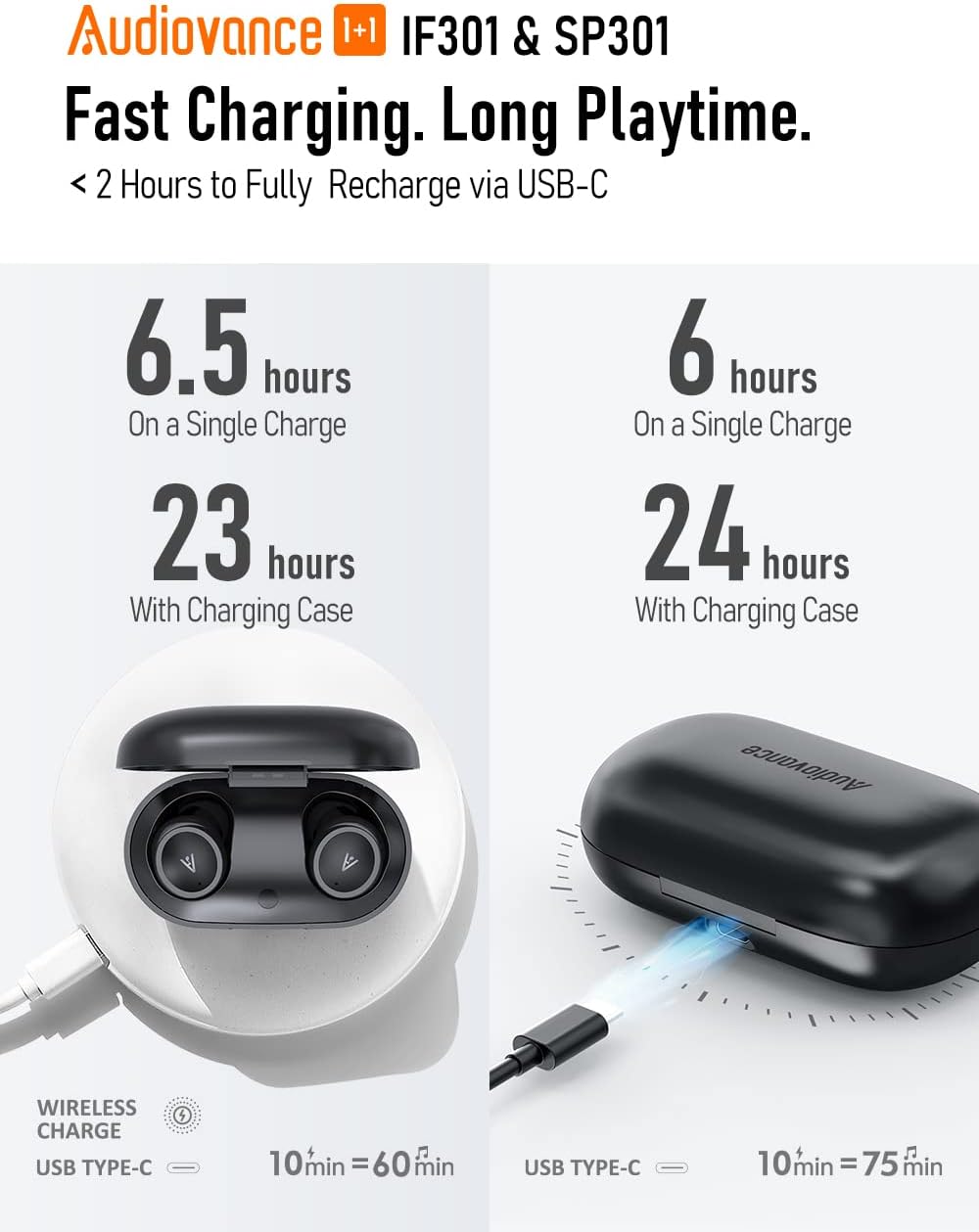
Image: Visual guide demonstrating the charging process for both Infinit 301 (wireless and USB-C) and Speed 301 (USB-C) charging cases, along with their respective battery life and fast charging capabilities.
Pairing with a Device
Both Infinit 301 and Speed 301 earbuds feature one-step pairing:
- Open the charging case and take out both earbuds. They will automatically enter pairing mode.
- On your device (smartphone, tablet, etc.), enable Bluetooth.
- Search for available Bluetooth devices. You will see 'Audiovance IF301' and 'Audiovance SP301' listed.
- Select the desired earbud model to connect. Once connected, you will hear an audio confirmation.

Image: A visual representation of the Bluetooth pairing process for Audiovance earbuds with a smartphone.
Operating Instructions
Wearing the Earbuds
- Infinit 301: Choose the eartip size (S/M/L) that provides the most comfortable and secure fit for optimal sound and passive noise cancellation. Insert the earbuds gently into your ear canal.
- Speed 301: Place the ear hook over your ear and adjust the earbud into your ear canal. The ear hooks ensure a stable fit during movement.

Image: Two individuals demonstrating the comfortable and secure fit of the Infinit 301 (in-ear) and Speed 301 (with ear hooks) earbuds.
Touch Controls
Both earbud models feature smart touch controls for various functions:
- Play/Pause: Single tap on either earbud.
- Answer/Hang Up Call: Single tap on either earbud.
- Next Track: Double tap on the right earbud.
- Previous Track: Double tap on the left earbud.
- Volume Up: Triple tap on the right earbud.
- Volume Down: Triple tap on the left earbud.
- Activate Voice Assistant: Long press (2 seconds) on either earbud.
Mono or Stereo Mode
You can use either earbud independently in mono mode. Simply take one earbud from the charging case, close the lid, and it will automatically enter mono mode. To switch back to stereo, take out the second earbud.
Maintenance and Care
- Cleaning: Regularly clean the earbuds and charging case with a soft, dry, lint-free cloth. Avoid using harsh chemicals or abrasive materials.
- Eartips: Remove eartips and clean them with mild soap and water if necessary. Ensure they are completely dry before reattaching.
- Storage: When not in use, always store the earbuds in their charging case to protect them and keep them charged.
- Water Resistance: Both models are IPX5-rated, meaning they are resistant to sweat and light splashes of water. Do not submerge them in water or expose them to heavy rain. Ensure the charging port is dry before charging.
Troubleshooting
If you encounter issues with your Audiovance earbuds, please refer to the following common solutions:
- Earbuds not charging:
- Ensure the protective sticker has been removed from the earbud charging contacts.
- Verify the charging cable is securely connected to both the case and the power source.
- Check if the charging case itself has power.
- Clean the charging contacts on both the earbuds and inside the case with a dry cotton swab.
- Earbuds not pairing or connecting:
- Ensure Bluetooth is enabled on your device and the earbuds are out of the charging case.
- Turn off Bluetooth on your device, then turn it back on.
- Forget the earbuds from your device's Bluetooth list and attempt to pair again.
- Place both earbuds back in the charging case, close the lid, wait a few seconds, then take them out again to reset the connection.
- Only one earbud playing audio:
- Ensure both earbuds are out of the charging case and connected to your device.
- Try placing both earbuds back in the case, closing the lid, and then taking them out simultaneously.
- Reset the earbuds (refer to specific model instructions if available, or try forgetting and re-pairing).
- Low volume or poor sound quality:
- Adjust the volume on both your device and using the earbud touch controls.
- Ensure the eartips are properly seated in your ear canal to create a good seal. Try different eartip sizes.
- Clean any debris from the earbud speaker grilles.
- Ensure there are no obstructions between the earbuds and your device that could interfere with the Bluetooth signal.
Specifications
| Feature | Infinit 301 (IF301) | Speed 301 (SP301) |
|---|---|---|
| Connectivity Technology | Wireless (Bluetooth 5.2) | |
| Driver Size | Φ10mm NdFeB Speaker | Φ13mm NdFeB Speaker |
| Frequency Response | 20Hz-20kHz | |
| Impedance | 16Ω | 32Ω |
| Playtime (Single Charge) | Up to 6.5 hours | Up to 6.0 hours |
| Total Playtime (with Case) | Up to 23 hours | Up to 24 hours |
| Fast Charging | 10-minute charge for 60 minutes of playtime | |
| Wireless Charging | Supported | Not Supported |
| Water Resistance | IPX5 (Sweat-Resistant & Waterproof) | |
| Microphones | 4-microphone with CVC Technology | 2-microphone with CVC Technology |
| Control Method | Touch | |
| Material | Plastic | |
| Item Weight | 11.3 ounces (total package) | |
Warranty and Support
For warranty information or technical support, please refer to the contact details provided with your purchase documentation or visit the official Audiovance website. Keep your proof of purchase for warranty claims.
Related documentsAudiovance 1+1 (SP301+IF301)


Ask a question about this manual
Ask about setup, troubleshooting, compatibility, parts, safety, or missing instructions. Manuals+ will review the question and use this page’s manual context to help answer it.