
Geekee CG6
Geekee Security Cameras Wireless Outdoor User Manual
Model: CG6
Your guide to setting up, operating, and maintaining your Geekee Security Cameras.
Introduction
The Geekee CG6 Wireless Security Camera is designed to provide comprehensive surveillance for both indoor and outdoor environments. Featuring 2K ultra-HD video quality, full-color night vision, AI motion detection, two-way audio, and IP65 weatherproofing, this battery-powered camera offers a reliable and convenient security solution. This manual provides detailed instructions to help you maximize the functionality of your camera system.

Image: Two Geekee wireless security cameras, designed for outdoor use, shown with water droplets to highlight their weatherproof design.
What's in the Box
Upon unboxing your Geekee Security Camera system, please verify that all the following components are included:
- Security Camera(s)
- USB Cable
- Instruction Manual
- Screws Sets (for mounting)
- Mounting Bracket(s)

Image: A visual representation of the items included in the product packaging, ensuring all parts are present for setup.
Specifications
| Feature | Detail |
|---|---|
| Model Name | CG6 |
| Indoor/Outdoor Usage | Indoor/Outdoor |
| Video Capture Resolution | 2K (3MP) |
| Viewing Angle | 110 Degrees |
| Power Source | Battery Powered (5200mAh) |
| Connectivity Protocol | Wi-Fi (2.4GHz only) |
| International Protection Rating | IP65 Weatherproof |
| Special Feature | Motion Sensor, Two-Way Talk, Night Vision (Full Color/Infrared) |
| Control Method | App (VicoHome) |
Setup
Follow these steps to set up your Geekee Security Camera:
- Charge the Camera: Before initial use, fully charge the camera's built-in 5200mAh rechargeable battery using the provided USB cable. A full charge ensures optimal performance and battery life.
- Download the VicoHome App: Scan the QR code in the instruction manual or search for "VicoHome" in your device's app store (available for Android and iOS). Install the app on your smartphone.
- Register an Account: Open the VicoHome app and follow the on-screen prompts to register a new user account.
- Connect to Wi-Fi: Ensure your smartphone is connected to a 2.4GHz Wi-Fi network. The Geekee camera only supports 2.4GHz Wi-Fi; it is not compatible with 5GHz networks. Follow the in-app instructions to connect your camera to your Wi-Fi network.
- Add Camera to App: Within the VicoHome app, select the option to add a new device and follow the pairing process. This typically involves scanning a QR code displayed on your phone with the camera.
- Mount the Camera: Choose a suitable location for installation. The camera can be wall-mounted using the included mounting bracket and screws. Ensure the camera has a clear field of view and is within range of your 2.4GHz Wi-Fi signal.
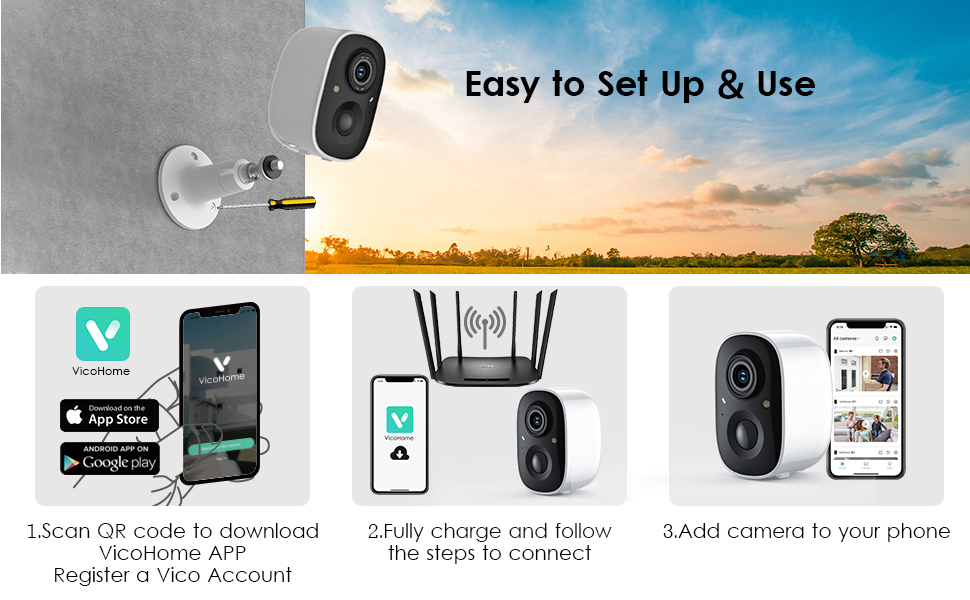
Image: A visual guide illustrating the three primary steps for quick and easy setup of the security camera, including app download and connection.
Operating Instructions
Live Video and Night Vision
Access live 2K ultra-HD video streams directly from the VicoHome app. The camera supports dual light source night vision, offering both full-color night vision and infrared night vision options for clear visibility in low-light conditions.

Image: A demonstration of the camera's 2K HD resolution and its ability to capture full-color video even in low-light conditions, compared to standard night vision.
Intelligent PIR Motion Detection and Instant Alerts
The camera features a built-in passive infrared (PIR) motion detection sensor. When movement is detected within the customizable monitoring range, the camera will instantly send a notification to your phone via the VicoHome app. This allows for immediate awareness of activity.

Image: An illustration of the camera's motion detection capabilities, showing how it secures your home by identifying movement and offering various alert options.
Two-Way Talk and Intelligent Alarm
Utilize the integrated microphone and speaker for two-way communication. You can speak to visitors, delivery personnel, or deter unwanted individuals directly through the VicoHome app, regardless of your location. The camera also features flashing white lights and a siren alarm that can be activated manually or automatically upon motion detection to deter intruders.

Image: A visual representation of the two-way voice intercom feature, enabling real-time communication with individuals at your property.
Storage Options
The camera offers dual storage modes: local SD card storage (supports up to 128GB micro-SD card) and cloud storage. A free rolling 3-day cloud storage history is provided, with a 30-day free trial for advanced features including upgraded cloud memory and AI recognition.
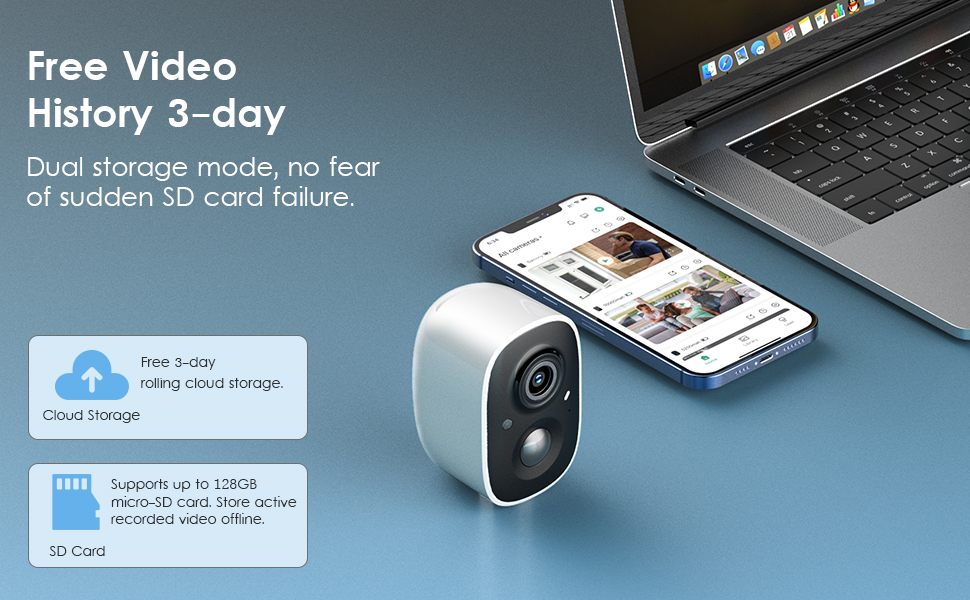
Image: An overview of the camera's storage capabilities, highlighting both free cloud storage and local SD card support for video history.
AI Intelligent Recognition and Custom Activity Zones
Leverage AI recognition features to differentiate between pets, persons, and vehicles, reducing false alerts. You can also define custom activity zones within the camera's field of view to focus motion detection on specific areas of interest.
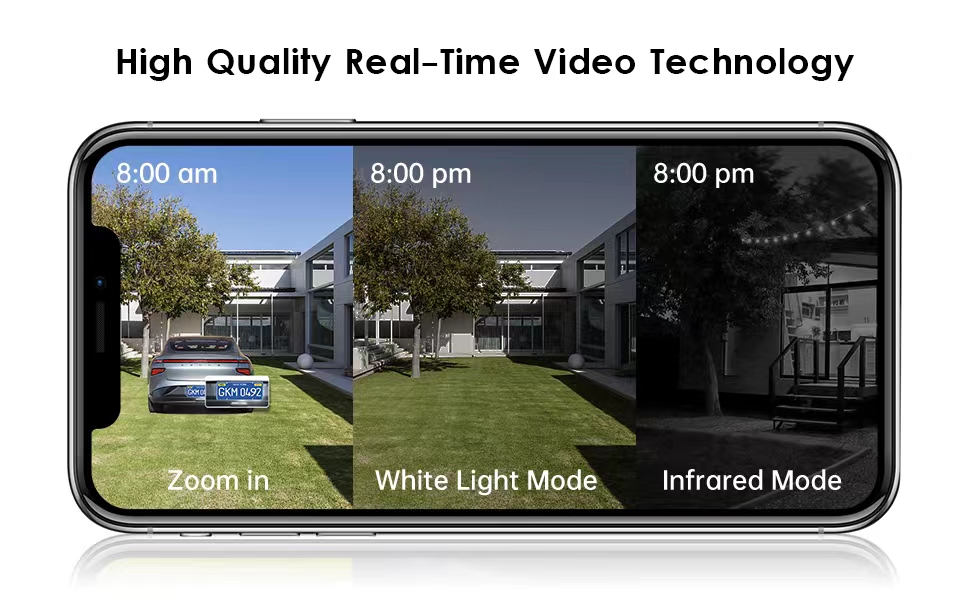
Image: A visual explanation of how to specify custom activity zones and the camera's AI intelligent recognition features for different types of motion.
Maintenance
Battery Management
The camera is equipped with a 5200mAh rechargeable battery designed for low power consumption. Battery life varies based on usage, motion detection frequency, and environmental factors. Monitor the battery level through the VicoHome app and recharge as needed using the provided USB cable.

Image: An internal view of the camera, emphasizing its built-in high-performance battery for true wireless operation and extended use.
Weatherproofing (IP65)
The Geekee camera is rated IP65 weatherproof, meaning it is protected against dust ingress and low-pressure water jets from any direction. This allows for reliable operation in various outdoor conditions, including rain and snow. Periodically clean the camera lens and housing with a soft, damp cloth to ensure optimal performance and image clarity.

Image: The camera shown operating effectively in both rainy and snowy conditions, illustrating its IP65 weatherproof durability.
Troubleshooting
- Camera not connecting to Wi-Fi: Ensure your Wi-Fi network is 2.4GHz. The camera does not support 5GHz Wi-Fi. Verify that the camera is within range of your router and that the Wi-Fi password is entered correctly.
- Frequent motion detection alerts: Adjust the motion detection sensitivity settings within the VicoHome app. You can also define custom activity zones to exclude areas with frequent irrelevant motion (e.g., busy streets, swaying trees).
- Poor night vision quality: Ensure the camera lens is clean and free from obstructions. Check for any strong light sources directly facing the camera at night, which can interfere with night vision.
- Battery draining quickly: High frequency of motion detection events, live view access, or two-way talk usage can increase battery consumption. Reduce sensitivity or frequency of alerts if possible. Ensure the camera is fully charged before deployment.
- Two-way audio issues: Check your smartphone's volume settings and ensure the microphone and speaker permissions are granted to the VicoHome app. Ensure a stable internet connection for clear audio transmission.
Warranty and Support
Geekee is committed to providing high-quality products and customer satisfaction. Your product comes with dedicated technical support.
- Technical Help: Lifetime technical assistance is available to ensure your product operates smoothly.
- Response Time: Expect a reply to your inquiries within 24 hours.
- Contact: For technical support or any product-related questions, please contact us at support@getgeekee.com.

Image: Visual representation of the comprehensive technical support offered, including high-quality service, lifetime assistance, and prompt email replies.
Related documentsCG6


Ask a question about this manual
Ask about setup, troubleshooting, compatibility, parts, safety, or missing instructions. Manuals+ will review the question and use this page’s manual context to help answer it.