
Introduction
Thank you for choosing the Hocazor HP033 Bluetooth AM/FM Radio Hearing Protection Earmuffs. These earmuffs are designed to provide effective hearing protection in noisy environments while allowing you to enjoy audio entertainment via Bluetooth or AM/FM radio. This manual provides essential information for the safe and efficient use of your device.
Safety Information
- Always ensure the earmuffs are worn correctly to achieve the stated Noise Reduction Rating (NRR).
- Do not modify the earmuffs. Unauthorized modifications may reduce their effectiveness and void the warranty.
- Clean the earmuffs regularly as described in the Maintenance section to ensure hygiene and performance.
- Store the earmuffs in a clean, dry place away from extreme temperatures.
- The earmuffs are designed to protect against harmful noise levels. However, they do not eliminate all sound. Always be aware of your surroundings, especially in hazardous environments.
Product Overview
The Hocazor HP033 earmuffs feature a robust design with integrated Bluetooth and AM/FM radio capabilities. Key components include:
- Adjustable Headband: For a comfortable and secure fit.
- Ear Cups: Designed with composite sound-absorbing materials and soft-seal leather for noise reduction and comfort.
- Control Panel: Buttons for power, volume, mode selection, radio tuning, and Bluetooth functions.
- Built-in Antenna: For AM/FM radio reception.
- Charging Port: For recharging the internal battery.
- AUX Input: For connecting external audio devices.
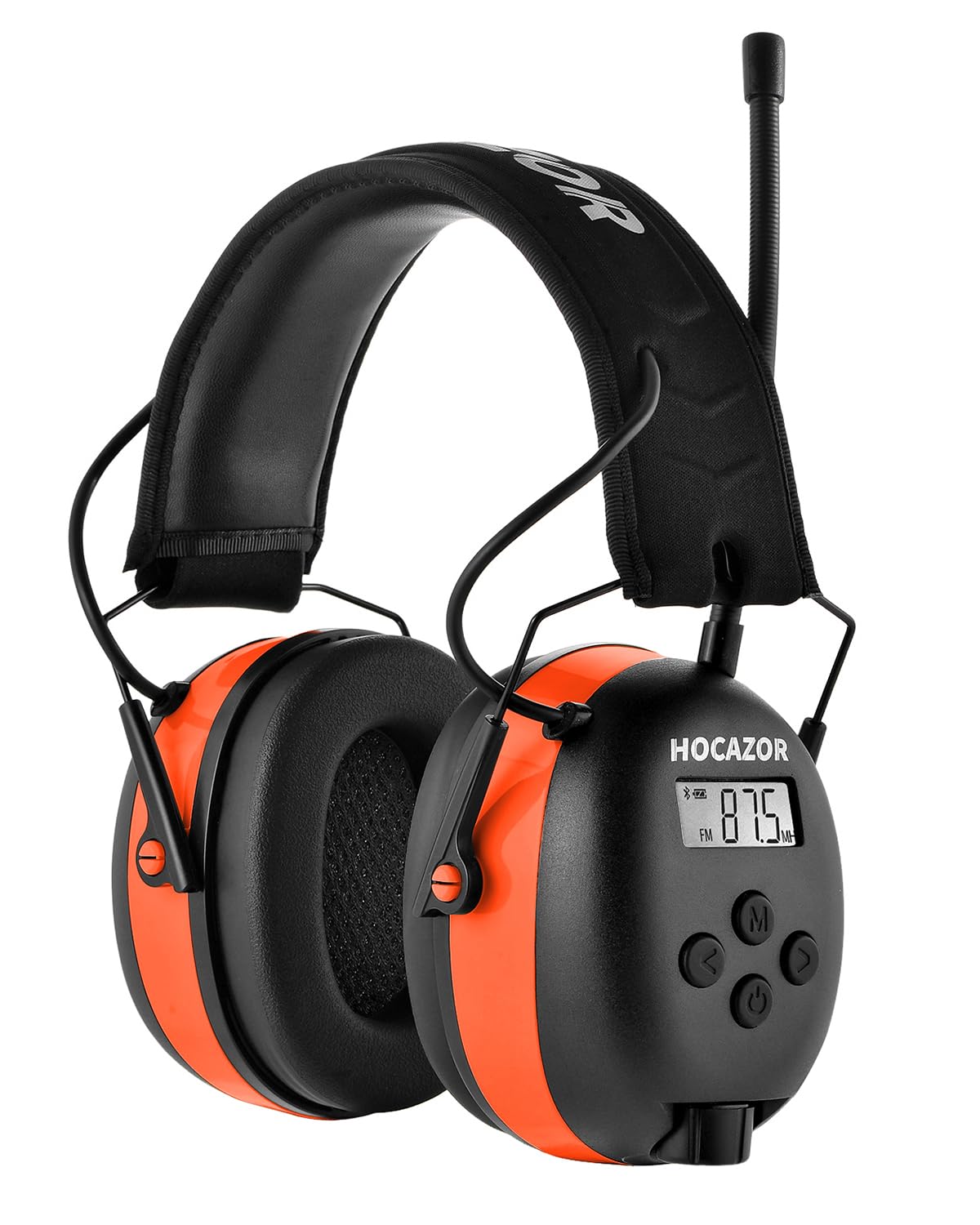
Figure 1: Hocazor HP033 Earmuffs highlighting Bluetooth 5.4, faster pairing, stable connection, wider range, lower power consumption, and stronger signal.

Figure 2: Detailed view of the upgraded EVA headband, industrial canvas, soft-seal leather, and high-density EVA foam for comfort and durability.
Setup
1. Charging the Battery
The earmuffs are equipped with a 2000 mAh lithium-ion rechargeable battery. Before first use, fully charge the device.
- Connect the provided charging cable to the charging port on the earmuffs.
- Plug the other end of the cable into a standard USB power adapter (not included).
- The charging indicator light will illuminate. A full charge takes approximately 4 hours.
- Once fully charged, the indicator light may change color or turn off. Disconnect the charging cable.

Figure 3: Battery specifications showing 2000 mAh capacity, 120+ hours on AUX, 48+ hours on Bluetooth, 40+ hours on AM/FM, and 4 hours charging time.
2. Adjusting the Headband
For optimal hearing protection and comfort, adjust the headband to fit snugly over your head and ears.
- Extend the headband by pulling the ear cups downwards.
- Place the earmuffs over your ears, ensuring the ear cups fully cover your ears.
- Adjust the headband by sliding the ear cups up or down until a comfortable and secure seal is achieved around your ears.
Operating Instructions
1. Power On/Off
- To power on, press and hold the Power button until the display illuminates.
- To power off, press and hold the Power button until the display turns off.
2. Volume Control
- Use the Volume Up (+) and Volume Down (-) buttons to adjust the listening volume.
3. Bluetooth Pairing
The earmuffs feature Bluetooth 5.3 for stable wireless connectivity.
- Ensure the earmuffs are powered on and in Bluetooth mode (indicated on the display). If not, press the Mode button to switch to Bluetooth.
- The earmuffs will automatically enter pairing mode, and the Bluetooth indicator will flash.
- On your mobile device, enable Bluetooth and search for available devices.
- Select "Hocazor HP033" from the list of devices.
- Once paired, the Bluetooth indicator will stop flashing and remain solid. You can now stream audio wirelessly.
4. AM/FM Radio Operation
The earmuffs provide strong AM/FM reception with auto-search and preset functions.
- Press the Mode button to switch to AM or FM radio mode.
- Auto-Scan: Press and hold the Scan button to automatically search for and save available stations. The earmuffs can store up to 10 AM and 10 FM presets.
- Manual Tuning: Use the Tune Up (>>) or Tune Down (<<) buttons for fine-tuning to specific frequencies.
- Preset Selection: Use the Preset (P) button to cycle through saved stations.

Figure 4: Displaying AM (520-1710KHz) and FM (87.5-108MHz) frequency ranges for radio reception.
5. Call Handling
When connected via Bluetooth, you can manage phone calls directly from the earmuffs.
- Answer/End Call: Press the Call button once to answer an incoming call or end an ongoing call.
- Reject Call: Press and hold the Call button to reject an incoming call.
6. AUX Mode
Connect external audio devices using the 3.5mm AUX input.
- Connect one end of a 3.5mm audio cable (included) to the AUX port on the earmuffs.
- Connect the other end to the audio output of your external device (e.g., MP3 player, smartphone).
- Press the Mode button to switch to AUX mode.
- Control playback and volume from your external device.
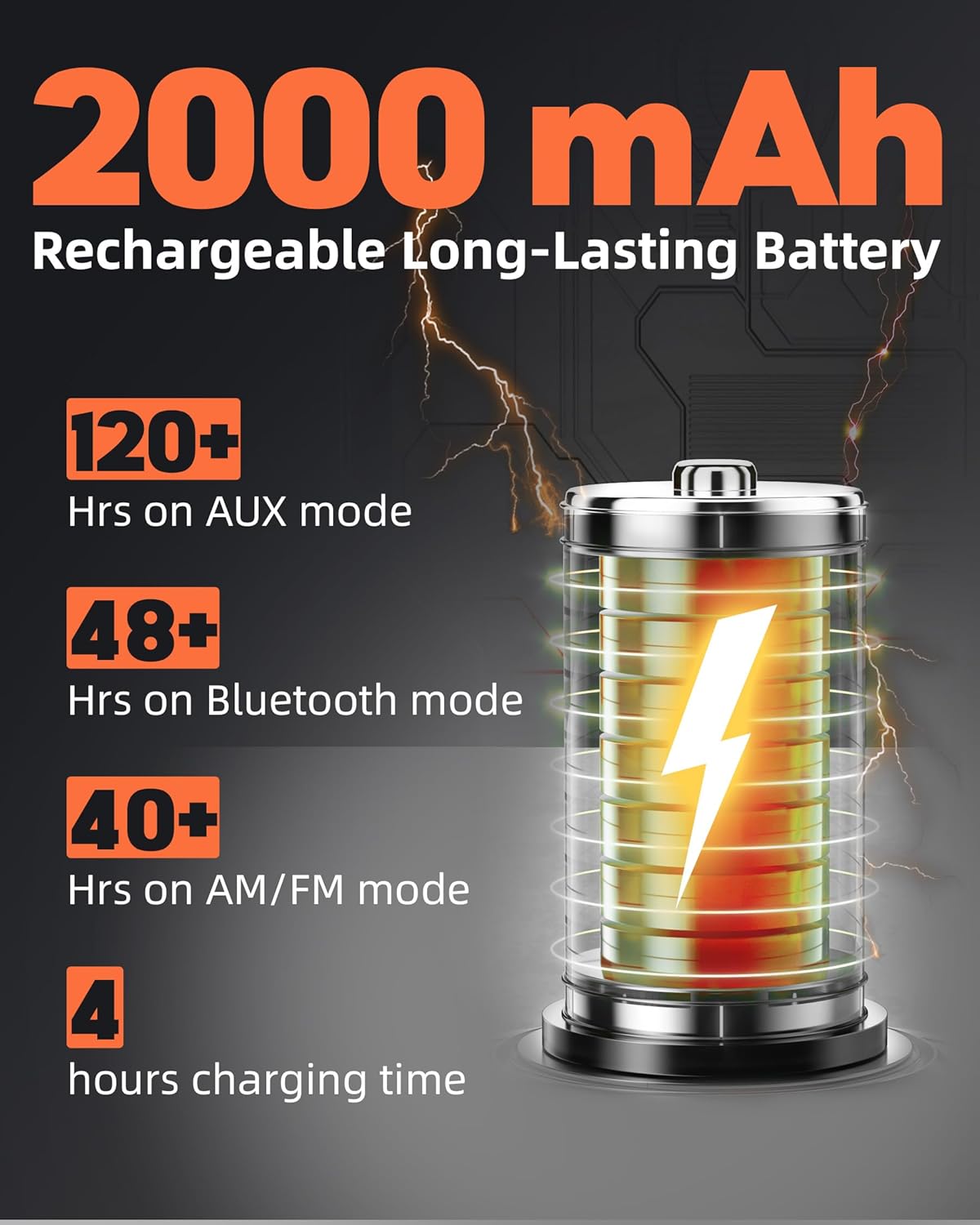
Figure 5: Overview of earmuff features including 31dB SNR/25dB NRR hearing protection, hands-free calling, Bluetooth/AM/FM/AUX modes, immersive stereo sound, and 20 channel memory.

Figure 6: Highlighting immersive sound features such as reduced low-frequency noise, HD speakers, stereo sound, and superior sound quality.
Maintenance
1. Cleaning
- Wipe the exterior of the earmuffs with a soft, damp cloth.
- Do not use abrasive cleaners or solvents.
- Ensure no liquid enters the ear cups or control panel.
2. Storage
- Store the earmuffs in a cool, dry place when not in use.
- Avoid exposing the earmuffs to direct sunlight or extreme temperatures.
3. Battery Care
- To prolong battery life, charge the earmuffs regularly, even if not used frequently.
- Avoid fully discharging the battery for extended periods.
Troubleshooting
| Problem | Possible Cause | Solution |
|---|---|---|
| No power | Battery is discharged. | Charge the earmuffs fully. |
| Cannot pair via Bluetooth | Earmuffs not in pairing mode; device Bluetooth off; too far apart. | Ensure earmuffs are in Bluetooth pairing mode. Turn on Bluetooth on your device. Keep devices within 10 meters. |
| Poor radio reception | Weak signal area; interference. | Move to an area with better reception. Try auto-scanning again. |
| No sound | Volume too low; incorrect mode selected; device not playing audio. | Increase volume. Ensure correct mode (Bluetooth, AM/FM, AUX) is selected. Check audio playback on connected device. |
Specifications
| Feature | Detail |
|---|---|
| Model Number | HP033 |
| Noise Reduction Rating (NRR) | 25 dB |
| Signal-to-Noise Ratio (SNR) | 31 dB |
| Bluetooth Version | 5.3 |
| Battery Capacity | 2000 mAh Lithium-ion |
| Charging Time | Approx. 4 hours |
| Playback Time (Bluetooth) | Up to 48 hours |
| Playback Time (AM/FM) | Over 40 hours |
| Playback Time (AUX) | Over 120 hours |
| AM Frequency Range | 520-1710 KHz |
| FM Frequency Range | 87.5-108 MHz |
| Dimensions (L x W x H) | 10.2 x 15.2 x 20.3 cm (4 x 6 x 8 inches) |
| Weight | 453.59 g (1 Pound) |
| Material | Composite sound-absorbing materials, steel frame, soft-seal leather |
| Included Components | Earmuffs, Charging Cable, 3.5mm AUX Cable |
Warranty and Support
Hocazor provides a ONE-YEAR WARRANTY for the HP033 earmuffs from the date of purchase. This warranty covers manufacturing defects and material faults under normal use.
For warranty claims, technical support, or any inquiries, please contact Hocazor customer service through the retailer where the product was purchased or visit the official Hocazor website for contact information.

