
Introduction
This instruction manual provides detailed guidance for the safe and effective use of your OTL Technologies Harry Potter Wireless Headphones. Please read this manual thoroughly before using the product and retain it for future reference. These headphones are designed for children aged 3 and up, featuring dual safe volume settings and wireless connectivity for an optimal listening experience.
Safety Information
- Volume Control: The headphones include two safety volume settings (85 dB and 95 dB) to protect children's hearing. Always select the appropriate volume limit for the listening environment. Prolonged exposure to loud sounds can cause hearing damage.
- Supervision: Adult supervision is recommended for young children during use.
- Choking Hazard: Keep small parts and cables away from young children to prevent choking hazards.
- Cleaning: Use a soft, dry cloth for cleaning. Avoid using harsh chemicals or abrasive materials.
- Water Exposure: While the product has a water resistance level of 'Impermeabile' (Waterproof), avoid submerging the headphones in water.
- Battery Safety: Do not attempt to replace the built-in lithium polymer battery. Do not expose the headphones to extreme temperatures or direct sunlight.
Package Contents
Verify that all items are present in the package:
- 1x OTL Technologies Harry Potter Wireless Headphones
- 1x USB Type-C Charging Cable
- 1x 3.5mm Audio Sharing Cable
- 1x Instruction Leaflet

Image: The open product box displaying the headphones, charging cable, audio sharing cable, and instruction leaflet.
Product Overview
Familiarize yourself with the main components of your headphones:

Image: Front view of the OTL Technologies Harry Potter Wireless Headphones in cream color, featuring the Harry Potter glasses and lightning bolt logo on the earcups.
- Adjustable Headband: Allows for a comfortable fit.
- Earcups: Soft, cushioned earcups for comfort.
- Control Buttons: Located on the earcup for power, volume, and playback.
- Volume Limit Switch: Toggle between 85 dB and 95 dB safety volume settings.
- Charging Port: USB Type-C port for charging.
- 3.5mm Audio Jack: For wired connection and audio sharing.
- Integrated Microphone: For hands-free communication.

Image: A close-up view of the volume limit switch on the earcup, clearly showing the '85dB' and '95dB' options.

Image: A close-up of the adjustable headband mechanism, showing numbered markings for size adjustment.
Setup
1. Charging the Headphones
- Connect the provided USB Type-C charging cable to the charging port on the headphones.
- Connect the other end of the cable to a compatible USB power source (e.g., computer USB port, USB wall adapter).
- The charging indicator light will illuminate. Charging takes approximately 2 hours for a full charge.
- Once fully charged, the indicator light will change or turn off (refer to the specific behavior in the included leaflet). A full charge provides up to 24 hours of playtime.
2. Bluetooth Pairing
- Ensure the headphones are charged and powered off.
- Press and hold the Power button on the headphones until the indicator light flashes, indicating pairing mode.
- On your device (smartphone, tablet, laptop), go to the Bluetooth settings.
- Search for available devices and select "OTL HP0990" (or similar name) from the list.
- Once paired, the indicator light on the headphones will stop flashing and remain solid, or turn off.
3. Wired Connection (Optional)
For devices without Bluetooth or when the battery is depleted, you can use the 3.5mm audio cable:
- Plug one end of the 3.5mm audio cable into the audio jack on the headphones.
- Plug the other end into the 3.5mm audio output of your device.
- The headphones will function as wired headphones.
Operating Instructions
1. Power On/Off
- Power On: Press and hold the Power button for approximately 3 seconds until the indicator light illuminates.
- Power Off: Press and hold the Power button for approximately 3-5 seconds until the indicator light turns off.
2. Volume Control
- Adjusting Playback Volume: Use the volume buttons (+/-) on the headphones or your connected device to adjust the listening volume.
- Setting Safety Volume Limit: Use the physical switch on the earcup to select between 85 dB and 95 dB. Choose 85 dB for quieter environments or younger children, and 95 dB for slightly louder environments.
3. Music Playback
- Play/Pause: Press the Play/Pause button once.
- Next Track: Press and hold the '+' volume button (or specific next track button if available).
- Previous Track: Press and hold the '-' volume button (or specific previous track button if available).
4. Phone Calls
When connected via Bluetooth, you can manage calls:
- Answer/End Call: Press the Play/Pause button once.
- Reject Call: Press and hold the Play/Pause button for approximately 2 seconds.
5. Audio Sharing Feature
The included 3.5mm audio sharing cable allows two pairs of headphones to listen to the same audio source:
- Connect one end of the audio sharing cable to the 3.5mm audio jack of the primary headphones (connected to the audio source).
- Connect the other end of the audio sharing cable to the 3.5mm audio jack of a second pair of headphones.
- Both headphones will now receive audio from the primary source.
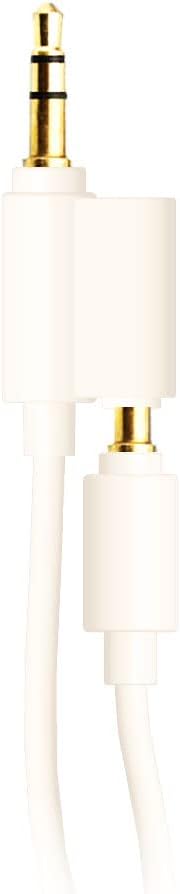
Image: A close-up of the 3.5mm audio sharing cable, showing two male jacks for connecting multiple headphones.
Maintenance
- Cleaning: Wipe the headphones with a soft, slightly damp cloth. Do not use liquid cleaners or sprays directly on the headphones.
- Storage: Store the headphones in a cool, dry place away from direct sunlight and extreme temperatures. The headphones are foldable for compact storage.
- Battery Care: To prolong battery life, avoid fully discharging the headphones frequently. Charge them regularly, even if not in use for extended periods.

Image: The OTL Technologies Harry Potter Wireless Headphones shown in their folded position, demonstrating their compact storage capability.
Troubleshooting
| Problem | Possible Cause | Solution |
|---|---|---|
| Headphones do not power on. | Low battery. | Charge the headphones using the provided USB Type-C cable. |
| Cannot pair via Bluetooth. | Headphones not in pairing mode; device Bluetooth off; too far from device. | Ensure headphones are in pairing mode (flashing light). Turn on Bluetooth on your device. Move headphones closer to the device (within 10 meters). |
| No sound or low volume. | Volume too low on headphones or device; incorrect volume limit setting; wired connection issue. | Increase volume on both headphones and connected device. Check the 85dB/95dB switch. Ensure 3.5mm cable is fully inserted for wired use. |
| Sound distortion. | Weak Bluetooth signal; audio source issue. | Move closer to the Bluetooth device. Try a different audio source or file. |
Specifications
| Brand | OTL Technologies |
| Model | HP0990-stickerless |
| Connectivity Technology | Wireless (Bluetooth) |
| Wireless Communication Technology | Bluetooth |
| Recommended Age Range | 3+ years |
| Material | Plastic |
| Charging Time | Approximately 2 hours |
| Battery Life | Up to 24 hours |
| Working Distance | 10 meters |
| Volume Limit Settings | 85 dB or 95 dB |
| Microphone | Integrated |
| Form Factor | Over-ear |
| Weight | 160 grams |
| Dimensions | 17 x 7 x 16 cm |
| Frequency Response | 20 Hz - 20,000 Hz |
| Impedance | 32 Ohm |
| Sensitivity | 85 dB |
| Headphone Jack | 3.5 mm |
| Water Resistance Level | Waterproof (Impermeabile) |
Warranty and Support
For warranty information and customer support, please refer to the contact details provided in the original product packaging or visit the official OTL Technologies website. Keep your proof of purchase for warranty claims.
