
JVC HAA3TBU
JVC HA-A3T True Wireless Earbuds
User Manual
Introduction
Thank you for choosing the JVC HA-A3T True Wireless Earbuds. This manual provides essential information for setting up, operating, maintaining, and troubleshooting your new earbuds. Please read it thoroughly to ensure optimal performance and longevity of your device.
Package Contents
- JVC HA-A3T True Wireless Earbuds (Left and Right)
- Charging Case
- USB Charging Cable
- User Manual (this document)

Image: The JVC HA-A3T True Wireless Earbuds, showing both earbuds and their compact charging case in black.
Setup
1. Initial Charging
Before first use, fully charge the earbuds and the charging case. Connect the supplied USB charging cable to the charging port on the case and a USB power source. The indicator lights on the case will show charging status.
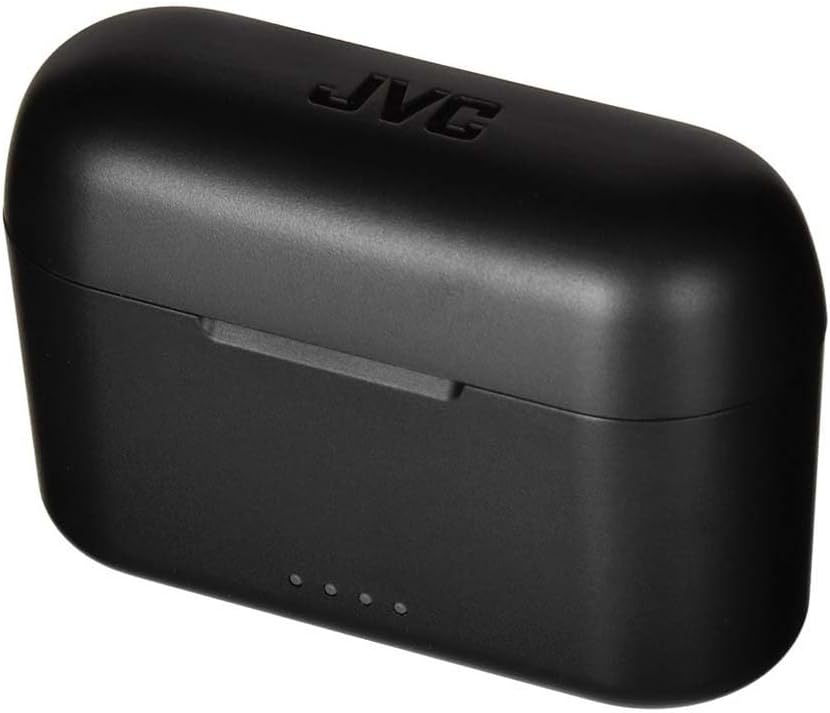
Image: The black JVC HA-A3T charging case, illustrating its compact design and the location of the charging port and indicator lights.

Image: JVC HA-A3T earbuds and case, highlighting 22 hours total battery life, quick charge capability, and IPX4 water resistance.

Image: A visual representation of the JVC HA-A3T's battery life: 7 hours from the earbuds plus 15 hours from the charging case, totaling 22 hours.
2. Pairing with Your Device
- Open the charging case and remove both earbuds. They will automatically power on and enter pairing mode.
- On your smartphone or audio device, enable Bluetooth.
- Search for "JVC HA-A3T" in the list of available devices and select it to connect.
- Once connected, you will hear a confirmation tone, and the earbud indicator lights will turn off or flash slowly.
Auto Connect: After initial pairing, the earbuds will automatically power on and connect to your last paired device when removed from the charging case.
Single Earbud Use: Either the left or right earbud can be used independently for mono listening or calls.

Image: A person wearing a single JVC HA-A3T earbud, demonstrating the product's capability for independent earbud use.
Video: An official JVC video showcasing the HA-A3T Wireless Bluetooth Earbuds, demonstrating their features and ease of use.
Operating Instructions
Touch Controls
The JVC HA-A3T earbuds feature intuitive touch controls on each earbud for easy management of music playback and calls.
| Action | Function |
|---|---|
| Single Tap (Left/Right) | Play/Pause music, Answer/End call |
| Double Tap (Right) | Next Track |
| Double Tap (Left) | Previous Track |
| Triple Tap (Left/Right) | Activate Voice Assistant (Siri, Google Assistant) |
| Long Press (Left/Right) | Reject Call |

Image: A close-up of a JVC HA-A3T earbud illustrating its touch control capabilities for functions like calling, playing music, skipping tracks, and activating voice assistants.

Image: A hand demonstrating the touch control feature on a JVC HA-A3T earbud.
Maintenance
Cleaning Your Earbuds
Regular cleaning helps maintain sound quality and hygiene. Use a soft, dry, lint-free cloth to wipe the earbuds and charging case. Do not use harsh chemicals or abrasive materials.
Water Resistance (IPX4)
The JVC HA-A3T earbuds are IPX4 water resistant, meaning they are protected against splashing water from any direction. This makes them suitable for workouts and outdoor activities. However, they are not designed for submersion in water or exposure to strong jets of water.
- Do not rinse the earbuds under running water.
- Do not wear them while swimming or showering.
- If the earbuds get wet, wipe them dry thoroughly before placing them back in the charging case.

Image: JVC HA-A3T earbuds shown with water splashes, illustrating their IPX4 water resistance, suitable for sweat and light rain.
Storage
When not in use, store the earbuds in their charging case to protect them and keep them charged. Store the case in a cool, dry place away from direct sunlight and extreme temperatures.
Troubleshooting
If you encounter issues with your JVC HA-A3T earbuds, please refer to the following common solutions:
- No Sound:
- Ensure earbuds are charged.
- Check Bluetooth connection on your device.
- Increase volume on both your device and earbuds.
- Try re-pairing the earbuds.
- Earbuds Not Pairing:
- Ensure earbuds are in pairing mode (indicator lights flashing).
- Turn off Bluetooth on other nearby devices that might be connected.
- Place earbuds back in the case, close it, wait a few seconds, then remove them to reset.
- Forget "JVC HA-A3T" from your device's Bluetooth list and try pairing again.
- Charging Issues:
- Ensure the charging cable is securely connected.
- Try a different USB port or power adapter.
- Clean the charging contacts on both the earbuds and the case with a dry cotton swab.
- Poor Sound Quality:
- Ensure earbuds are clean and free of debris.
- Check for interference from other wireless devices.
- Ensure the earbuds are properly seated in your ears.
If the problem persists, please contact JVC customer support for further assistance.
Specifications
| Feature | Detail |
|---|---|
| Model Number | HAA3TBU |
| Brand | JVC |
| Connectivity Technology | Wireless (Bluetooth) |
| Ear Placement | In Ear |
| Form Factor | In Ear |
| Water Resistance | IPX4 (Splash Proof) |
| Battery Life (Earbuds) | Up to 7 hours |
| Battery Life (with Case) | Up to 22 hours total |
| Quick Charge | 15 minutes charge = 90 minutes playback |
| Product Dimensions | 2.79 x 24.64 x 16.51 cm; 8 g |
| Impedance | 16 Ohm |
| Frequency Response | 2 Hz (Note: This value seems unusually low, typically a range is provided. Using provided data.) |
Warranty and Support
JVC products are designed and manufactured to the highest quality standards. For information regarding warranty coverage, technical support, or service, please visit the official JVC website or contact your local JVC customer service center. Keep your proof of purchase for warranty claims.
You can find more information and support on the Official JVC Store on Amazon.
Related documentsHAA3TBU


Ask a question about this manual
Ask about setup, troubleshooting, compatibility, parts, safety, or missing instructions. Manuals+ will review the question and use this page’s manual context to help answer it.