
NANROBOT D4+3.0
NANROBOT D4+3.0 Electric Scooter User Manual
Model: D4+3.0
1. Introduction
Thank you for choosing the NANROBOT D4+3.0 Electric Scooter. This manual provides essential information for the safe operation, maintenance, and troubleshooting of your new electric scooter. Please read this manual thoroughly before your first ride to ensure proper use and to maximize the lifespan of your device. Always prioritize safety and adhere to local regulations regarding electric scooter usage.
2. Safety Guidelines
Operating an electric scooter carries inherent risks. To minimize these risks, please observe the following safety precautions:
- Wear Protective Gear: Always wear a helmet, knee pads, elbow pads, and appropriate footwear.
- Check Before Each Ride: Ensure tires are properly inflated, brakes are functional, and all quick-release mechanisms are securely fastened.
- Understand Local Laws: Be aware of and comply with all local traffic laws and regulations concerning electric scooters.
- Ride Defensively: Be alert to your surroundings, anticipate potential hazards, and maintain a safe distance from pedestrians and other vehicles.
- Avoid Hazardous Conditions: Do not ride in heavy rain, on icy surfaces, or in areas with poor visibility.
- Weight Limit: Do not exceed the maximum load capacity of 330 lbs (150 kg).
- Age Restriction: This scooter is intended for adult use.
3. Product Components
Familiarize yourself with the key components of your NANROBOT D4+3.0 Electric Scooter:
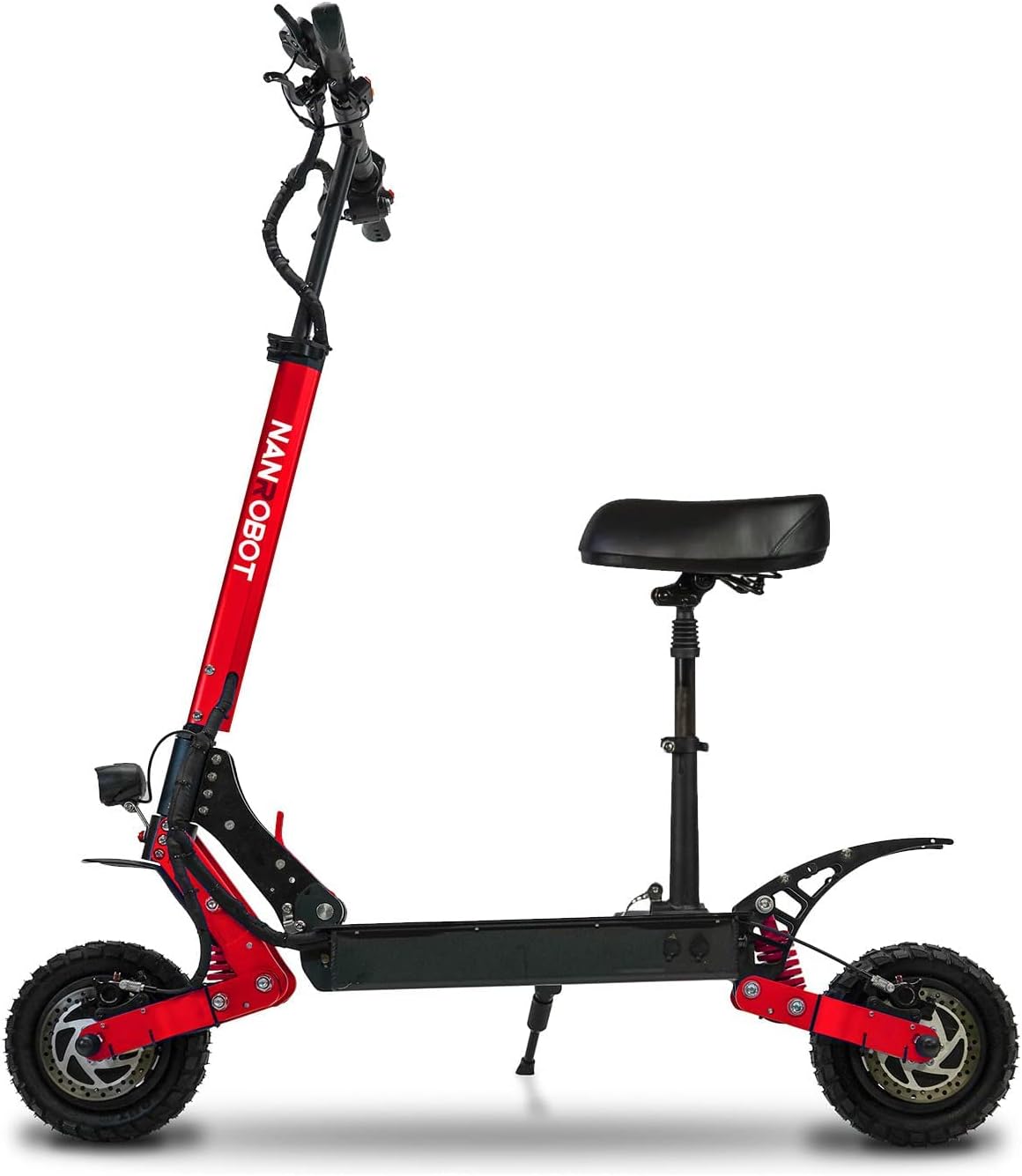
Overall View: The NANROBOT D4+3.0 Electric Scooter, shown in red with an optional seat installed. This image provides a complete side profile of the scooter, highlighting its robust frame and off-road tires.
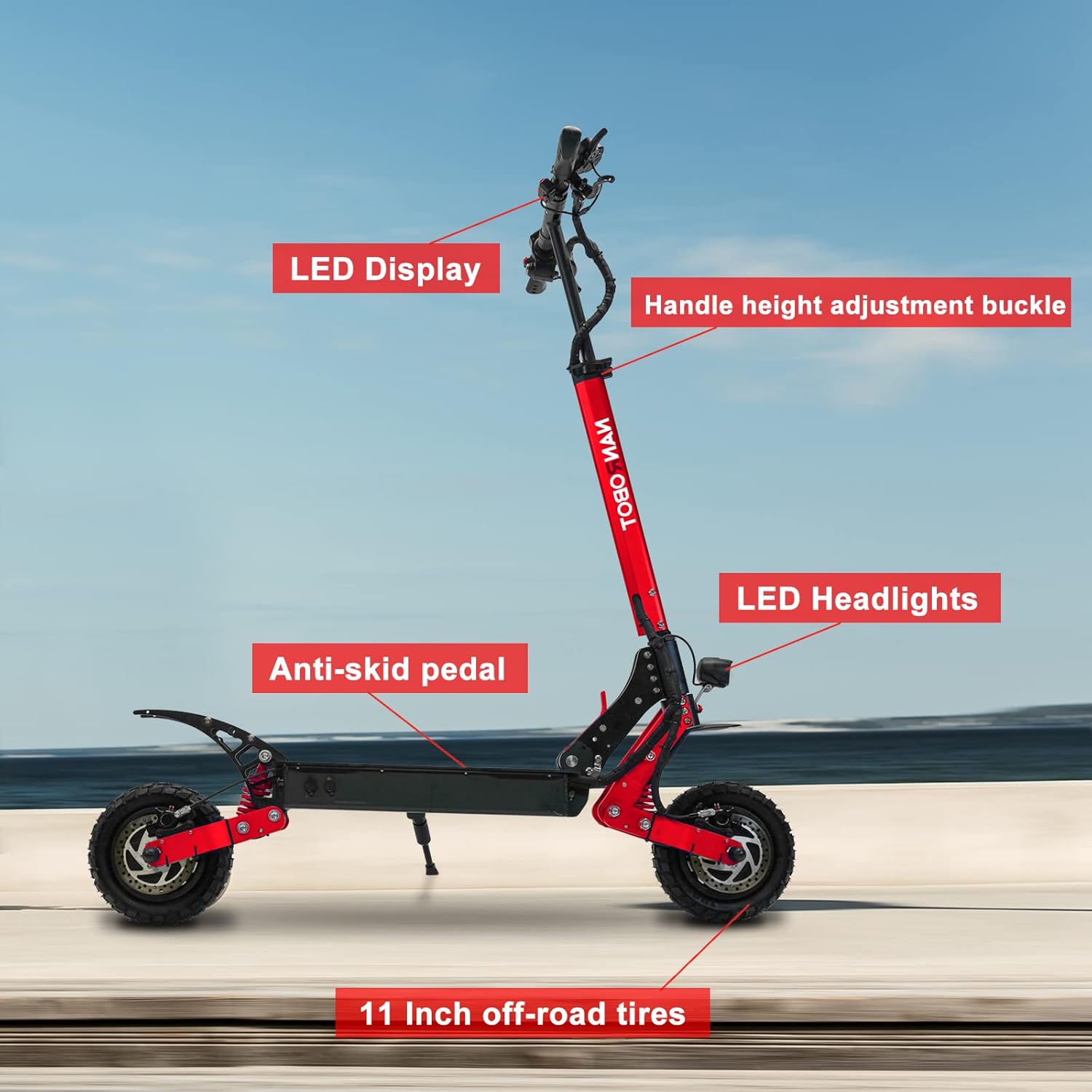
Key Components: This image labels important parts including the LED Display, Handle height adjustment buckle, LED Headlights, Anti-skid pedal, and 10-inch off-road tires. Understanding these components is crucial for operation and maintenance.

Suspension and Braking System: Detailed view of the front and rear spring dual shock absorbers, designed to provide a smooth ride over varied terrain. The image also highlights the hydraulic brakes, which offer strong and reliable stopping power.

Detailed Parts Overview: This diagram illustrates various parts such as the display, finger throttle, brake levers, headlight, fender, deck, folding mechanism, charging port, and 10-inch off-road tires, providing a comprehensive understanding of the scooter's layout.
4. Setup and Initial Assembly
Your NANROBOT D4+3.0 Electric Scooter comes largely pre-assembled. Follow these steps for initial setup:
- Unboxing: Carefully remove the scooter and all accessories from the packaging. Check for any visible damage.
- Unfolding: Release the folding mechanism and carefully unfold the scooter until it locks into the upright position. Ensure the stem is securely locked.
- Handlebar Installation/Adjustment: Attach the handlebars if they are separate. Adjust the handlebar height using the adjustment buckle to a comfortable riding position. The handlebar height can be set to High, Mid, or Low positions for rider comfort.
- Initial Charge: Before your first ride, fully charge the scooter's battery. Connect the charger to the charging port and then to a power outlet. The indicator light on the charger will change when fully charged.
- Tire Pressure: Check and adjust the tire pressure to the recommended PSI (usually found on the tire sidewall or in the specifications section). Proper tire pressure is crucial for performance and safety.

Folded Dimensions: This image illustrates the scooter's dimensions both unfolded (49.21 x 24.8 x 52 inches) and folded (47 x 12 x 27 inches), demonstrating its portability and ease of storage. The net weight is approximately 70 lbs (32 kg).

Handlebar Adjustment: This visual demonstrates the adjustable handlebar height, allowing riders to customize the scooter for optimal comfort and control. The three primary height settings are shown.
5. Operating Instructions
Learn how to safely operate your NANROBOT D4+3.0 Electric Scooter:
- Power On/Off: Press and hold the power button on the LCD display to turn the scooter on or off.
- LCD Display: The upgraded LCD display provides real-time information such as current speed, total mileage, battery power level, and allows you to switch between speed gears.
- Starting the Ride: Place one foot on the deck and push off with the other foot to gain some initial momentum. Once moving, gently press the finger throttle to engage the motor.
- Speed Control: Use the finger throttle to control your speed. The scooter features a powerful 2000W dual motor, capable of reaching speeds up to 40 MPH. Adjust your speed according to riding conditions and safety.
- Braking: The scooter is equipped with dual hydraulic brakes. Gently squeeze the brake levers on the handlebars to slow down or stop. Apply both brakes simultaneously for optimal stopping power and control.
- Lights: Activate the LED headlights for improved visibility, especially during low-light conditions or night riding. The scooter also features rear lights for enhanced safety.
- Terrain Adaptability: The 10-inch off-road tires and dual shock absorbers are designed to handle various terrains, including city roads, stone roads, and mountain paths, providing a comfortable and stable ride.

Display and Controls: This image provides a close-up view of the LCD display, showing speed and battery information, along with the handlebar controls including the throttle and brake levers. This is your primary interface for controlling the scooter.

Motor Power: A visual representation highlighting the scooter's 1000W x 2 dual motor system, capable of tackling slopes up to 30 degrees, indicating its strong climbing ability.

Dual Suspension System: This diagram illustrates the scooter's dual suspension system, which effectively absorbs shocks and vibrations from uneven surfaces, enhancing rider comfort and stability.

Lighting System: This image showcases the bright front LED headlight and rear brake light, crucial for visibility and safety during night rides or in low-light conditions.
6. Maintenance
Regular maintenance ensures the longevity and safe operation of your scooter:
- Cleaning: Wipe down the scooter with a damp cloth after each use. Do not use high-pressure water jets or immerse the scooter in water.
- Tire Care: Regularly check tire pressure and inflate to the recommended PSI. Inspect tires for wear, punctures, or damage.
- Brake Inspection: Periodically check the hydraulic brakes for proper function and wear on the brake pads. Adjust or replace as necessary.
- Battery Care: Charge the battery fully after each ride, especially if storing for an extended period. Avoid completely draining the battery. Store the scooter in a cool, dry place.
- Fasteners: Check all screws and bolts regularly to ensure they are tight. Loose fasteners can affect performance and safety.
- Lubrication: Apply appropriate lubricant to moving parts, such as folding mechanisms, if they become stiff.
7. Troubleshooting
Here are some common issues and their potential solutions:
| Problem | Possible Cause | Solution |
|---|---|---|
| Scooter does not turn on | Low battery; Loose connection; Power button issue | Charge the battery fully; Check all cable connections; Contact customer support if issue persists. |
| Reduced range or power | Under-inflated tires; Battery degradation; Overload | Inflate tires to correct PSI; Ensure battery is fully charged; Do not exceed weight limit. |
| Brakes feel weak | Worn brake pads; Air in hydraulic line; Loose brake cable | Inspect and replace brake pads; Bleed hydraulic system (professional service recommended); Tighten brake cable. |
| Unusual noises during ride | Loose components; Debris in wheels; Motor issue | Check all fasteners; Inspect wheels and motor for obstructions; Contact customer support. |
If you encounter an issue not listed here, or if the suggested solutions do not resolve the problem, please contact NANROBOT customer support for assistance.
8. Technical Specifications
Key technical details for the NANROBOT D4+3.0 Electric Scooter:
| Feature | Specification |
|---|---|
| Model Name | D4+ |
| Motor Power | 2000W (1000W x 2 Dual Brushless Motor) |
| Max Speed | Up to 40 MPH |
| Max Range | Up to 40 Miles |
| Battery | 52V 23Ah |
| Weight Limit | 330 Pounds (150 kg) |
| Tire Type | 10-inch Off-Road Pneumatic Tires |
| Brake Style | Dual Hydraulic Brake |
| Suspension Type | Dual Suspension (Front & Rear Spring Shock Absorber) |
| Item Weight | 70 Pounds (31.75 kg) |
| Folded Size (LxWxH) | 47 x 12 x 27 inches |
| Unfolded Size (LxWxH) | 49.21 x 24.8 x 52 inches |
| Material | Aluminum |
| Included Components | E-scooter*1, Charger*1, Scooter key*2, Tool kit* |
9. Warranty Information
NANROBOT electric scooters come with a 12-month limited warranty against manufacturing defects. This warranty covers defects in materials and workmanship under normal use. Please retain your proof of purchase for warranty claims. The warranty does not cover damage caused by misuse, accidents, unauthorized modifications, or normal wear and tear.
10. Customer Support
For any questions, technical assistance, or warranty claims, please contact NANROBOT customer support. You can find more information and contact details on the official NANROBOT store page:
Visit the NANROBOT Store on Amazon
Please have your scooter's model number (D4+3.0) and purchase information ready when contacting support.
Related documentsD4+3.0


Ask a question about this manual
Ask about setup, troubleshooting, compatibility, parts, safety, or missing instructions. Manuals+ will review the question and use this page’s manual context to help answer it.