
1. Introduction
Thank you for choosing the PhoneSuit Energy Core Ultra 10,000mAh LCD PD Battery Pack. This portable power bank is designed to provide reliable and fast charging for your mobile devices, featuring a high-capacity battery, Power Delivery (PD) technology, and a clear LCD display for battery status. Please read this manual carefully to ensure proper use and maintenance of your device.
2. Safety Information
To prevent damage to the device or injury to yourself or others, please observe the following safety precautions:
- Do not expose the battery pack to extreme temperatures (above 60°C/140°F or below 0°C/32°F).
- Avoid dropping, disassembling, or attempting to repair the device yourself.
- Keep away from water, moisture, and flammable materials.
- Do not use if the device is visibly damaged, swollen, or leaking.
- Dispose of the battery pack responsibly according to local regulations.
- Keep out of reach of children.
3. Package Contents
Please check the package for the following items:
- PhoneSuit Energy Core Ultra 10,000mAh LCD PD Battery Pack
- USB Charging Cable (USB-A to USB-C or Micro-USB, depending on model)
- User Manual
4. Product Overview
The PhoneSuit Energy Core Ultra features multiple ports and an LCD display for convenient power management.
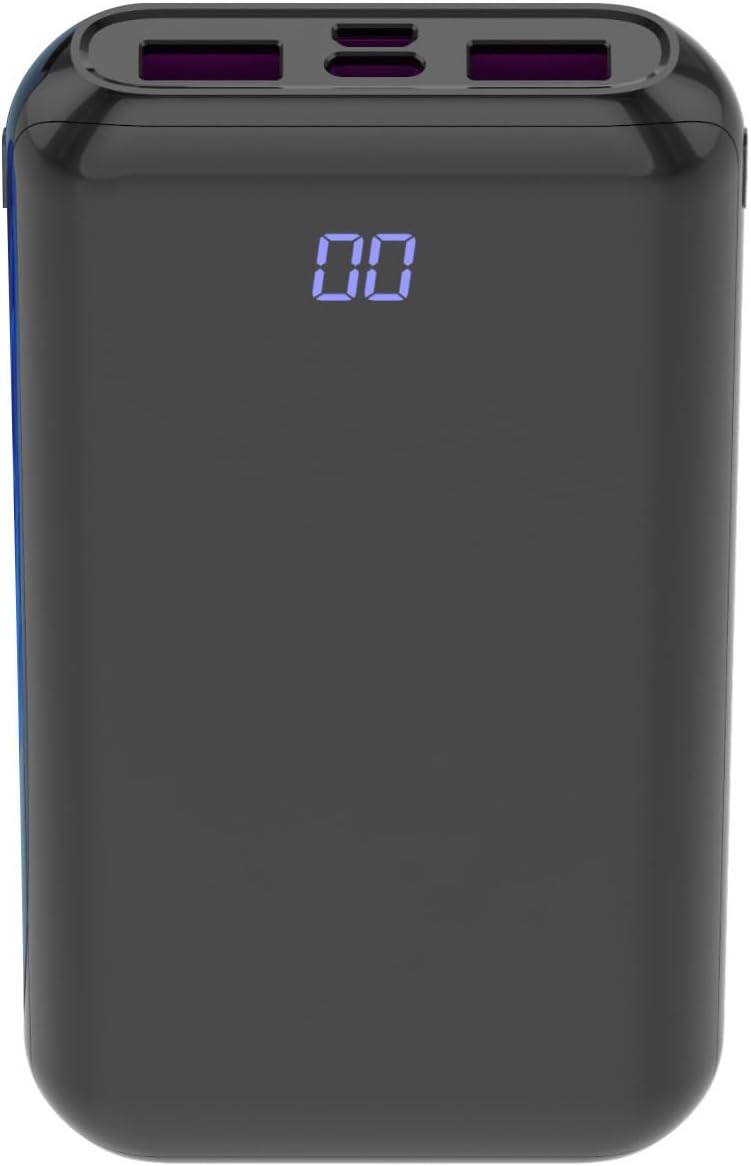
Image 1: Front view of the PhoneSuit Energy Core Ultra power bank. The central LCD screen displays '00', indicating a low or empty charge. The top edge shows various charging ports.

Image 2: Angled view of the PhoneSuit Energy Core Ultra power bank. The LCD display shows '100', indicating a full charge. The top panel clearly shows the USB-C, Micro-USB, and dual USB-A output ports.
Key Features:
- 10,000mAh Battery Capacity: Provides multiple charges for smartphones and other devices.
- LCD Digital Display: Shows the precise percentage of remaining battery charge.
- USB-C Input & Output: Supports Power Delivery (PD) 20W for fast charging compatible devices and recharging the power bank.
- Micro-USB Input: Alternative port for recharging the power bank.
- Dual USB-A Output: Supports Quick Charge 3.0 for high-speed charging of various devices.
- Durable Construction: High-quality rubber composite shell for enhanced grip and protection.
5. Setup: Initial Charging of the Power Bank
Before first use, it is recommended to fully charge your PhoneSuit Energy Core Ultra battery pack.
- Connect the provided USB charging cable to either the USB-C Input port or the Micro-USB Input port on the power bank.
- Connect the other end of the cable to a USB wall adapter (not included) or a powered USB port.
- The LCD display will show the charging progress, with the percentage increasing until it reaches '100'.
- Once fully charged, disconnect the cable. The power bank is now ready for use.
6. Operating Instructions
6.1. Charging Your Devices
The Energy Core Ultra can charge a wide range of smartphones, tablets, Bluetooth devices, and more.
- Connect your device's charging cable to one of the output ports on the power bank (USB-C Output or Dual USB-A Output).
- Connect the other end of the cable to your device.
- The power bank will automatically begin charging your device. The LCD display will show the remaining battery percentage of the power bank.
- Disconnect your device once it is fully charged or when you wish to stop charging.

Image 3: The PhoneSuit Energy Core Ultra power bank positioned next to a smartphone. Both devices show '00' on their screens, illustrating a low battery state before charging begins.

Image 4: An angled view of the PhoneSuit Energy Core Ultra power bank alongside a smartphone. Both devices display '100' on their screens, indicating they are fully charged.
6.2. Checking Battery Level
The LCD digital display provides an accurate indication of the power bank's remaining charge.
- When the power bank is active (charging a device or being charged), the display will automatically show the percentage.
- To check the battery level when idle, briefly press the power button (if available, otherwise connect a device to activate the display).
7. Maintenance
- Cleaning: Use a soft, dry cloth to clean the exterior of the power bank. Do not use harsh chemicals or abrasive materials.
- Storage: Store the power bank in a cool, dry place away from direct sunlight and extreme temperatures. For long-term storage, it is recommended to keep the battery at approximately 50-70% charge.
- Battery Care: To prolong battery life, avoid fully discharging the power bank frequently. Recharge it when the capacity drops significantly.
8. Troubleshooting
- Power bank not charging: Ensure the charging cable is securely connected to both the power bank's input port and the power source. Try a different cable or wall adapter.
- Device not charging from power bank: Ensure the power bank has sufficient charge. Check that the charging cable is securely connected to both the power bank's output port and your device. Try a different cable or output port.
- Slow charging: Ensure you are using a compatible cable and that your device supports fast charging protocols (PD, QC 3.0) if expecting high-speed charging. Some cables may limit charging speed.
- LCD display not working: If the display is unresponsive, try fully charging the power bank. If the issue persists, contact customer support.
9. Specifications
| Feature | Detail |
|---|---|
| Model | Energy Core Ultra 10000mAh |
| Battery Capacity | 10,000 Milliamp Hours (mAh) |
| Input (USB-C) | Up to 20W Power Delivery (PD) |
| Input (Micro-USB) | Standard 5V/2A (typical) |
| Output (USB-C) | Up to 20W Power Delivery (PD) |
| Output (USB-A) | Dual ports, Quick Charge 3.0 compatible |
| Display | LCD Digital Display |
| Dimensions | 8.3 x 6.4 x 5 inches |
| Item Weight | 13 ounces |
| Special Features | Digital Display, Fast Charging, Travel |
| Manufacturer | PhoneSuit Inc. |
10. Warranty and Support
PhoneSuit products are designed for reliability and performance. For warranty information, technical support, or any inquiries regarding your Energy Core Ultra battery pack, please visit the official PhoneSuit website or contact their customer service directly. Please retain your proof of purchase for warranty claims.

