
1. Applicable Models & Years
This XTRONS Car Stereo is designed for the following Porsche Cayenne models and years:
- Porsche Cayenne (2003-2010)
- Porsche Cayenne S (2003-2010)
- Porsche Cayenne GTS (2003-2010)
- Porsche Cayenne Turbo (2003-2010)
- Porsche Cayenne Turbo S (2003-2010)
- Porsche Cayenne Diesel (2003-2010)

Image: Comparison of the Porsche Cayenne dashboard before and after installing the XTRONS car stereo, showing seamless integration.
Important Compatibility Note:
If your car comes with the original reversing camera, you may need to purchase an adapter cable (e.g., ICE/ACS/FZM RM01) to ensure it functions correctly after upgrading to this stereo unit.
2. Key Features
- Android 12 Qualcomm Snapdragon 665: Octa-core processor with 8GB LPDDR4 RAM and 256GB Solid State ROM for responsive performance and ample storage.
- 9-inch IPS Touch Screen: High-definition 1280x720 resolution with a 178° viewing angle for clear and vibrant visuals.
- Built-in AKM DSP: Enhances audio experience with advanced sound processing.
- Automotive Grade Hardware: Features 100% aluminum heat dissipation and a built-in cooling fan for high performance and durability.
- Wireless Car Play & Android Auto: Compatible with iPhone (iOS 8+) and Android phones (Android 4.3+) for seamless smartphone integration, including navigation, calls, and music.
- Optimized CANbus Decoding: Ensures perfect fitting for Porsche, displaying car information like AUX status, GPS status, and door status.
- Dual Band Wi-Fi: Supports 2.4GHz and 5GHz bands for faster and more stable internet connectivity.
- GPS Navigation: Supports popular Android navigation software such as Google Maps, Sygic, and Waze.
- XTRONS Exclusive UI: Optimized user interface with intuitive icons for safe driving.
- Built-in HDMI Port: Allows transmission of high-fidelity content to external monitors for passenger entertainment.
- Integrated 4G LTE Solution: (Note: 4G function DOES NOT work in the Americas area - US, Canada, etc.) Supports Asia and Europe for internet access via SIM card.

Image: Overview of the XTRONS Car Stereo's core specifications and features.
3. Package Contents
The following items are included in your XTRONS Car Stereo package:
- 2 × ISO Wiring Harness
- 1 × RCA Cable
- 2 × USB Cable
- 1 × GPS Antenna
- 1 × Camera Cable
- 1 × Radio Antenna Adapter
- 1 × 4G+ Antenna
- 1 × 4G- Antenna
- 1 × CANbus Box
- 1 × Radio Antenna Cable
- 1 × Optical Fiber Decoder
- 2 × User Manual (English/German)

Image: All included accessories for the XTRONS Car Stereo.
4. Setup & Installation
4.1 Wiring Diagram
Refer to the detailed wiring diagram below for proper connection of the car stereo to your vehicle's electrical system. Ensure all connections are secure before powering on the unit.
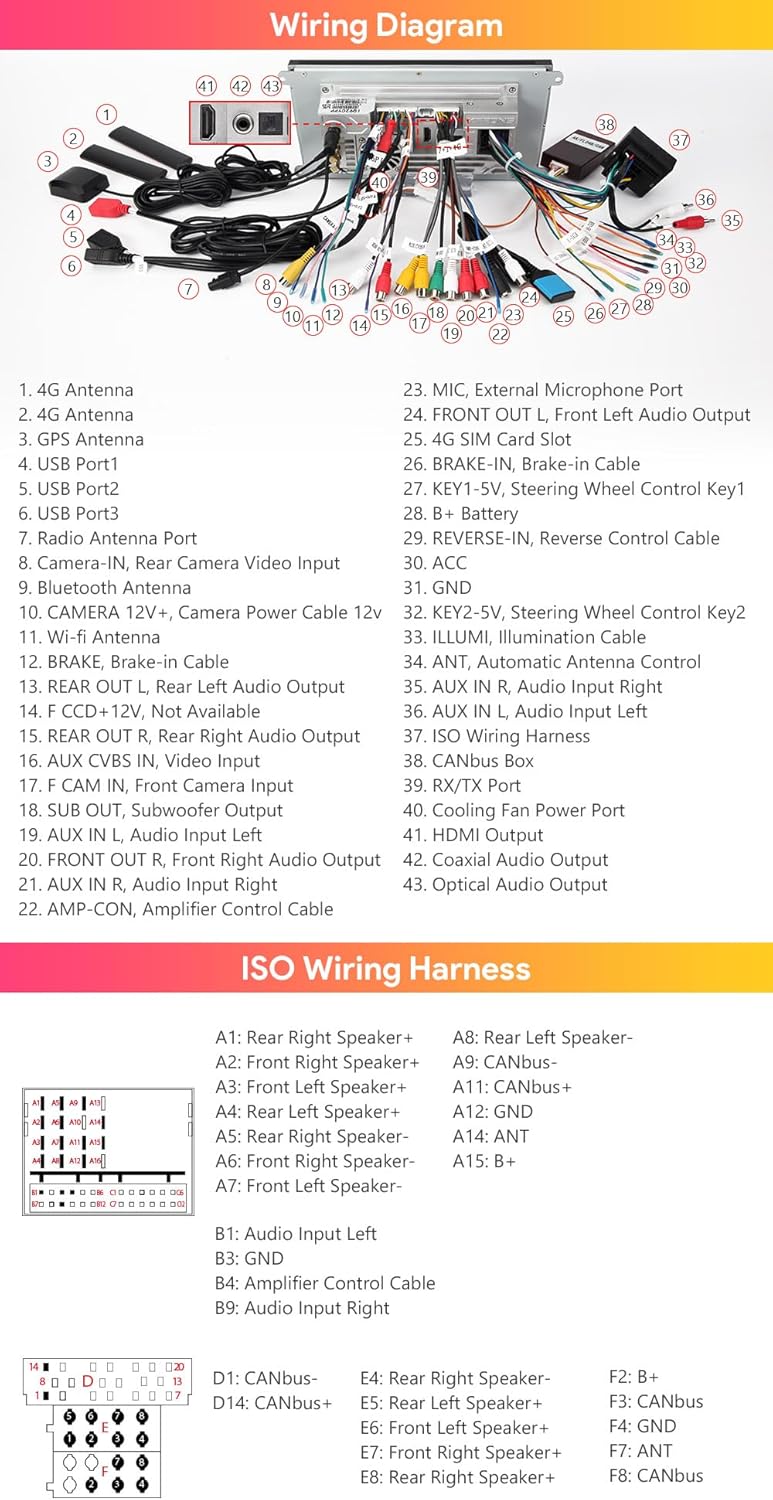
Image: Comprehensive wiring diagram for the XTRONS Car Stereo.
4.2 Optical Fiber Decoder
The included Optical Fiber Decoder is essential for integrating the stereo with your Porsche Cayenne's existing fiber optic audio system. Connect it according to the wiring diagram to ensure proper audio output.
4.3 CANbus Box
The CANbus Box facilitates communication between the car stereo and your vehicle's CANbus system. This enables features such as displaying car information (AUX status, GPS status, door status) and maintaining steering wheel control functionality.
5. Operating Instructions
5.1 Display & Interface
The 9-inch IPS touch screen provides a clear and responsive interface. Navigate through menus and applications with ease. The XTRONS Exclusive UI is designed for intuitive operation, minimizing distractions while driving.

Image: Main display interface of the XTRONS Car Stereo.
5.2 Connectivity
- Wireless Car Play & Android Auto: Connect your iPhone (iOS 8 and above) or Android phone (Android 4.3 and above) wirelessly or via USB for access to navigation, calls, music, and voice assistants (Siri, Google Assistant).
- Bluetooth 5.0: Pair your Bluetooth devices for hands-free calling and audio streaming.
- Dual Band Wi-Fi: Connect to 2.4GHz or 5GHz Wi-Fi networks for faster internet speeds and improved stability.
- Integrated 4G LTE Solution: For regions outside the Americas (US, Canada, etc.), insert a SIM card to access the internet directly from the unit.

Image: CarAutoPlay and Android Auto functionality.
5.3 Navigation
The unit supports various Android navigation software, including Google Maps, Sygic, and Waze. Download your preferred navigation app from the Google Play Store.
5.4 Audio Features
- Built-in AKM DSP: Utilize the Digital Sound Processor to fine-tune your audio settings for an enhanced listening experience.
- Coaxial/Optical/HDMI Output: Connect external audio playback devices or monitors to enjoy high-fidelity sound and video.

Image: HD Output for external displays.
5.5 Screen Mirroring
Screen mirroring allows you to display content from your smartphone directly onto the car stereo screen. This feature is useful for viewing videos, photos, or using apps that are not natively supported by the head unit.
5.6 Official Product Video
Video: XTRONS 9'' Octa Core 8+256GB Car Stereo for Porsche Cayenne. This video provides an overview of the product's features and functionality.
6. Maintenance
6.1 Cooling System
The XTRONS Car Stereo features a 100% aluminum heat sink and a built-in cooling fan to ensure optimal performance and prevent overheating. The cooling fan automatically activates when the unit's temperature exceeds 80°C and deactivates when it drops below 80°C, contributing to power saving and durability. Ensure the cooling fan's power cable is connected for proper operation.

Image: Internal cooling system of the XTRONS Car Stereo.
7. Troubleshooting
If you encounter any issues with your XTRONS Car Stereo, please refer to the following general troubleshooting steps:
- No Power: Check all power connections and ensure the vehicle's ignition is on. Verify the fuse is intact.
- No Sound: Check speaker connections, audio output settings, and ensure the volume is not muted or too low. Verify the optical fiber decoder is correctly installed if applicable.
- Touch Screen Unresponsive: Try restarting the unit. If the issue persists, a factory reset might be necessary (refer to the on-screen settings for this option).
- GPS Signal Loss: Ensure the GPS antenna is properly connected and has a clear view of the sky.
- Bluetooth Connection Issues: Ensure Bluetooth is enabled on both the stereo and your device. Try unpairing and re-pairing the device.
- Wi-Fi Connectivity Problems: Verify Wi-Fi is enabled and you are connecting to the correct network with the correct password. Check signal strength.
For more specific issues or persistent problems, please contact XTRONS customer support.
8. Specifications
| Feature | Detail |
|---|---|
| Operating System | Android 12 |
| Processor | Qualcomm Snapdragon 665 Octa-core |
| RAM | 8GB LPDDR4 |
| ROM | 256GB Solid State ROM |
| GPU | Adreno 610 |
| Screen Size | 9 Inches |
| Resolution | 1280x720 (IPS Panel) |
| Connectivity | Bluetooth 5.0, Dual Band Wi-Fi (2.4GHz/5GHz), 4G LTE (region dependent) |
| Audio Output | Built-in AKM DSP, Coaxial/Optical/HDMI Output |
| Dimensions (Package) | 14 x 8.6 x 4.92 inches |
| Item Weight | 4.91 pounds |
9. Warranty & Support
XTRONS provides a 1-year warranty for this unit. For any technical support or warranty claims, please do not hesitate to contact XTRONS via Amazon email. They aim to reply as soon as possible to ensure your rights and interests are protected at all times.
You can also visit the official XTRONS store for more information and additional products: XTRONS Amazon Store


