
Introduction
Thank you for choosing the TOZO A2 Mini Wireless Earbuds. This manual provides essential information for setting up, operating, and maintaining your earbuds to ensure optimal performance and longevity. Please read it thoroughly before use.

Image: TOZO A2 Mini Wireless Earbuds and their charging case.
What's in the Box
- TOZO A2 Mini Wireless Earbuds
- Charging Case
- Eartips (multiple sizes)
- USB-C (A to C) cable (30cm)
- User Manual
Setup
1. Initial Charging
Before first use, ensure both the earbuds and the charging case are fully charged. Place the earbuds into the charging case. Connect the USB-C cable to the charging port on the case and plug the other end into a compatible USB power source. The indicator lights on the case will show charging status.
2. Pairing with Your Device
The TOZO A2 earbuds feature one-step pairing. Simply open the charging case, and the earbuds will automatically enter pairing mode. On your device (smartphone, tablet, laptop), go to Bluetooth settings and select "TOZO-A2" from the list of available devices. Once connected, you will hear a confirmation tone.
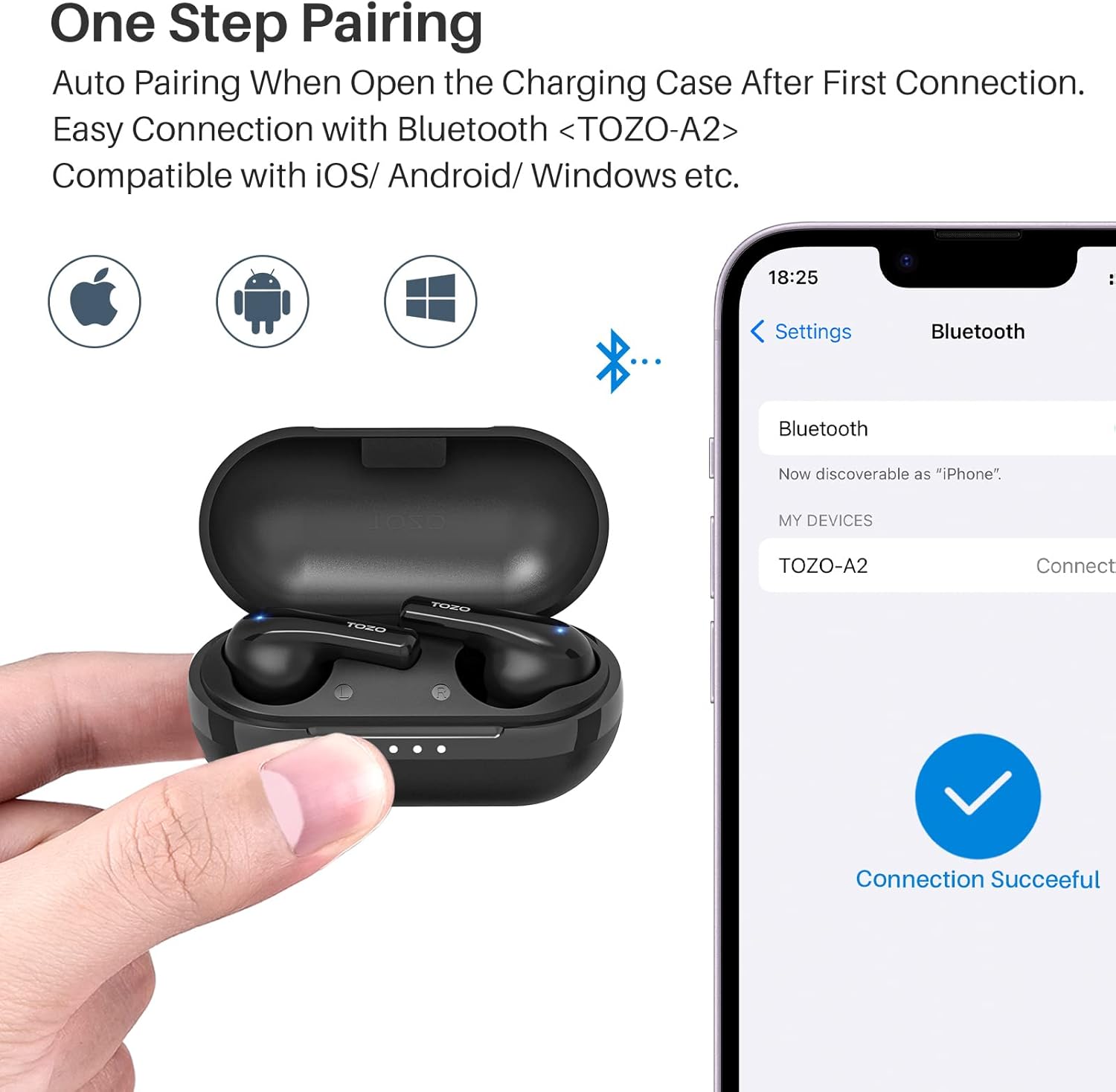
Image: Illustration of the one-step pairing process with a smartphone.
3. Wearing the Earbuds
Select the appropriate eartip size for a comfortable and secure fit. The earbuds are designed to fit snugly in your ear canal. Gently insert each earbud and twist slightly to ensure a stable position. A proper fit is crucial for optimal sound quality and noise isolation.

Image: A person wearing the TOZO A2 earbuds, highlighting their comfortable and discreet fit.

Image: The earbuds are shown to be ultra-lightweight, weighing only 3.7g each.
Operating Instructions
Touch Controls
The TOZO A2 earbuds support smart touch control for convenient operation:
- Volume Control: Tap the left or right earbud to adjust volume (specific tap patterns may vary, refer to quick start guide for details).
- Previous/Next Song: Double-tap the left or right earbud to skip tracks.
- Pause/Play: Single-tap either earbud to pause or resume playback.
- Answer/End Calls: Single-tap either earbud during an incoming call to answer, or during a call to end.
- Voice Assistant: Triple-tap either earbud to activate your device's voice assistant.
Call Functions
The earbuds feature a built-in microphone for clear calls. Ensure the earbuds are properly connected to your device for call functionality.

Image: A man demonstrating the use of TOZO A2 earbuds for clear communication.
Battery Life
The earbuds provide approximately 5 hours of listening time on a single charge. The charging case holds an additional 3 charges, extending the total playtime to up to 20 hours. The charging case has a battery capacity of 315 mAh.

Image: Visual representation of the 20-hour total playtime with the charging case.
Maintenance
Cleaning
Regularly clean your earbuds and charging case to maintain optimal performance and hygiene. Use a soft, dry, lint-free cloth. For the eartips, you can gently wipe them with a damp cloth and mild soap, then dry thoroughly before reattaching.
Water Resistance
The TOZO A2 earbuds are IPX5 waterproof. This means they are resistant to splashes and sweat, making them suitable for workouts and light rain. However, they are not designed for submersion in water. Avoid exposing them to strong jets of water or prolonged immersion.
Troubleshooting
- Earbuds not pairing: Ensure both earbuds are in the charging case, then open the lid. Check your device's Bluetooth settings to ensure Bluetooth is enabled and "TOZO-A2" is selected. If issues persist, try forgetting the device on your phone and re-pairing.
- Only one earbud working: Place both earbuds back into the charging case, close the lid, wait a few seconds, then open it again. This often resets the connection between the two earbuds.
- No sound: Check the volume level on both your device and the earbuds. Ensure the earbuds are properly connected via Bluetooth.
- Charging issues: Verify the USB-C cable is securely connected to both the case and the power source. Ensure the charging pins on the earbuds and inside the case are clean and free of debris.
Specifications
| Feature | Detail |
|---|---|
| Model Name | A2 |
| Brand | TOZO |
| Connectivity Technology | Wireless (Bluetooth 5.3) |
| Ear Placement | In Ear |
| Water Resistance Level | IPX5 (Waterproof) |
| Battery Life (Earbuds) | 5 Hours (single charge) |
| Total Playtime (with case) | 20 Hours |
| Charging Case Battery Capacity | 315 mAh |
| Charging Time | 2 Hours |
| Control Method | Touch |
| Audio Driver Size | 6 Millimeters |
| Frequency Response | 20 Hz - 20 kHz |
| Sensitivity | 100 dB |
| Impedance | 32 Ohm |
| Item Weight (Earbud) | 3.7g (single earbud) |
| Product Dimensions | 1.27 x 0.87 x 0.9 inches |
Warranty and Support
For warranty information and customer support, please refer to the official TOZO website or contact their customer service directly. Keep your purchase receipt for warranty claims.


