
1. Introduction
The ASHATA HDMI Transmitter and Receiver Kit (Model BIN 810) provides a wireless solution for extending HDMI audio and video signals. This kit supports 4K Ultra HD resolution and 3D visual effects, allowing for high-quality streaming from various devices to a display up to 30 meters away. It is designed for ease of use with plug-and-play functionality and broad compatibility.
2. Safety Information
- Ensure proper ventilation around the devices to prevent overheating.
- Do not expose the devices to water, moisture, or extreme temperatures.
- Use only the provided power cables and adapters.
- Keep out of reach of children.
- Avoid dropping or subjecting the devices to strong impacts.
3. Package Contents
Verify that all items are present in your package:
- 1 x HDMI Transmitter Unit (TX)
- 1 x HDMI Receiver Unit (RX)
- 2 x USB-C Power Cables
- 1 x HDMI Extension Cable
- 1 x Mini HDMI Adapter
- 1 x Micro HDMI Adapter
- 1 x USB-C to HDMI Adapter
- 1 x User Manual (this document)
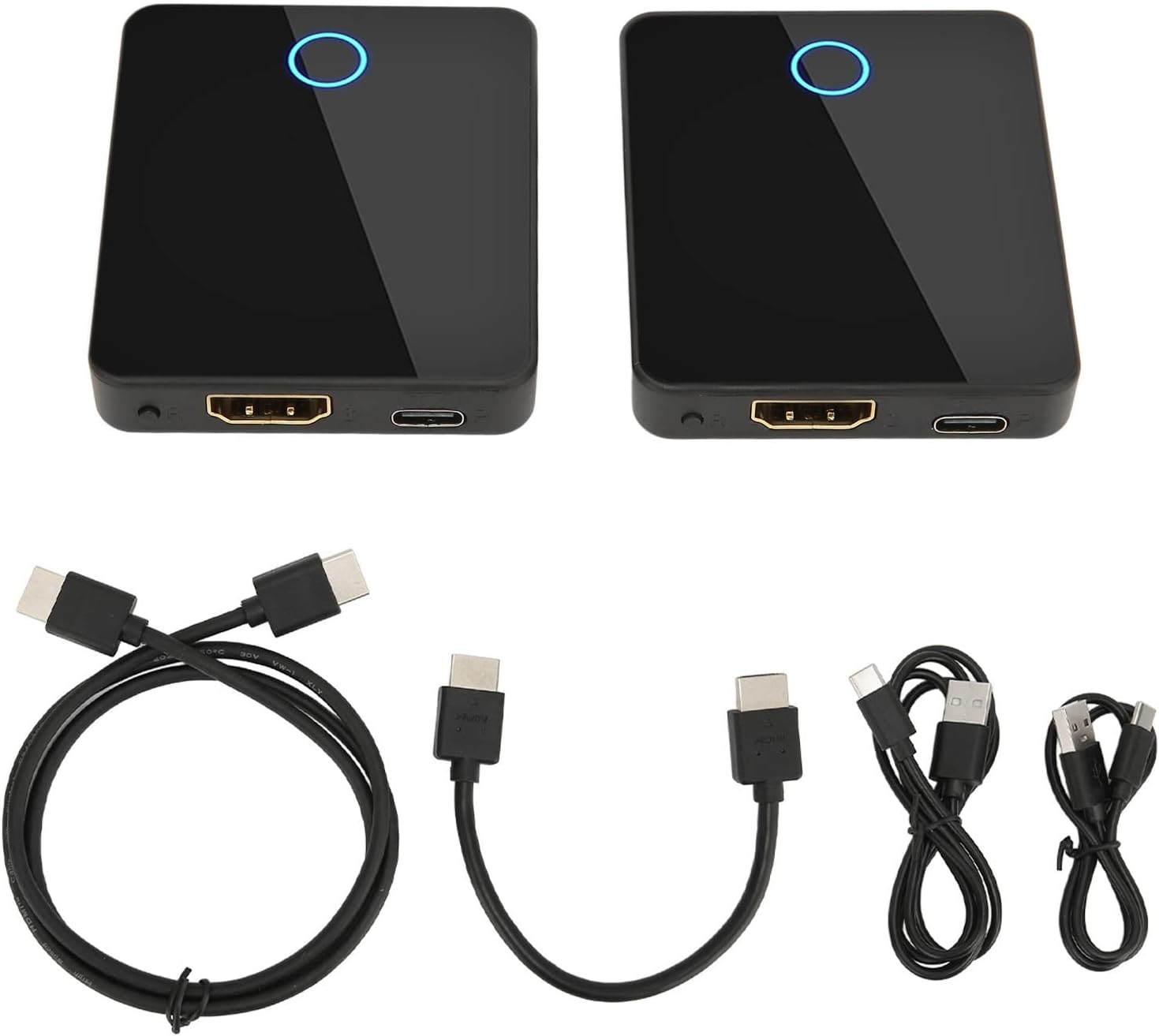
Image: All components included in the ASHATA HDMI Transmitter and Receiver Kit, including the transmitter, receiver, various cables, and adapters.
4. Product Overview
The kit consists of a transmitter (TX) and a receiver (RX) unit, designed for seamless wireless connectivity. Each unit features essential ports for power and signal transmission.
Unit Features:
- HDMI Port: For video and audio input (Transmitter) or output (Receiver).
- USB-C Power Input: Provides power to the unit.
- Reset Button: Used for resetting or re-pairing the units.
- Indicator Light: Shows connection status.

Image: Detailed diagram illustrating the dimensions and port layout of both the Transmitter (TX) and Receiver (RX) units, including HDMI, USB-C Power Input, and Reset Button.

Image: A close-up photograph of the side of one unit, clearly showing the HDMI port, USB-C power input, and the 'OR', 'S', 'P' labels, indicating its function.
5. Setup Instructions
Follow these steps to set up your ASHATA HDMI Transmitter and Receiver Kit:
- Connect the Receiver (RX) to your Display: Plug the HDMI end of the Receiver unit into an available HDMI input port on your TV, projector, or monitor. If the receiver is too bulky for direct connection, use the provided HDMI extension cable.
- Power the Receiver (RX): Connect one of the USB-C power cables to the USB-C port on the Receiver unit and the other end to a USB power source (e.g., TV's USB port, USB wall adapter). The indicator light on the receiver will illuminate.
- Connect the Transmitter (TX) to your Source Device: Plug the HDMI end of the Transmitter unit into the HDMI output port of your source device (e.g., PC, laptop, camera, game console). If your source device has Mini HDMI, Micro HDMI, or USB-C video output, use the appropriate adapter provided.
- Power the Transmitter (TX): Connect the second USB-C power cable to the USB-C port on the Transmitter unit and the other end to a USB power source (e.g., laptop's USB port, USB wall adapter). The indicator light on the transmitter will illuminate.
- Automatic Pairing: The transmitter and receiver units are designed to pair automatically. Once both units are powered on and connected, the display should show the signal from your source device. If not, press the reset button on both units briefly to initiate re-pairing.

Image: A clear diagram illustrating how to connect the transmitter to various source devices (laptop, game console, TV box, Blu-ray player) and the receiver to different display types (projector, TV, monitor).

Image: A visual representation of the kit's compatibility, showing the transmitter connecting to devices like PCs, laptops, PS4/Xbox, TV boxes, and DVD/Blu-ray players, and the receiver connecting to projectors, TVs, and monitors.
6. Operating Instructions
6.1. Basic Operation
Once connected and powered, the ASHATA HDMI Transmitter and Receiver Kit operates as a plug-and-play device. The signal from your source device will be wirelessly transmitted to your display.
6.2. Display Modes
Your computer or source device will recognize the wireless display as an external monitor. You can configure display settings (e.g., duplicate, extend, second screen only) through your device's operating system settings.
6.3. 3D Effect
The extender supports 3D visual output. If your source content and display are 3D-compatible, you can enjoy an immersive 3D viewing experience.

Image: A visual demonstrating the 3D visual effect capability of the HDMI extender, showing a whale leaping out of a TV screen with a 3D logo.
6.4. Wireless Transmission Range
The device offers a wireless transmission range of up to 30 meters (98 feet) in an open environment. Performance may vary based on environmental factors such as walls, interference, and other obstacles. For indoor use with walls, the effective transmission distance is approximately 10 meters.

Image: A classroom setting showing a laptop wirelessly transmitting to a projector and a wall-mounted display, highlighting the 30-meter digital encryption wireless transmission distance.

Image: A depiction of the wireless HDMI extender facilitating a video conference, with a laptop transmitting to a large screen in a meeting room, emphasizing wireless audio and video signal transmission.
7. Maintenance
- Clean the devices with a soft, dry cloth. Do not use liquid or aerosol cleaners.
- Store the devices in a cool, dry place when not in use.
- Avoid bending or crimping the cables excessively.
8. Troubleshooting
- No Display:
- Ensure both the transmitter and receiver are properly powered and their indicator lights are on.
- Check all HDMI and USB-C connections.
- Try pressing the reset button on both units to re-initiate pairing.
- Verify that your display is set to the correct HDMI input source.
- Ensure your source device's display settings are configured to extend or duplicate to the external monitor.
- Intermittent Signal or Poor Quality:
- Reduce the distance between the transmitter and receiver.
- Minimize obstacles (walls, furniture) between the units.
- Avoid sources of strong electromagnetic interference (e.g., Wi-Fi routers, microwaves).
- Ensure both units are receiving stable power.
- No Audio:
- Check your source device's audio output settings.
- Verify your display's audio input settings and volume.
9. Specifications
| Feature | Specification |
|---|---|
| Brand | ASHATA |
| Model Name | BIN 810 |
| Connectivity Technology | HDMI, USB, Wi-Fi |
| Connector Type | HDMI, USB |
| Special Feature | 3D Effect, 4K Resolution |
| Resolution | 1080p, 4K (3840x2160) |
| Video Output Resolution | 1920x1080, 3840x2160 |
| Form Factor | TV Box |
| Wireless Transmission Range | Up to 30 meters (98 feet) in open space; approx. 10 meters through walls. |
| Item Weight | 8.1 ounces |
| Package Dimensions | 5.24 x 4.21 x 2.05 inches |
10. Warranty and Support
For warranty information and technical support, please refer to the documentation included with your purchase or contact ASHATA customer service directly. Keep your purchase receipt for warranty claims.