
1. Introduction
The XYGStudy ST3215 is a high-performance serial bus servo designed for applications requiring precision, high torque, and flexible control. It features a programmable 360-degree magnetic encoder for accurate positioning and offers two-way feedback. This servo can operate in both servo and motor modes, making it versatile for various robotic projects.
Key features include:
- 30KG torque at 12V, suitable for quadruped robots, hexapod walkers, and robotic arms.
- Programmable 360-degree magnetic encoder for high precision and extended lifetime.
- Two-way feedback for real-time position, load, speed, and input voltage monitoring.
- Switchable between precise rotation (servo mode) and continuous rotation (motor mode).
- UART serial bus control, allowing up to 253 servos to be controlled simultaneously.
2. Package Contents
Verify that all components are present in your package:
- ST3215 Servo x1
- Servo horns and mounting screws
- Connection cable

Image: The ST3215 Servo, along with various servo horns, mounting screws, and a connection cable.
3. Setup and Connection
3.1 UART Serial Bus Control
The ST3215 servo utilizes UART serial bus communication, enabling multiple servos to be daisy-chained and controlled from a single channel. This setup simplifies wiring for complex robotic systems.
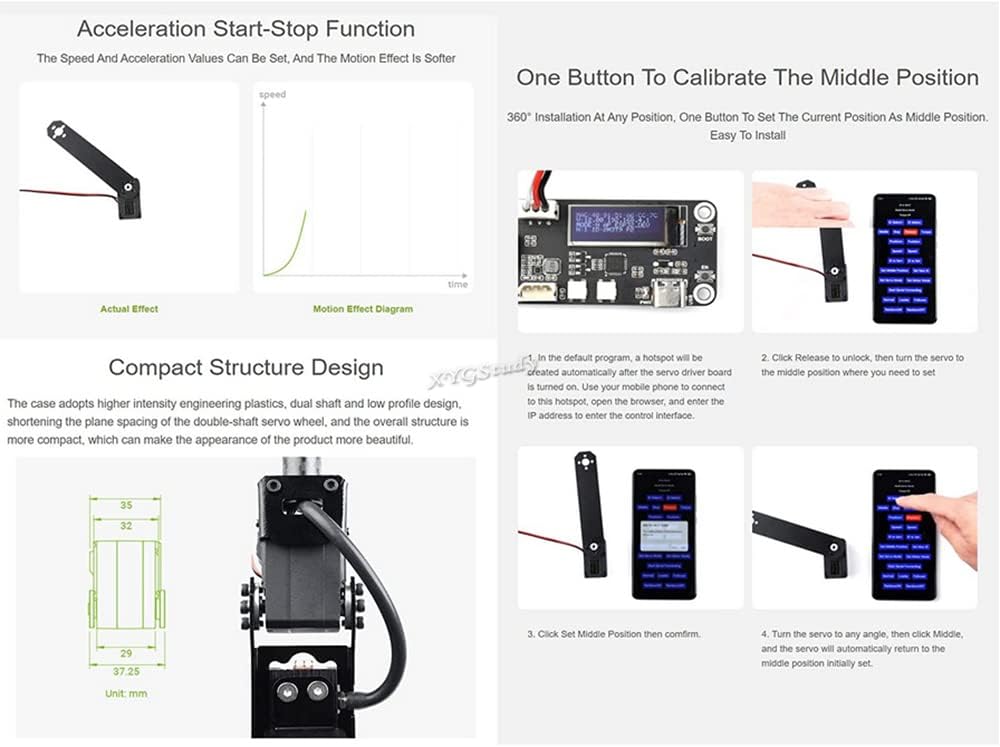
Image: A diagram illustrating how multiple ST3215 servos are connected in a daisy-chain configuration using UART serial bus control. Note: Ensure adequate power supply when connecting many servos.
3.2 Open Source Control Program
The servo can be controlled via a web-based open-source control program. This program allows for remote setting and control of the servo parameters.
- Connect your device (e.g., smartphone, computer) to the servo driver board's Wi-Fi Access Point (AP).
- Enter the provided IP address into your web browser.
- Access the control interface to manage servo settings.

Image: A visual guide demonstrating the three steps to connect to the servo's web-based control interface: connecting to the AP, entering the IP address, and accessing the control panel.
4. Operating Modes
The ST3215 servo supports two distinct operating modes:
- Servo Mode: Provides precise rotation angle control, ideal for applications requiring specific positional accuracy.
- Motor Mode: Enables continuous rotation, suitable for driving wheels or other components that require constant movement.
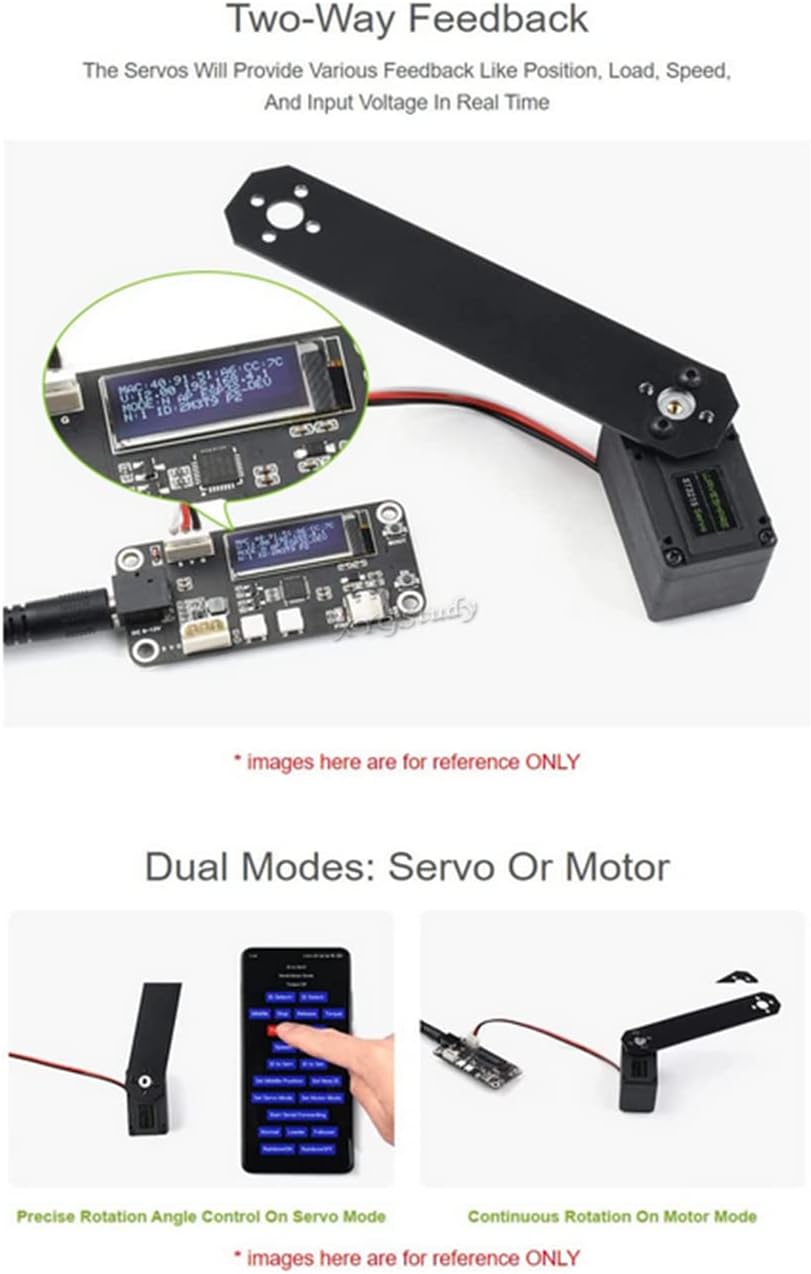
Image: A visual representation contrasting the precise rotation angle control in Servo Mode with the continuous rotation in Motor Mode.
5. Calibrating the Middle Position
The ST3215 servo features a convenient one-button calibration function for setting the middle position at any desired 360-degree installation angle.
- In the default program, a hotspot will be created automatically after the servo driver board is turned on. Use your mobile phone to connect to this hotspot, then open the browser and enter the IP address to enter the control interface.
- Click 'Release' to unlock the servo, then manually turn the servo to the desired middle position.
- Click 'Set Middle Position' and then confirm.
- Turn the servo to any angle, then click 'Middle', and the servo will automatically return to the newly set middle position.

Image: A step-by-step visual guide demonstrating the process of calibrating the servo's middle position using the control interface.
6. Two-Way Feedback
The ST3215 servo provides two-way feedback, allowing you to monitor various parameters in real-time. This includes position, load, speed, and input voltage, which is crucial for advanced control and diagnostics.
Image: A display unit connected to the servo, showing real-time feedback data such as position, load, speed, and input voltage.
7. Technical Specifications
Detailed specifications for the ST3215 Serial Bus Servo:
| Parameter | ST3215 Serial Bus Servo (12V) | ST3215-7.4V Serial Bus Servo (7.4V) |
|---|---|---|
| Torque | 30kg.cm@12V | 19.5kg.cm@7.4V |
| Rotation Angle | 360° (0-4095) | |
| Position Sensor Resolution | 360° / 4096 | |
| Mechanism Limited Angle | No Limit | |
| Operating Voltage | 6 ~ 12.6 V | 4V ~ 7.4V |
| Gear | High precision metal gear | |
| No-Load Speed | 0.222sec / 60° (45RPM)@12V | 0.192sec / 60° (52RPM)@7.4V |
| Encoder Type | 360° Magnetic Encoder | |
| ID Range | 0 ~ 253 | |
| Baudrate | 38400bps ~ 1Mbps (1Mbps by default) | |
| Feedback | Position, Load, Speed, Input Voltage | |
| No-Load Current | 200mA | 150mA |
| Locked-Rotor Current | 2.7A | 2.5A |
| KT | 11kg.cm/A | 7.8kg.cm/A |

Image: A detailed table outlining the technical specifications for the ST3215 serial bus servo at different operating voltages.
7.1 Outline Dimensions
Refer to the diagram below for the physical dimensions of the ST3215 servo (measurements in millimeters).
Image: A technical drawing showing the precise outline dimensions of the ST3215 servo in millimeters.
8. Maintenance
To ensure the longevity and optimal performance of your ST3215 servo, follow these maintenance guidelines:
- Keep Clean: Regularly clean the servo's exterior to prevent dust and debris accumulation, especially around moving parts.
- Avoid Overload: Do not exceed the specified torque limits to prevent damage to the internal gears and motor.
- Proper Storage: Store the servo in a dry, cool environment away from direct sunlight and extreme temperatures.
- Inspect Connections: Periodically check all electrical connections for secure fit and signs of wear.
9. Troubleshooting
If you encounter issues with your ST3215 servo, consider the following common troubleshooting steps:
- No Movement:
- Check power supply voltage and current to ensure it meets the servo's requirements.
- Verify all wiring connections are correct and secure.
- Ensure the servo ID is correctly set and matches the control command.
- Erratic Movement:
- Check for electrical interference or noise in the signal line.
- Ensure the control signal is stable and within the expected range.
- Inspect for any physical obstructions preventing smooth movement.
- Overheating:
- Reduce the load on the servo if it's operating under continuous high torque.
- Ensure adequate ventilation around the servo.
- Feedback Issues:
- Verify the communication protocol and baud rate settings.
- Check for loose connections in the feedback line.
10. Warranty Information
The XYGStudy ST3215 Servo comes with a 1 Year Warranty from the date of purchase. This warranty covers manufacturing defects under normal use. Please retain your proof of purchase for warranty claims. The warranty does not cover damage caused by misuse, accidents, unauthorized modifications, or improper installation.
11. Customer Support
For additional resources, technical assistance, or any questions regarding your ST3215 Servo, please contact XYGStudy customer support via Amazon message. We will provide you with necessary attachments and guidance.