
1. Introduction
This manual provides essential information for the safe and effective use of your BH Fitness TRBS9 Folding Treadmill. Please read all instructions carefully before assembly, operation, or maintenance. Retain this manual for future reference.

Figure 1: BH Fitness TRBS9 Folding Treadmill
The BH Fitness TRBS9 is designed for home fitness, offering a robust and versatile workout experience. It features a powerful motor, a spacious running surface, and a user-friendly console with various programs to help you achieve your fitness goals.
2. Safety Information
Your safety is paramount. Adhere to the following safety guidelines:
- Always consult with a physician before starting any exercise program.
- Keep children and pets away from the treadmill during operation.
- Place the treadmill on a solid, level surface with adequate clearance around it (at least 2 meters behind and 0.6 meters on each side).
- Ensure the safety key is properly attached to your clothing before starting the treadmill. In case of an emergency, pulling the safety key will immediately stop the machine.
- Do not operate the treadmill if it is damaged or malfunctioning.
- Wear appropriate athletic footwear and clothing.
- Do not step on or off the treadmill while the belt is moving.
- Unplug the treadmill from the power outlet when not in use or before cleaning and maintenance.
3. Setup
The BH Fitness TRBS9 Treadmill is designed for minimal assembly. Follow these steps for initial setup:
- Unpacking: Carefully remove all components from the packaging. Verify that all parts listed in the 'What's in the Box' section are present.
- Placement: Choose a suitable location for your treadmill. Ensure it is on a stable, flat surface and has sufficient space around it for safe operation and folding. The treadmill is equipped with transport wheels for easier relocation.
- Unfolding: If the treadmill is in its folded position, gently lower the running deck until it locks into place. The Assisted Folding System (SDS) ensures a soft drop.
- Power Connection: Plug the power cord into a grounded electrical outlet.

Figure 2: Treadmill dimensions and key features, including transport wheels.

Figure 3: Illustration of the treadmill's electric incline mechanism.
4. Operating Instructions
Familiarize yourself with the control console and its functions before beginning your workout.
4.1 Console Overview
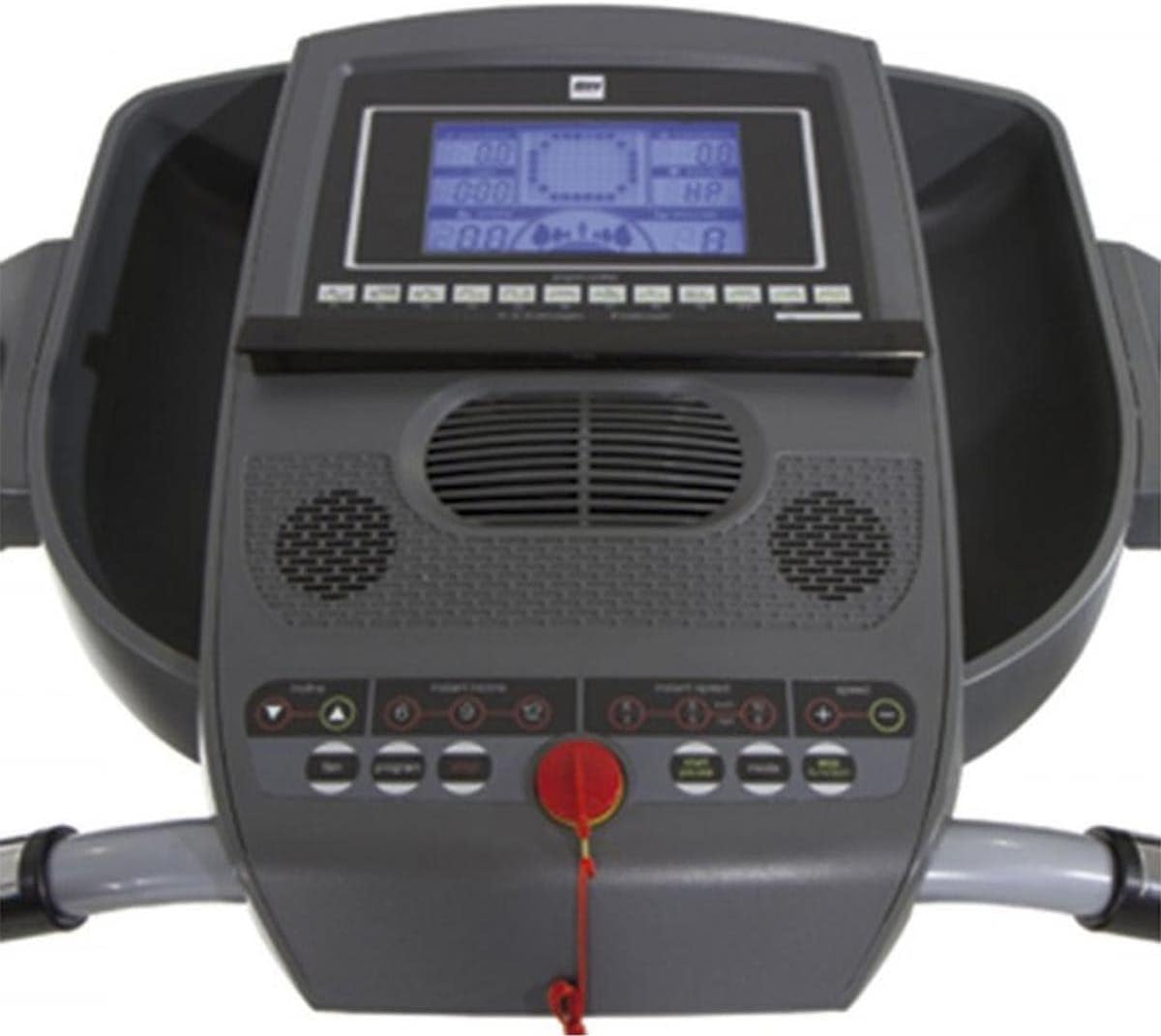
Figure 4: Close-up view of the 5-inch LCD monitor and control panel.

Figure 5: Console showing integrated cup holder for convenience.
The 5-inch LCD monitor displays key workout metrics such as calories burned, distance, heart rate, inclination, speed, and time. The console also features a cooling fan and a music player function.
4.2 Starting a Workout
- Ensure the safety key is in place on the console and clipped to your clothing.
- Press the START button to begin. The belt will start moving at a low speed.
- Gradually increase speed using the speed adjustment buttons or quick speed keys. The treadmill supports speeds from 0.6 to 13.7 mph (0.96 to 22 km/h).
4.3 Adjusting Speed and Incline
- Use the SPEED +/- buttons to fine-tune your speed.
- Use the INCLINE +/- buttons to adjust the incline level. The treadmill offers an electric tilt up to 12%.
- Quick speed and incline buttons are available for rapid adjustments.
4.4 Workout Programs
The TRBS9 features 16 workout programs:
- 12 Pre-set Programs: Designed for various fitness levels and goals.
- 3 Custom Programs: Allows users to create and save personalized workout routines.
- 1 Body Fat Program: Helps estimate body fat percentage.
Select your desired program using the program selection buttons on the console.
4.5 Heart Rate Monitoring
Grasp the hand pulse sensors on the handlebars to monitor your heart rate during your workout. Your heart rate will be displayed on the LCD monitor.
4.6 Eco-Mode Option
Activate the Eco-Mode option to reduce power consumption during your workout, contributing to energy efficiency.
4.7 Cooling Fan

Figure 6: Integrated cooling fan for user comfort.
The integrated cooling fan can be activated from the console to provide a comfortable airflow during your exercise session.
4.8 Stopping a Workout
To stop the treadmill, press the STOP button. For an emergency stop, pull the safety key from the console.
5. Maintenance
Regular maintenance ensures the longevity and optimal performance of your treadmill.
5.1 Cleaning
- Always unplug the treadmill before cleaning.
- Wipe down the console and exterior surfaces with a damp cloth. Avoid abrasive cleaners or excessive moisture.
- Periodically vacuum under the motor cover to remove dust and debris.
5.2 Running Belt Lubrication
The running belt requires periodic lubrication to reduce friction and extend its lifespan. Refer to the specific lubrication instructions provided with your treadmill's lubricant kit. Generally, apply silicone lubricant under the belt every few months, depending on usage.
5.3 Running Belt Adjustment
If the running belt becomes off-center or slips, it may require adjustment. Use the provided Allen wrench to turn the rear roller bolts in small increments until the belt is centered and properly tensioned. Consult the detailed instructions in the full manual for precise adjustment procedures.
6. Troubleshooting
This section addresses common issues you might encounter with your treadmill.
| Problem | Possible Cause | Solution |
|---|---|---|
| Treadmill does not power on. | Power cord not plugged in; circuit breaker tripped; safety key not in place. | Ensure power cord is securely plugged in. Check household circuit breaker. Verify safety key is fully inserted into the console. |
| Running belt slips or hesitates. | Belt tension too loose; belt requires lubrication. | Adjust belt tension (refer to Section 5.3). Lubricate the running belt (refer to Section 5.2). |
| Unusual noise during operation. | Loose parts; motor cover rubbing; belt misalignment. | Inspect for loose screws and tighten. Check if motor cover is properly seated. Adjust belt alignment (refer to Section 5.3). |
If the problem persists after attempting these solutions, please contact customer support.
7. Specifications
Detailed technical specifications for the BH Fitness TRBS9 Folding Treadmill:

Figure 7: Illustration of the 4.0 HP peak motor, capable of speeds up to 13.7 mph.

Figure 8: Depiction of the 6 Elastomers Cushioning System for reduced impact.
| Model Number | TRBS9 |
| Brand | BH |
| Dimensions (L x W x H) | 172 x 87 x 145 cm |
| Weight | 92 kg |
| Maximum User Weight | 130 kg |
| Motor (Peak) | 4.0 HP |
| Speed Range | 0.6 - 13.7 mph (0.96 - 22 km/h) |
| Maximum Incline | 12% (Electric) |
| Running Surface | 140 cm x 51 cm |
| Display Type | 5-inch LCD |
| Programs | 16 (12 pre-set, 3 custom, 1 Body Fat) |
| Special Features | Eco-Mode, Cooling Fan, Hand-pulse sensors, Music Player, Assisted Folding System (SDS), 6 Elastomers Cushioning System |
| Material | Steel Alloy |
| Color | Gray |
| Assembly Required | No |
8. Warranty and Support
For warranty information, please refer to the warranty card included with your product or visit the official BH Fitness website. Keep your proof of purchase for warranty claims.
For technical support, spare parts, or service inquiries, please contact BH Fitness customer service through their official channels. Provide your product model (TRBS9) and ASIN (B0B93XFG7M) when contacting support to ensure efficient assistance.


