
1. Introduction
This manual provides detailed instructions for the safe and efficient operation of your KITWLEMEN 8-inch Rechargeable Camping Fan with Light. Please read this manual thoroughly before use and retain it for future reference.
2. Important Safety Instructions
- Do not insert fingers or any objects into the fan grille.
- Keep the fan away from water or other liquids to prevent electric shock.
- Do not use the fan in extremely high temperatures or humid environments.
- Ensure the fan is placed on a stable surface when in use.
- Keep out of reach of children.
- Use only the provided charging cable or a compatible USB-C cable for charging.
- Do not attempt to disassemble or repair the fan yourself. Contact customer support if needed.
3. Product Features
- High-Capacity Battery: Integrated 20000mAh rechargeable battery provides up to 60 hours of operation on the lowest fan speed.
- Power Bank Functionality: Equipped with USB output ports (USB-A and USB-C) to charge mobile phones and other devices.
- Adjustable Airflow: Features 4 fan speed settings, delivering airflow up to 12.5 ft/s and reaching distances of up to 13 ft.
- Wide-Angle Oscillation: Automatic oscillation options of 45° and 90° for broader air distribution (135° total coverage).
- Flexible Positioning: Fan head pivots 270° vertically, and includes a 360° rotatable hanging hook for versatile placement.
- Integrated LED Light: 16 ultra-bright LED bulbs with 3 brightness settings (up to 400LM) for illumination.
- Quiet Operation & Timer: Operates at less than 30dB noise level, ideal for sleep. Includes 1/2/4/8-hour timer settings and a sleep mode that turns off all indicator lights.
- Remote Control: Convenient remote control with a 19.6 ft range for adjusting settings.
- LED Indicators: Displays remaining power and current mode.
4. Package Contents
- KITWLEMEN 8-inch Rechargeable Camping Fan with Light
- Remote Control
- USB-C Charging Cable
- User Manual
5. Setup
5.1 Initial Charging
Before first use, fully charge the fan. Connect the provided USB-C cable to the fan's USB-C input port and to a compatible USB power adapter (not included). The LED indicators will show charging progress.
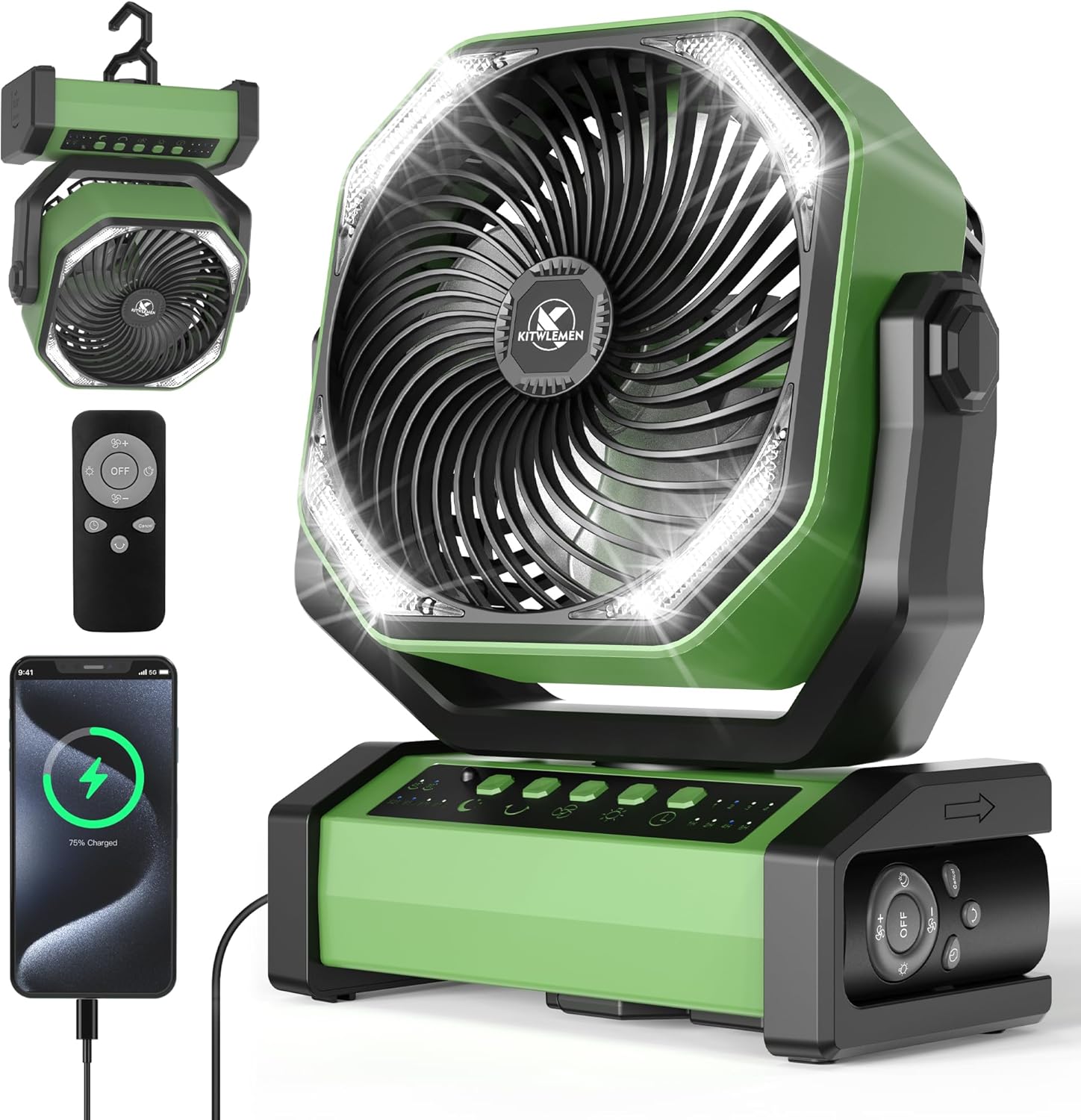
Image: The KITWLEMEN camping fan with its remote control and a phone charging from its USB port. This image illustrates the fan's design and its power bank capability.
5.2 Remote Control Setup
The remote control is typically pre-paired. Ensure the remote is inserted correctly into its storage slot on the fan base when not in use.
Video: A brief demonstration of the fan's remote control being removed from its storage slot and used to operate the fan. This highlights the convenience of the remote for adjusting settings.
6. Operating Instructions
6.1 Powering On/Off
Press the power button on the fan base or the 'OFF' button on the remote control to turn the fan on or off.
6.2 Fan Speed Adjustment
The fan has 4 speed settings. Press the fan speed button on the base or the '+' / '-' buttons on the remote to cycle through the speeds.

Image: The camping fan operating inside a tent, illustrating its use in an outdoor setting and highlighting its four wind speed capabilities.
6.3 Oscillation Function
Press the oscillation button on the fan base or the remote to activate 45° or 90° automatic oscillation. Press again to stop.

Image: A diagram illustrating the fan's wide airflow coverage through 45°/90° auto-oscillation and 270° vertical pivoting, demonstrating its ability to cool a large area.
6.4 LED Light Operation
Press the light button on the fan base or the remote to cycle through 3 brightness settings (low, medium, high). Press again to turn off the light.

Image: The camping fan illuminating a dark outdoor scene, showcasing its three ultra-bright lighting modes for various nighttime activities.
6.5 Timer Settings
Press the timer button on the fan base or the remote to set the fan to turn off automatically after 1, 2, 4, or 8 hours. The corresponding LED indicator will light up.
6.6 Sleep Mode
Activate sleep mode by pressing the moon icon button on the fan base or remote. In this mode, the fan operates at its lowest speed, and all indicator lights are turned off to ensure undisturbed sleep.

Image: A collage showing the fan in different sleep scenarios, emphasizing its quiet operation, timer functions (1H, 2H, 4H, 8H), and sleep mode that turns off all indicator lights.
6.7 Power Bank Function
To use the fan as a power bank, connect your device to the USB-A or USB-C output port on the side of the fan. The fan's internal battery will charge your device.

Image: The camping fan being used as a power bank to charge two devices simultaneously, highlighting its 20000mAh emergency battery with USB-A and USB-C output ports.
6.8 Hanging Hook
The fan features a 360° rotatable hook on its base, allowing it to be hung from tents, branches, or other suitable structures.
Video: A brief demonstration of the fan's remote control being removed from its storage slot and used to operate the fan. This highlights the convenience of the remote for adjusting settings.
7. Maintenance
7.1 Cleaning
- Ensure the fan is turned off and unplugged before cleaning.
- Wipe the exterior with a soft, damp cloth. Do not use abrasive cleaners or solvents.
- To clean the fan blades, carefully remove the front grille (if detachable, refer to specific instructions for removal) and wipe the blades with a soft cloth. Reattach the grille securely.
7.2 Storage
When not in use for extended periods, store the fan in a cool, dry place away from direct sunlight and extreme temperatures. Ensure the battery is partially charged (around 50%) before storage to prolong battery life.
8. Troubleshooting
| Problem | Possible Cause | Solution |
|---|---|---|
| Fan does not turn on. | Low battery or power button not pressed correctly. | Charge the fan fully. Press the power button firmly. |
| Fan speed is weak. | Low battery or fan set to lowest speed. | Charge the fan. Increase fan speed using the controls or remote. |
| LED light is dim or not working. | Low battery or light set to lowest brightness. | Charge the fan. Adjust light brightness using the controls or remote. |
| Remote control not responding. | Remote battery low or obstruction between remote and fan. | Replace remote battery. Ensure clear line of sight. |
| Device not charging from fan. | Fan battery low or incorrect cable/port used. | Charge the fan. Use appropriate USB-A or USB-C cable and port. |
9. Specifications
- Brand: KITWLEMEN
- Model: 8 inch
- Color: Army Green
- Battery Capacity: 20000mAh
- Max Run Time (Fan): Up to 60 hours (lowest speed)
- Fan Speeds: 4 levels
- Max Airflow Speed: 12.5 ft/s
- Oscillation: 45°/90° Auto Oscillation
- Vertical Pivot: 270°
- LED Light Brightness: 3 settings (Max 400LM)
- Timer: 1H, 2H, 4H, 8H
- Noise Level: <30dB
- USB Output Ports: USB-A (5V/2A), USB-C (5V/3A)
- Product Dimensions: 8.66"D x 4.25"W x 10.83"H
10. Warranty and Support
For warranty information or technical support, please refer to the contact details provided on the product packaging or visit the official KITWLEMEN website. Keep your purchase receipt as proof of purchase.
Manufacturer: KITWLEMEN
Website: Visit the KITWLEMEN Store

