
1. Product Overview
The Sanpyl K913AF is an 8-megapixel HD USB document camera designed for efficient scanning and document management. It features a CMOS sensor, automatic focusing, and a 5-level dimming LED fill light to ensure clear imaging in various lighting conditions. This device supports scanning documents up to A3 size and offers advanced functions such as Optical Character Recognition (OCR), barcode recognition, and PDF conversion. Its portable design and USB 2.0 connectivity make it suitable for office, educational, and personal use.

Image: The Sanpyl K913AF Document Camera positioned over documents, ready for scanning.
Key Features:
- High Resolution: 8 Million PX CMOS Sensor (3840 x 2160) for clear images.
- Large Scanning Area: Supports documents up to A3 size.
- Automatic Focusing: Ensures sharp images without manual adjustment.
- Adjustable Fill Light: Built-in LED with 5-level touch intelligent dimming.
- Advanced Software Functions: OCR, Barcode/QR code recognition, PDF conversion, video recording, image editing.
- Connectivity: USB 2.0 interface.
- System Compatibility: Compatible with Windows 7, 10, XP, Vista, 2003.
2. Package Contents
Please verify that all items listed below are included in your package. If any items are missing or damaged, please contact customer support.
- 1 x Sanpyl K913AF Document Scanner Unit
- 1 x Base
- 1 x Software CD
- 1 x User Manual
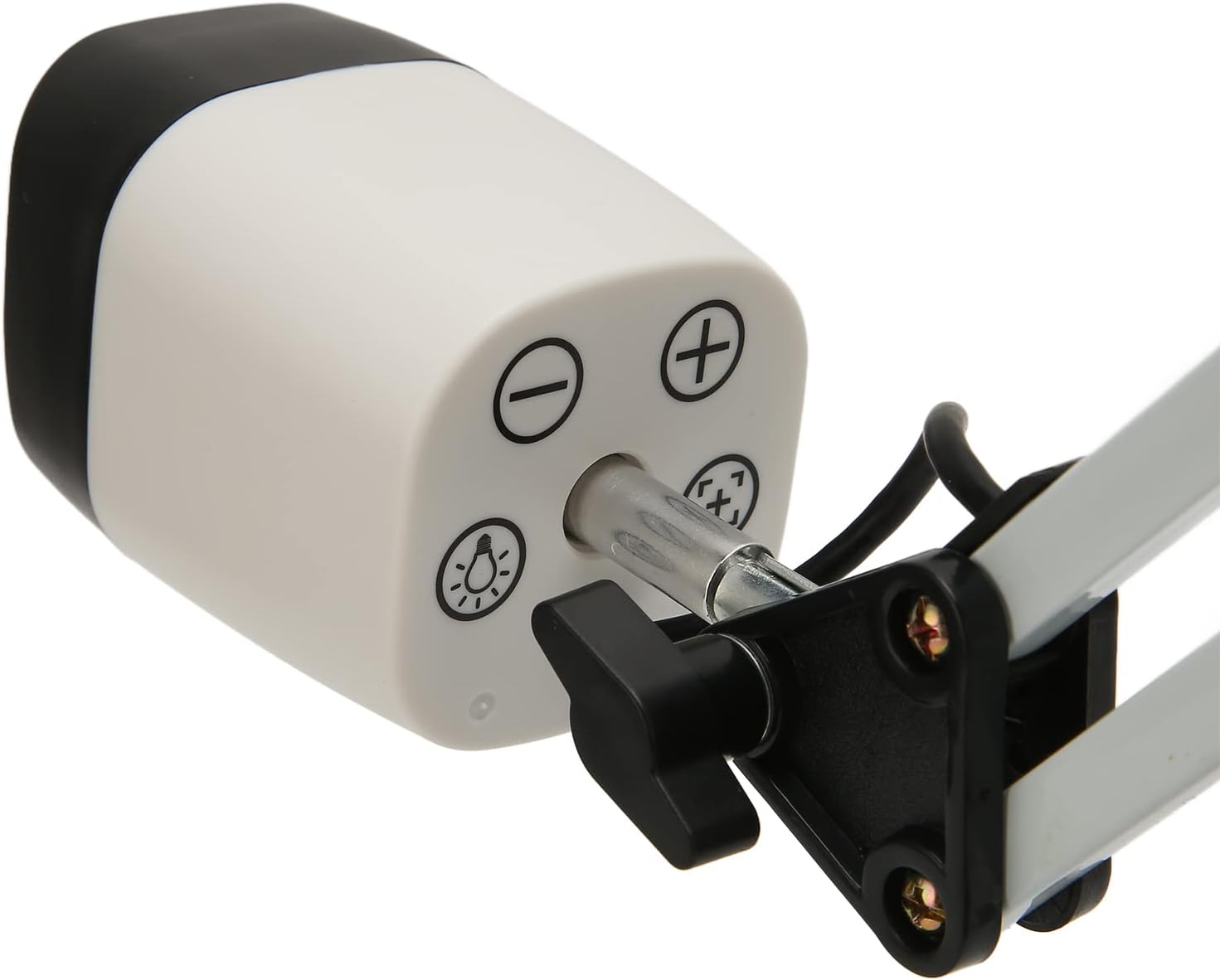
Image: All main components of the Sanpyl K913AF Document Camera laid out, showing the scanner arm, base, and USB cable.
3. Setup Instructions
Follow these steps to set up your Sanpyl K913AF Document Camera.
- Assemble the Device: Securely attach the document scanner arm to the base. Ensure the connection is firm and stable.
- Connect to Computer: Plug the USB cable from the document camera into an available USB 2.0 port on your Windows computer. The device is driver-free for supported Windows systems.
- Install Software: Insert the provided Software CD into your computer's CD-ROM drive. Follow the on-screen instructions to install the necessary scanning and image processing software. This software is essential for utilizing all features of the document camera, including OCR and image adjustments.
- System Requirements: Ensure your computer runs on one of the following operating systems: Windows 7, Windows 10, Windows XP, Windows Vista, or Windows 2003.

Image: Side view of the Sanpyl K913AF Document Camera, showing its adjustable arm and stable base.
4. Operating Instructions
This section details the basic and advanced operations of your Sanpyl K913AF Document Camera.
4.1 Basic Scanning
- Place Document: Position the document, ID card, magazine, or other material you wish to scan directly under the camera lens on the base. The camera supports scanning up to A3 size.
- Launch Software: Open the installed Sanpyl scanning software on your computer.
- Automatic Focus: The camera features automatic focusing. Ensure the document is flat and within the camera's field of view for clear imaging. The imaging speed is approximately 1 second.
- Select Scan Mode: Within the software, choose your desired scanning mode: color scanning, black and white scanning, or grayscale scanning.
- Capture Image: Use the software interface to capture the image. The captured image should be clear, rich in color, and free from flicker, ripple, or noise.

Image: The document camera positioned over a document on a desk, illustrating its use for scanning.
4.2 Fill Light Operation
The document camera includes a built-in LED fill light with touch intelligent dimming for optimal illumination.
- Activate/Adjust Light: The camera head features touch controls for the fill light. Touch the light icon to turn it on/off or cycle through the 5 dimming levels.
- Optimal Illumination: The two sets of digital fill lights illuminate in different directions, providing even coverage and enhancing image quality in low-light environments.

Image: The Sanpyl K913AF Document Camera with its integrated LED fill light turned on, providing illumination.

Image: A close-up view of the control buttons located on the camera head, including light and zoom controls.
4.3 Advanced Functions (Software-Dependent)
The included software provides a range of advanced features:
- Image Control: Adjust white balance (manual/automatic), exposure control (manual/automatic), brightness, saturation, exposure value, sharpness, color, gamma, and gain control.
- Image Processing: Perform intelligent cropping, skew correction, image enhancement and optimization, watermark addition, and general image editing.
- OCR Recognition: Convert captured document images into editable text files (Word, Excel, TXT). Supports multilingual, sign, and number recognition with over 98% accuracy.
- Barcode Recognition: Recognize both 1D barcodes and QR codes. The recognition result can be used as the filename.
- PDF Conversion: Convert scanned images into PDF format.
- Other Functions: Utilize automatic snapshot, timed photo, and video recording capabilities.
5. Maintenance
Proper maintenance ensures the longevity and optimal performance of your document camera.
- Cleaning: Use a soft, dry cloth to clean the exterior of the camera and base. For the lens, use a specialized lens cleaning cloth and solution to avoid scratches. Do not use abrasive cleaners or solvents.
- Storage: When not in use, store the document camera in a clean, dry environment away from direct sunlight and extreme temperatures.
- Handling: Handle the device with care. Avoid dropping it or subjecting it to strong impacts. Do not force the adjustable arm beyond its intended range of motion.
- Software Updates: Periodically check the manufacturer's website for any software updates to ensure you have the latest features and bug fixes.

Image: A detailed view of an adjustable joint on the document camera's arm, highlighting its construction.
6. Troubleshooting
If you encounter issues with your Sanpyl K913AF Document Camera, refer to the following common problems and solutions.
- No Image/Device Not Recognized:
- Ensure the USB cable is securely connected to both the camera and the computer.
- Try connecting to a different USB port.
- Verify that the scanning software is correctly installed and running.
- Check if your operating system meets the minimum requirements (Windows 7/10/XP/Vista/2003).
- Blurry or Unclear Images:
- Ensure the document is placed flat and directly under the camera lens.
- The camera has automatic focus; allow a moment for it to adjust.
- Check the lighting conditions. Use the built-in LED fill light if the environment is too dark.
- Clean the camera lens with a soft, lint-free cloth.
- Poor Image Quality (Color/Brightness):
- Adjust image control settings within the software (white balance, exposure, brightness, saturation, etc.).
- Ensure the fill light is set to an appropriate level for the ambient lighting.
- Software Not Functioning Correctly:
- Reinstall the software from the provided CD.
- Ensure your Windows operating system is up to date.
- Temporarily disable any antivirus software during installation if issues persist.
7. Specifications
Detailed technical specifications for the Sanpyl K913AF Document Camera.
| Model | K913AF |
| Camera Sensor | CMOS Sensor; Distortion Free Optical Lens |
| Resolution | 8 Million PX; 3840 x 2160 |
| Output Format | MJPG, YUY2 |
| Focusing Method | Automatic Focusing |
| Imaging Speed | ≤1s |
| Scanning Size | Maximum A3 (backward compatible with A4, A5, A6, etc.) |
| Image Format | JPG, PNG, BMP, TIF, etc. |
| Image Color | RGB 24 Bit True Color |
| Video Format | AVI |
| Fill Light | LED Fill Light, Touch Intelligent Dimming (Five Level) |
| Transmission Interface | USB 2.0 Interface |
| OCR Recognition Rate | Over 98% |
| Supported OS | For Windows 7, for Windows 10, for Windows XP, for Windows Vista, for Windows 2003 |
| Item Weight | 1186 Grams |

Image: A close-up front view of the camera lens, showing the integrated LED ring light.
8. Warranty and Support
For warranty information and technical support, please refer to the documentation included with your purchase or contact Sanpyl customer service. The included Software CD and User Manual provide initial guidance for setup and operation.
For further assistance, please visit the official Sanpyl support website or contact their customer service department directly.