
1. Introduction
Thank you for choosing the Mistral MDH012 Table Top Dehumidifier. This compact and efficient appliance is designed to reduce excess moisture in your indoor environment, helping to prevent mold, mildew, and musty odors. With its 1.2-liter water tank and up to 320ml/day removal capacity, it is ideal for small to medium-sized rooms. Please read this manual thoroughly before operating the dehumidifier to ensure safe and optimal performance.
2. Safety Instructions
Always follow basic safety precautions when using electrical appliances to reduce the risk of fire, electric shock, and injury.
- Read all instructions before using the appliance.
- Do not operate the dehumidifier with a damaged cord or plug.
- Ensure the appliance is placed on a stable, level surface.
- Keep the dehumidifier away from water and other liquids.
- Do not block the air intake or outlet vents.
- Unplug the appliance before cleaning or performing any maintenance.
- Keep out of reach of children and pets.
- Do not attempt to repair or disassemble the unit yourself. Contact qualified service personnel.
3. Product Overview
The Mistral MDH012 is a compact table-top dehumidifier designed for ease of use and portability. It features a transparent water tank, inner mood lighting, and a hidden handle.
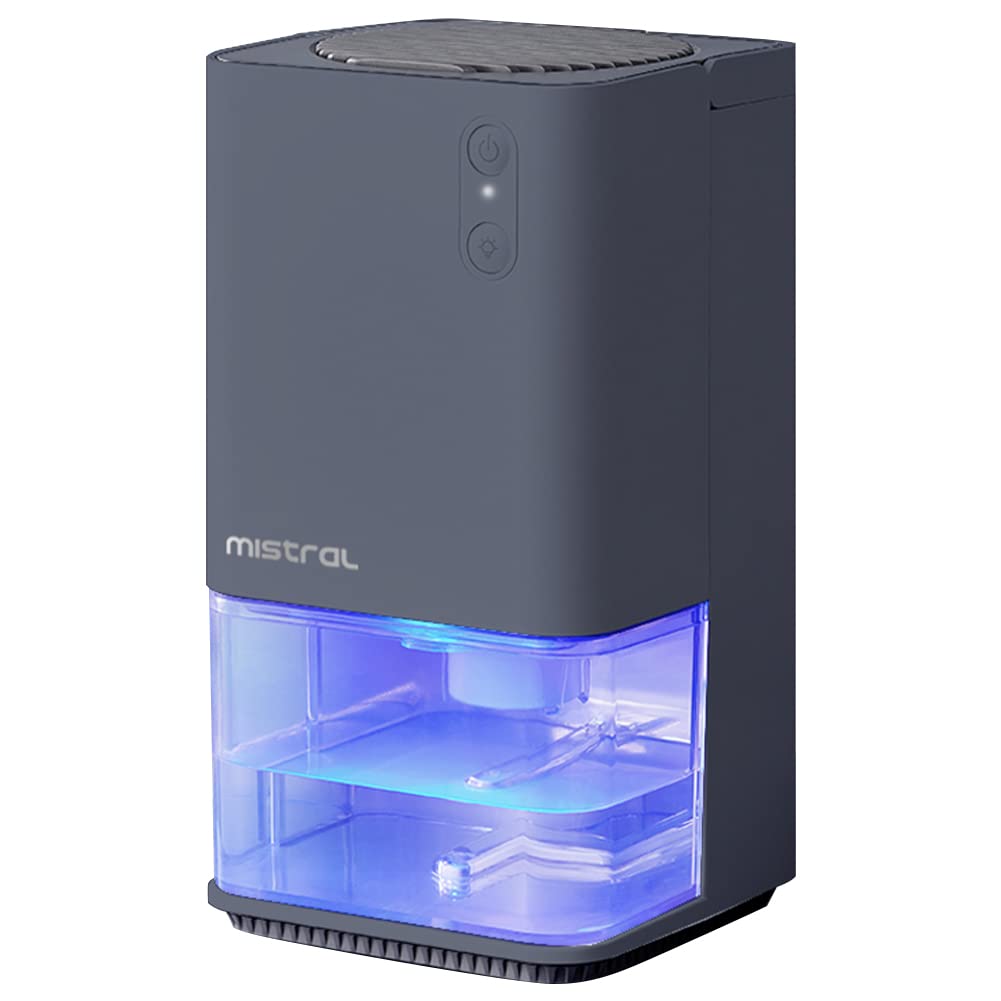
Figure 1: Front view of the Mistral MDH012 Dehumidifier with its transparent water tank illuminated by blue mood lighting.

Figure 2: The Mistral MDH012 Dehumidifier showing its hidden handle extended for convenient portability.
Key Components:
- Control Panel: Power button and mood lighting control.
- Air Intake/Outlet: Vents for air circulation.
- Water Tank: 1.2L transparent tank to collect condensed moisture.
- Hidden Handle: For easy carrying.
- Detachable Filter: For air purification and easy cleaning.
4. Setup
- Unpack: Carefully remove the dehumidifier from its packaging and ensure all components are present.
- Placement: Place the unit on a firm, level surface in the desired room. Ensure there is at least 20 cm (8 inches) of space around the air intake and outlet vents for proper airflow. Avoid placing it near heat sources or in direct sunlight.
- Power Connection: Plug the power adapter into the dehumidifier's power port, then plug the adapter into a suitable electrical outlet.
5. Operation
Power On/Off:
- Press the Power Button on the control panel to turn the dehumidifier ON. The indicator light will illuminate.
- Press the Power Button again to turn the dehumidifier OFF.
Mood Lighting:
- The dehumidifier features inner mood lighting. Press the Light Button to cycle through different lighting modes or turn the light off.
Automatic Shut-off:
The unit is equipped with an automatic power-off function. When the 1.2L water tank is full, the dehumidifier will automatically stop operating, and a red light will flash to alert you to empty the tank.

Figure 3: The transparent water tank of the dehumidifier displaying a red light, indicating it is full and requires emptying.
Semiconductor Refrigeration:
The Mistral MDH012 utilizes semiconductor refrigeration technology. Damp air passes over a semiconductor cooler, causing moisture to condense into water droplets that are collected in the tank. This process efficiently removes humidity from the air.

Figure 4: An internal view diagram of the dehumidifier, highlighting the semiconductor refrigeration technology that extracts moisture from humid air.
6. Maintenance
Emptying the Water Tank:
- When the water tank is full, the dehumidifier will automatically shut off and the red indicator light will flash.
- Carefully pull out the transparent water tank from the front of the unit.
- Pour out the collected water.
- Slide the empty water tank back into the dehumidifier until it clicks into place. The unit will resume operation automatically.
Cleaning the Detachable Filter:
Regular cleaning of the filter is essential for maintaining optimal performance and air quality.
- Turn off and unplug the dehumidifier.
- Locate the detachable filter (usually at the back or side of the unit).
- Gently remove the filter.
- Clean the filter with a soft brush or vacuum cleaner to remove dust and debris. For deeper cleaning, wash it with mild soap and water, then rinse thoroughly.
- Allow the filter to air dry completely before reinserting it into the dehumidifier.
7. Troubleshooting
If you encounter any issues with your Mistral MDH012 Dehumidifier, please refer to the following common problems and solutions:
- Dehumidifier not turning on:
- Check if the power cord is securely plugged into both the unit and the electrical outlet.
- Ensure the power outlet is functioning correctly.
- Dehumidifier not collecting water:
- Verify that the water tank is correctly inserted and not full.
- Check if the room temperature or humidity level is too low for effective dehumidification.
- Ensure the air filter is clean and not blocked.
- Unusual noise during operation:
- Ensure the unit is placed on a stable, level surface to prevent vibrations.
- Check for any foreign objects inside the unit or around the fan.
- Red light flashing, but tank is not full:
- The float switch inside the water tank might be stuck. Remove the tank, clean it, and ensure the float moves freely.
If the problem persists after trying these solutions, please contact Mistral customer support for assistance.
8. Specifications
Below are the technical specifications for the Mistral MDH012 Table Top Dehumidifier:

Figure 5: Detailed product specifications for the Mistral MDH012 Dehumidifier.
| Feature | Specification |
|---|---|
| Brand | MISTRAL |
| Model Name/Number | MDH012 |
| Colour | Dark Blue (Product image shows Grey, but spec says Dark Blue) |
| Capacity (Water Tank) | 1.2 Liters |
| Dehumidification Capacity | Up to 320ml/day (0.32 Liters per Day) |
| Coverage Area | 5~30 m³ (2.9 - 9.7 m²) |
| Noise Level | 41dB |
| Wattage | 33 watts |
| Voltage | 9 Volts |
| Operation Mode | Automatic |
| Product Dimensions (D x W x H) | 13.7D x 13.7W x 28.4H centimetres |
| Material | Metal, Plastic |
| Special Features | Detachable filter, Inner mood lighting, Hidden handle, Automatic power off when water overflow |
9. Warranty and Support
The Mistral MDH012 Table Top Dehumidifier comes with a manufacturer's warranty. Please refer to the warranty card included in your product packaging for specific terms and conditions. For technical support, service, or inquiries, please contact Mistral customer service through their official website or the contact information provided with your purchase.
