
Introduction
The EK-Quantum Vector 2 Trio RTX 3090 Ti GPU Backplate, Nickel, is a precision-engineered component designed to complement the EK-Quantum Vector2 Trio RTX 3090 Ti water block. Crafted from nickel-plated aluminum, this backplate serves multiple functions: it enhances the aesthetic appeal of your graphics card, provides structural rigidity, and contributes to passive cooling for critical components such as the Voltage Regulation Module (VRM) and the GPU core on the backside of the PCB. This manual provides essential information for the proper installation, operation, and maintenance of your backplate.

Image: The EK-Quantum Vector 2 Trio RTX 3090 Ti GPU Backplate, Nickel, showcasing its sleek, metallic finish and overall design.
Setup and Installation
This backplate is specifically designed for use with the EK-Quantum Vector2 Trio RTX 3090 Ti water block. Ensure you have the correct water block before proceeding with installation. The package includes the backplate, necessary mounting mechanisms, and thermal pads.
Included Components:
- EK-Quantum Vector 2 Trio RTX 3090 Ti Backplate - Nickel
- Mounting mechanism (screws, standoffs)
- Thermal pads
Installation Steps:
- Preparation: Before installation, ensure your graphics card and water block are clean and free of dust or debris. Refer to your water block's manual for initial installation steps, as the backplate is typically installed after the water block.
- Thermal Pad Application: Carefully remove the protective film from both sides of the provided thermal pads. Apply the thermal pads to the designated areas on the inner surface of the backplate. Refer to the diagram below for correct placement. These pads facilitate heat transfer from the PCB components to the backplate.
- Backplate Alignment: Gently place the backplate onto the backside of your graphics card, aligning the screw holes on the backplate with the corresponding mounting points on the PCB and water block.
- Securing the Backplate: Using the provided mounting mechanism (screws), carefully secure the backplate. Tighten screws evenly in a cross-pattern to ensure uniform pressure and prevent damage to the PCB. Do not overtighten.
- Final Check: Verify that the backplate is securely attached and that there are no gaps or misalignments. Ensure all thermal pads are making proper contact.

Image: The underside of the backplate, illustrating the precisely machined cutouts for thermal pad placement, ensuring optimal contact with the GPU PCB components.
Operating Principles
Once installed, the EK-Quantum Vector 2 Trio RTX 3090 Ti GPU Backplate operates passively. Its primary functions are:
- Passive Cooling: Through direct contact with the thermal pads, the nickel-plated aluminum backplate draws heat away from the backside of the GPU core and the Voltage Regulation Module (VRM) components. This heat is then dissipated into the surrounding air, contributing to lower operating temperatures and improved stability.
- Structural Support: The robust construction of the backplate provides additional rigidity to the graphics card PCB, helping to prevent sagging and potential long-term stress on the card's components, especially with the added weight of a water block.
- Aesthetic Enhancement: The high-quality nickel finish offers a premium look, complementing the overall appearance of your PC build.
Maintenance
Regular maintenance ensures the longevity and optimal performance of your backplate.
- Cleaning: Periodically inspect the backplate for dust accumulation. Use a soft, dry, lint-free cloth to gently wipe down the surface. For stubborn grime, a slightly damp cloth with distilled water can be used, followed immediately by drying. Avoid abrasive cleaners or solvents, as these can damage the nickel plating.
- Inspection: During routine PC maintenance, check the backplate for any signs of physical damage, scratches, or corrosion. Ensure all mounting screws remain snug. If any issues are observed, refer to the troubleshooting section or contact support.
- Thermal Pads: The thermal pads are designed for long-term use. Replacement is generally not necessary unless the backplate is removed and reinstalled, or if thermal performance degrades significantly. If replacement is needed, use only high-quality thermal pads of the correct thickness.
Troubleshooting
Should you encounter any issues with your backplate, consider the following common scenarios:
- Poor Thermal Performance: If you suspect the backplate is not effectively cooling, ensure the thermal pads are correctly applied and making full contact with both the backplate and the PCB components. Re-check the tightness of the mounting screws to ensure adequate pressure.
- Backplate Not Fitting Correctly: Double-check that you have the correct backplate model for your specific graphics card and water block (EK-Quantum Vector2 Trio RTX 3090 Ti). Ensure no cables or other components are obstructing the backplate's seating.
- Loose or Vibrating Backplate: Verify that all mounting screws are securely tightened. If the issue persists, inspect the mounting mechanism for any damaged parts.
If these steps do not resolve your issue, please refer to the warranty and support section for further assistance.
Specifications
| Feature | Detail |
|---|---|
| Product Name | EK-Quantum Vector 2 Trio RTX 3090 Ti GPU Backplate, Nickel |
| Model Number | 3831109897393 |
| Material | Nickel-plated aluminum |
| Compatibility | EK-Quantum Vector2 Trio RTX 3090 Ti water block |
| Product Dimensions | 3.94 x 1.97 x 0.5 inches (L x W x H) |
| Weight | 2.2 Pounds |
| Manufacturer | EKWB |
| Date First Available | August 2, 2022 |
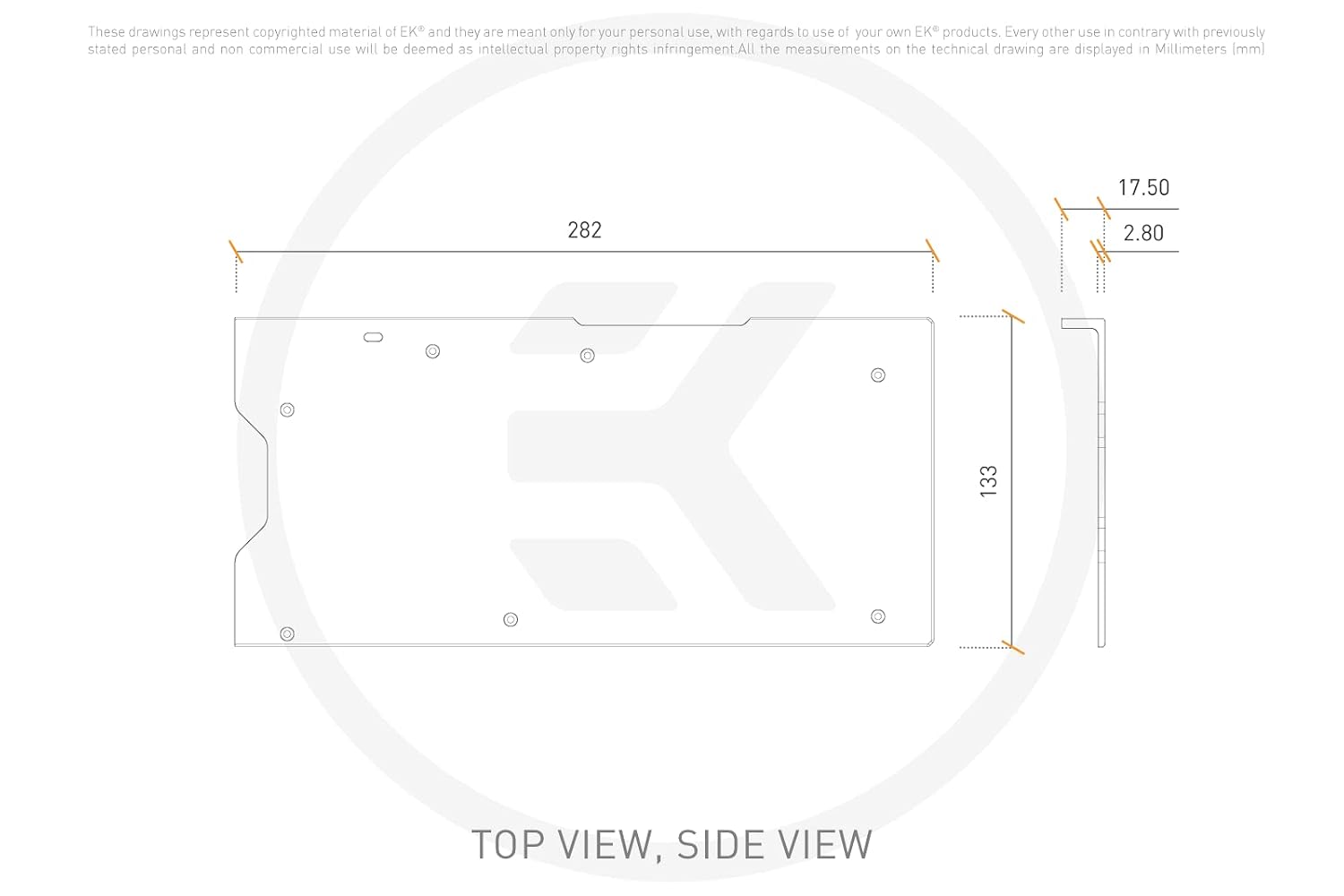
Image: Technical drawing illustrating the top and side dimensions of the backplate in millimeters.
Warranty and Support
For detailed warranty information, product support, or to contact customer service, please visit the official EKWB website. Keep your proof of purchase for warranty claims.
Official Website: www.ekwb.com


