1. Introduction
The AIYIMA A08 PRO is a high-fidelity Class D stereo digital audio amplifier designed for passive speakers in home audio systems. It features a TPA3255 amplifier chip, Bluetooth 5.1 connectivity, and a classic VU meter for visual feedback. This manual provides detailed instructions for setting up, operating, and maintaining your A08 PRO amplifier to ensure optimal performance.
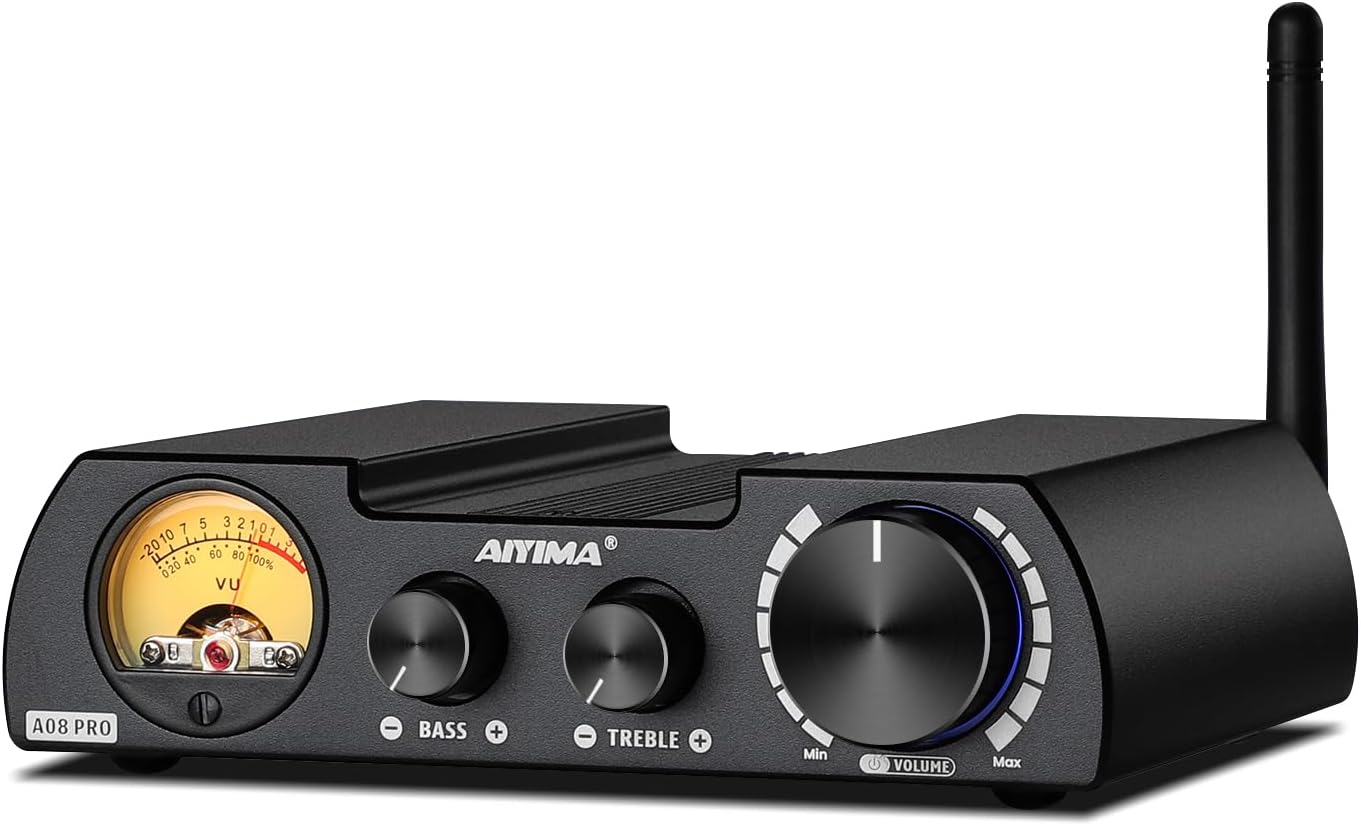
Figure 1: AIYIMA A08 PRO TPA3255 Power Amplifier
2. What's in the Box
- 1x AIYIMA A08 PRO Amplifier
- 1x DC 36V 6A Power Adapter
- 1x Bluetooth Antenna
- 1x User Manual

Figure 2: Package Contents
3. Product Overview
3.1 Front Panel
- VU Meter: Displays audio signal level, providing a vintage visual experience.
- Bass Control: Adjusts low-frequency output.
- Treble Control: Adjusts high-frequency output.
- Volume/Power Knob: Controls overall volume and acts as the power switch (press to turn on/off).
3.2 Rear Panel
- Bluetooth Antenna Connector: For attaching the included Bluetooth antenna.
- RCA Audio Input: For connecting external audio sources via RCA cables.
- 3.5mm AUX Output: For connecting to active speakers, active amplifiers, or active subwoofers.
- Speaker Output Terminals: For connecting passive speakers (left and right channels).
- DC Power Input (24V-48V): For connecting the power adapter.

Figure 3: Front and Rear Panel Layout
3.3 Dimensions
The A08 PRO has compact dimensions, making it suitable for various setups.
- Product Dimensions: 5.98 x 4.8 x 1.57 inches (152mm x 122mm x 40mm)
- Item Weight: 2.31 pounds (692.5g)

Figure 4: Product Dimensions
4. Setup
4.1 Connecting Speakers
- Ensure the A08 PRO is powered off.
- Connect your passive speakers to the Speaker Output Terminals on the rear panel. Match the positive (+) and negative (-) terminals correctly for each speaker.
4.2 Connecting Audio Sources
RCA Input
- Connect your audio source (e.g., CD player, DAC, TV) to the RCA Audio Input terminals on the rear panel using RCA cables.
Bluetooth Input
- Screw the included Bluetooth antenna onto the RF connector on the rear panel.
- Ensure Bluetooth is enabled on your source device (smartphone, tablet, PC).
- Search for "AIYIMA" in your device's Bluetooth settings and pair.
4.3 Connecting a Subwoofer or External Amplifier (AUX OUT)
- Connect the 3.5mm AUX Output on the rear panel to the input of an active subwoofer or another active amplifier. This allows for building a 2.1 channel system or expanding your audio setup.
4.4 Power Connection
- Connect the included DC 36V 6A power adapter to the DC Power Input (24V-48V) on the rear panel.
- Plug the power adapter into a suitable wall outlet.

Figure 5: Various Connection Scenarios
Video 1: Connecting AIYIMA A08 PRO Power Amplifier to an A07 Amplifier. This video demonstrates how to connect the A08 PRO to another amplifier, showcasing its versatility in a multi-component audio setup.
Video 2: AIYIMA T8 Tube Preamplifier matching the A08 PRO Power Amp. This video illustrates how to integrate the A08 PRO with a T8 tube preamplifier for enhanced audio performance, demonstrating the connection process and resulting sound.
5. Operating Instructions
5.1 Power On/Off
Press the Volume/Power knob on the front panel to turn the amplifier on or off.
5.2 Volume Control
Rotate the Volume/Power knob clockwise to increase volume and counter-clockwise to decrease volume.
5.3 Tone Controls
Use the Bass and Treble knobs on the front panel to adjust the low and high frequencies according to your preference.
5.4 Input Selection
The A08 PRO automatically prioritizes Bluetooth input if a paired device is connected. If Bluetooth is disconnected, it will automatically switch to the RCA input. The color of the light around the Volume/Power knob indicates the active input:
- Red light: RCA Input active
- Blue light: Bluetooth Input active
6. Power Supply Considerations
The A08 PRO comes with a DC 36V 6A power adapter. To achieve the maximum rated power output of 300W per channel (into 4Ω), an upgraded linear power supply with DC 48V and current above 10A is required. Ensure any upgraded power supply is a linear type and not an industrial power supply.

Figure 6: Power Output vs. Supply Power and Impedance
7. Specifications
| Feature | Specification |
|---|---|
| Model Number | A08 Pro |
| Amplifier Chip | TPA3255 |
| Power Output (Max) | 300W + 300W (into 4Ω with 48V/12.5A power supply) |
| Speaker Impedance | 3-8Ω |
| Bluetooth Version | 5.1 (Qualcomm QCC5125 Chip) |
| Supported Bluetooth Codecs | SBC, AAC, APTX, APTX-LL, APTX-HD, LDAC |
| Audio Inputs | Bluetooth, RCA |
| Audio Outputs | Speaker Output, 3.5mm AUX Output |
| Product Dimensions | 5.98 x 4.8 x 1.57 inches |
| Item Weight | 2.31 pounds |
| Manufacturer | YIMA TECH |
8. Troubleshooting
8.1 No Sound from RCA Input
If you are not getting sound from the RCA input, check the following:
- The A08 PRO prioritizes Bluetooth input. If a previously paired Bluetooth device is within range and has its Bluetooth enabled, the amplifier may automatically connect to it, overriding the RCA input.
- To switch to RCA input, ensure no Bluetooth device is actively paired with the A08 PRO. You may need to manually disconnect or turn off Bluetooth on your source device (e.g., smartphone) to force the amplifier to switch to RCA.
- Verify that the RCA cables are securely connected to both the amplifier and the audio source.
- Check the volume levels on both the amplifier and your audio source.
Video 3: Bluetooth Auto-Connect Behavior. This video highlights the amplifier's tendency to auto-connect to Bluetooth devices and how it affects RCA input selection, providing a visual guide for troubleshooting.
9. Maintenance
- Keep the amplifier in a dry, well-ventilated area away from direct sunlight, heat sources, and moisture.
- Clean the exterior with a soft, dry cloth. Do not use liquid cleaners or solvents.
- Ensure proper airflow around the unit to prevent overheating.
10. Warranty & Support
AIYIMA provides a worry-free warranty and technical services for its products. For any questions or support needs, please refer to the contact information provided with your purchase or visit the official AIYIMA website.
Video 4: About AIYIMA Audio Company. This video provides an overview of AIYIMA, its history, and its commitment to HiFi audio equipment, offering insight into the brand's background and values.


