1. Introduction
This manual provides essential instructions for the safe and effective use of your BLACK+DECKER BHSM15FX10 Steam Matrix Multipurpose Steam Cleaner. This versatile system is designed for various cleaning tasks, converting from a steam mop to a handheld steamer. It utilizes steam to clean and sanitize surfaces without the need for harsh chemicals.
The BLACK+DECKER BHSM15FX10 is engineered to kill up to 99.9% of germs on sealed hard surfaces such as hardwood, ceramic tile, and vinyl floors. Please read this manual thoroughly before operating the appliance and retain it for future reference.
2. Important Safety Instructions
Always follow basic safety precautions when using electrical appliances to reduce the risk of fire, electric shock, and personal injury. This includes:
- Read all instructions before using the appliance.
- Use the appliance only for its intended household use as described in this manual.
- Do not immerse the appliance in water or other liquids.
- Do not leave the appliance unattended when plugged in. Unplug from outlet when not in use and before servicing.
- Do not allow to be used as a toy. Close attention is necessary when used by or near children.
- Use only manufacturer's recommended attachments.
- Do not use with a damaged cord or plug. If appliance is not working as it should, has been dropped, damaged, left outdoors, or dropped into water, return it to a service center.
- Do not pull or carry by cord, use cord as a handle, close a door on cord, or pull cord around sharp edges or corners. Keep cord away from heated surfaces.
- Do not unplug by pulling on cord. To unplug, grasp the plug, not the cord.
- Do not handle plug or appliance with wet hands.
- Do not put any object into openings. Do not use with any opening blocked; keep free of dust, lint, hair, and anything that may reduce air flow.
- Keep hair, loose clothing, fingers, and all parts of body away from openings and moving parts.
- Turn off all controls before unplugging.
- Use extra care when cleaning on stairs.
- Do not use to pick up flammable or combustible liquids, such as gasoline, or use in areas where they may be present.
- Do not pick up anything that is burning or smoking, such as cigarettes, matches, or hot ashes.
- Do not use without dust bag and/or filters in place.
- Steam is hot. Avoid direct contact with steam.
3. Product Components
Your BLACK+DECKER BHSM15FX10 Steam Matrix comes with the following components and attachments:
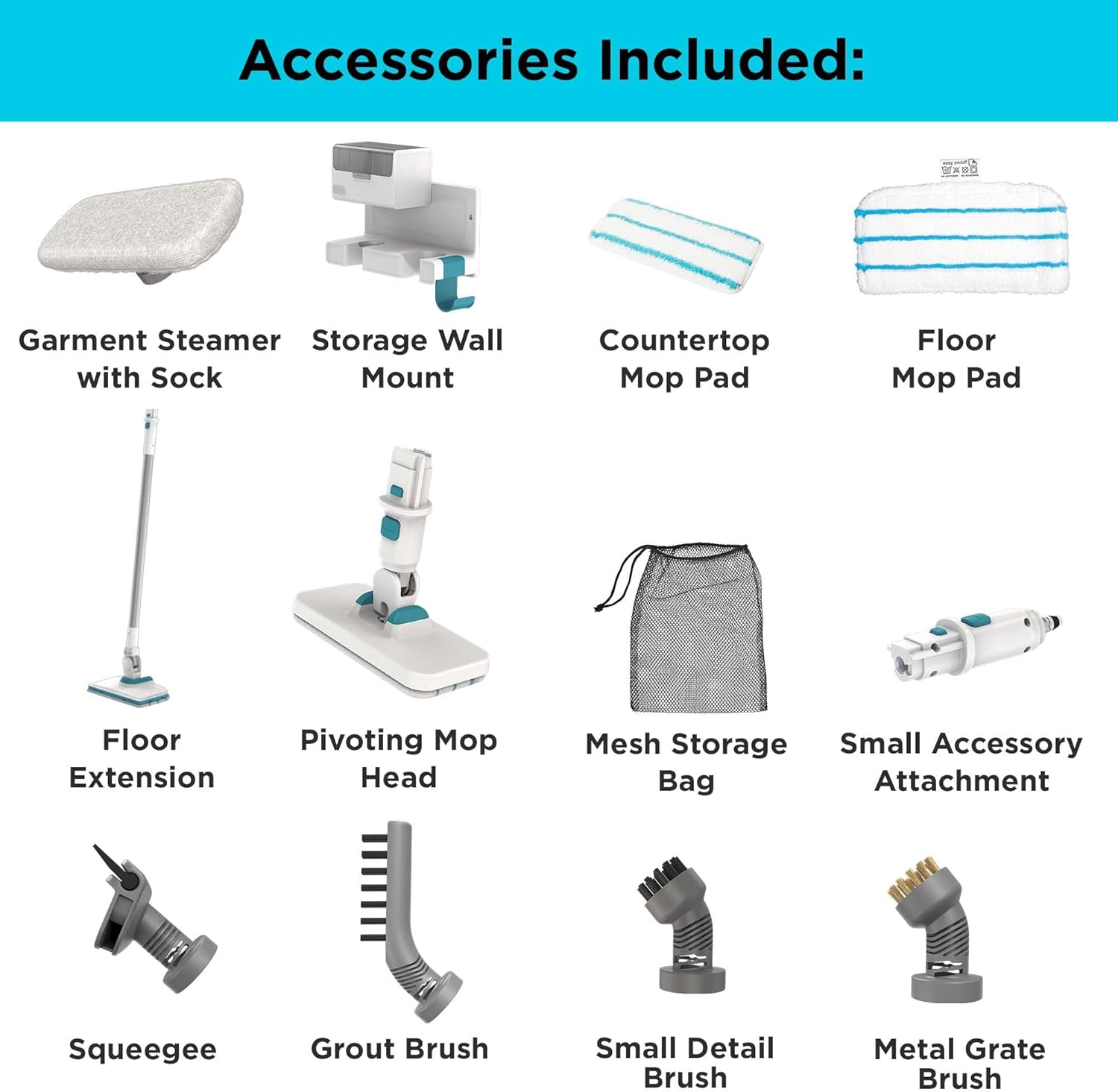
Figure 3.1: All Included Accessories. This image displays the complete set of accessories that come with the steam cleaner, including various brushes, pads, and the storage wall mount.

Figure 3.2: Complete Steam Cleaner System. The main unit is shown assembled in mop configuration, with all seven attachments displayed alongside it.
- Multipurpose Steam-Mop Unit: The main body of the steam cleaner, convertible for handheld or mop use.
- Floor Extension: Long handle and base for steam mopping floors.
- Microfiber Steam Mop Pad (SMP20): For floor cleaning.
- Pivoting Small Mop: Compact mop head for smaller areas and handheld use.
- Small Microfiber Mop Pad (SMP20): For the pivoting small mop.
- Accessory Adapter: Connects various brushes and tools to the handheld unit.
- Small Detail Brush: For focused scrubbing on small, tough spots.
- Grout Brush: Specifically designed for cleaning grout lines.
- Metal Grate Brush: For cleaning metal surfaces like oven grates or BBQ grills.
- Window Squeegee: For streak-free cleaning of windows and glass surfaces.
- Garment Steamer: For refreshing clothing and upholstery.
- Accessory Bag: For convenient storage of smaller attachments.
- On-Pole Accessory Storage: Attaches to the mop pole for easy access to tools.
- Wall Mount Storage: For organized storage of the entire system.
4. Assembly and Setup
The BLACK+DECKER BHSM15FX10 requires some assembly before first use. Follow these steps:
4.1 Assembling the Steam Mop
- Attach Floor Extension: Insert the floor extension pole into the main steam-mop unit until it clicks securely into place.
- Attach Mop Head: Connect the floor mop head to the bottom of the floor extension. Ensure it is firmly attached.
- Attach Microfiber Pad: Securely attach a microfiber steam mop pad to the bottom of the floor mop head. The pad should adhere firmly to the hook-and-loop fasteners.
4.2 Filling the Water Tank

Figure 4.1: Assembly Overview. This image illustrates how the main unit connects to the floor extension and highlights the various interchangeable attachments and the wall mount storage system.
- Ensure the appliance is unplugged from the power outlet.
- Locate the water tank cap on the main unit.
- Open the cap and carefully fill the water tank with clean tap water. Distilled or demineralized water is recommended to prevent mineral buildup, especially in hard water areas. Do not overfill. The tank capacity is 350 milliliters.
- Close the water tank cap securely.
4.3 Wall Mount Installation (Optional)
The included wall mount provides convenient storage. Choose a suitable location on a sturdy wall. Use appropriate hardware (not included) to securely fasten the wall mount. Refer to the full PDF user manual for detailed installation instructions.
5. Operating Instructions
Before operating, ensure the water tank is filled and the desired attachment is securely in place.
5.1 General Operation
- Plug the appliance into a grounded electrical outlet.
- The indicator light will illuminate, signaling that the unit is heating up. The steam cleaner heats up in approximately 30 seconds.
- Once the indicator light changes (refer to your specific unit's light indicators for 'ready' status), the steamer is ready for use.
- Press the steam trigger or button to release steam. Some models may have continuous steam or on-demand steam.
5.2 Using as a Steam Mop

Figure 5.1: Steam Mop in Action. This image shows the steam mop being used on a dark tiled floor, demonstrating its effectiveness in cleaning large floor areas.
- Ensure the floor extension and microfiber mop pad are attached.
- Plug in the unit and wait for it to heat up.
- Move the steam mop slowly and steadily across the sealed hard floor surface. The steam will clean and sanitize as you go.
- For heavily soiled areas, hold the mop over the spot for a few seconds to allow the steam to penetrate.
- The pivoting mop head allows for easy maneuverability around furniture and into corners.
5.3 Using as a Handheld Steamer with Attachments
To convert to a handheld steamer, detach the main unit from the floor extension. Attach the accessory adapter, then select and attach the desired cleaning tool.

Figure 5.2: Handheld Cleaning. This image demonstrates the handheld steamer being used with various brush attachments to clean a stovetop and a bathroom sink, effectively removing dirt and grime.

Figure 5.3: Garment Steamer Use. The garment steamer attachment is shown in use, refreshing a blue shirt, highlighting its versatility beyond floor cleaning.
- Small Detail Brush: Ideal for cleaning tight spaces, crevices, and stubborn spots on various surfaces.
- Grout Brush: Specifically designed with stiff bristles to effectively clean and refresh grout lines between tiles.
- Metal Grate Brush: Use for cleaning tough grease and grime from metal surfaces like BBQ grills or oven racks.
- Window Squeegee: Attach for streak-free cleaning of windows, mirrors, and other glass surfaces.
- Garment Steamer: Use to remove wrinkles and refresh fabrics on clothing, curtains, and upholstery. Hold the steamer a few inches away from the fabric and move it slowly.
- Pivoting Small Mop: For cleaning sealed countertops, bathroom walls, and other smaller, flat surfaces.
6. Maintenance and Care
Proper maintenance ensures the longevity and optimal performance of your steam cleaner.
6.1 Cleaning the Microfiber Pads
The microfiber pads are machine washable. Remove them from the mop head after each use. Wash with similar colors in warm water. Do not use bleach or fabric softeners, as these can damage the microfiber material and reduce its effectiveness. Air dry or tumble dry on low heat.
6.2 Descaling the Water Tank
Over time, mineral deposits can build up in the water tank, especially if using hard tap water. To descale:
- Unplug the appliance and allow it to cool completely.
- Empty any remaining water from the tank.
- Fill the tank with a solution of 50% white vinegar and 50% water.
- Allow the solution to sit in the tank for several hours or overnight.
- Empty the solution and rinse the tank thoroughly with clean water several times.
- Run a tank of clean water through the steamer to flush out any remaining vinegar.
6.3 Cleaning Attachments
Wipe down all attachments with a damp cloth after use. For brushes, rinse under water and allow to air dry. Ensure all parts are dry before storing.
6.4 Storage

Figure 6.1: Comprehensive Storage. The steam cleaner and its attachments are neatly organized on the wall mount, demonstrating an efficient storage solution.
Store the steam cleaner and its accessories in a dry, safe place. The included wall mount and accessory bag provide convenient and organized storage options.
7. Troubleshooting
If you encounter issues with your steam cleaner, refer to the following common problems and solutions:
| Problem | Possible Cause | Solution |
|---|---|---|
| No steam or low steam output |
|
|
| Water leaking from unit |
|
|
| Unit not turning on |
|
|
| Mop pad not staying on |
|
|
For issues not listed here, or if solutions do not resolve the problem, please contact BLACK+DECKER customer support.
8. Technical Specifications
| Feature | Specification |
|---|---|
| Model Name | BLACK+DECKER Steam Matrix 10 Piece (BHSM15FX10) |
| Item Model Number | BHSM15FX10 |
| Brand | BLACK+DECKER |
| Power Source | Corded Electric |
| Wattage | 1200 watts |
| Tank Volume / Capacity | 350 Milliliters |
| Heat Time | 0.5 Minutes (30 seconds) |
| Form Factor | Handheld |
| Color | White |
| Item Weight | 12.03 pounds |
| Assembly Required | Yes |
| Number of Pieces | 13 (including main unit and accessories) |
| Care Instructions | Hand Wash (for certain components like pads) |
| UPC | 885911819732 |
9. Warranty and Customer Support
For detailed warranty information, please refer to the official BLACK+DECKER warranty statement included with your product packaging or visit the official BLACK+DECKER website. Warranty terms typically cover defects in materials and workmanship for a specified period from the date of purchase.
If you require assistance, have questions about your product, or need to report a defect, please contact BLACK+DECKER customer support. You can often find contact information on the manufacturer's website or in the full user manual.
For a comprehensive guide, you can also refer to the official PDF user manual: Download User Manual (PDF)


