
Introduction
This manual provides essential instructions for the safe and proper operation, maintenance, and troubleshooting of your LEXiBOOK Crosslander Pro RC Fire Truck, Model RCP20. Please read this manual thoroughly before first use and retain it for future reference.
Safety Information
Recommended Age: Suitable for users aged 6 years and older.
Battery Safety: Do not mix old and new batteries. Do not mix alkaline, standard (carbon-zinc), or rechargeable (nickel-cadmium) batteries. Insert batteries with correct polarity. Remove exhausted batteries promptly. Do not short-circuit battery terminals. Remove batteries if the product is not used for an extended period.
Water Use: Use only clean tap water in the water tank. Do not spray water towards electrical outlets or other electronic devices. Avoid spraying water at people or animals.
Supervision: Adult supervision is recommended during operation, especially when using the water spray function.
Choking Hazard: This product contains small parts and is not suitable for children under 3 years due to choking hazards.
Package Contents
Ensure all items listed below are present in your package:
1 x LEXiBOOK Crosslander Pro RC Fire Truck
1 x Remote Control
1 x Rechargeable Battery (for the truck)
1 x USB Charging Cable
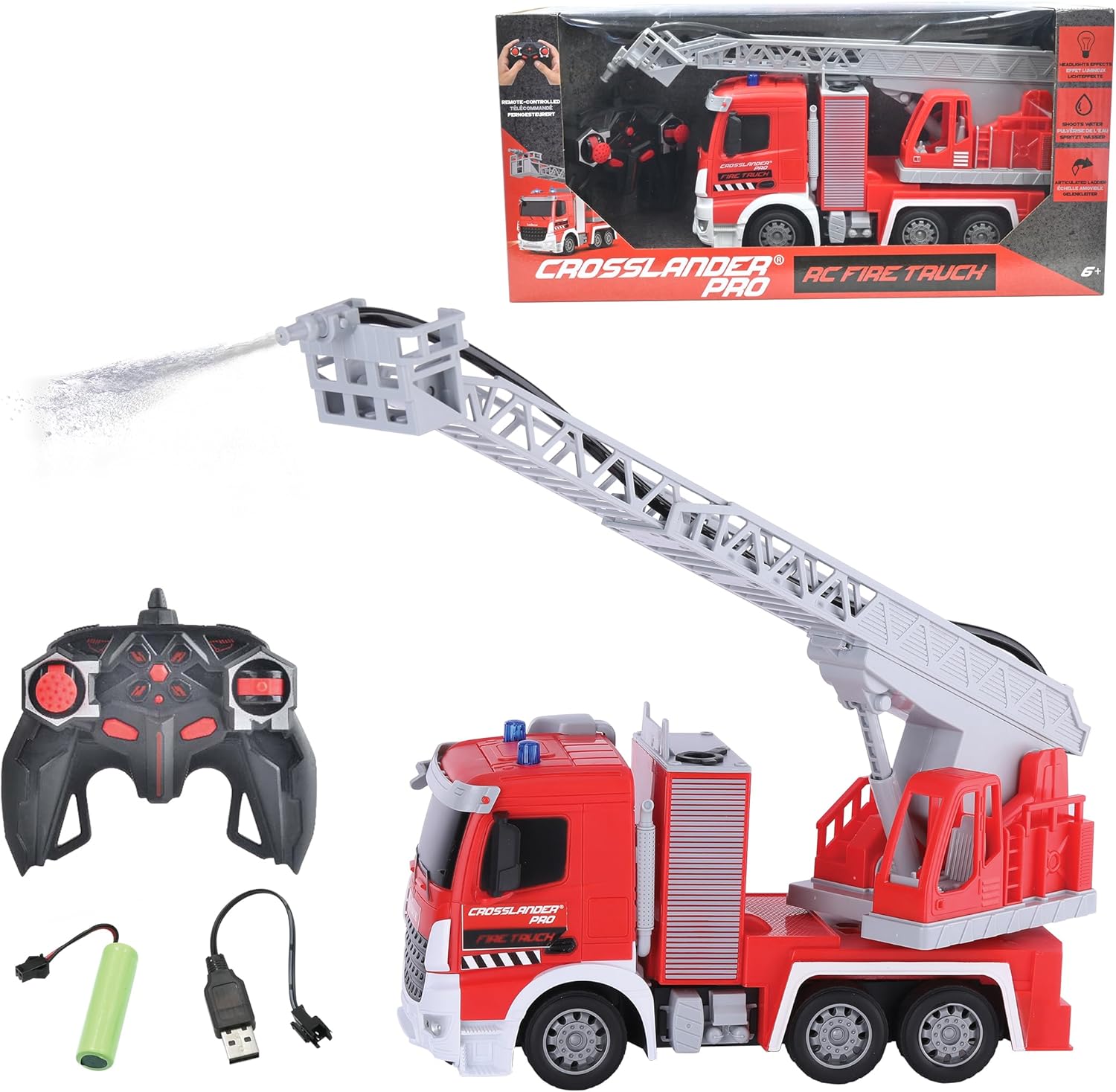
Image: The LEXiBOOK Crosslander Pro RC Fire Truck with its remote control, rechargeable battery, and USB charging cable.
Setup
1. Battery Installation
Fire Truck Battery: Locate the battery compartment on the underside of the fire truck. Open the compartment cover. Connect the included rechargeable battery to the truck's connector. Place the battery inside the compartment and close the cover securely.
Remote Control Batteries: Locate the battery compartment on the back of the remote control. Open the cover. Insert 2 x LR6 / AA batteries (not included) into the compartment, ensuring correct polarity (+/-). Close the cover securely.
2. Charging the Fire Truck Battery
Connect the rechargeable battery to the USB charging cable.
Plug the USB charging cable into a standard USB power adapter (e.g., computer USB port, wall adapter, not included).
The charging indicator light (if present on the cable or adapter) will show the charging status. Charging time is approximately 2 hours.
Once fully charged, disconnect the battery from the charger.
3. Filling the Water Tank
Locate the water tank opening on the fire truck (typically on the top or side, near the ladder base).
Carefully pour clean tap water into the tank. Do not overfill.
Securely close the water tank cap.

Image: A detailed view of the fire truck, highlighting the ladder and front section where the water tank is typically located.
Operating Instructions
1. Powering On/Off
Turn on the fire truck by sliding the power switch (usually on the underside or rear) to the "ON" position. Turn on the remote control using its power switch. The indicator lights on both devices should illuminate.
2. Pairing (if necessary)
The truck and remote control should automatically pair. If not, turn both off and then on again, ensuring they are close to each other. The 2.4 GHz frequency ensures optimized range and reduced interference.
3. Remote Control Functions
Video: An official demonstration of the LEXiBOOK Crosslander Pro RC Fire Truck's features, including remote control operation, ladder movement, and water spray function.
Familiarize yourself with the remote control layout:
Forward/Backward: Use the left joystick/button to move the truck forward or backward.
Turn Left/Right: Use the right joystick/button to steer the truck left or right.
Ladder Rising/Decline: Specific buttons on the remote control allow you to raise or lower the articulated ladder.
Water Spray: A dedicated button (often requiring a long press) activates the water spray function from the articulated hose.
Car Lights: The truck features light effects, including a rotating beacon and headlights, which may be activated automatically or via a remote button.
Automatic Presentation (Demo Mode): Press the designated button to activate demo mode, where the truck performs a sequence of its functions automatically.
Flexible Steering: The remote control allows for precise and responsive steering.

Image: The RC fire truck actively spraying water from its fully extended and articulated ladder.
Maintenance
Cleaning: Wipe the truck and remote control with a soft, dry cloth. Do not use harsh chemicals or immerse in water.
Water Tank: After use, empty any remaining water from the tank to prevent mold or residue buildup. Allow it to air dry.
Storage: Store the fire truck and remote control in a cool, dry place away from direct sunlight. Remove batteries from both devices if storing for extended periods.
Troubleshooting
Truck Not Responding:
Check if both the truck and remote control are powered on.
Ensure batteries are correctly installed and charged in both devices.
Try replacing the remote control's AA batteries.
Recharge the truck's rechargeable battery.
Ensure the truck and remote are within operating range (approximately 2.4 GHz frequency range).
Water Spray Not Working:
Check if the water tank is filled with water.
Ensure there are no blockages in the hose or nozzle.
Verify that the water spray button on the remote control is being pressed correctly (e.g., long press if required).
Ladder Not Moving:
Check for any physical obstructions preventing the ladder from moving.
Ensure the truck's battery has sufficient charge.
Specifications
| Feature | Detail |
|---|---|
| Model Number | RCP20 |
| Brand | LEXiBOOK |
| Scale | 1:24 |
| Product Dimensions | 14.96 x 4.72 x 7.48 inches |
| Item Weight | 1.71 pounds |
| Power Supply (Truck) | 1 x Rechargeable Battery (included) |
| Power Supply (Remote) | 2 x LR6 / AA Batteries (not included) |
| Charging Time | Approximately 2 hours |
| Playing Time | Approximately 20 minutes |
| Frequency | 2.4 GHz |
| Maximum Speed | 3 km/hr |
| Manufacturer Recommended Age | 6 years and up |
Warranty and Support
For warranty information or technical support, please refer to the contact details provided on the product packaging or visit the official LEXiBOOK website. Keep your purchase receipt as proof of purchase.