
1. Introduction
Thank you for choosing the Briidea Automatic Power Switch HSSS-01-1-11. This device is designed to safely and automatically share a single 240-volt NEMA 10-30 dryer outlet between your electric vehicle (EV) charger and your clothes dryer. It eliminates the need for expensive electrical panel upgrades or new circuit installations, providing a convenient and efficient solution for EV charging at home.
This manual provides essential information for the safe installation, operation, and maintenance of your Briidea Automatic Power Switch. Please read it thoroughly before use and retain it for future reference.
2. Important Safety Information
WARNING: Electrical shock hazard. Improper installation or use can result in serious injury or death. Always follow local electrical codes and consult a qualified electrician if you are unsure about any part of the installation process.
- Do not attempt to open or modify the device.
- Ensure the main power supply to the dryer outlet is OFF before installation.
- This device is designed for NEMA 10-30 outlets only. Do not use with other outlet types.
- Do not exceed the maximum continuous load of 25 amps or maximum safe charging rate of 24 amps.
- Keep the device away from water and extreme temperatures.
- Ensure all connections are secure and properly insulated.
3. Package Contents
Verify that all items are present in the package:
- Briidea Automatic Power Switch (Model HSSS-01-1-11)
- Mounting Hardware (screws, anchors)
- User Manual (this document)
4. Product Features
- Automatic Power Switching: Intelligently detects dryer operation and automatically switches power between the dryer and EV charger. Prioritizes the dryer.
- Fast EV Charging: Utilizes existing 240-volt NEMA 10-30 outlet for significantly faster EV charging compared to standard 120-volt outlets.
- Real-Time Power Display: Integrated LCD screen shows power (W), accumulated KWh, voltage (V), and amperage (A) in real-time.
- LED Indicator: Provides visual confirmation when the EV is actively charging.
- Enhanced Safety: Features an internal circuit breaker for overload protection and a new algorithm for accurate dryer action identification and switching time protection.
- Reduced Noise: Utilizes improved electronic components to minimize switching sound.
- High Power Support: Supports a maximum continuous load of 25 amps and a maximum power of 5.76 KW.
- Compatibility: Designed for NEMA 10-30 plug input and two NEMA 10-30 outlets (one for dryer, one for EV).
5. Setup and Installation
Before beginning installation, ensure the main circuit breaker for the dryer outlet is switched OFF. Verify there is no power at the outlet using a voltage tester.
5.1 Mounting the Device
- Choose a suitable location near your existing NEMA 10-30 dryer outlet, ensuring it is dry and protected from physical damage.
- Mark the desired mounting points on the wall using the device as a template.
- Drill pilot holes at the marked locations. Insert wall anchors if necessary.
- Secure the Briidea Automatic Power Switch to the wall using the provided screws.
5.2 Connecting the Power Switch
- Plug the NEMA 10-30 input plug of the Briidea Automatic Power Switch into your existing 240-volt NEMA 10-30 dryer wall outlet.
- Plug your clothes dryer's NEMA 10-30 plug into the "DRYER" outlet on the Briidea Automatic Power Switch. This is typically the left-side outlet.
- Plug your EV charger's NEMA 10-30 plug into the "EV" outlet on the Briidea Automatic Power Switch. This is typically the right-side outlet.
- Ensure all connections are firm and secure.

Image: Briidea Automatic Power Switch connected to a dryer and an EV charger, illustrating the setup.

Image: A visual comparison showing the difference in charging speed and range per hour between 120V (Level 1) and 240V (Level 2) charging for electric vehicles.
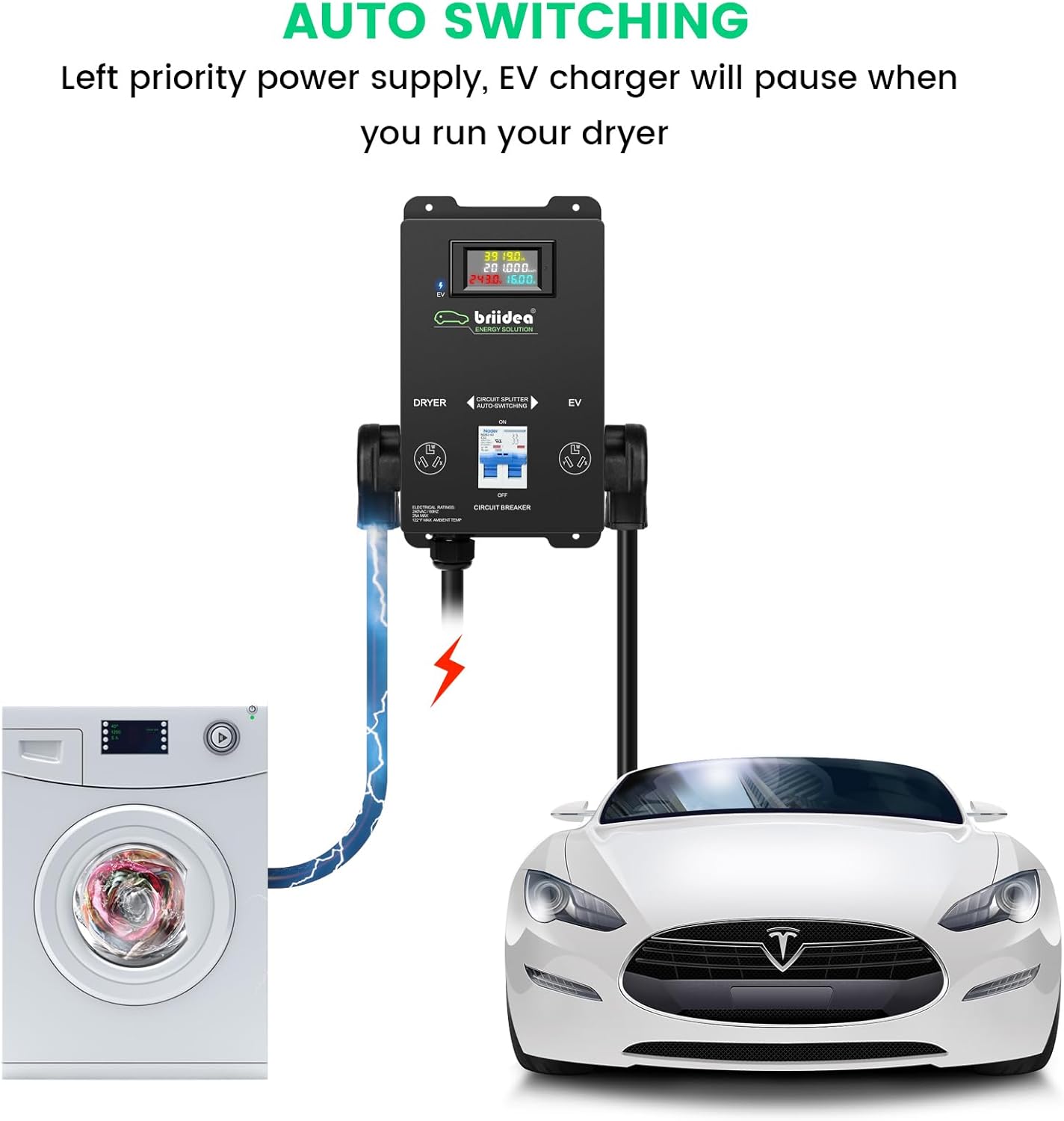
Image: Diagram illustrating the automatic power switching mechanism, showing power being supplied to the dryer, then automatically switching to the EV once the dryer cycle is complete.
6. Operating Instructions
6.1 Initial Power-Up
- Once all connections are made, switch the main circuit breaker for the dryer outlet back ON.
- The LCD screen on the Briidea Automatic Power Switch will illuminate, displaying real-time parameters such as voltage and amperage.
- The device will automatically detect if the dryer or EV charger is drawing power.
6.2 Automatic Switching Function
- Dryer Priority: The device is designed to prioritize power to the dryer. When the dryer is in operation, power will be directed to the "DRYER" outlet. The EV charger will pause or not receive power during this time.
- EV Charging: Once the dryer cycle is complete and the dryer is no longer drawing significant power, the device will automatically switch power to the "EV" outlet, allowing your electric vehicle to begin or resume charging.
- Real-Time Display: Monitor the LCD screen for current power usage, accumulated KWh, voltage, and amperage. The LED indicator will light up when the EV is actively charging.

Image: Close-up view of the Briidea Automatic Power Switch, highlighting the LCD display, LED indicator, circuit breaker, appliance socket, EV socket, and NEMA 10-30 input plug.
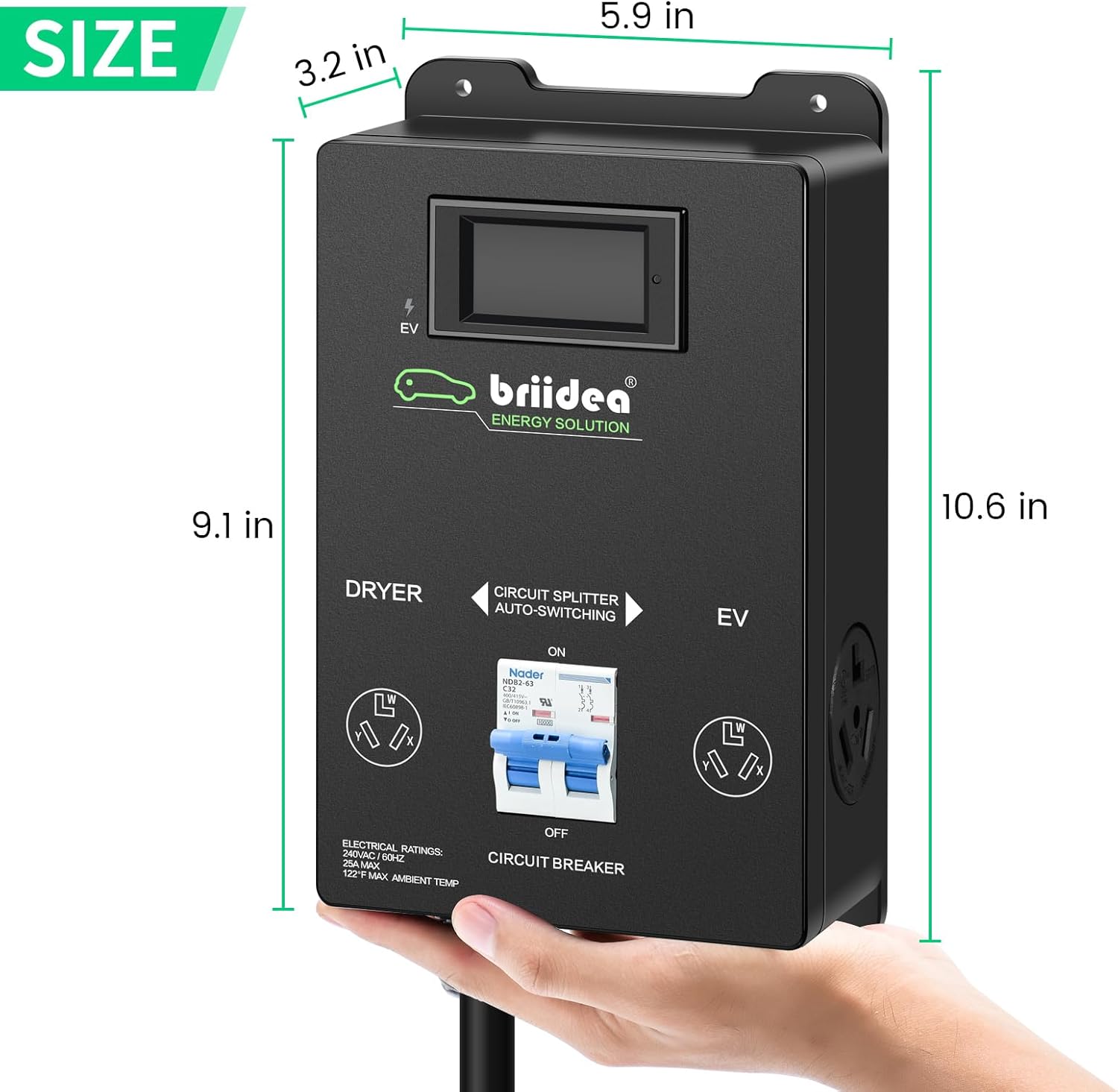
Image: Diagram showing the physical dimensions of the Briidea Automatic Power Switch in inches.

Image: Illustration of two electric vehicles in a garage, demonstrating how the power switch can manage charging for multiple EVs in sequence (left first).
7. Maintenance
- Cleaning: Disconnect power before cleaning. Wipe the exterior with a dry, soft cloth. Do not use liquid cleaners or solvents.
- Inspection: Periodically inspect the device, plugs, and cables for any signs of damage, wear, or overheating. If any damage is found, discontinue use immediately and contact customer support.
- Firmware Updates: This device does not require user-initiated firmware updates.
8. Troubleshooting
| Problem | Possible Cause | Solution |
|---|---|---|
| Device has no power / LCD is off. | Main circuit breaker is off, or device is unplugged. | Ensure the main circuit breaker for the dryer outlet is ON. Check that the device is securely plugged into the wall outlet. |
| EV is not charging when dryer is off. | EV charger not properly connected, or EV battery is full. | Ensure the EV charger is securely plugged into the "EV" outlet. Check your EV's charging status. Verify the internal circuit breaker on the device is ON. |
| Dryer is not receiving power. | Dryer not properly connected, or internal circuit breaker tripped. | Ensure the dryer is securely plugged into the "DRYER" outlet. Check the internal circuit breaker on the device; if tripped, reset it. |
| LCD shows "HHHHH" for KWh. | Temporary power interruption or internal error. | This typically does not affect the core functionality. If it persists and is a concern, contact customer support. |
9. Specifications
| Feature | Detail |
|---|---|
| Model Number | HSSS-01-1-11 |
| Brand | briidea |
| Product Dimensions | 5.08 x 2.54 x 2.54 cm (2.0 x 1.0 x 1.0 inches) |
| Item Weight | 136.08 g (0.3 Pounds) |
| Operation Mode | Automatic |
| Current Rating | 25 Amps (Maximum Continuous Load) |
| Operating Voltage | 240 Volts (AC) |
| Connector Type | NEMA 10-30 (Input and Output) |
| Switch Type | Relay |
| Wattage | 5760 watts (Maximum Power) |
| Material | Plastic, Copper (Contact Material) |
| International Protection Rating | IP00 |
| Specification Met | CSA |
10. Warranty and Support
Briidea products are manufactured to high-quality standards. For warranty information and customer support, please refer to the documentation included with your purchase or visit the official Briidea website. Keep your proof of purchase for warranty claims.
Contact Information: Please refer to the product packaging or the manufacturer's website for the most current contact details for technical support and warranty service.
11. Product Videos
How the splitter switch works
Video: An animated demonstration explaining the operational principle of the automatic power splitter switch, showing how it manages power distribution between a dryer and an EV charger.
Live Splitvolt Splitter Switch Demo
Video: A live demonstration of a Splitvolt splitter switch in action, showing its functionality and how it operates in a real-world setting with a dryer and an EV.