
Introduction
The AcuRite Iris Weather Station (Model 01122M) provides comprehensive environmental monitoring, tracking indoor and outdoor temperature, outdoor humidity, wind speed and direction, rainfall, and barometric pressure. This system utilizes a wireless outdoor sensor and a compact indoor display to deliver hyperlocal weather forecasts and real-time conditions.
What's Included
- Digital Display
- Weather Sensor
- Instruction Manual (this document)
Setup
1. Powering the Display
The indoor display requires three (3) AA batteries (not included). Insert batteries into the compartment on the back of the display.
2. Powering the Outdoor Sensor
The outdoor sensor requires four (4) AA batteries (not included). Ensure batteries are inserted correctly.
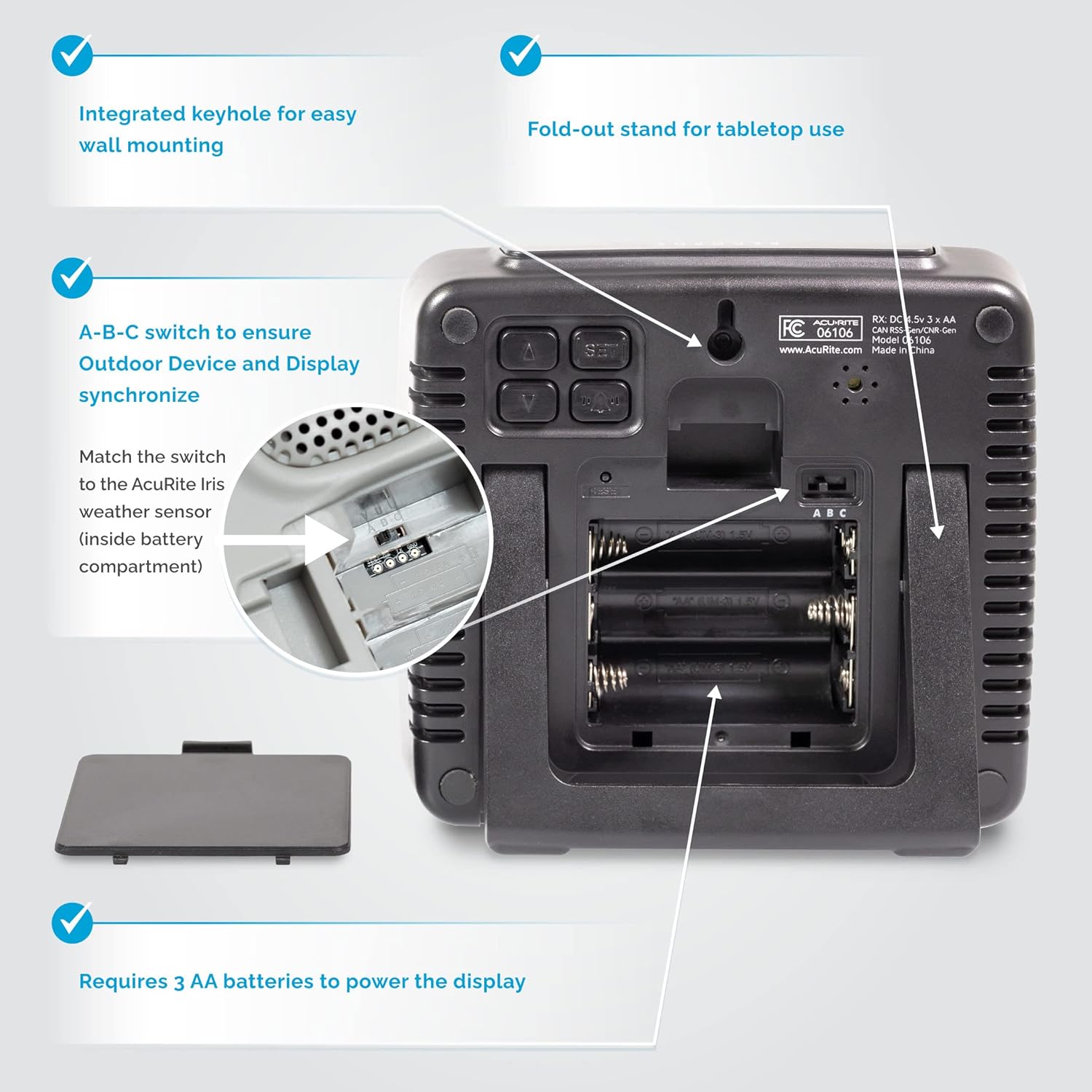
Image showing the back of the AcuRite Iris Mini Display, highlighting the battery compartment for three AA batteries and the A-B-C switch for sensor synchronization. Also visible are the integrated keyhole for wall mounting and the fold-out stand.
3. A-B-C Switch Synchronization
Locate the A-B-C switch inside the battery compartment of both the indoor display and the outdoor weather sensor. Ensure both switches are set to the same letter (A, B, or C) for proper synchronization.
4. Placement
The indoor display can be placed on a tabletop using its fold-out stand or mounted on a wall using the integrated keyhole hanger. The outdoor sensor has a wireless range of up to 330 feet (100 meters) from the display, depending on environmental factors and building materials. For optimal wind and rain readings, mount the outdoor sensor in an open area, ideally on a pole.
Cutaway diagram of the AcuRite Iris outdoor weather sensor, illustrating its components including optical sensors for wind direction, high-speed anemometer, solar-powered aspirating fan, rain funnel, dual precision bearings, and self-emptying rain gauge. This image demonstrates the internal workings and features designed for accurate weather data collection.
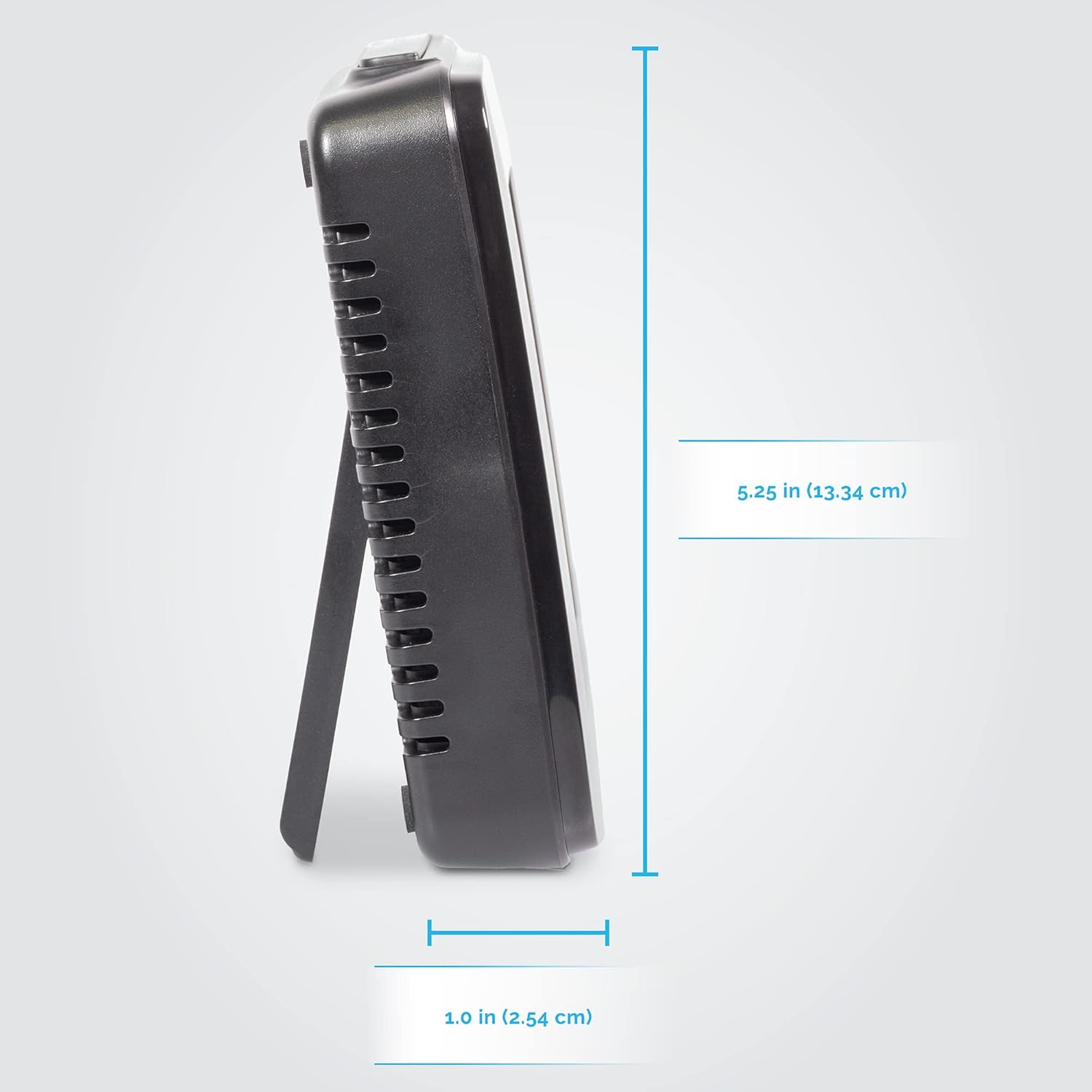
Side view of the AcuRite Iris Mini Display, showing its slim profile and dimensions: 5.25 inches (13.34 cm) in height and 1.0 inch (2.54 cm) in depth. This view highlights the compact design suitable for various placements.

Front-angled view of the AcuRite Iris Mini Display with dimensions overlaid, indicating a width of 5 inches, a height of 5.4 inches, and a depth of 1.3 inches. This image provides a clear understanding of the display's physical size.
Operating Instructions
1. Display Overview
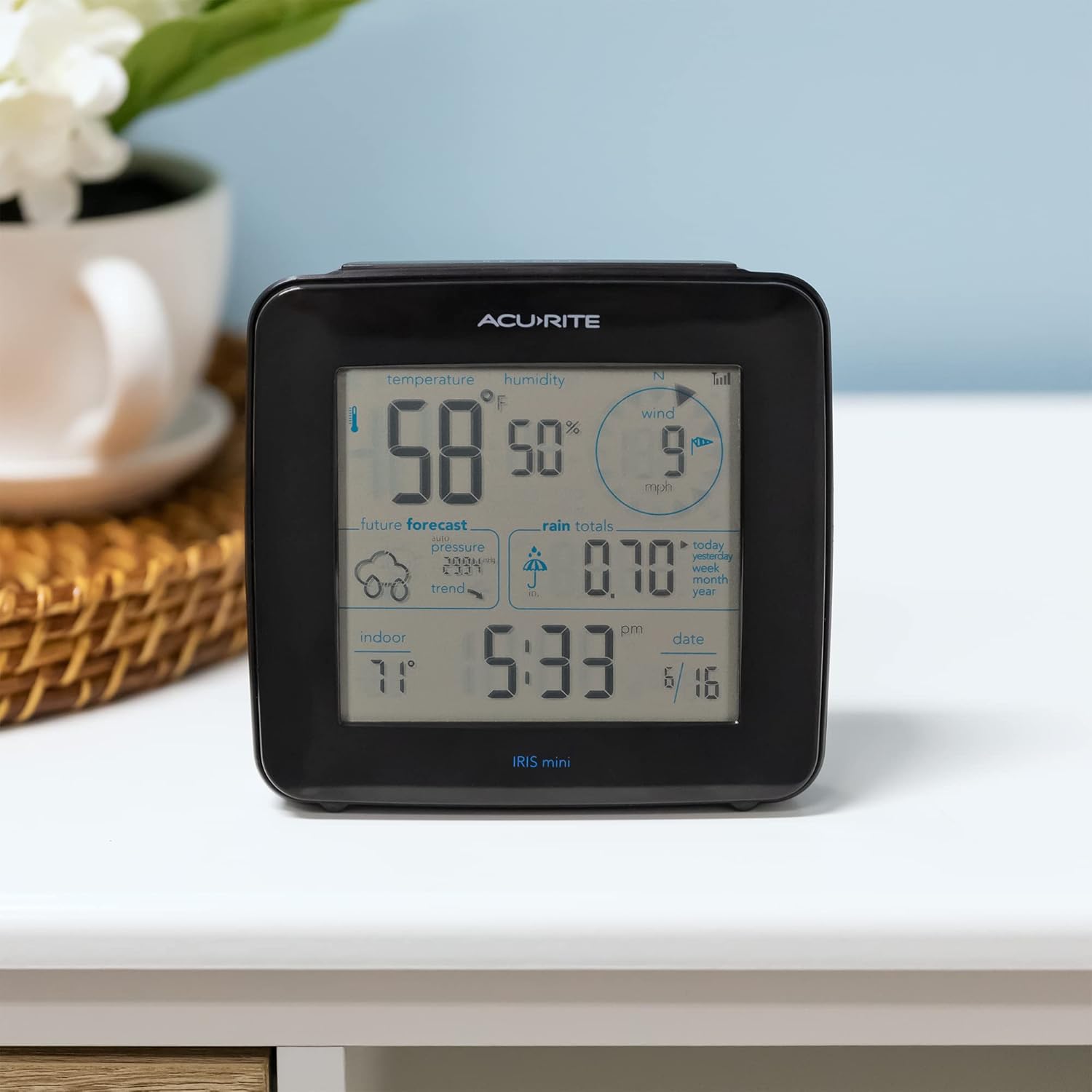
The monochrome screen displays real-time data including indoor and outdoor temperature, outdoor humidity, wind speed and direction, barometric pressure trends, and rainfall totals. It also provides a hyperlocal 12-hour weather forecast.
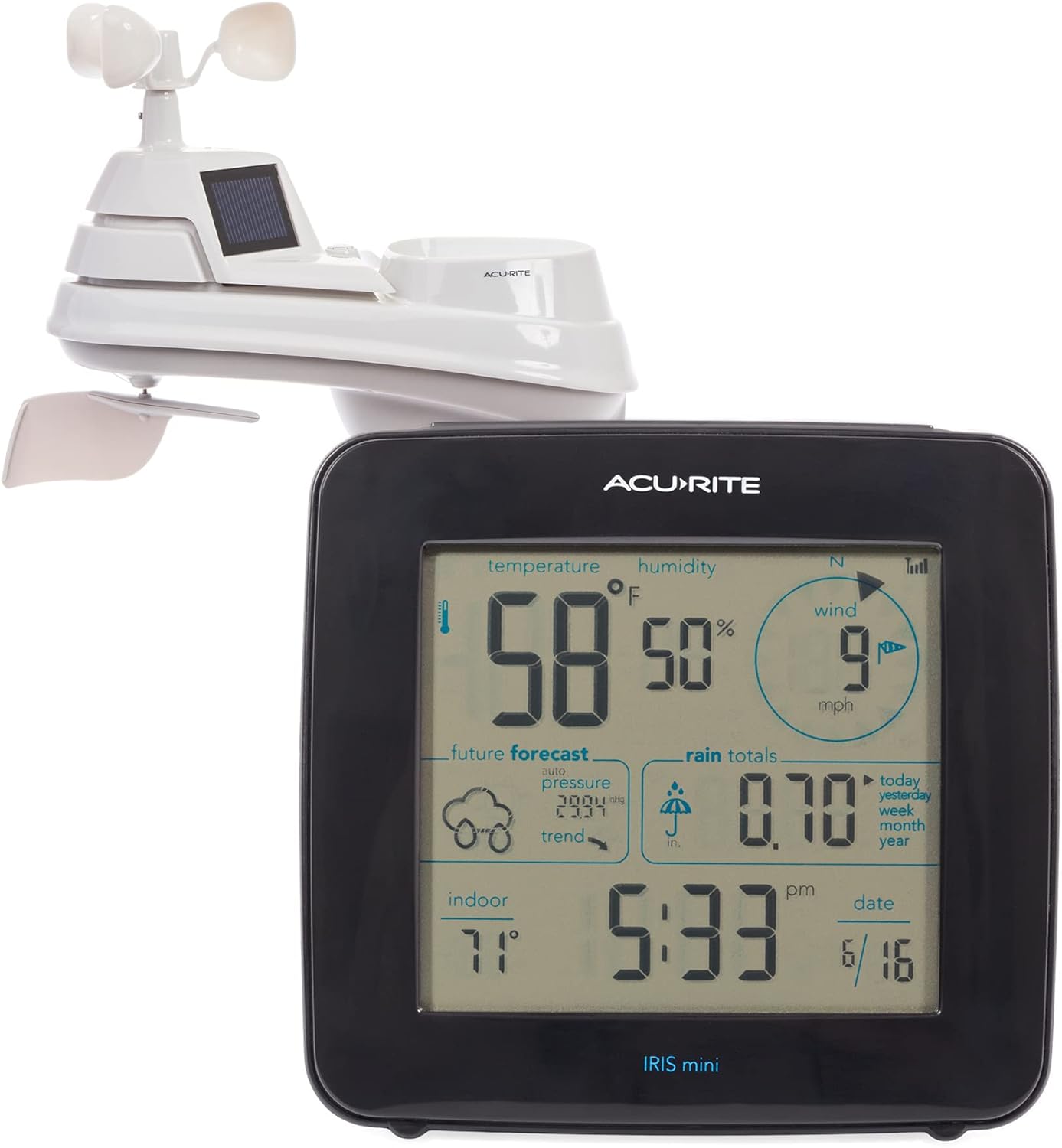
Front view of the AcuRite Iris Mini Display showing the monochrome screen with current weather readings. The display shows temperature, humidity, wind speed, future forecast, auto pressure, rain totals, indoor temperature, time, and date.
2. Accessing Historical Data
Press the 'RECORDS' button (located on the top or back of the display) to toggle through daily and all-time minimum/maximum readings for outdoor temperature and humidity, wind speed, and rainfall totals (today, yesterday, past week, month, and year).

Close-up view of the AcuRite Iris Mini Display screen, illustrating how to access historical weather records. The image highlights the 'RECORDS' button and shows the display toggling through various minimum and maximum readings for temperature, humidity, wind, and rainfall totals.
3. Custom Alarms
The station allows setting custom alarms for changes in outdoor temperature, humidity, wind speed, or rainfall. Refer to the full manual for detailed instructions on setting these alarms.
Maintenance
1. Sensor Cleaning
Periodically clean the outdoor sensor to ensure accurate readings. Remove any debris from the rain collector and ensure the wind cups and wind vane spin freely. The solar panel should also be kept clean to ensure proper operation of the aspirating fan.
2. Battery Replacement
Replace batteries in both the display and outdoor sensor when the low battery indicator appears. Use high-quality alkaline batteries.
Troubleshooting
1. Inaccurate Temperature Readings
If outdoor temperature readings appear unusually high, especially in direct sunlight, check the solar-powered aspirating fan on the outdoor sensor. Ensure the solar panel is clean and the fan is spinning. If the fan is not working, it may need replacement or the sensor may require an upgrade kit (e.g., PRO+ Upgrade with dual solar panels) for improved performance in sunny conditions.
2. No Connectivity
If the display is not receiving data from the outdoor sensor, ensure both units have fresh batteries and their A-B-C switches are set to the same channel. Relocate the sensor or display to improve signal strength, avoiding large metal objects or thick walls.
3. Rainfall Inaccuracy
Verify the rain collector is free of debris and properly leveled. Ensure the tipping bucket mechanism moves freely.
Specifications
| Feature | Detail |
|---|---|
| Brand | AcuRite |
| Model Number | 01122M |
| Power Source | Battery Powered (3 AA for display, 4 AA for sensor) |
| Connectivity Technology | 433 MHz Wireless |
| Temperature Accuracy | +/- 1.11 degrees Celsius |
| Outdoor Temperature Range | -40°F to 158°F (-40°C to 70°C) |
| Special Features | Barometer, Self-Calibrating Forecast, Freeze Indicator |
| Display Type | Monochrome LCD |
| Product Dimensions (Display) | 1.3"D x 5.4"W x 5"H |
| Material | Plastic |
Warranty
This AcuRite Iris Weather Station (Model 01122M) comes with a Limited One-Year Warranty. Please retain your proof of purchase for warranty claims.
Support
For further assistance, product registration, or to view additional resources, please visit the official AcuRite website or contact AcuRite Customer Support.