Product Overview
The Sophos XGS 87 is a next-generation dual-band Ethernet firewall designed for small to medium businesses and branch offices. It offers advanced network security features, including Xstream Protection, high-performance TLS inspection, and deep packet inspection. This manual provides essential information for setting up, operating, maintaining, and troubleshooting your Sophos XGS 87 appliance.
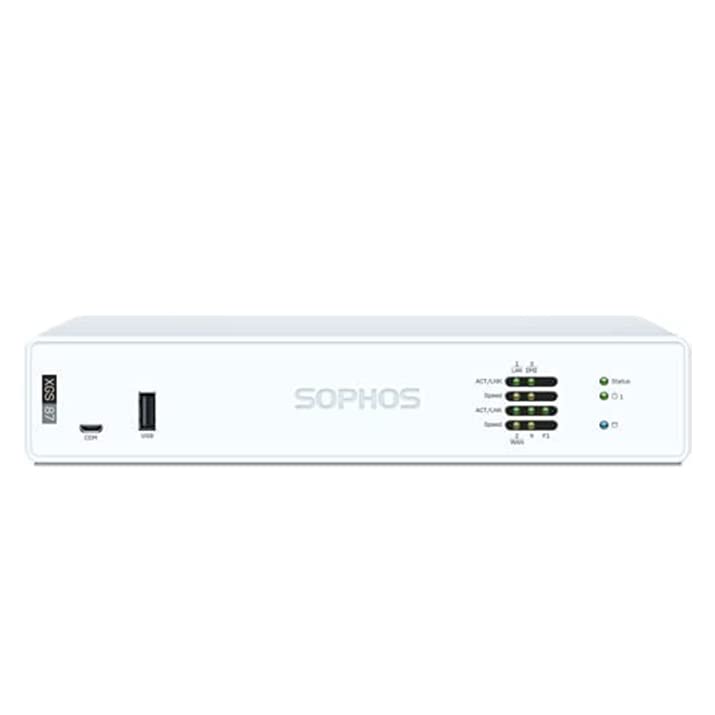
Figure 1: Front view of the Sophos XGS 87 Next-Gen Firewall, showing LED indicators and front ports.
Package Contents
Verify that all items are present in the package:
- 1N UTM Security Appliance
- 1N USB Cable
- 1N Ethernet Cable
- 1N Power Adapter
- 1N Power Cord
- 1N Quick Start Guide
- 1N Security Note
Setup and Installation
Physical Installation
- Unpack the Appliance: Carefully remove the Sophos XGS 87 appliance from its packaging.
- Choose a Location: Select a stable, well-ventilated location away from direct sunlight and heat sources. Ensure adequate space for cable management.
- Connect Power: Connect the power adapter to the appliance's DC IN 12V port and then plug the power cord into a suitable power outlet. The appliance will power on automatically.
- Connect Network Cables:
Connect your internet source (e.g., modem) to the WAN port (typically labeled 2/WAN or similar) on the back of the appliance using an Ethernet cable.
Connect your internal network (e.g., switch, computer) to one of the LAN ports (e.g., 1/LAN, 3, 4) using an Ethernet cable.
- Initial Configuration Access: For initial setup, connect a computer directly to a LAN port or the COM port using the provided USB cable for console access.

Figure 2: Rear view of the Sophos XGS 87 Next-Gen Firewall, showing power input, COM, USB, and Ethernet ports.
Initial Software Configuration
Refer to the included Quick Start Guide for detailed instructions on accessing the web-based management interface or command-line interface (CLI) for initial network configuration, license activation, and basic security settings. This typically involves setting up WAN and LAN interfaces, defining network zones, and configuring basic firewall rules.
Operating the Appliance
The Sophos XGS 87 operates as a comprehensive network security gateway. Once configured, it provides robust protection and network management capabilities.
Key Operational Features
- Xstream Protection: The Xstream architecture protects your network from the latest threats while accelerating important SaaS, SD-WAN, and cloud application traffic.
- TLS 1.3 Decryption: Intelligent TLS inspection supports the latest standards with extensive exceptions and policy tools.
- Deep Packet Inspection: High-performance streaming deep packet inspection, including next-gen IPS, web protection, app control, deep learning, and sandboxing powered by SophosLabs Intelix, stops ransomware and breaches.
- Network Protection: Provides intrusion prevention, VPN, and advanced routing capabilities.
- Web Protection: Offers URL filtering, content filtering, and web application firewall functionalities.
LED Indicators
Monitor the status of your appliance using the LED indicators on the front panel:
- Power LED: Indicates power status.
- Status LED: Shows overall system health.
- Activity/Link LEDs (for each port): Indicate network activity and link status for connected Ethernet ports.
Maintenance
Regular maintenance ensures optimal performance and longevity of your Sophos XGS 87 appliance.
- Firmware Updates: Regularly check for and apply the latest firmware updates from the Sophos support portal to ensure you have the most current security features and bug fixes.
- Configuration Backups: Periodically back up your appliance configuration. This is crucial for quick recovery in case of unexpected issues or hardware replacement.
- System Monitoring: Utilize the appliance's monitoring tools to check system logs, resource utilization (CPU, memory), and network traffic.
- Physical Cleaning: Ensure the appliance's vents are clear of dust and debris to maintain proper airflow and prevent overheating. Use a soft, dry cloth for cleaning the exterior.
Troubleshooting
This section provides solutions to common issues you might encounter.
No Power
- Check Power Connection: Ensure the power adapter is securely connected to the appliance and the power outlet.
- Verify Outlet: Test the power outlet with another device to confirm it is functional.
- Inspect Power Adapter: Check the power adapter for any visible damage.
No Network Connectivity
- Cable Connections: Verify that all Ethernet cables are securely connected to the correct ports (WAN, LAN).
- LED Indicators: Check the link/activity LEDs on the appliance ports and connected devices. If they are off, there might be a cable or port issue.
- IP Configuration: Ensure your connected devices have correct IP settings (DHCP or static) for the network segment.
- Firewall Rules: Review your firewall rules to ensure they are not blocking necessary traffic.
Slow Performance
- Resource Utilization: Check the appliance's CPU and memory usage through the management interface. High utilization can indicate a bottleneck.
- Network Traffic: Monitor network traffic to identify any unusual spikes or bandwidth-intensive applications.
- Firmware: Ensure the appliance is running the latest firmware version.
Specifications
| Feature | Detail |
|---|---|
| Brand | Sophos |
| Model Name | XGS87 |
| Model Number | XGS87IN |
| Firewall Throughput | 3,700 Mbps |
| Firewall IMIX | 2,500 Mbps |
| Firewall Latency (64 byte UDP) | 6 µs |
| IPS Throughput | 1,015 Mbps |
| Threat Protection Throughput | 240 Mbps |
| Number of Ports | 4 (Ethernet) |
| Connector Type | Ethernet |
| Frequency Band Class | Dual-Band |
| Compatible Devices | Laptop |
| Item Weight | 2 kg |
| Package Dimensions | 40 x 30 x 10 cm |
| Country of Origin | China |
Warranty and Support
Sophos provides comprehensive support for its products. The Sophos XGS 87 appliance typically includes a base license with enhanced support, as detailed in the product specifications.
- Technical Support: For technical assistance, visit the official Sophos support website or contact your authorized Sophos partner.
- Documentation: Further detailed documentation, including administration guides and release notes, can be found on the Sophos support portal.
- Software Updates: Ensure your appliance is registered to receive critical software and threat definition updates.
For specific warranty terms and conditions, please refer to the documentation provided with your purchase or consult the Sophos official website.


