
1. Introduction
Thank you for choosing the ARREGUI Forma Evolution 150080 Electronic Code and Key Safe. This safe is designed to provide robust security for your valuables, featuring a dual-locking mechanism with both an electronic keypad and a key. Please read this manual carefully before installation and use to ensure proper operation and maximum security.
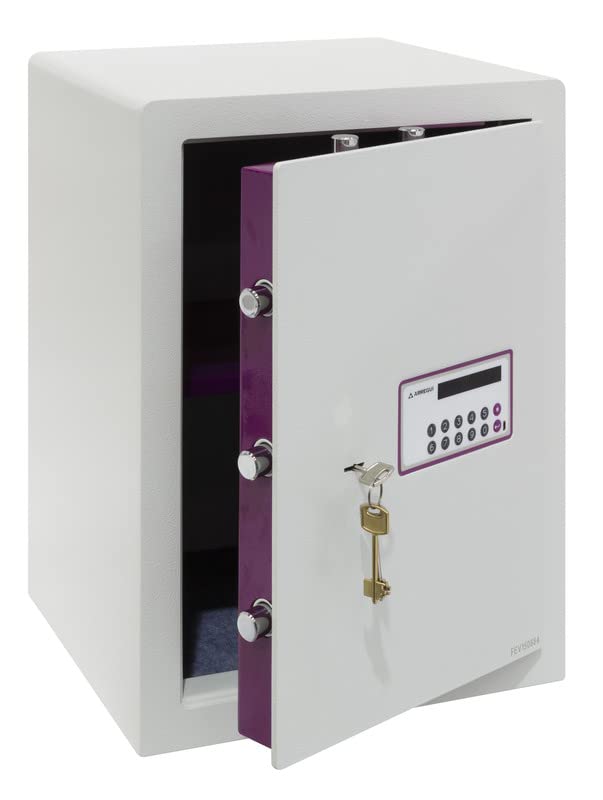
Figure 1: Front view of the ARREGUI Forma Evolution 150080 electronic safe.
2. Safety Information
- Keep the emergency keys in a secure location away from the safe and out of reach of unauthorized persons. Do not store them inside the safe.
- Ensure the safe is securely mounted to a wall or floor to prevent unauthorized removal.
- Do not expose the safe to extreme temperatures or humidity.
- Replace batteries promptly when the low battery indicator appears to avoid being locked out.
- Do not attempt to force the safe open if you forget the code or if the batteries are completely drained. Use the emergency key or external power supply as instructed.
3. Package Contents
Verify that all components are present in the package:
- 1 x ARREGUI Forma Evolution 150080 Safe
- 1 x Instruction Manual
- 2 x User Keys (for daily operation)
- 1 x Emergency Key (for emergency opening)
- 4 x 1.5V AA Batteries
- 1 x External Micro-USB Power Supply
- Mounting hardware (screws and anchors)
4. Product Overview
The ARREGUI Forma Evolution 150080 safe features a robust design with key components for security and ease of use.

Figure 2: Key features and dimensions of the Forma Evolution 150080 safe.
Key Components:
- Electronic Keypad: For entering your personal access code. Features an 8-digit display.
- Keyhole: For use with the user key during normal operation and the emergency key for override.
- Locking Bolts: 7 nickel-plated steel bolts with a diameter of 22 mm provide strong locking.
- Internal LED Light: Illuminates the safe interior for better visibility.
- Removable Shelf: Allows for organized storage of items.
- External Power Port: Micro-USB port for connecting the external power supply in case of drained batteries.

Figure 3: Locking bolts.

Figure 4: Internal LED light.

Figure 5: Removable shelf.
5. Setup
5.1. Battery Installation
- Open the safe door using the emergency key (if not already open). The emergency keyhole is usually located behind a small cover near the keypad.
- Locate the battery compartment on the inside of the safe door.
- Insert 4 x 1.5V AA batteries, ensuring correct polarity (+/-).
- Close the battery compartment cover. The safe is now powered.
5.2. Mounting the Safe
The safe can be securely mounted to a wall or floor using the pre-drilled holes at the bottom and back. This is highly recommended for maximum security.
- Choose a suitable location for the safe, ensuring it is on a solid surface (e.g., concrete wall or floor, wooden stud).
- Mark the drilling points through the pre-drilled holes on the back or bottom of the safe.
- Drill holes in the wall or floor using an appropriate drill bit for the mounting surface and anchors.
- Insert the provided anchors into the drilled holes.
- Position the safe and secure it using the provided screws. Tighten firmly.
6. Operating Instructions
6.1. Setting Your Personal Code
When you first use the safe, you will need to set your personal access code.
- With the safe door open, press the internal red or green reset button (location may vary, usually on the inside of the door near the hinge). You will hear a beep and the display will show "----" or similar.
- On the keypad, enter your desired code (3 to 8 digits).
- Press the "#" or "ENTER" button to confirm. The display will show "GOOD" and beep, indicating the code is set.
- Test the new code with the door open first to ensure it works correctly before closing the safe.

Figure 6: Digital display of the electronic keypad.
6.2. Opening the Safe (Code + Key)
The Forma Evolution safe requires both the correct code and the user key for opening.
- Enter your personal code on the electronic keypad. The display will show "OPEN" if the code is correct.
- Within 5 seconds of entering the correct code, insert one of the user keys into the keyhole and turn it clockwise (or counter-clockwise, depending on the model) to retract the bolts.
- Pull the door open.

Figure 7: Keypad and keyhole for dual security access.
6.3. Closing the Safe
- Close the safe door.
- Turn the user key counter-clockwise (or clockwise) to extend the bolts and lock the safe.
- Remove the key. The safe is now locked.
6.4. Changing Your Personal Code
To change your code, follow the same steps as setting the initial code:
- Open the safe door.
- Press the internal reset button.
- Enter your new desired code (3 to 8 digits).
- Press the "#" or "ENTER" button to confirm.
- Test the new code with the door open before closing.
6.5. Emergency Opening
In case of forgotten code or completely drained batteries, you can use the emergency key or external power supply.
Using the Emergency Key:
- Locate the emergency keyhole (often hidden behind a small removable cover on the keypad panel).
- Insert the emergency key and turn it to unlock the safe.
- Open the door.

Figure 8: Emergency key.
Using the External Power Supply:
- Connect the external micro-USB power supply to the micro-USB port on the keypad panel.
- Once connected, the keypad will power on.
- Enter your personal code and use the user key as described in section 6.2 to open the safe.
- Replace the internal batteries immediately after opening.

Figure 9: Connecting the external micro-USB power supply.
7. Maintenance
- Battery Replacement: Replace the 4 x 1.5V AA batteries annually or when the low battery indicator appears on the display. Always use new, high-quality alkaline batteries.
- Cleaning: Clean the safe's exterior with a soft, damp cloth. Do not use abrasive cleaners or solvents.
- Lubrication: Periodically check the locking bolts and hinges for smooth operation. If necessary, apply a small amount of silicone-based lubricant.
8. Troubleshooting
| Problem | Possible Cause | Solution |
|---|---|---|
| Safe does not open with code. | Incorrect code entered. Batteries are low or dead. | Re-enter the code carefully. Replace batteries or use external power supply. |
| Keypad does not respond. | Batteries are completely dead. | Use the external micro-USB power supply to power the keypad, then open with code and key. Replace internal batteries immediately. |
| Door does not open after entering code. | User key not turned within 5 seconds. Bolts are jammed. | Ensure the user key is turned immediately after the "OPEN" signal. Check for obstructions around the door or bolts. |
| Safe beeps continuously. | Low battery warning. | Replace all 4 x 1.5V AA batteries. |
9. Specifications
| Feature | Detail |
|---|---|
| Model Number | Forma Evolution 150080 |
| Brand | ARREGUI |
| External Dimensions (H x W x D) | 52 x 38.5 x 36 cm |
| Internal Dimensions (H x W x D) | Approximately 51.4 x 37.9 x 30.5 cm (excluding door mechanism) |
| Capacity | 59 Liters |
| Weight | 38.5 kg |
| Material | Alloy Steel |
| Front Door Thickness | 6 mm + 3 mm reinforced steel (drill protection) |
| Locking Mechanism | Electronic Keypad (3-8 digit code) and Key |
| Locking Bolts | 7 x 22 mm diameter nickel-plated steel bolts |
| Power Source | 4 x 1.5V AA Alkaline Batteries (included) |
| Emergency Power | External Micro-USB Power Supply |
| Special Features | Internal LED light, Removable shelf, Anti-pry system, Floor/Wall mountable |

Figure 10: Interior view with dimensions and removable shelf.
10. Support
If you encounter any issues not covered in this manual or require further assistance, please contact ARREGUI customer support. Refer to the contact information provided with your purchase or visit the official ARREGUI website for support details.


