
1. Introduction
This manual provides detailed instructions for the safe installation, operation, and maintenance of your Ohniyou 52 Inch Ceiling Fan with Light and Remote. Please read all instructions carefully before beginning installation and retain this manual for future reference.
The Ohniyou 52-inch ceiling fan features a reversible DC motor, integrated LED lighting with adjustable color temperature, and remote control functionality. It is designed for both indoor and outdoor use in covered areas such as patios, living rooms, kitchens, and dining rooms.
2. Safety Information
- Always turn off power at the circuit breaker before installation or maintenance.
- Ensure all electrical connections comply with local codes and ordinances. If you are unsure, consult a qualified electrician.
- The fan must be mounted to a structurally sound ceiling capable of supporting the fan's weight (approximately 16.46 lbs).
- Maintain a minimum clearance of 7 feet from the floor to the bottom of the fan blades.
- Do not operate the fan if any part is damaged.
- Do not insert objects into the path of the fan blades.
- This fan is not intended for use with dimmer switches for the fan speed function.
3. Package Contents
Verify that all components are present and undamaged before proceeding with installation. If any parts are missing or damaged, contact Ohniyou customer support.
- Ceiling Fan Motor Assembly
- 5 Fan Blades (reversible finish: Wood Black / Oak)
- Mounting Bracket
- Downrods (5-inch and 10-inch options)
- Canopy and Canopy Cover
- LED Light Kit
- Remote Control and Receiver
- Hardware Pack (screws, washers, wire nuts)
- Instruction Manual
4. Assembly and Installation
Installation typically requires 1 to 2 people and takes approximately 0.5 to 1 hour. Ensure you have the necessary tools, including a screwdriver, wrench, and drill.
4.1 Mounting the Bracket
Secure the mounting bracket to the ceiling junction box. Ensure the bracket is firmly attached and can support the fan's weight.
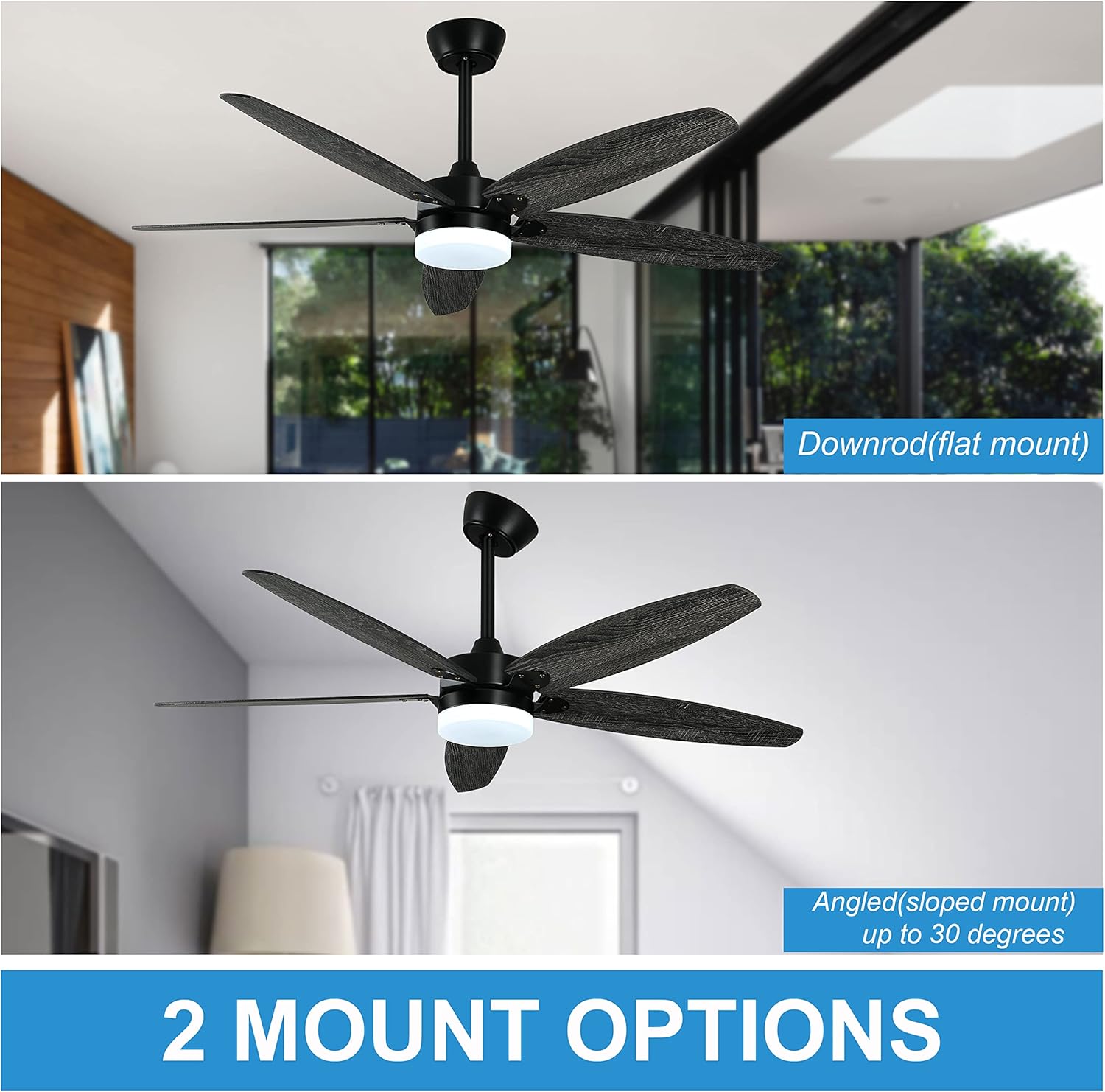
Figure 1: Mounting options for flat and sloped ceilings.
4.2 Assembling the Fan Blades
Attach the fan blades to the motor assembly using the provided screws and washers. The blades feature a double-sided finish (Wood Black and Oak), allowing you to choose your preferred aesthetic.

Figure 2: Double finish fan blades.
4.3 Attaching the Downrod and Wiring
Select the appropriate downrod (5-inch for low ceilings or 10-inch for regular ceilings) and feed the fan wires through it. Secure the downrod to the motor assembly. Connect the receiver wires to the fan motor wires according to the wiring diagram in your printed manual. Carefully tuck all wires into the canopy.
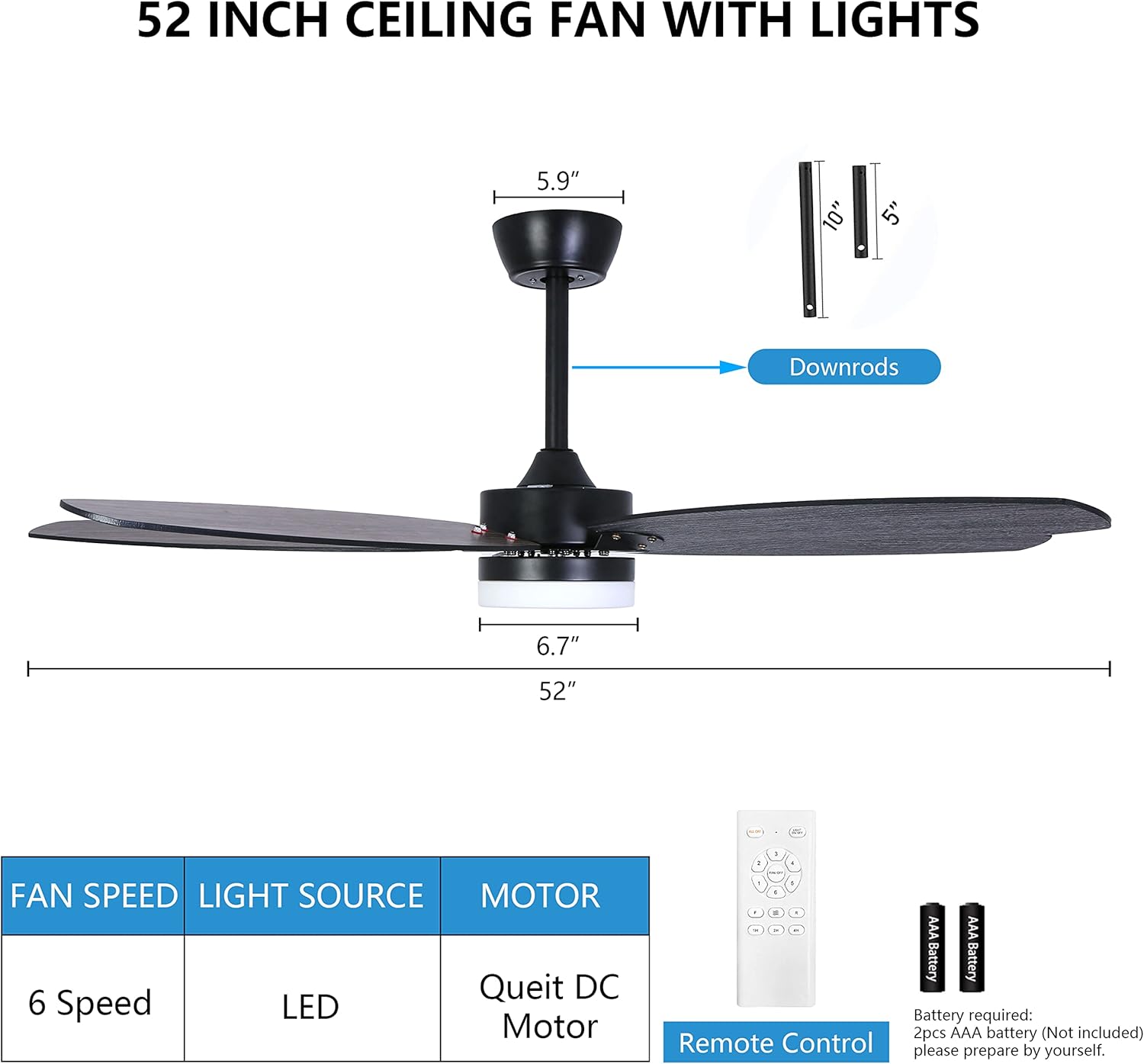
Figure 3: Fan dimensions and downrod options.

Figure 4: Included downrod lengths.
4.4 Securing the Fan to the Ceiling
Lift the fan assembly and hang it onto the mounting bracket. Make the final electrical connections from the fan to your household wiring. Ensure all connections are secure. Slide the canopy up to cover the mounting bracket and secure it.
4.5 Attaching the Light Kit
Connect the LED light kit wires to the corresponding wires from the fan motor assembly. Secure the light kit to the bottom of the fan motor housing.
4.6 Video Installation Guide
For a visual guide, please refer to the official installation video below:
Video 1: OHNIYOU 52'' Ceiling Fan Light Assembly Guide. This video demonstrates the step-by-step assembly and installation process for the ceiling fan and light kit.
5. Operating Instructions
Your Ohniyou ceiling fan is operated via the included handheld remote control. Ensure the remote has working batteries (2pcs AAA battery, not included).
5.1 Fan Speed Control
The remote allows you to select from 6 fan speeds. Press the fan speed buttons to increase or decrease the airflow.
5.2 Light Control and Color Temperature
The integrated LED light offers three color temperatures: 3000K (Warm Light), 4500K (Neutral Light), and 6000K (Cool Light). Cycle through these options by pressing the light button on the remote. The light is not dimmable via a wall switch.

Figure 5: Three adjustable light color temperatures.
5.3 Reversible DC Motor (Seasonal Modes)
The fan features a reversible DC motor for year-round comfort. Use the remote to switch between downdraft mode (summer) and updraft mode (winter).
- Downdraft Mode (Summer): Blades rotate counter-clockwise, pushing cool air down.
- Updraft Mode (Winter): Blades rotate clockwise, drawing cool air up and circulating warm air.
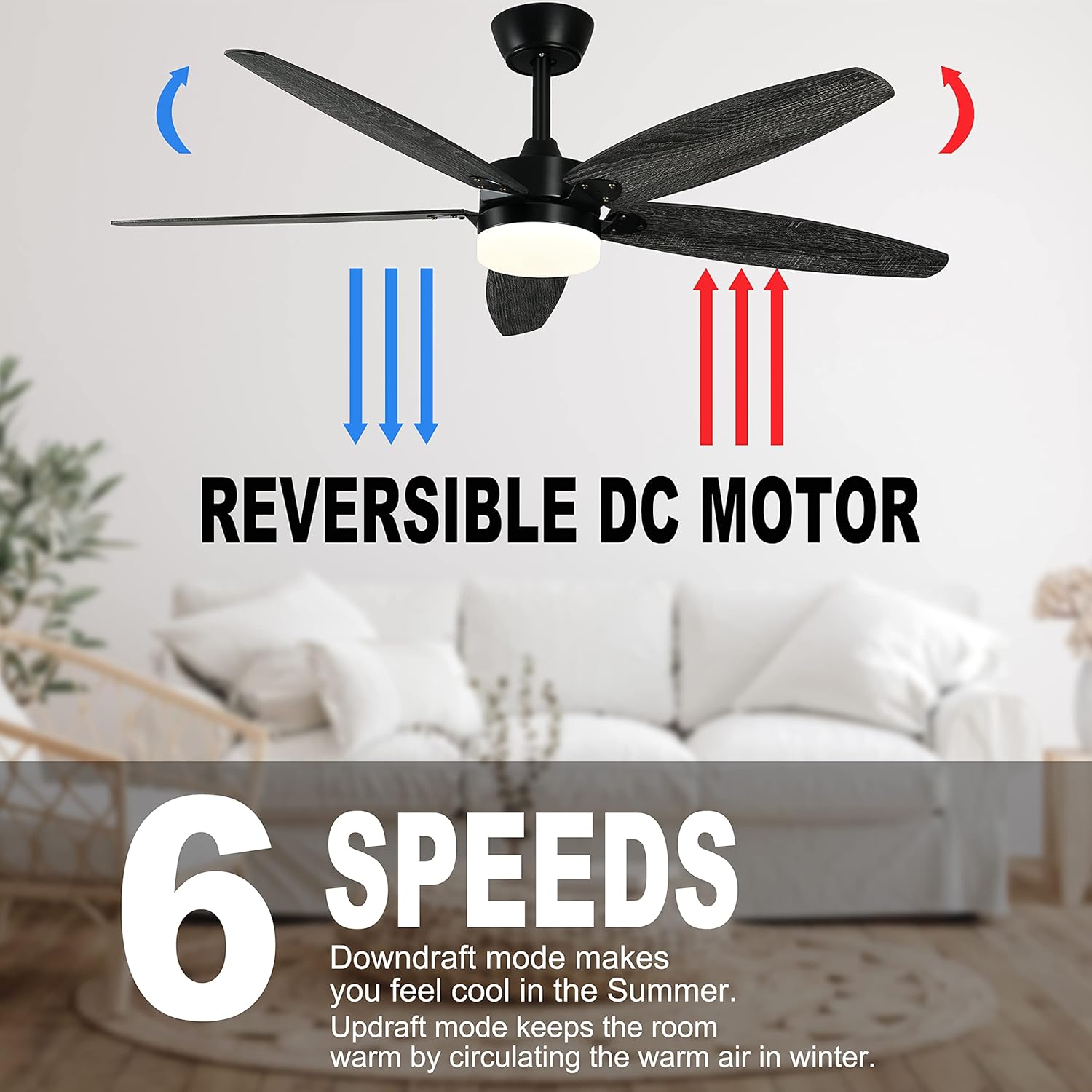
Figure 6: Reversible DC motor for seasonal use.
5.4 Timer Function
Set the fan to automatically turn off after 1, 2, or 4 hours using the timer buttons on the remote control.
6. Maintenance
Regular maintenance ensures optimal performance and longevity of your ceiling fan.
- Cleaning: Dust the fan blades and motor housing periodically with a soft, damp cloth. Do not use abrasive cleaners or solvents.
- Tightening Screws: Check all screws on the fan blades and mounting hardware annually to ensure they are secure.
- Blade Balance: If the fan wobbles, ensure all blades are securely attached and use a balancing kit if necessary (not included).
7. Troubleshooting
If you encounter issues with your ceiling fan, refer to the following common problems and solutions:
| Problem | Possible Cause | Solution |
|---|---|---|
| Fan does not start | No power; loose wiring; remote control issue. | Check circuit breaker. Ensure all wiring connections are secure. Replace remote batteries. |
| Light flickers or turns on/off randomly | Loose wiring in light kit; faulty LED driver. | Check light kit wiring connections. If problem persists, contact customer support. |
| Fan makes rubbing noise | Loose screws on blades or motor housing; blades hitting an obstruction. | Tighten all screws. Ensure blades have clear clearance from ceiling and walls. |
| Fan wobbles excessively | Loose mounting bracket; unbalanced blades. | Ensure mounting bracket is securely fastened. Check blade screws. Use a blade balancing kit. |
| Remote control not working | Dead batteries; remote not paired. | Replace batteries. Refer to your printed manual for remote pairing instructions. |
8. Specifications
- Brand: Ohniyou
- Model: 1
- Product Dimensions: 52"D x 52"W x 15"H
- Item Weight: 16.46 pounds
- Number of Blades: 5
- Blade Length: 52 Inches
- Motor Type: DC Motor (Reversible)
- Fan Speeds: 6
- Light Source: LED
- Color Temperature: 3000K, 4500K, 6000K
- Control Method: Remote
- Mounting Type: Downrod Mount (suitable for flat and sloped ceilings up to 15 degrees)
- Indoor/Outdoor Usage: Indoor, Outdoor (covered areas)
- Power Source: DC
9. Warranty and Support
For warranty information or technical support, please refer to the documentation included with your purchase or contact Ohniyou customer service directly. If you have any questions during the installation or operation process, do not hesitate to reach out for assistance.


