1. Introduction
The KINGBOLEN YA200 OBD2 Scanner is a practical and versatile diagnostic tool designed for automotive enthusiasts and professionals. It supports full OBDII functions, allowing users to read and erase fault codes, view live data streams, perform I/M readiness checks, and conduct voltage tests. This manual provides detailed instructions for setting up, operating, and maintaining your YA200 scanner to ensure optimal performance and accurate vehicle diagnostics.
2. Package Contents
Upon opening the package, please verify that all items listed below are present and in good condition:
- 1 × KINGBOLEN YA200 Code Reader
- 1 × USB Cable
- 1 × User Manual

Image: Contents of the KINGBOLEN YA200 package, showing the scanner, USB cable, and user manual.
3. Setup
The KINGBOLEN YA200 scanner is designed for plug-and-play operation, requiring no batteries for use as it draws power directly from the vehicle's OBDII port.
- Locate the OBDII Port: The OBDII (On-Board Diagnostics II) port is typically located under the dashboard on the driver's side of the vehicle. Refer to your vehicle's owner's manual if you have difficulty locating it.
- Connect the Scanner: Plug the OBDII connector cable from the YA200 scanner firmly into your vehicle's OBDII port.
- Power On: Once connected, the scanner will automatically power on and display the main menu. If the device does not power on, ensure the vehicle's ignition is in the 'ON' position (engine off or running, depending on the test).
Video: Demonstration of connecting the Kingbolen YA200 OBD2 scanner to a vehicle's OBDII port and navigating its basic functions.
4. Operating Instructions
The YA200 scanner offers a user-friendly interface with dedicated hotkeys for quick access to common functions.

Image: Overview of the KINGBOLEN YA200's enhanced OBD2 scanner full functions menu.
4.1. Hot-key Functions
The YA200 is equipped with three convenient hotkeys for quick access:
- One-key DTC (F1): Quickly looks up Pending Codes stored in the scan tool.
- One-key VIN (F2): Displays the vehicle identification number (VIN).
- One-key I/M Readiness (F3): Provides a quick check of the vehicle's emission readiness status and drive cycle verification.
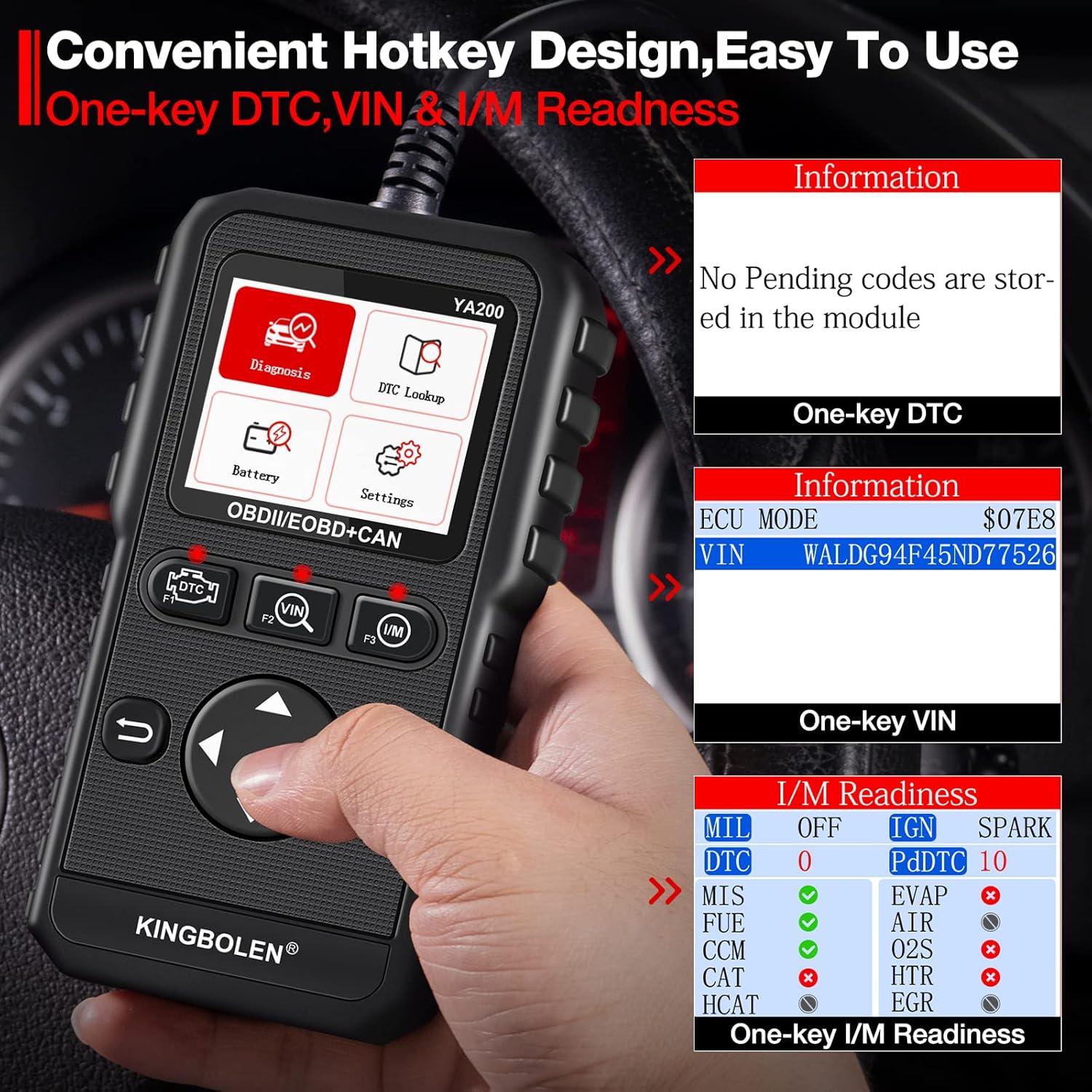
Image: Close-up of the KINGBOLEN YA200's convenient hotkey design for quick access to DTC, VIN, and I/M Readiness functions.
4.2. Read/Erase Codes
This function allows you to retrieve Diagnostic Trouble Codes (DTCs) from the vehicle's Engine Control Module (ECM) and clear them.
- Read Codes: Select 'Diagnosis' from the main menu, then 'Read Codes' to view stored, pending, and permanent codes.
- Erase Codes: After addressing the underlying issue, select 'Erase Codes' to turn off the Check Engine Light (MIL) and clear diagnostic information.
4.3. Live Data & Voltage Test
Monitor real-time operational parameters of the vehicle's engine and electrical system.
- Live Data: View Parameter Identification Data (PIDs) in textual or graphical format. This includes engine RPM, coolant temperature, fuel system status, and more. The device supports recording and playback of live data for detailed analysis.
- Voltage Test: Detect and display the car battery voltage in real-time, showing maximum and minimum values graphically. This helps assess battery condition.

Image: The KINGBOLEN YA200 showing real-time data stream with options for graph display, record, and playback.

Image: The KINGBOLEN YA200 conducting a voltage test, displaying real-time voltage fluctuations on a graph.
4.4. I/M Readiness
This function checks whether the vehicle's emission system components are operating normally and have completed their diagnostic tests.

Image: The I/M Readiness screen on the KINGBOLEN YA200, indicating the status of various emission monitors.
4.5. DTC Lookup
The DTC Lookup feature allows you to search for the definition of a Diagnostic Trouble Code directly on the device. Simply enter the code, and the scanner will provide its meaning and possible causes.
4.6. Screenshot Function
The YA200 includes a screenshot function. Press the up and down keys simultaneously for 3-5 seconds to capture a screenshot. The device can store up to 10 screenshots for later review.
5. Compatibility
The KINGBOLEN YA200 OBD2 Scanner offers broad compatibility with a wide range of vehicles and supports multiple languages.
- Vehicle Compatibility: Supports 9 OBDII protocols (ISO15765-4 (CAN), ISO14230-4 (KWP2000), ISO9141-2, J1850 VPW, J1850 PWM). Compatible with most US-based cars manufactured after 1996, and EU-based and Asian cars manufactured after 2000. (Note: Not compatible with Kia, Hyundai, or 24V heavy trucks).
- Language Support: Supports 9 languages including English, French, Russian, Spanish, German, Italian, Portuguese, Polish, and Traditional Chinese.

Image: Visual representation of the KINGBOLEN YA200's wide automotive compatibility and multi-language support.
6. Maintenance
To ensure the longevity and optimal performance of your KINGBOLEN YA200 scanner, follow these maintenance guidelines:
- Software Updates: The device supports lifetime free updates via USB cable. Connect the scanner to a computer using the provided USB cable and visit the official KINGBOLEN website for the latest software. (Note: The product description indicates the latest version may not require immediate upgrade).
- Cleaning: Use a soft, dry cloth to clean the scanner's screen and body. Avoid using abrasive cleaners or solvents.
- Storage: Store the scanner in a cool, dry place away from direct sunlight and extreme temperatures when not in use.
7. Troubleshooting
If you encounter any issues while using your KINGBOLEN YA200 scanner, please refer to the following common troubleshooting tips:
- No Power: Ensure the OBDII cable is securely connected to the vehicle's port and the vehicle's ignition is in the 'ON' position. Check the vehicle's fuse for the OBDII port if the issue persists.
- Link Error: If the scanner displays a 'Link Error' message, verify that the vehicle is OBDII compliant and that the connection is stable. Some older or non-standard vehicles may not be fully compatible.
- Codes Not Clearing: Ensure that the underlying issue causing the fault code has been resolved before attempting to erase codes. If the problem persists, the code may reappear.
- Screen Issues: If the screen is unresponsive or displays incorrectly, try restarting the device by disconnecting and reconnecting it to the vehicle.
For more complex issues, please contact KINGBOLEN customer support.
8. Specifications
| Feature | Specification |
|---|---|
| Brand | KINGBOLEN |
| Model | KINGBOLEN YA200 |
| Screen Size | 2.4 inch TFT Color Screen |
| Display Resolution | 320 x 240 pixels |
| Operating Voltage | 9V - 16V |
| Item Weight | 8.4 ounces |
| Product Dimensions | 5.4 x 3.1 x 0.9 inches |
| Supported Protocols | ISO15765-4 (CAN), ISO14230-4 (KWP2000), ISO9141-2, J1850 VPW, J1850 PWM |
| Supported Languages | English, French, Russian, Spanish, German, Italian, Portuguese, Polish, Traditional Chinese |
9. Warranty & Support
The KINGBOLEN YA200 OBD2 Scanner typically comes with a standard return policy of 30 days from the date of purchase. For specific warranty details, including coverage and duration, please refer to the warranty card included in your product packaging or visit the official KINGBOLEN website.
For technical support, troubleshooting assistance, or any inquiries regarding your product, please contact KINGBOLEN customer service through their official channels. Keep your purchase receipt and product model information handy when seeking support.