
Introduction
This manual provides detailed instructions for the YUSONIC Cat Ear Bluetooth Headphones, Model STN-26. Please read this manual thoroughly before using the product to ensure proper operation and to maintain the device's longevity. Keep this manual for future reference.
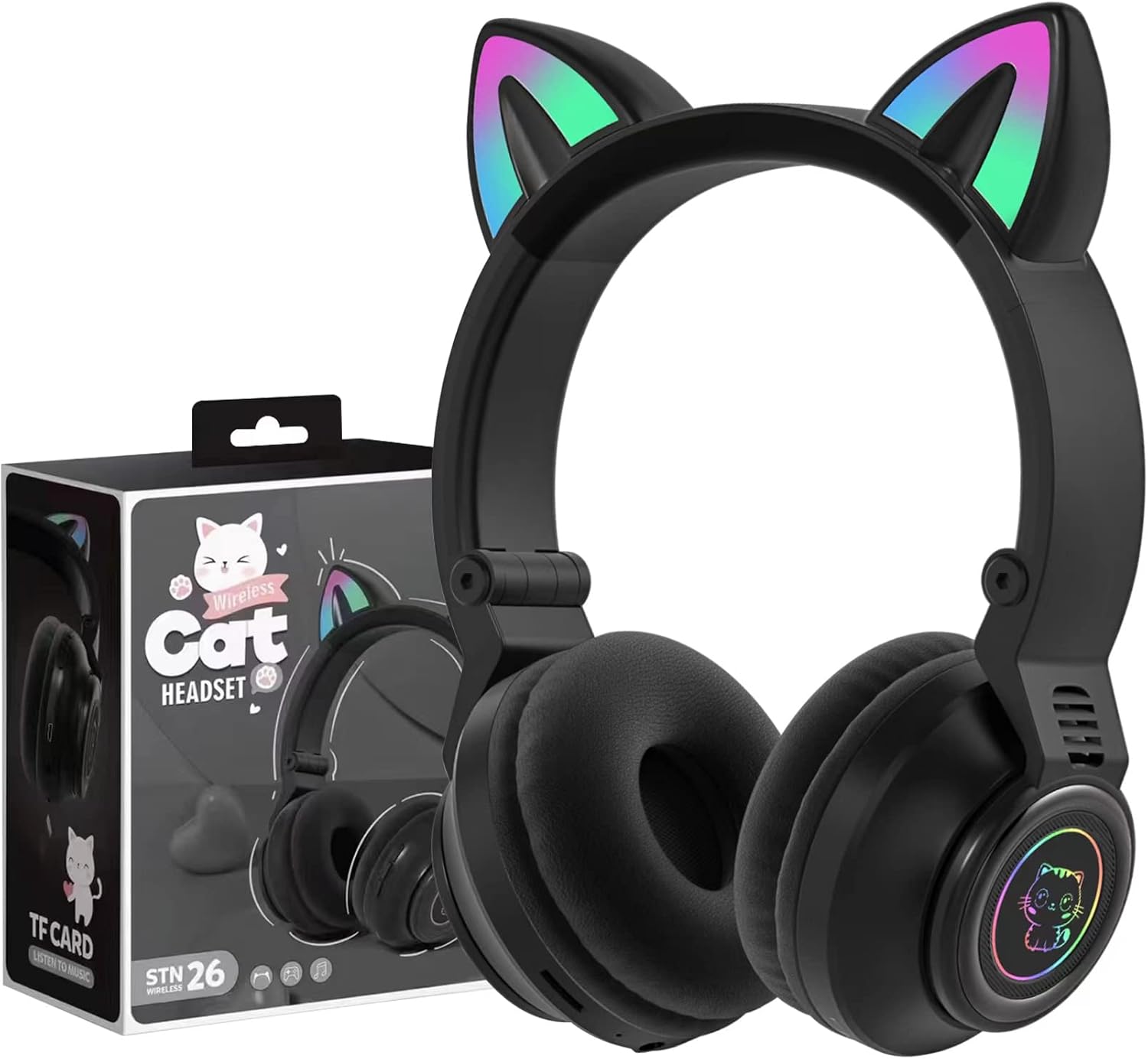
Image: YUSONIC Cat Ear Bluetooth Headphones STN-26 with packaging.
Package Contents
Verify that all items are present in the package:
- YUSONIC Cat Ear Bluetooth Headphones (STN-26)
- USB Charging Cable
- 3.5mm Audio Cable
- User Manual

Image: Retail box of the YUSONIC Cat Ear Bluetooth Headphones STN-26.
Product Overview
The YUSONIC Cat Ear Bluetooth Headphones are designed for comfort and ease of use, featuring soft ear cushions and an adjustable headband. The headphones include integrated cat ears with LED lights and control buttons on the earcup.

Image: Front view of the YUSONIC Cat Ear Bluetooth Headphones STN-26.
Controls and Ports
The main controls are located on the earcup:
- Power Button: Used to power on/off the headphones.
- Volume Up (+): Short press for volume up, long press for next track. Double press to toggle LED lights.
- Volume Down (-): Short press for volume down, long press for previous track.
- Multi-function Button: Play/Pause, Answer/End calls.
- 3.5mm Audio Jack: For wired connection.
- USB Charging Port: For charging the internal battery.
- Microphone: For hands-free calls.

Image: Side view showing control buttons on the earcup.
Setup
Charging the Headphones
- Connect the USB charging cable to the charging port on the headphones.
- Connect the other end of the USB cable to a USB power adapter (not included) or a computer's USB port.
- The charging indicator light will illuminate during charging.
- Charging typically takes approximately 1.5 hours. The indicator light will change or turn off once fully charged.
Bluetooth Pairing
- Ensure the headphones are fully charged.
- Press and hold the Power Button until the LED indicator flashes, indicating pairing mode.
- On your device (smartphone, tablet, laptop), enable Bluetooth and search for available devices.
- Select "STN-26" from the list of found devices.
- Once connected, the LED indicator will stop flashing or show a steady light, and a voice prompt may confirm the connection.
- The headphones will automatically attempt to reconnect to the last paired device when powered on.
Operating Instructions
Power On/Off
- Power On: Press and hold the Power Button for a few seconds until the indicator light turns on.
- Power Off: Press and hold the Power Button for a few seconds until the indicator light turns off.
Music Playback
- Play/Pause: Short press the Multi-function Button.
- Next Track: Long press the Volume Up (+) button.
- Previous Track: Long press the Volume Down (-) button.
- Volume Up: Short press the Volume Up (+) button.
- Volume Down: Short press the Volume Down (-) button.
Call Functions
- Answer/End Call: Short press the Multi-function Button.
- Reject Call: Long press the Multi-function Button.
LED Light Control
The cat ears and earcups feature LED lights that can blink and change color.
- Toggle LED Lights: Double press the Volume Up (+) button to turn the lights on or off. This feature helps conserve battery life when lights are not desired.

Image: Headphones with illuminated cat ears and earcups.
Wired Mode
The headphones can be used in wired mode even if the battery is depleted.
- Connect one end of the 3.5mm audio cable to the audio jack on the headphones.
- Connect the other end of the 3.5mm audio cable to your audio source (e.g., smartphone, tablet, computer).
- The headphones will function as standard wired headphones. Bluetooth features and LED lights will not operate in wired mode if the battery is off or depleted.
Maintenance and Care
- Clean the headphones with a soft, dry cloth. Do not use abrasive cleaners or solvents.
- Avoid exposing the headphones to extreme temperatures, humidity, or direct sunlight.
- Do not immerse the headphones in water, as they are not water-resistant.
- Store the headphones in a cool, dry place. The foldable design allows for compact storage.

Image: Folded YUSONIC Cat Ear Bluetooth Headphones STN-26.
Troubleshooting
| Problem | Solution |
|---|---|
| Headphones do not power on. | Ensure the headphones are charged. Connect to a power source using the USB cable. |
| Cannot pair with a device. | Ensure headphones are in pairing mode (flashing LED). Turn off and on Bluetooth on your device. Move closer to the device. |
| No sound in Bluetooth mode. | Check device volume and headphone volume. Ensure headphones are correctly paired and selected as the audio output on your device. |
| LED lights are not working. | Double press the Volume Up (+) button to toggle the LED lights on. Ensure the battery is not critically low. |
| Sound quality is poor. | Ensure there are no obstructions between the headphones and the paired device. Move away from sources of interference. Try a different audio source. |
Specifications
| Feature | Detail |
|---|---|
| Model | STN-26 |
| Bluetooth Version | 5.3 |
| Bluetooth Range | Up to 10 meters (33 feet) |
| Audio Driver Size | 40 mm |
| Frequency Response | 20 Hz - 20,000 Hz |
| Sensitivity | 105 dB |
| Impedance | 32 Ohm |
| Battery Life | Approximately 6 hours (with Bluetooth and LED lights on) |
| Charging Time | Approximately 1.5 hours |
| Connectivity | Wireless (Bluetooth), Wired (3.5mm audio jack) |
| Microphone | Built-in |
| Special Features | Foldable design, Cat ear LED lights, Sound Isolation |
| Material | Plastic |
| Dimensions | 8.66 x 6.69 x 3.54 inches |
| Weight | 250 grams (8.8 ounces) |
Warranty and Support
For warranty information or technical support, please refer to the product packaging or contact YUSONIC customer service through the retailer where the product was purchased. Keep your proof of purchase for any warranty claims.