
1. Introduction
The HOTO Laser Rangefinder (Model QWCJY001) is a compact and precise tool designed for accurate distance measurement. Featuring a patented low-power OLED screen, Bluetooth connectivity, and a user-friendly single-button operation, this device simplifies various measurement tasks for home decoration, design, and professional use.
Its dual laser transmitters ensure high accuracy of ±2mm over a range of 0.05m to 30m. The device is equipped with a universal Type-C charging port for convenience.

Image 1.1: The HOTO Laser Rangefinder in use, demonstrating its compact design and clear OLED display.
2. What's in the Box
Please check the package contents upon unboxing:
- 1 x HOTO Laser Rangefinder
- 1 x User Manual
- 1 x USB-C Charging Cable
3. Product Overview
The HOTO Laser Rangefinder features a minimalist design with essential components for efficient operation.
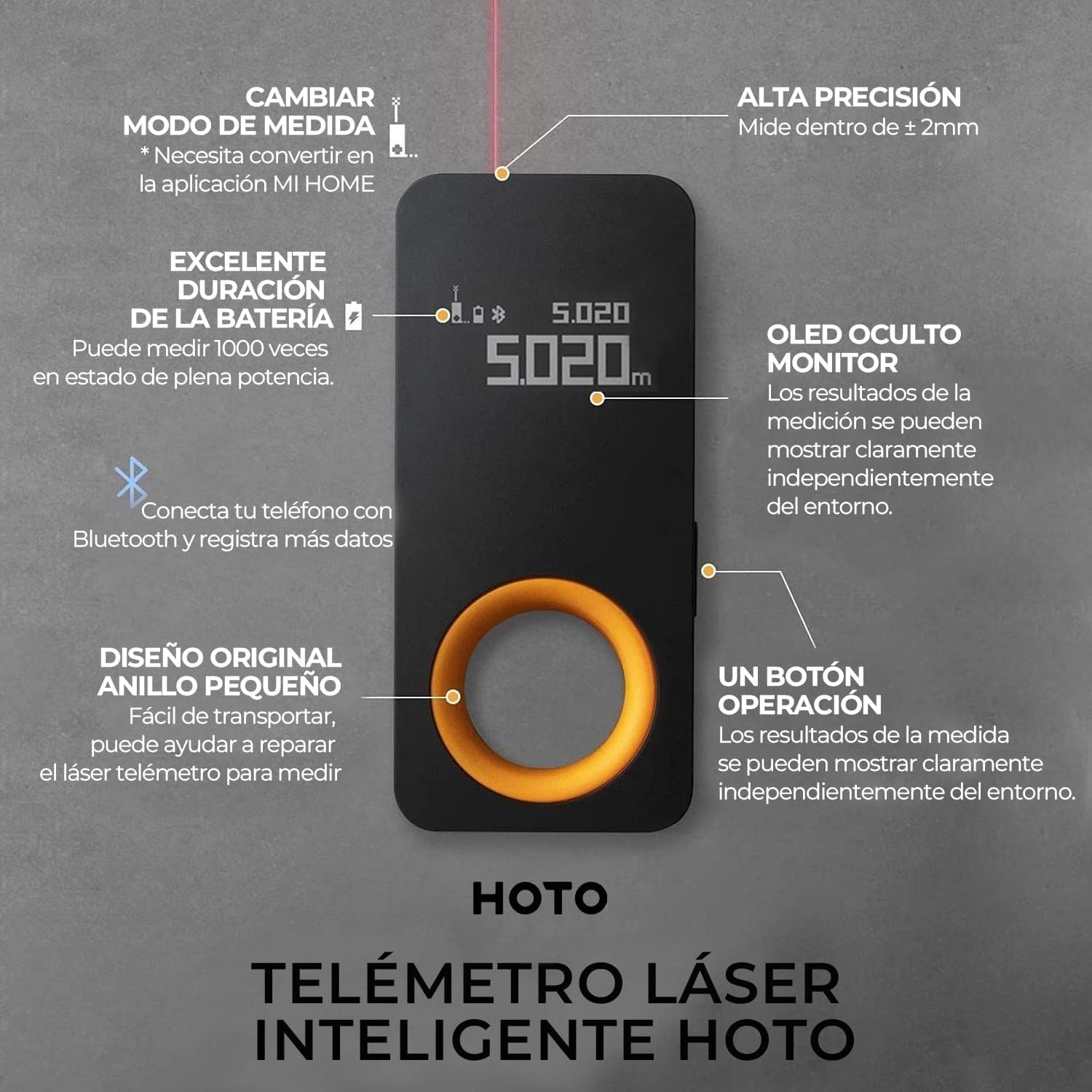
Image 3.1: Key features of the HOTO Laser Rangefinder, including the OLED display and single-button control.
Key Components:
- OLED Display: Shows measurement data, power status, and Bluetooth connection status.
- Single Operation Button: Used for powering on/off and initiating measurements.
- Patented Yellow Ring: Provides a comfortable grip and aids in stable measurement.
- Dual Laser Transmitters: Ensures high accuracy and quick measurements.
- Type-C Charging Port: For convenient recharging.
4. Setup
4.1 Charging the Device
Before first use, fully charge the device using the provided USB-C cable and a compatible power adapter (not included). The OLED screen will indicate the charging status.

Image 4.1: The device being charged via its Type-C port.
4.2 Power On/Off
Press and hold the single operation button for a few seconds to power the device on or off.
4.3 Connecting to the Mi Home App
For enhanced functionality, connect your HOTO Laser Rangefinder to the Mi Home application via Bluetooth:
- Download and install the Mi Home app on your smartphone.
- Ensure Bluetooth is enabled on your smartphone and the rangefinder is powered on.
- Open the Mi Home app and follow the instructions to add a new device. The app should detect the HOTO Smart Laser Measure.
- Pair the devices. Once connected, measurement data will synchronize in real-time.
Video 4.1: This video demonstrates the unboxing, basic operation, and connection of the HOTO Laser Rangefinder with the Mi Home app, showcasing real-time data synchronization and floor plan drawing features.
5. Operating Instructions
5.1 Taking a Measurement
With the device powered on:
- Point the laser at the desired target.
- Press the operation button once to activate the laser pointer.
- Press the button again to take the measurement. The result will be displayed on the OLED screen.

Image 5.1: The device displaying a measurement, highlighting its simple one-button operation.
5.2 Measurement Modes
The device supports two measurement reference points:
- Front-based Measurement: Measures from the front edge of the device.
- Tail-based Measurement: Measures from the rear edge of the device.
These modes can be switched within the Mi Home app to suit different measurement needs.

Image 5.2: Illustration of the two available measurement modes.
5.3 Unit Switching
Measurement units (Meters/Feet) can be conveniently switched within the Mi Home app.
5.4 Using with Mi Home App
The Mi Home app enhances the rangefinder's capabilities:
- Real-time Data Synchronization: View measurements instantly on your phone.
- Notes for Distinction: Add descriptions to your measurements for better organization.
- Floor Plan Drawing: Create simple floor plans and mark measurements directly on them.
- Visualized Measurements: Take photos and overlay measurement lines for clear visual records.

Image 5.3: Easy-to-use interface for quick and accurate measurements.
5.5 Application Scenarios
The HOTO Laser Rangefinder is suitable for various applications:
- Home Renovation: Ideal for DIY projects and room planning.
- Construction Projects: For quick and precise distance calculations.
- Furniture Measurement: Accurately measure furniture dimensions.
- Professional Use: Valuable for real estate agents and interior designers.

Image 5.4: Examples of the rangefinder's versatility in different environments.
6. Maintenance
- Keep the device clean and dry. Wipe with a soft, damp cloth if necessary.
- Avoid exposing the device to extreme temperatures or direct sunlight for prolonged periods.
- Do not attempt to disassemble or repair the device yourself. Contact customer support for assistance.
- Store the device in a safe place when not in use to prevent damage.
7. Troubleshooting
7.1 Inaccurate or No Measurement Readings
- Ensure the laser is pointed at a stable, non-reflective surface.
- Avoid measuring targets with extremely weak or strong reflective capacities, as this can lead to inaccurate or no readings.
- Check for obstructions between the device and the target.
- Verify that the device's lens is clean and free from dust or debris.
7.2 Device Not Powering On
- Ensure the device is fully charged. Connect it to a Type-C charger and allow sufficient charging time.
- Press and hold the power button firmly for a few seconds.
7.3 Bluetooth Connectivity Issues
- Ensure Bluetooth is enabled on both the rangefinder and your smartphone.
- Make sure the device is within the Bluetooth range of your smartphone.
- Restart both the rangefinder and your smartphone, then attempt to reconnect via the Mi Home app.
8. Specifications
| Feature | Detail |
|---|---|
| Brand | HOTO |
| Model Number | QWCJY001 |
| Measurement Range | 0.05m - 30m |
| Measurement Accuracy | ±2mm |
| Laser Type | Class II Laser |
| Connectivity | Bluetooth |
| Charging Port | USB Type-C |
| Battery Type | Lithium Ion (included) |
| Dimensions | 7.3 x 3.32 x 1.68 cm |
| Weight | 40 g |
| Material | Plastic |
| Color | Black |
| International Protection Rating | IPX2 |
| UPC | 789513716256 |
9. Safety Information
- This device uses a Class II laser. Avoid direct eye exposure to the laser beam.
- Do not point the laser at people or animals.
- Keep the device out of reach of children.
- It is recommended for indoor use. Outdoor use, especially in bright sunlight, may affect accuracy and visibility of the laser point.
- Do not use the device in explosive environments or near flammable materials.
10. Warranty and Support
For warranty information and customer support, please refer to the documentation provided with your purchase or contact the seller, HOTO Tools, directly through their official Amazon store page: HOTO Store.