
1. Product Overview
The pendancy OS-12T is a compact, 12-digit desk calculator designed for everyday use in office, school, or business environments. It features a large LCD display, dual power source (solar and battery), and essential functions including tax calculation. Its ergonomic design with a 30-degree angled display and large, comfortable buttons enhances usability.
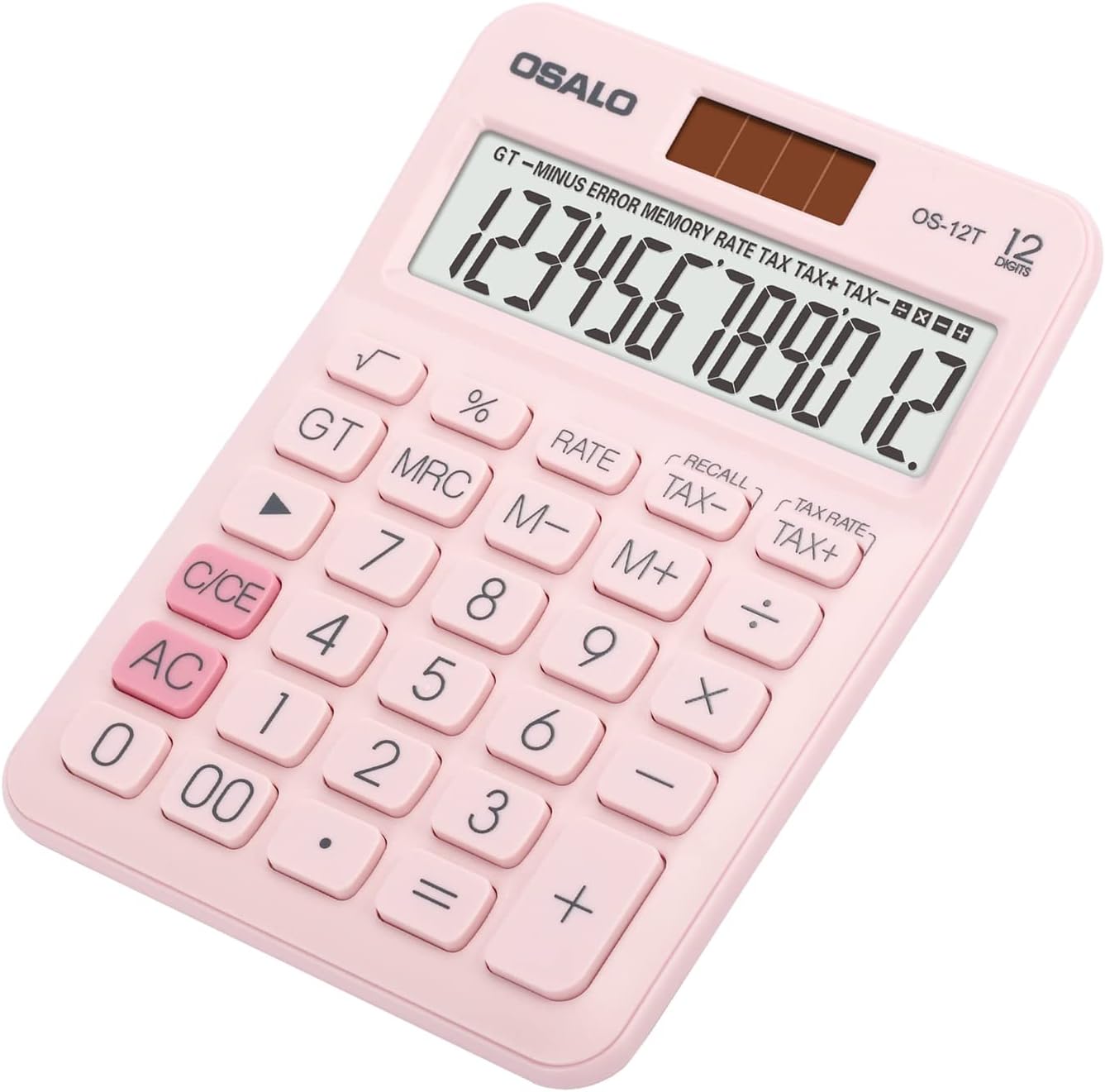
Image: The pendancy OS-12T calculator in pink, showcasing its compact design and key layout.
2. Key Features
- Pocket Size: Weighing approximately 90g and measuring 13.5 x 9.8 x 2.3 cm, this calculator is lightweight and slim, making it highly portable.
- 12-Digit Large LCD Display: Provides clear visibility of numbers and calculation results.
- Visualized Operation Symbol Display: Shows the active arithmetic operation (+, -, ×, ÷) on the screen during continuous calculations.
- Solar and Battery Dual Power: Operates efficiently in well-lit areas using solar power and automatically switches to battery power (1 LR44 battery, not included) in low light conditions. Features an auto-shutdown after 8 minutes of inactivity to conserve power.
- Durable ABS Engineering Plastic: Constructed from high-strength ABS plastic, ensuring durability and resistance to minor impacts.
- 30° Angled Display: The screen is ergonomically angled for comfortable viewing and improved readability during desktop use.
- Basic Tax Function: Includes dedicated keys for tax rate setting, tax addition (TAX+), and tax subtraction (TAX-).

Image: A hand placing the compact pendancy OS-12T calculator into a bag, illustrating its portability.

Image: A person holding the pendancy OS-12T calculator, highlighting its handheld use and tilted screen for easy viewing.
3. Setup
3.1 Power Source
The OS-12T calculator operates on a dual power system: solar and battery. In well-lit environments, the calculator will primarily use solar power. In dimmer conditions, it will automatically switch to battery power.
3.2 Battery Installation
The calculator requires one LR44 battery (not included) for optimal performance and operation in low-light conditions.
- Locate the battery compartment cover on the back of the calculator.
- Using a small screwdriver or coin, gently open the battery compartment cover.
- Insert one LR44 battery, ensuring the correct polarity (+/-) as indicated inside the compartment.
- Replace the battery compartment cover and secure it.
4. Operating Instructions
This section details the basic functions and operations of the OS-12T calculator.
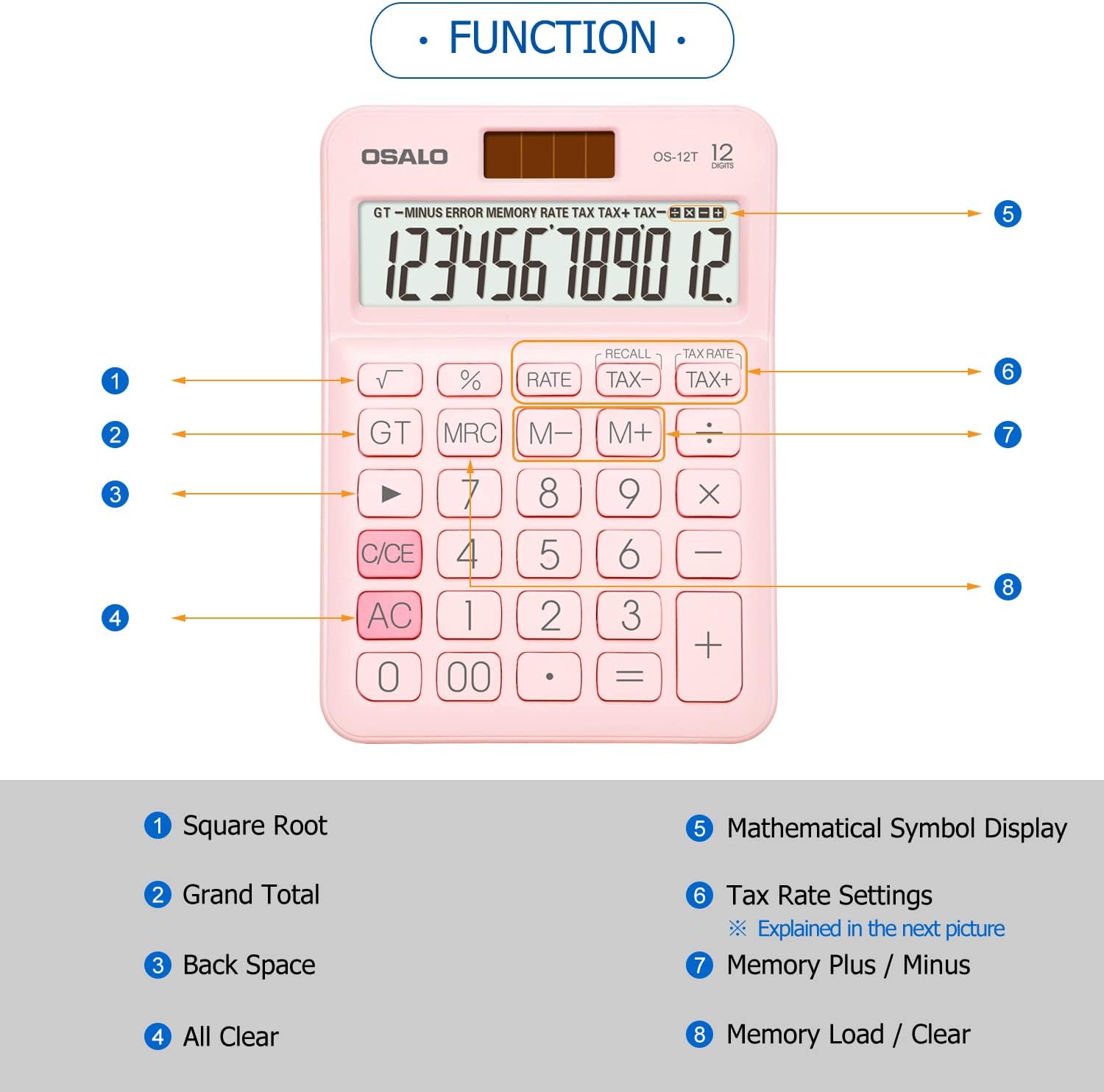
Image: A diagram illustrating the various function keys on the pendancy OS-12T calculator, including Square Root, Grand Total, Back Space, All Clear, Mathematical Symbol Display, Tax Rate Settings, Memory Plus/Minus, and Memory Load/Clear.
4.1 Basic Arithmetic Operations
- Addition (+): Enter the first number, press +, enter the second number, then press =.
- Subtraction (-): Enter the first number, press -, enter the second number, then press =.
- Multiplication (×): Enter the first number, press ×, enter the second number, then press =.
- Division (÷): Enter the first number, press ÷, enter the second number, then press =.
4.2 Clear Functions
- AC (All Clear): Clears all entries and calculations, resetting the calculator to zero.
- C/CE (Clear Entry): Clears the last entered number or the current calculation entry without affecting previous operations or memory. Pressing it twice acts as an AC.
- ▶ (Backspace): Deletes the last digit entered.
4.3 Memory Functions
- M+ (Memory Plus): Adds the displayed number to the memory.
- M- (Memory Minus): Subtracts the displayed number from the memory.
- MRC (Memory Recall/Clear): Press once to recall the memory value. Press twice to clear the memory.
4.4 Other Functions
- √ (Square Root): Calculates the square root of the displayed number.
- % (Percentage): Used for percentage calculations. For example, to calculate 10% of 200, enter 200 × 10 %.
- GT (Grand Total): Displays the grand total of all results accumulated since the last AC press.
5. Tax Function
The OS-12T calculator includes dedicated keys for tax calculations.
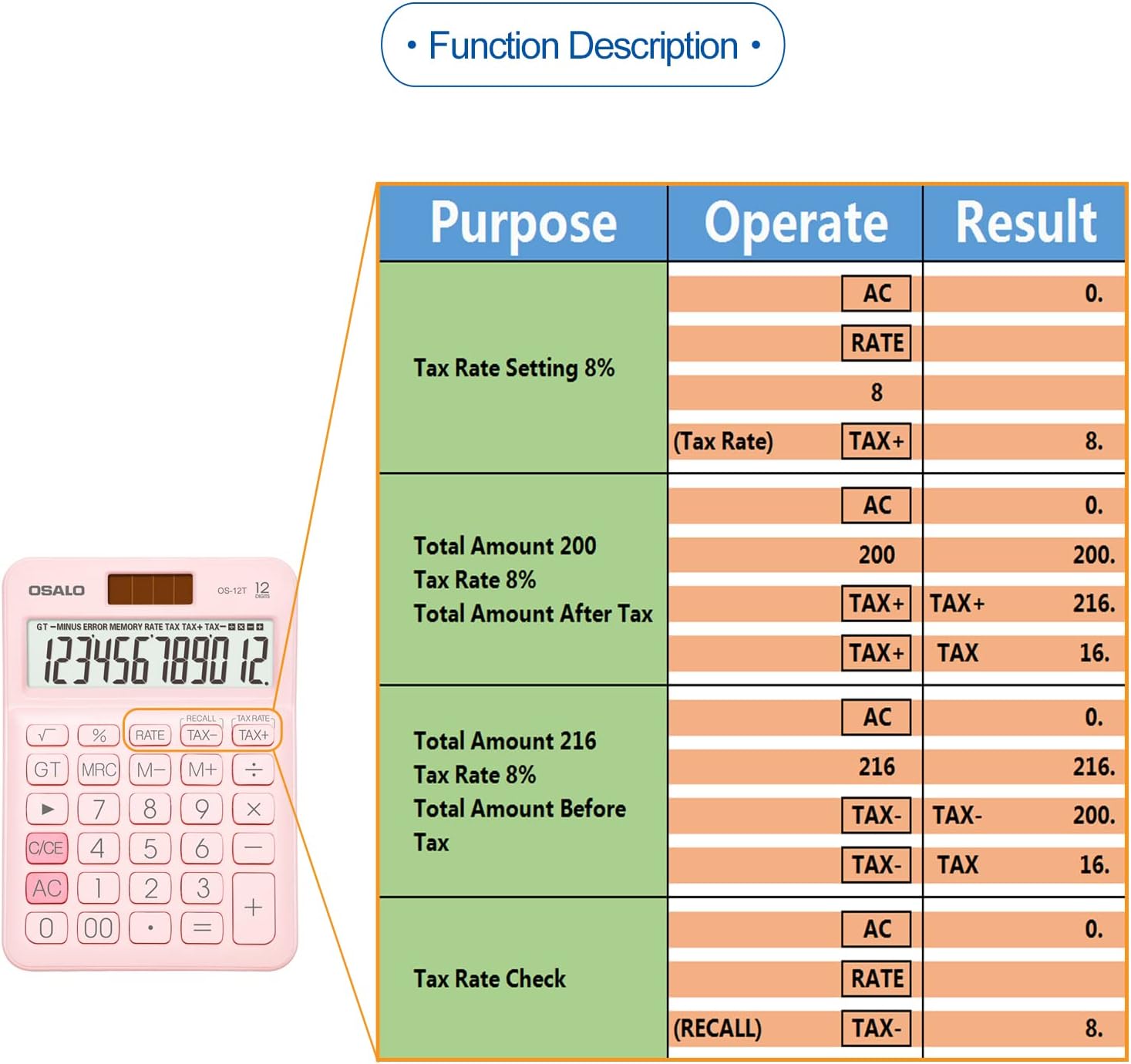
Image: A table detailing the steps for setting tax rates, calculating total amounts with tax, and checking tax rates on the pendancy OS-12T calculator.
5.1 Setting the Tax Rate
- Press AC to clear the calculator.
- Press RATE.
- Enter the desired tax rate (e.g., 8 for 8%).
- Press TAX+ to save the tax rate. The display will show the set tax rate.
5.2 Calculating Total Amount After Tax
- Press AC.
- Enter the original amount (e.g., 200).
- Press TAX+. The display will show the total amount including tax.
- Press TAX+ again to display the tax amount.
5.3 Calculating Total Amount Before Tax
- Press AC.
- Enter the total amount including tax (e.g., 216).
- Press TAX-. The display will show the amount before tax.
- Press TAX- again to display the tax amount.
5.4 Checking the Current Tax Rate
- Press AC.
- Press RECALL.
- Press TAX-. The display will show the currently set tax rate.
6. Maintenance and Care
- Cleaning: Use a soft, dry cloth to clean the calculator. Do not use abrasive cleaners or solvents.
- Storage: Store the calculator in a cool, dry place away from direct sunlight and extreme temperatures.
- Battery Replacement: Replace the LR44 battery when the display becomes dim or unresponsive, even in well-lit conditions.
- Avoid Dropping: While made of durable plastic, excessive force or dropping can damage the internal components or display.
7. Troubleshooting
- Display is blank or dim:
- Ensure the calculator is in a well-lit area for solar power.
- Check if the LR44 battery needs replacement.
- Incorrect calculations:
- Press AC to clear all previous entries and start a new calculation.
- Verify the entered numbers and operations.
- Keys are unresponsive:
- Ensure no debris is lodged under the keys.
- Replace the battery.
8. Specifications
| Feature | Specification |
|---|---|
| Model | OS-12T |
| Display Digits | 12 Digits |
| Display Type | LCD |
| Power Source | Solar and Battery (LR44) |
| Material | ABS Engineering Plastic |
| Product Dimensions | 13.46 x 9.65 x 0.1 cm (5.3 x 3.8 x 0.04 inches) |
| Weight | 90 g (3.17 oz) |
| Auto Shut-off | After 8 minutes of inactivity |

Image: A visual representation of the pendancy OS-12T calculator's dimensions and weight, comparing its size to a typical smartphone.
9. Warranty and Support
For warranty information or technical support regarding your pendancy OS-12T calculator, please refer to the product packaging or contact the retailer where the product was purchased. You may also visit the official pendancy website for further assistance.