
1. Introduction
Thank you for choosing Murata 371 SR920SW Silver Oxide Button Cell Batteries. Murata has over 40 years of expertise in developing and manufacturing high-performance micro batteries. These batteries are designed to provide reliable and long-lasting power for a wide range of personal electronic devices.
The Murata 371 SR920SW is a 1.55V Silver Oxide battery with a nominal capacity of 35mAh. It is manufactured in Japan, is 0% Mercury, and RoHS Compliant, reflecting a commitment to quality and environmental responsibility.

Image 1: Murata 371 SR920SW batteries in their original blister packaging.
2. Product Features
- Type: 371 SR920SW Silver Oxide Button Cell
- Voltage: 1.55V
- Nominal Capacity: 35mAh
- Operating Temperature: -10℃ to +60℃
- Composition: 0% Mercury, RoHS Compliant
- Reliability: Engineered for high performance and reliability, continuing a long tradition of Japanese quality.
- Applications: Suitable for various devices including watches, remotes, car keyfobs, medical devices, wearables, digital thermometers, toys, and calculators.

Image 2: Close-up view of a Murata SR920SW battery, highlighting its 0% Mercury content.
3. Setup and Installation
These batteries are designed for easy replacement in compatible devices. Always refer to your device's specific instruction manual for detailed battery replacement procedures, as steps may vary.
General Installation Steps:
- Identify Battery Compartment: Locate the battery compartment on your device. This is often on the back or underside, secured by screws or a small latch.
- Open Compartment: Carefully open the battery compartment using appropriate tools (e.g., a small screwdriver or watch case opener).
- Remove Old Battery: Note the orientation of the old battery (positive (+) and negative (-) terminals). Gently remove the old battery.
- Insert New Battery: Insert the new Murata 371 SR920SW battery, ensuring the correct polarity. The positive (+) side is typically facing upwards.
- Secure Compartment: Close the battery compartment securely.
- Test Device: Power on your device to confirm proper function.

Image 3: Illustrative image of a button cell battery being carefully placed into a watch movement using tweezers.
Compatibility:
The Murata 371 SR920SW battery is a common replacement for various watch and small electronic device batteries. It is equivalent to Sony 371 and other similar models. Always verify the required battery type for your specific device.
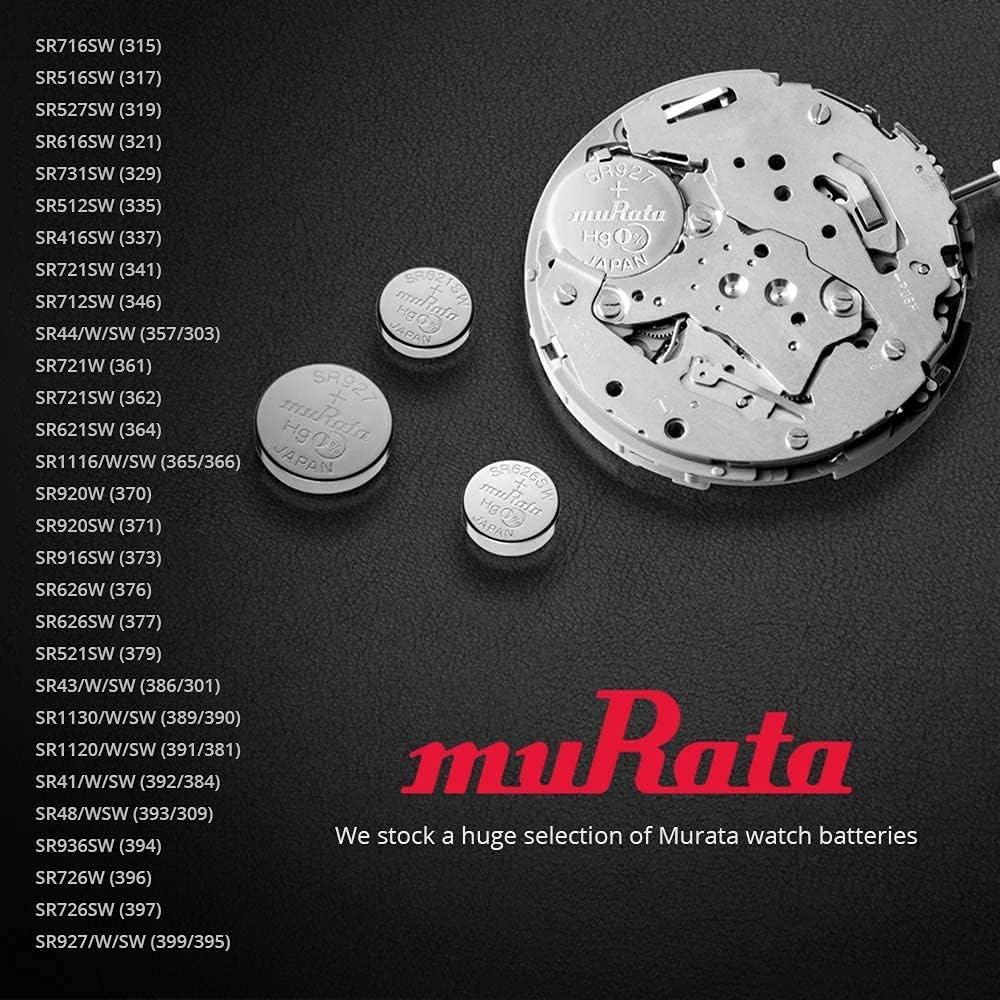
Image 4: A visual guide displaying various Murata watch battery models and their corresponding reference numbers.
4. Operating Guidelines
Once correctly installed, the Murata 371 SR920SW battery will power your device. These silver oxide batteries are known for their stable voltage output throughout their lifespan, which is crucial for devices requiring consistent power, such as watches.
- Consistent Power: Provides a steady 1.55V output for reliable device operation.
- Long Lifespan: Designed for extended use in low-drain applications.
- Temperature Resilience: Functions effectively within a wide operating temperature range of -10℃ to +60℃.
5. Maintenance and Storage
Proper handling and storage can extend the life of your batteries and ensure safety.
- Storage: Store unused batteries in their original packaging in a cool, dry place, away from direct sunlight and extreme temperatures.
- Handling: Avoid touching the battery terminals with bare hands, as oils and dirt can affect performance. Use non-conductive tweezers if possible.
- Avoid Short Circuits: Do not store batteries loosely or with metal objects that could cause a short circuit.
- Disposal: Dispose of used batteries according to local regulations. Do not dispose of in household waste.
6. Troubleshooting
If your device is not functioning correctly after battery installation, consider the following:
- Incorrect Installation: Ensure the battery is inserted with the correct polarity (+/-).
- Poor Contact: Check that the battery makes firm contact with the device's terminals. Clean any dirt or corrosion from the terminals if necessary.
- Depleted Battery: Although new, a battery might be faulty or have been stored improperly. Try a different new battery.
- Device Malfunction: If multiple new batteries do not resolve the issue, the problem may lie with the device itself. Consult your device's manual or a qualified technician.
7. Safety Information
WARNING: KEEP BATTERIES OUT OF REACH OF CHILDREN.
- Choking Hazard: Button cell batteries are small and can be easily swallowed by children.
- Chemical Burn Hazard: If swallowed, button cell batteries can cause severe internal chemical burns in as little as 2 hours, leading to serious injury or death.
- Immediate Medical Attention: If you suspect a battery has been swallowed, seek immediate medical attention.
- General Safety: Do not recharge, disassemble, heat, or dispose of batteries in fire. Doing so may cause explosion, leakage, or fire.
- Leakage: In case of battery leakage, avoid contact with skin and eyes. If contact occurs, rinse immediately with plenty of water and seek medical advice.
8. Specifications
| Attribute | Detail |
|---|---|
| Battery Type | 371 SR920SW Silver Oxide Button Cell |
| Voltage | 1.55V |
| Nominal Capacity | 35mAh |
| Operating Temperature | -10°C to +60°C |
| Mercury Content | 0% Mercury |
| Compliance | RoHS Compliant |
| Origin | Made in Japan |
| Package Dimensions | 2.09 x 1.02 x 0.75 inches |
| Item Weight | 0.634 ounces (package) |
| Recommended Uses | Watch, remotes, car keyfobs, medical devices, wearables, calculators, digital thermometers, toys |
9. Support
For further assistance or inquiries regarding Murata products, please visit the official Murata Store on Amazon.


