
Introduction
This manual provides essential information for setting up, operating, and maintaining your Fossil Gen 6 44mm Touchscreen GPS and Activity Smartwatch. This device is designed to enhance your daily activities with advanced tracking features and smart connectivity.
The bundle includes: 1 Fossil Gen 6 44mm Bluetooth Smartwatch with Wear OS and rPET Camo Strap, 1 Signature Series Fossil Gen 6 Watch Charger, and 1 Signature Series Microfiber Cloth.
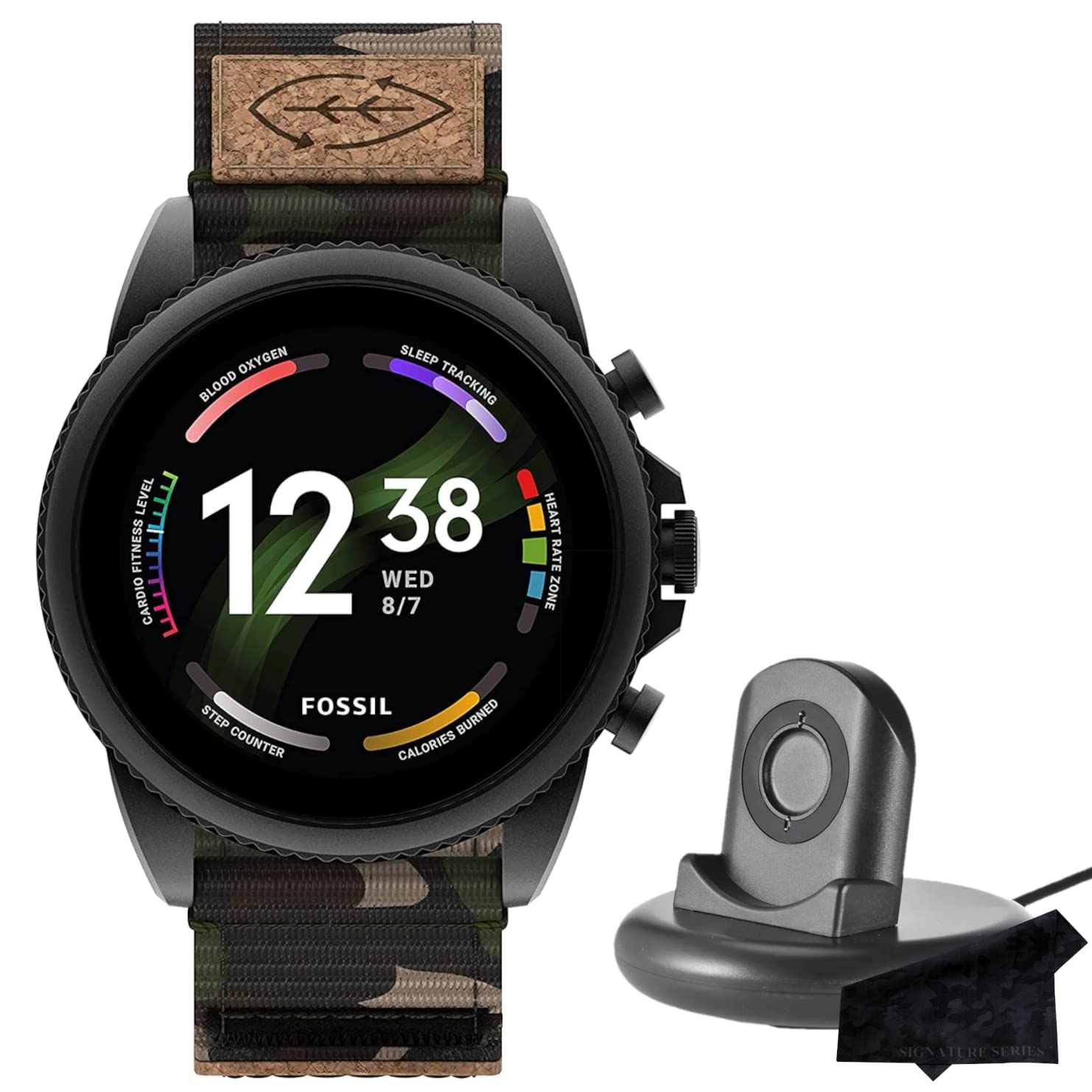
Image: Front view of the Fossil Gen 6 Smartwatch, showcasing its digital display with time, heart rate, blood oxygen, sleep tracking, cardio fitness level, step counter, and calories burned.
Setup
1. Initial Power On and Charging
To power on your smartwatch for the first time, connect it to the provided charger. The watch will automatically turn on and display the current charge level. The Signature Series Fossil Gen 6 Watch Charger can charge the device to 80% in approximately 30 minutes.

Image: Side profile of the Fossil Gen 6 Smartwatch, highlighting the rotating crown and two push buttons on the right side of the watch case.
2. App Installation and Pairing
Your Fossil Gen 6 Smartwatch is compatible with phones running the latest version of Android or iOS. Download the companion app (e.g., DA Fit or similar, as indicated by the watch's QR code or user manual) from your device's app store. Follow the in-app instructions to pair your smartwatch with your phone via Bluetooth. This process typically takes less than a minute.
Once paired, the app allows you to customize watch faces, manage notifications, and view detailed health and activity data.
Video: An overview of the SOUYIE Smart Watch with GPS, demonstrating its features including various watch faces, health tracking, sports modes, and call functionality. This video provides a general idea of smartwatch capabilities.
Operating Instructions
Health and Activity Tracking
The smartwatch automatically tracks various health metrics:
- Activity Goals: Monitor your progress towards daily activity targets.
- Steps: Counts your daily steps.
- Sleep: Tracks sleep patterns, including REM and restful sleep.
- Heart Rate: Provides real-time heart rate monitoring.
- Cardio: Measures cardio fitness levels.
- SpO2 (Blood Oxygen): Monitors blood oxygen saturation levels.
Activity modes with GPS keep you on track with your distance and path during workouts. Advanced sensors provide data for health and fitness tracker apps.

Image: The Fossil Gen 6 Smartwatch screen showing a heart rate graph with current BPM and resting BPM.
Communication Features
Stay connected with notifications for calls, texts, and app alerts. The watch supports automatic time zone and calendar syncing. You can answer and make calls directly from your watch when your phone is within Bluetooth range, thanks to its built-in speaker and microphone.

Image: The Fossil Gen 6 Smartwatch screen showing the Alexa voice assistant interface, prompting the user to tap to talk and providing example commands.
Customization and Apps
The Always-On display is brighter with more colors and a higher pixel count (416 x 416 resolution). Personalize your look with thousands of watch faces. Access hundreds of apps for various functions, including fitness, contactless payments, music control, social media, news, games, and stopwatches. Android users can also utilize built-in Alexa for quick information and smart home control.

Image: The Fossil Gen 6 Smartwatch worn on a wrist, showing a detailed watch face with time, date, and multiple health tracking indicators like blood oxygen, sleep tracking, cardio fitness, heart rate, step counter, and calories burned.
Maintenance
Charging
Use the included Signature Series Fossil Gen 6 Watch Charger. Plug the USB cable into a power source and connect your smartwatch to the magnetic pad on the caseback. The watch will automatically begin charging. A full charge provides approximately 7 to 10 days of consecutive use, depending on usage.
Cleaning
Regularly clean your smartwatch and strap. Use the provided Signature Series Microfiber Cloth to gently wipe the screen and watch body. For the rPET Camo Strap, a damp cloth can be used to remove dirt. Ensure the watch is dry before wearing or charging.
Troubleshooting
- Watch not turning on: Ensure the watch is properly connected to the charger and the power source is active. Allow a few minutes for it to charge before attempting to power on.
- Connectivity issues: Check that Bluetooth is enabled on your phone and the smartwatch is within range. Restart both devices and try pairing again through the companion app.
- Inaccurate health data: Ensure the watch is worn snugly on your wrist, but not too tight. Clean the sensors on the back of the watch regularly.
- App not syncing: Verify that the companion app is updated to the latest version and has all necessary permissions on your phone.
Specifications
| Model Number | FTW4063V |
| Display Size | 1.28 Inches |
| Display Resolution | 416 x 416 |
| Operating System | Wear OS |
| Connectivity | Bluetooth 5, Wireless |
| Memory Storage Capacity | 8 GB |
| Battery Life | Up to 24 Hours (Extended Mode: 24 Hr + multi-day, varies based on usage) |
| Waterproof Rating | IPX7 |
| Special Features | Touchscreen, GPS Enabled, Voice Command (Buttons, Touchscreen) |
Warranty and Support
For warranty information and customer support, please refer to the documentation included with your product or visit the official website of Certified Brands. Keep your proof of purchase for any warranty claims.