1. Introduction
This manual provides essential information for the safe and efficient operation of your Panasonic NA-F80X10PRB 8 Kg Wi-Fi Fully-Automatic Top Loading Smart Washing Machine. Please read it thoroughly before using the appliance and keep it for future reference. This washing machine features an 8 kg capacity, Wi-Fi connectivity for smart control via the MirAIe app, and a 5-star energy efficiency rating.

Image 1.1: Front view of the Panasonic NA-F80X10PRB washing machine.
2. Safety Information
Always follow basic safety precautions when using electrical appliances to reduce the risk of fire, electric shock, and injury.
- Ensure the washing machine is properly grounded.
- Do not operate the machine with a damaged power cord or plug.
- Keep children and pets away from the appliance during operation.
- Do not wash items that are soiled with flammable substances.
- Unplug the appliance before cleaning or performing any maintenance.
- Do not attempt to repair or replace any part of the appliance unless specifically recommended in this manual.
3. Setup and Installation
Proper installation is crucial for the performance and longevity of your washing machine.
3.1 Unpacking and Placement
- Carefully remove all packaging materials.
- Place the washing machine on a firm, level surface. Adjust the leveling feet to ensure stability.
- Ensure there is adequate space around the machine for ventilation and access. The dimensions are approximately 60.4 cm (L) x 52.5 cm (W) x 103.5 cm (H).

Image 3.1: Illustrates the washing machine's dimensions, 8 kg capacity, and 5-star energy rating.
3.2 Water and Drain Connections
- Connect the water inlet hose to a cold water tap and to the inlet valve on the back of the machine. Ensure connections are tight to prevent leaks.
- Position the drain hose into a standpipe or over the edge of a sink, ensuring it is securely fastened to prevent dislodging during operation.
3.3 Power Connection
- Plug the power cord into a grounded 230 Volt electrical outlet.
- Do not use extension cords or adapters.
3.4 Initial MirAIe App Setup
- Download the Panasonic MirAIe app from your smartphone's app store.
- Follow the in-app instructions to connect your washing machine to your home Wi-Fi network. This enables smart features and remote control.
4. Operating Instructions
Your Panasonic washing machine offers various features for optimal washing performance.
4.1 Control Panel Overview
The control panel, located on the top of the machine, allows you to select wash programs, adjust settings, and start/pause cycles. Refer to the labels on the panel for specific functions.
4.2 Loading Laundry and Detergent
- Open the lid and load clothes loosely into the drum, ensuring not to overload.
- Add appropriate detergent and fabric softener to their respective compartments in the dispenser.
4.3 Using Smart Features with MirAIe App
The MirAIe app provides enhanced control and smart functionalities for your washing machine.

Image 4.1: Overview of MirAIe app benefits including remote control, scheduling, and alerts.
Wash Wizard
The Wash Wizard feature in the MirAIe app helps you select the most suitable wash cycle from over 600 available programs based on your clothes' type, soil level, and load size.

Image 4.2: MirAIe app's Wash Wizard guiding users to select the correct wash cycle.
Stain Genius
Utilize the Stain Genius feature for pre-treatment guidance to effectively remove over 50 types of stains, helping to keep your clothes looking new.
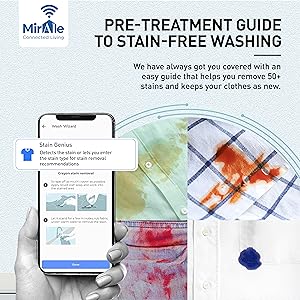
Image 4.3: MirAIe app's Stain Genius providing pre-treatment recommendations for stain removal.
Start, Pause, End & Smart Scheduling
Control your wash cycles remotely. You can start, pause, or end a wash cycle from anywhere. Schedule wash cycles according to your convenience and even add items mid-cycle without resetting the program.
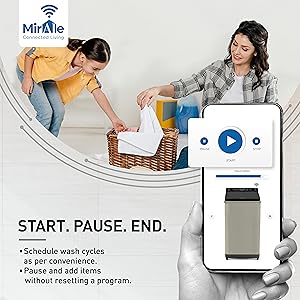
Image 4.4: MirAIe app interface showing remote control options for starting, pausing, and ending wash cycles.
Voice Commands & Alexa Compatibility
The washing machine is compatible with Alexa, allowing you to control it using voice commands for added convenience.
Weather Alerts
Receive regular weather recommendations through the MirAIe app to help you plan your laundry effectively, avoiding washing on days with expected heavy rains.

Image 4.5: MirAIe app displaying a weather alert, advising against washing clothes due to expected heavy rains.
Energy & Water Tracking
Monitor your washing machine's performance in real-time by tracking energy and water consumption directly through the MirAIe app.

Image 4.6: MirAIe app interface showing real-time tracking of energy and water consumption.
4.4 Advanced Washing Technologies
Built-in Heater
The integrated heater assists in better stain dissolution, ensuring a cleaner and more hygienic wash.

Image 4.7: Illustration of the built-in heater enhancing cleaning performance.
ECONAVI Sensors
Intelligent ECONAVI sensors detect the load and water temperature, optimizing wash cycles to save up to 20% of water and energy.

Image 4.8: Visual representation of ECONAVI sensors for intelligent washing.
Gentle Hand Wash
A dedicated net accessory allows for the gentle and careful washing of delicate items such as embroidery and lace, mimicking a handwash.

Image 4.9: Illustration of the gentle hand wash feature with a dedicated net accessory for delicate clothes.
ActiveFoam System
The ActiveFoam system generates fine foam that lifts, separates, and removes impurities from deep within fabric fibers, providing an effortless washing experience.
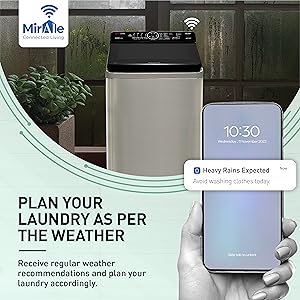
Image 4.10: Visual representation of the ActiveFoam system creating fine foam for effective cleaning.
5. Maintenance
Regular maintenance ensures optimal performance and extends the lifespan of your washing machine.
5.1 Cleaning the Lint Filter
The large lint filter effectively captures lint and debris. Clean it regularly to prevent blockages and maintain washing efficiency.
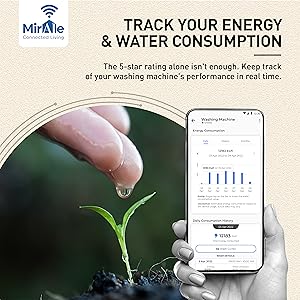
Image 5.1: Close-up of the lint filter, highlighting its role in collecting debris.
5.2 Cleaning the Detergent Dispenser
Remove and clean the detergent dispenser periodically to prevent residue buildup.
5.3 Exterior Cleaning
Wipe the exterior of the machine with a soft, damp cloth. Avoid abrasive cleaners.
5.4 Durable Body and Lid
The washing machine features a durable body and a tempered, soft-closing glass lid, tested for over 10,000 cycles, ensuring long-lasting performance.

Image 5.2: Illustration of the washing machine's durable construction and soft-closing lid mechanism.
5.5 Maintenance Alerts
The MirAIe app provides timely maintenance alerts, allowing you to schedule service visits with ease.

Image 5.3: MirAIe app displaying a reminder for washing machine service.
6. Troubleshooting
If you encounter issues with your washing machine, refer to the following common problems and solutions.
| Problem | Possible Cause | Solution |
|---|---|---|
| Machine does not start | Power cord unplugged; Lid not closed properly; Power outage. | Check power connection; Ensure lid is fully closed; Check household circuit breaker. |
| Error Code H12 displayed | Indicates a specific internal fault. | Turn off the machine, wait a few minutes, then restart. If the error persists, contact customer service. |
| Excessive noise or vibration | Machine not level; Overloaded or unbalanced load; Shipping bolts not removed. | Adjust leveling feet; Redistribute laundry; Ensure all shipping bolts are removed during installation. |
| Poor washing results | Incorrect detergent amount; Overloading; Wrong wash program selected. | Use recommended detergent amount; Do not overload; Select appropriate wash program using Wash Wizard. |
| Water leakage | Loose hose connections; Clogged drain hose. | Tighten all hose connections; Clear any blockages in the drain hose. |
For issues not listed here or if problems persist, please contact Panasonic customer support.
7. Specifications
Detailed technical specifications for the Panasonic NA-F80X10PRB washing machine.
| Feature | Specification |
|---|---|
| Brand | Panasonic |
| Model | NA-F80X10PRB |
| Energy Efficiency | 5 Star |
| Capacity | 8 Kilograms |
| Maximum Rotational Speed | 702 RPM |
| Installation Type | Free Standing |
| Colour | Pure Black |
| Access Location | Top Load |
| Voltage | 230 Volts |
| Included Components | Washing Machine, Warranty Card |
| Item Weight | 31 kg |
| Item Dimensions (LxWxH) | 60.4 x 52.5 x 103.5 Centimeters |
| Manufacturer | Panasonic Life Solutions India Private Limited |
8. Warranty and Support
Your Panasonic NA-F80X10PRB washing machine comes with a comprehensive warranty.
- 2 Years Comprehensive Warranty: The product includes a 2-year comprehensive warranty from the date of purchase.
- 12 Years Warranty on Motor: The motor is covered by a 12-year warranty.

Image 8.1: Details on the 2-year comprehensive warranty and 12-year motor warranty.
Please refer to the included Warranty Card for detailed terms and conditions. For technical support, service requests, or warranty claims, please contact Panasonic customer service through their official website or the contact information provided in your warranty documentation.


