1. Introduction
Thank you for choosing the Vangoa Digital Piano VDP-2. This manual provides essential information for the proper setup, operation, and maintenance of your new instrument. Please read it thoroughly before use to ensure optimal performance and longevity.

Figure 1: Vangoa Digital Piano VDP-2. This image shows the complete digital piano with its stand and three pedals.
Video 1: Vangoa VDP-2 Black Digital Piano Overview. This video provides a general overview of the Vangoa VDP-2 digital piano, showcasing its design and features.
2. Setup and Assembly
The Vangoa Digital Piano VDP-2 requires minimal assembly. Follow these steps to set up your instrument:
- Unpacking: Carefully remove all components from the packaging. Verify that all parts listed in the packing list are present.
- Stand Assembly: Assemble the furniture stand according to the included diagrams. Ensure all screws are tightened securely.
- Attaching the Piano Unit: Place the main piano unit onto the assembled stand. Secure it using the provided screws.
- Connecting the Pedals: Locate the pedal unit and connect its cable to the designated port on the underside of the piano. Ensure a firm connection.
- Power Connection: Connect the power adapter to the DC IN port on the rear of the piano and then plug it into a suitable power outlet.
- Headphone Connection (Optional): If using headphones, plug them into one of the two 6.35mm headphone jacks located on the underside of the piano.
- Music Rest: Attach the music rest to the designated slot on the piano unit.
Video 2: How to connect the sustain pedal. This video demonstrates the correct procedure for connecting the sustain pedal to the digital piano.
Video 3: How to connect the headphone. This video illustrates how to properly connect headphones to the digital piano.
3. Operating the Digital Piano
Familiarize yourself with the control panel to utilize the piano's various functions.

Figure 2: Control panel with buttons for record, metronome, sync, headphone, split, and dual tone functions.
- Power On/Off: Press the 'POWER' button on the control panel to turn the piano on or off.
- Volume Control: Use the 'VOL' knobs to adjust the master volume.
- Selecting Tones: Use the 'SELECT' buttons or numerical selection to choose from 880 instrument sounds.
- Rhythm Selection: Browse through 200 rhythms using the dedicated controls.
- Demo Songs: Access 80 pre-loaded demo songs for listening or practice.
- Recording: Use the 'REC' function to record your performances.
- Metronome: Activate the metronome for timing assistance during practice.
- Transpose: Adjust the pitch of the keyboard using the transpose function.
4. Key Features
- 88 Fully Weighted Hammer Action Keys: The keys are designed to mimic the feel of an acoustic piano, with heavier touch in the lower registers and lighter touch in the higher registers. This promotes proper finger technique and provides a realistic playing experience.
- Vivid and Rich Sound: Equipped with advanced sampling technology, the VDP-2 offers 128 polyphony, 880 diverse instrument sounds, 200 rhythms, and 80 demo songs. Two built-in 25W stereo speakers deliver clear and powerful audio.
- Flexible Connectivity: The piano features USB-MIDI and DIN MIDI connectors for seamless integration with computers, phones, tablets, or laptops, enabling use with various piano teaching applications and music creation software.
- Teaching and Practice Functions:
- Dual Function: Allows layering of two different sounds simultaneously.
- Split Function: Divides the keyboard into two independent sections, ideal for teacher-student lessons or four-hand performances.
- Dual Headphone Jacks: Two 6.35mm headphone jacks allow for private practice without disturbing others, or for two users to listen simultaneously.
- Elegant and Practical Design: The VDP-2 features a modern, compact design that complements any room decor. It includes a flip key cover to protect the keys from dust and damage, extending their lifespan.

Figure 3: Illustration of the weighted hammer action keys, showing the varying touch response across the keyboard.

Figure 4: Visual representation of the piano's dynamic sound capabilities, highlighting 80 demos, 880 tones, 200 rhythms, and AWM sampling technology.
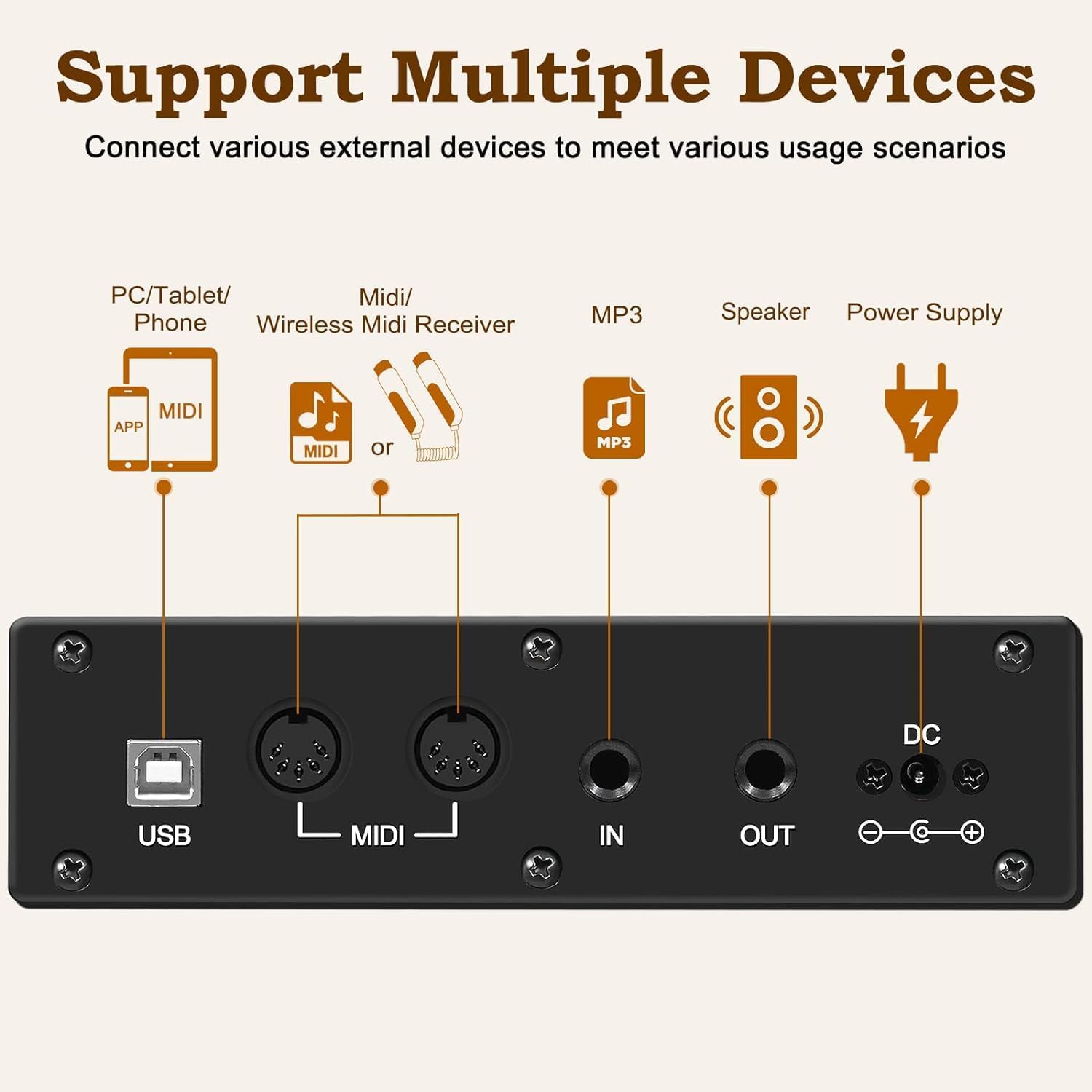
Figure 5: Diagram showing the various connectivity ports including USB, MIDI In/Out, Audio In/Out, and DC power input.
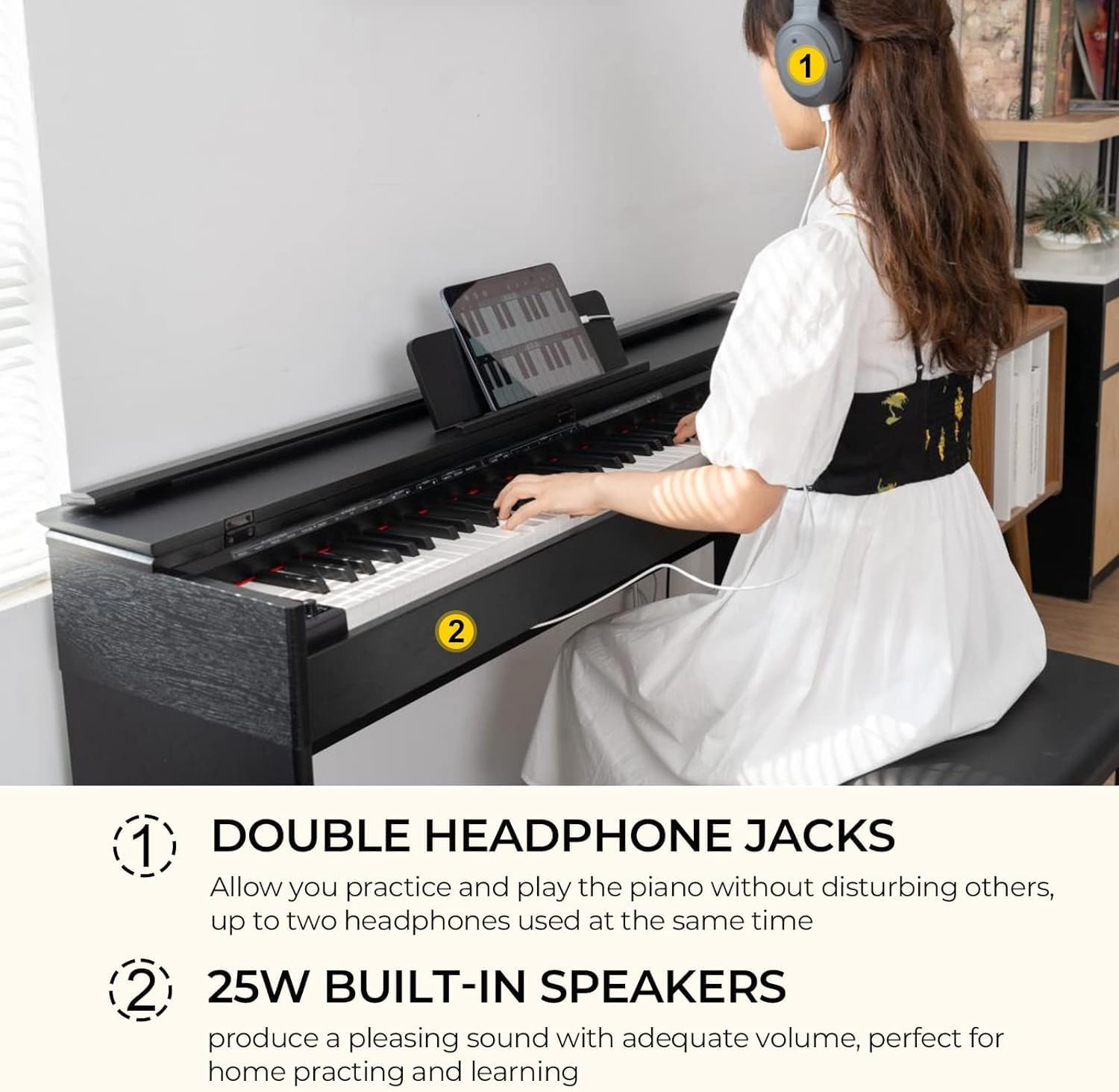
Figure 6: Image illustrating the dual headphone jacks for private practice and the built-in 25W speakers for room-filling sound.
5. Maintenance
Proper care ensures the longevity and performance of your digital piano:
- Cleaning: Use a soft, dry cloth to wipe the surface of the piano. For stubborn dirt, slightly dampen the cloth with water and a mild soap solution, then wipe dry immediately. Avoid abrasive cleaners or solvents.
- Key Care: Keep the keys clean using a soft cloth. Avoid excessive force when playing to prevent damage. Utilize the flip key cover when the piano is not in use to protect the keys from dust.
- Environment: Place the piano in a stable location away from direct sunlight, heat sources, and excessive humidity. Extreme temperature changes can affect the instrument.
- Power: Always turn off the piano and unplug it from the power outlet when not in use for extended periods or during electrical storms.
6. Troubleshooting
If you encounter any issues, refer to the following common problems and solutions:
| Problem | Possible Cause | Solution |
|---|---|---|
| No sound |
|
|
| Pedals not working |
|
|
| Keys feel unresponsive or sticky |
|
|
| Distorted sound |
|
|
If the problem persists after attempting these solutions, please contact Vangoa customer support for further assistance.
7. Specifications
| Feature | Detail |
|---|---|
| Brand | Vangoa |
| Model Number | VDP-2 |
| Number of Keys | 88 |
| Key Type | Weighted Hammer Action |
| Polyphony | 128 |
| Instrument Sounds | 880 |
| Rhythms | 200 |
| Demo Songs | 80 |
| Speakers | 2 x 25W Stereo |
| Connectivity | USB-MIDI, DIN MIDI, 6.35mm Headphone Jack (x2), Auxiliary |
| Power Source | Corded Electric |
| Dimensions | 35.43 x 54.73 x 14.57 inches |
| Item Weight | 81.4 pounds |
| Color | Black |
8. Warranty and Support
For warranty information, product registration, or technical support, please refer to the official Vangoa website or contact their customer service department. Keep your purchase receipt as proof of purchase for any warranty claims.
Online Support: Visit the Vangoa Store on Amazon for additional resources and contact options.


