1. Introduction
Thank you for choosing the toocki 100W USB C to C Fast Charging Cable. This high-performance cable is designed to provide rapid charging and efficient data transfer for a wide range of USB-C compatible devices. Featuring an integrated LED display, you can monitor real-time charging power, ensuring your devices are always optimally charged. Its durable nylon braided design ensures longevity and reliability.

Image: Two toocki 100W USB C to C cables, highlighting the LED power display.
2. Key Features
- 100W USB C Super Fast Charging: Supports Power Delivery (PD) up to 100W (20V/5A) for rapid charging of laptops, tablets, and smartphones.
- 480Mbps High-Speed Data Transfer: Enables quick synchronization of photos, videos, and files between devices.
- E-marker Smart Chip: Built-in intelligent chip regulates current and voltage, ensuring safe and stable charging while protecting your devices.
- LED Power Digital Display: Real-time wattage display allows you to monitor the charging status and power output.
- 6.6FT (2M) Durable Nylon Braided Cable: Constructed with high-density nylon braiding for enhanced durability, flexibility, and tangle-free use, withstanding over 35,000 bend tests.
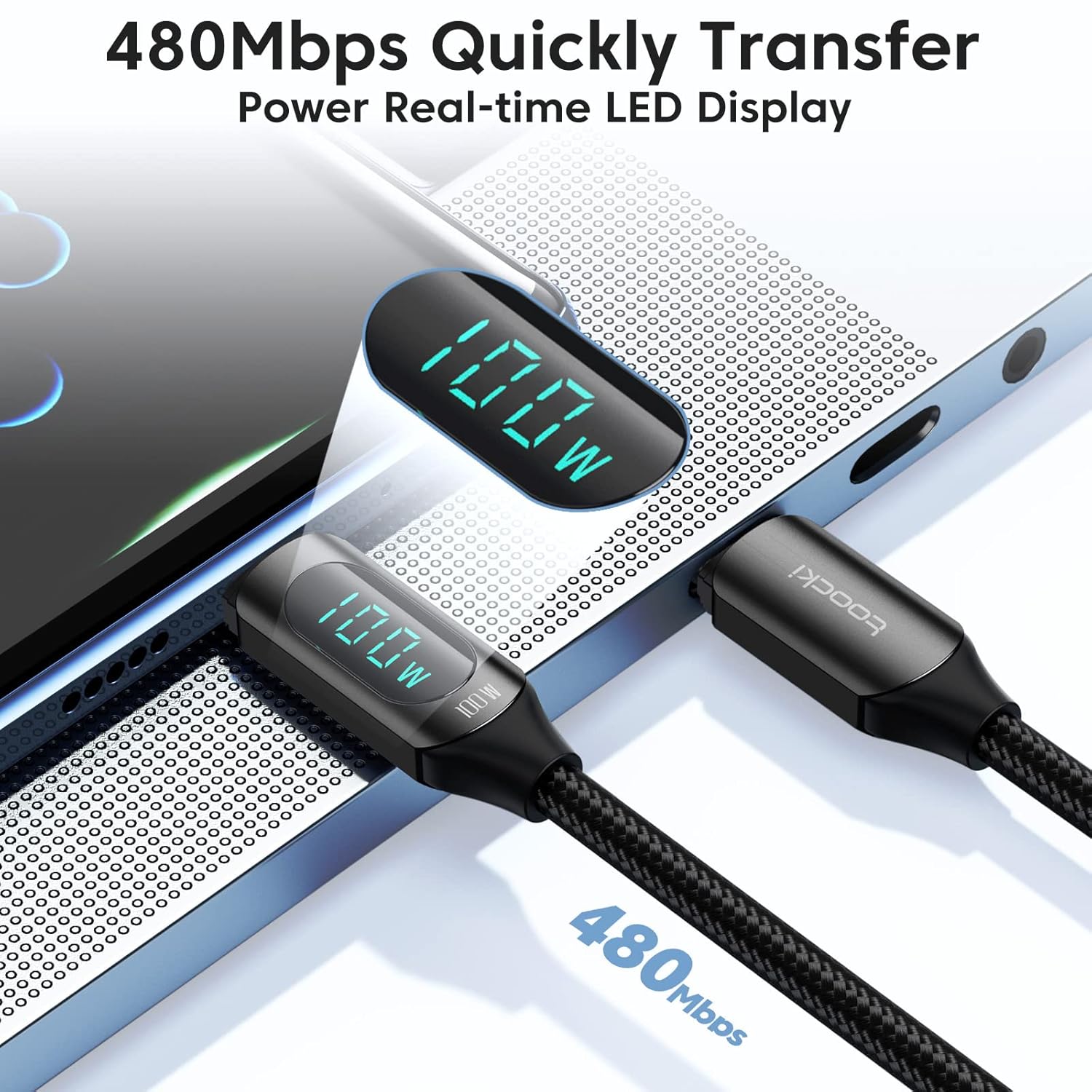
Image: High-speed data transfer and power display.

Image: Built-in E-marker smart chip for safe charging.

Image: Cable construction highlighting durability.

Image: Demonstrating the convenient 6.6ft (2M) cable length.
3. Setup Guide
Using your toocki 100W USB C to C Fast Charging Cable is straightforward. Follow these steps to begin charging or transferring data:
- Connect to Power Source: Insert one end of the USB C cable into a compatible USB-C power adapter (wall charger, power bank, etc.). Ensure your power adapter supports Power Delivery (PD) for optimal fast charging.
- Connect to Device: Insert the other end of the USB C cable into the USB-C port of your device (smartphone, tablet, laptop, etc.). For real-time power monitoring, ensure the end of the cable with the LED display is connected to your device.
- Verify Connection: Once connected, the LED display on the cable will illuminate, showing the current charging wattage. Your device should indicate that it is charging.

Image: Connecting the cable for fast charging.
4. Operating Instructions
4.1. Real-time Power Monitoring
The integrated LED display provides instant feedback on the charging power (in Watts) being delivered to your device. This feature allows you to verify if your charger and device are utilizing the cable's full 100W capability. The display updates in real-time, offering a clear visual of the charging process.
4.2. High-Speed Data Transfer
In addition to charging, the cable supports data transfer speeds of up to 480Mbps. Connect your USB-C device to a computer or another compatible device to quickly transfer files, photos, and videos.
4.3. Device Compatibility
This cable is designed for devices with a USB-C port. It is compatible with a wide range of devices, including:
- Smartphones: iPhone 15 Series, Samsung Galaxy (S21, S20, Note20, etc.), Google Pixel, Huawei, Xiaomi, LG, and more.
- Tablets: iPad Pro, iPad Air, iPad Mini, and other USB-C tablets.
- Laptops: MacBook, MacBook Air, MacBook Pro, HP Spectre, Lenovo Yoga, Dell XPS, Microsoft Surface, and other USB-C enabled laptops.
- Other Devices: Nintendo Switch, Go Pro, smartwatches, Bluetooth speakers, and more.
Note: This cable is not compatible with devices that use Micro USB or older iPhone models (pre-iPhone 15) that utilize a Lightning port. Please confirm your device ports before purchasing.

Image: Wide compatibility with Type-C interface devices.

Image: Visual representation of broad device compatibility.
4.4. Product Demonstration Video
Video: A visual demonstration of the toocki 100W USB C to C cable's fast charging capabilities, LED display functionality, and durable design. This video highlights the product's key features in action.
5. Maintenance
To ensure the longevity and optimal performance of your toocki USB C cable, please follow these maintenance guidelines:
- Avoid Extreme Bending: While the cable is designed to be durable and flexible, avoid sharp or extreme bends, especially near the connectors, to prevent internal wire damage.
- Keep Clean: Regularly wipe the cable and connectors with a soft, dry cloth to remove dust and debris. Avoid using harsh chemicals or abrasive materials.
- Proper Storage: When not in use, coil the cable loosely and secure it with the included Velcro strap. Avoid tangling or knotting the cable. Store it in a cool, dry place away from direct sunlight and extreme temperatures.
- Handle with Care: Always pull from the connector head, not the cable itself, when unplugging from a device or power source.
6. Troubleshooting
If you encounter any issues with your toocki USB C cable, please refer to the following common problems and solutions:
| Problem | Possible Cause | Solution |
|---|---|---|
| Device not charging or charging slowly. | Incompatible power adapter; loose connection; device issue. | Ensure power adapter supports PD and provides sufficient wattage. Check if both ends of the cable are securely connected. Try a different power adapter or device to isolate the issue. |
| LED display not showing wattage. | Cable end with display not connected to device; device not drawing power. | Ensure the cable end with the LED display is plugged into the device you are charging. Verify the device is powered on and attempting to draw power. |
| Data transfer not working. | Incorrect port; driver issue; cable damage. | Ensure both devices have compatible USB-C data ports. Check computer drivers. Try connecting to a different port or computer. |
| Cable appears damaged. | Physical stress or wear. | Discontinue use immediately to prevent potential damage to devices. Contact customer support for assistance. |
If the problem persists after trying these solutions, please contact toocki customer support for further assistance.
7. Specifications
| Attribute | Detail |
|---|---|
| Brand | toocki |
| Model | 2PCS-6.6FT USB C to C Cable (100W/5A) Black |
| Connector Type | USB Type C to USB Type C |
| Power Delivery | Up to 100W (20V/5A) |
| Data Transfer Speed | Up to 480Mbps |
| Cable Length | 6.6 feet (2 meters) |
| Special Features | Braided, Data Transfer, Fast Charging, High Speed, LED Display |
| Material | Nylon Braided |
| Package Dimensions | 6.02 x 4.53 x 0.75 inches |
| Weight | 3.84 ounces |
| Date First Available | November 11, 2022 |
8. What's in the Box
- USB C Cable x 2
9. Warranty & Support
toocki products are manufactured to the highest quality standards. For information regarding warranty coverage, technical support, or any product-related inquiries, please refer to the contact information provided on the product packaging or visit the official toocki website.
We are committed to providing excellent customer service and support.


