1. Product Overview
The GOWENIC LP A8BT is a compact and powerful 2.0 channel Hi-Fi stereo audio amplifier designed for versatile use. It features Bluetooth 5.0 connectivity, coaxial decoding, and multiple input options, delivering high-fidelity sound for various audio setups.
Key Features:
- Compact and Powerful: Delivers 2 x 40W rated power.
- Bluetooth 5.0: Built-in core for stable, noise-free wireless audio streaming.
- Multi-functional Controls: LCD display with backlight, independent treble and bass adjustment knobs.
- Multiple Playback Options: Supports U disk, memory card (TF card), AUX input, and FM radio.
- Coaxial Decoding: Supports SPDIF transmission and coaxial decode for APE, WAV, FLAC, and other lossless audio formats, providing CD-quality sound.
- Wide Compatibility: Connects to mobile phones, computers, tablets, laptops, MP3/MP4 players, TVs with AV audio, and projectors.

Image 1.1: Front view of the GOWENIC LP A8BT amplifier, showing the LCD display, control knobs, and input ports.
2. Setup Instructions
Follow these steps to set up your GOWENIC LP A8BT amplifier:
2.1. Unpacking
Carefully remove all components from the packaging. The package should include:
- 1 x GOWENIC LP A8BT Amplifier
- 1 x Remote Control
- 1 x Audio Cable
- 1 x User Manual (this document)
2.2. Connecting Speakers
Connect your passive speakers to the speaker terminals on the rear panel of the amplifier. Ensure correct polarity (+ to + and - to -) for each channel (Left and Right).
- Locate the speaker terminals on the rear of the amplifier.
- Unscrew the terminal caps.
- Insert the bare speaker wire ends into the corresponding terminals.
- Tighten the terminal caps to secure the wires.

Image 2.1: Rear panel of the amplifier, showing speaker terminals, audio input (RCA), AUX, Coaxial, and DC power input.
2.3. Connecting Audio Sources
The amplifier supports multiple audio input methods:
- AUX Input (RCA): Use the provided audio cable to connect devices like CD players, DVD players, or other audio sources to the "AUDIO INPUT" RCA ports.
- Coaxial Input: For digital audio sources, connect a coaxial cable to the "COAXIAL" port.
- USB/TF Card: Insert a USB flash drive or TF (Micro SD) card into the respective slots on the front panel for direct media playback.
- Bluetooth: For wireless connection from smartphones, tablets, or computers.
2.4. Power Connection
Connect a DC 12V-18V ≥3A power adapter (not included) to the "POWER IN" port on the rear panel. Ensure the power adapter meets the specified voltage and current requirements.
Warning: Using an incorrect power adapter may damage the device.
3. Operating Instructions
3.1. Power On/Off
Turn the main volume knob clockwise until you hear a click to power on the amplifier. Turn it counter-clockwise until it clicks to power off.
3.2. Input Mode Selection
Press the "MODE" button on the front panel or the remote control to cycle through available input modes: Bluetooth, AUX, USB, TF Card, FM Radio, Coaxial.
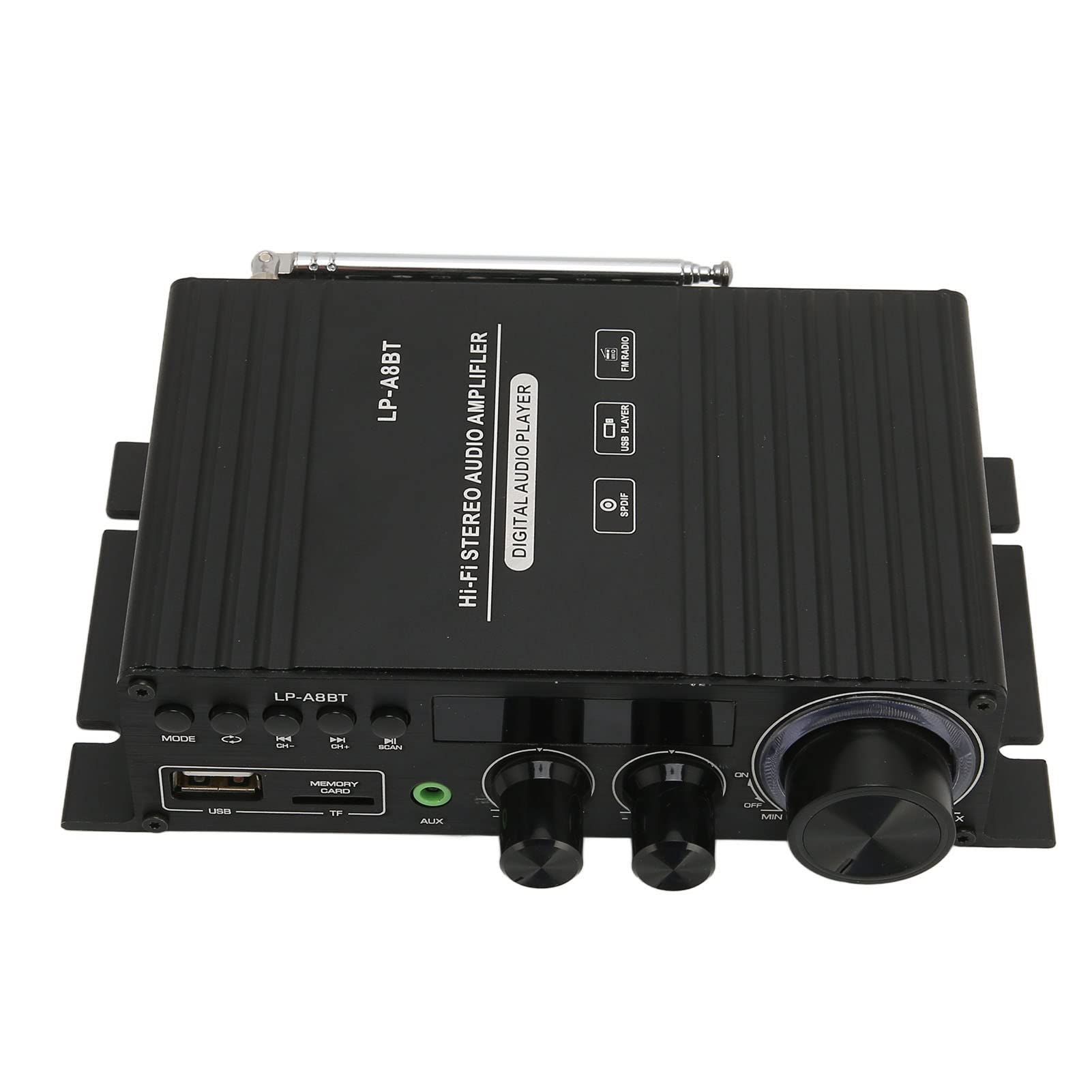
Image 3.1: Close-up of the amplifier's front panel, highlighting the MODE button, playback controls, and tone knobs.
3.3. Volume and Tone Control
- Volume: Use the large "MAX/MIN" knob on the front panel or the volume buttons on the remote control to adjust the overall volume.
- Treble (HIGH): Use the "HIGH" knob to adjust the high-frequency response.
- Bass (LOW): Use the "LOW" knob to adjust the low-frequency response.
3.4. Bluetooth Pairing
- Select "Bluetooth" mode using the MODE button. The LCD display will show "BT".
- On your mobile device, enable Bluetooth and search for available devices.
- Select "LP A8BT" from the list.
- Once paired, the amplifier will indicate a successful connection, and you can stream audio wirelessly.
3.5. USB/TF Card Playback
- Insert a USB flash drive or TF card containing audio files into the corresponding slot.
- The amplifier should automatically switch to USB or TF card mode and begin playback. If not, select the correct mode using the MODE button.
- Use the playback control buttons (Previous/Next Track, Play/Pause) on the front panel or remote control.
3.6. FM Radio Operation
- Select "FM" mode using the MODE button.
- The amplifier will automatically scan and store available FM stations.
- Use the Previous/Next Track buttons to navigate between stored stations.
3.7. Remote Control
The included remote control provides convenient access to all amplifier functions, including power, mode selection, volume, track control, and EQ settings.

Image 3.2: The remote control for the LP A8BT amplifier, showing various buttons for control.
4. Maintenance
- Cleaning: Use a soft, dry cloth to clean the amplifier's exterior. Do not use liquid cleaners or aerosols.
- Ventilation: Ensure the amplifier has adequate ventilation. Do not block the ventilation openings.
- Storage: When not in use for extended periods, store the amplifier in a cool, dry place away from direct sunlight and extreme temperatures.
- Power: Disconnect the power adapter before cleaning or if the unit will be unused for a long time.
5. Troubleshooting
| Problem | Possible Cause | Solution |
|---|---|---|
| No power | Power adapter not connected or faulty; power switch off. | Ensure power adapter is securely connected and functioning. Turn the volume knob clockwise to power on. |
| No sound | Incorrect input mode; volume too low; speakers not connected; faulty audio cable. | Select the correct input mode. Increase volume. Check speaker connections. Replace audio cable if necessary. |
| Bluetooth not pairing | Amplifier not in Bluetooth mode; device too far; interference. | Ensure amplifier is in Bluetooth mode. Move device closer. Restart both devices. |
| Distorted sound | Volume too high; poor audio source quality; speaker impedance mismatch. | Reduce volume. Use a higher quality audio source. Ensure speakers are 4-8Ω. |
| Remote control not working | Battery depleted; obstruction; remote not pointed at sensor. | Replace remote control battery (CR2025). Remove obstructions. Point remote directly at the amplifier's IR sensor. |
6. Specifications
| Feature | Specification |
|---|---|
| Product Type | Car Audio Power Amplifier |
| Material | Aluminum Alloy |
| Color | Black |
| Remote Control Battery | 160mAh CR2025 Button Battery (built-in) |
| Input Voltage | DC 12V-18V ≥3A |
| Frequency Response | 20Hz-20KHz |
| Output Power | 2 x 40W |
| Distortion Rate | <0.2% |
| Signal to Noise Ratio | >80dB |
| Load Impedance | 4-8Ω |
| Bluetooth Version | 5.0 |
| FM Frequency | 87.5MHz-108.0MHz |
| Input Impedance | 47K |
| Dimensions | Approx. 18 x 13 x 6 cm |
| Weight | Approx. 401 g |
7. Warranty and Support
GOWENIC products are designed and manufactured to the highest quality standards. This product comes with a standard manufacturer's warranty against defects in materials and workmanship from the date of purchase. Please retain your proof of purchase for warranty claims.
For technical support, troubleshooting assistance, or warranty inquiries, please contact your retailer or visit the official GOWENIC support website. Contact information may be found on the product packaging or the retailer's website.
Please note that the warranty does not cover damage caused by misuse, unauthorized modifications, accidents, or improper installation.


