
Product Overview
The Core Innovations Wireless Bluetooth Karaoke Microphone is a portable, handheld device designed for karaoke and entertainment. It features built-in speakers, HD recording capabilities, and Bluetooth connectivity for streaming music from your smartphone.

Image: The Core Innovations Wireless Bluetooth Karaoke Microphone in Rose Gold, showcasing its design.
Package Contents
Ensure all items are present in the package:
- Core Innovations Wireless Bluetooth Karaoke Microphone
- Micro-USB Charging Cable
- User Manual (this document)
Controls and Ports
Familiarize yourself with the microphone's controls and connection points:

Image: Detailed view of the microphone's control panel, showing buttons for Mode, Volume, Echo, Music, and power.
- Power Button: Press and hold to turn on/off.
- Mode Button: Cycles through different operating modes (e.g., Bluetooth, MP3).
- Volume Sliders: Adjust microphone volume and music volume.
- Echo Slider: Adjust the echo effect level.
- Music Controls: Play/Pause, Previous Track, Next Track.

Image: Bottom view of the microphone, highlighting the Headphone Jack, Memory Card Slot, and Micro USB Charging Port.
- Micro-USB Charging Port: For charging the internal battery.
- Memory Card Slot: For inserting a memory card for HD recording.
- Headphone Jack: For private listening.
Setup
1. Charging the Microphone
- Connect the Micro-USB charging cable to the microphone's charging port.
- Connect the other end of the cable to a USB power source (e.g., computer, USB wall adapter).
- The charging indicator light will illuminate. Once fully charged, the light may change color or turn off (refer to specific product behavior if indicated by manufacturer).
- A full charge typically takes a few hours.
2. Powering On/Off
- Press and hold the Power Button for approximately 3 seconds to turn the microphone on or off.
- A voice prompt will indicate the power status.
3. Bluetooth Pairing
- Ensure the microphone is powered on and in Bluetooth mode (indicated by a flashing blue light).
- On your smartphone or other Bluetooth-enabled device, go to the Bluetooth settings.
- Search for available devices and select "Core Innovations Mic" (or similar name).
- Once paired, a voice prompt will confirm the connection, and the blue light will stop flashing.

Image: The microphone connected wirelessly via Bluetooth to a smartphone, ready for music streaming.
Operating Instructions
1. Singing with Music
- Pair your device via Bluetooth as described in the Setup section.
- Open your preferred music app on your smartphone and start playing a karaoke track or any song.
- Adjust the Music Volume slider on the microphone to control the background music level.
- Speak or sing into the microphone. Adjust the Microphone Volume slider to control your voice level.
- Use the Echo Slider to add a reverberation effect to your voice.
- Use the Music Controls (Play/Pause, Previous Track, Next Track) to manage your music playback directly from the microphone.
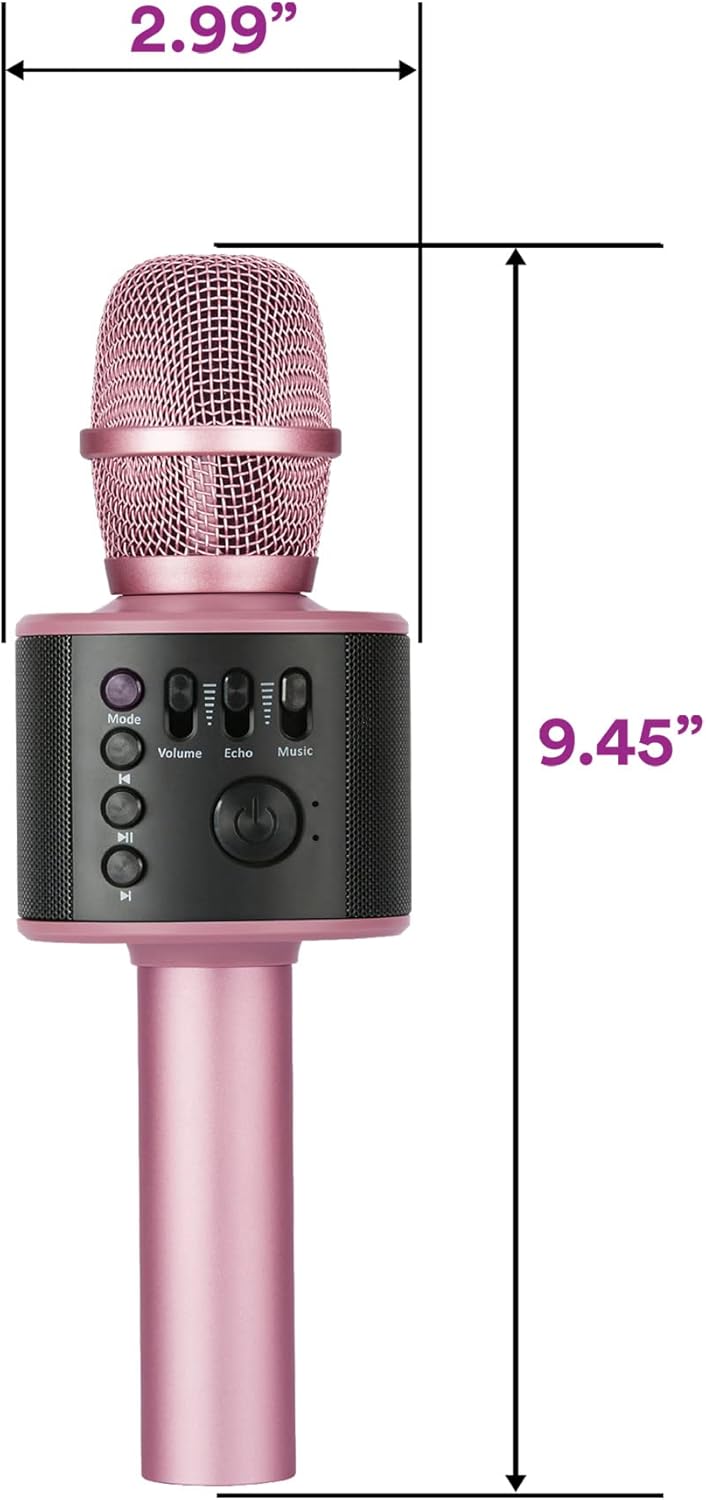
Image: A person holding the microphone, demonstrating its use for singing.
2. HD Recording
- Insert a compatible memory card into the Memory Card Slot.
- Ensure the microphone is in the appropriate recording mode (check the Mode button functionality for recording options, if available, or use a connected smartphone app for recording).
- Begin singing or speaking into the microphone.
- Recordings are saved to the inserted memory card.
3. Using as a Standalone Speaker
- Connect your device via Bluetooth.
- Play music from your device. The microphone's built-in speakers will play the audio.
- Adjust the Music Volume slider to control the playback volume.

Image: The microphone emitting sound waves from its built-in speakers.
Maintenance
- Keep the microphone dry and away from moisture.
- Clean the exterior with a soft, dry cloth. Do not use harsh chemicals or abrasive cleaners.
- Store in a cool, dry place when not in use.
- Avoid dropping the microphone or subjecting it to strong impacts.
Troubleshooting
| Problem | Solution |
|---|---|
| Microphone does not turn on. | Ensure the battery is charged. Connect to a power source using the Micro-USB cable. |
| Cannot pair via Bluetooth. |
|
| No sound from speakers. |
|
| Echo effect is too strong/weak. | Adjust the Echo Slider on the microphone. |
Specifications
- Model Number: KRMC101RG
- Connectivity: Bluetooth, USB
- Power Source: Battery Powered (1 Lithium Ion battery required)
- Battery Capacity: 1200mAh (rechargeable)
- Item Dimensions (L x W x H): 2.99 x 2.99 x 9.45 inches
- Item Weight: 11.2 ounces (0.7 Pounds)
- Microphone Form Factor: Handheld
- Special Feature: Volume Control
- Compatible Devices: Personal Computer, Smartphone
- UPC: 810111500876

Image: Diagram showing the dimensions of the Core Innovations Wireless Bluetooth Karaoke Microphone.
Warranty and Support
For warranty information and customer support, please refer to the manufacturer's official website or contact their customer service department. Keep your purchase receipt for warranty claims.
Manufacturer: DP Audio Video
Important Safety Information
- Do not expose the device to extreme temperatures or direct sunlight.
- Do not disassemble or attempt to repair the device yourself.
- Keep out of reach of small children.
- Dispose of batteries according to local regulations.
Official Product Videos
Watch these official videos for additional guidance and demonstrations:
Video: "Microphone and karaoke all in one" by Luisana Esquer. This video demonstrates the microphone's features and its use for karaoke.
Video: "UNBOXING: Core Innovations Karaoke Microphone" by TechyNerds. This video provides an unboxing experience and initial look at the microphone.