
ODK B010115SPD00USDF
ODK 40 Inch Small L Shaped Computer Desk - Instruction Manual
Model: B010115SPD00USDF
Product Overview
The ODK 40 Inch Small L Shaped Computer Desk is designed for small spaces, offering a versatile workstation for home offices, bedrooms, living rooms, or gaming rooms. It features ample desktop space, reversible storage shelves, and an integrated monitor stand. The desk is constructed from engineered wood with a rustic brown finish and a powder-coated frame.

Image: The ODK L-shaped desk in a rustic brown finish, showcasing its compact design with a monitor, laptop, and books on its surface and shelves.
Safety Information
WARNING:
This desk has a low weight limit of approximately 0.36 pounds, considering its own weight of 35.70 pounds. Properly anchor the desk to the wall or floor to prevent tipping or collapse, especially when using heavy equipment like monitors or printers. Always follow local safety guidelines and regulations when assembling and using this desk.
Package Contents
- L-Shaped Desk Components (Engineered Wood panels, Metal frame parts)
- 2 Storage Shelves
- Headphones Hook
- Assembly Tools (Note: Full set of assembly tools may not be included, refer to manual for specifics)
- User Manual
Specifications
| Feature | Detail |
|---|---|
| Brand | ODK |
| Model Number | B010115SPD00USDF |
| Product Dimensions | 39.3"D x 29.1"W x 30"H |
| Color | Rustic Brown |
| Style | Modern |
| Base Material | Engineered Wood |
| Top Material Type | Engineered Wood |
| Finish Type | Powder Coated |
| Special Feature | Reversible shelves |
| Item Weight | 24.97 Pounds |
| Maximum Weight Recommendation | 36 Pounds |
| Recommended Number of People for Assembly | 1 (though 2 is recommended for ease) |
Setup and Assembly
Assembly of the ODK L-shaped desk is designed to be straightforward, typically taking around 30 minutes. While one person can assemble it, having a second person can significantly ease the process, especially when aligning parts.
Key Assembly Features:
- Reversible Shelves: The storage shelves can be installed on either the left or right side of the L-shaped desk to suit your space and preference.
- Monitor Stand: An elevated monitor stand is included for ergonomic screen placement. Note that this stand is typically held in place by rubber circles on the underside of its legs and is not screwed into the main desk surface.
- Headphones Hook: A convenient hook is provided for hanging headphones or other accessories.
Assembly Tips:
- Identify all parts and hardware using the provided user manual before beginning. Parts are often labeled alphabetically.
- Ensure all screws are tightened securely, but avoid over-tightening to prevent stripping.
- For optimal alignment, especially with the main desk panels, it is helpful for one person to hold or push components into place while another tightens screws.
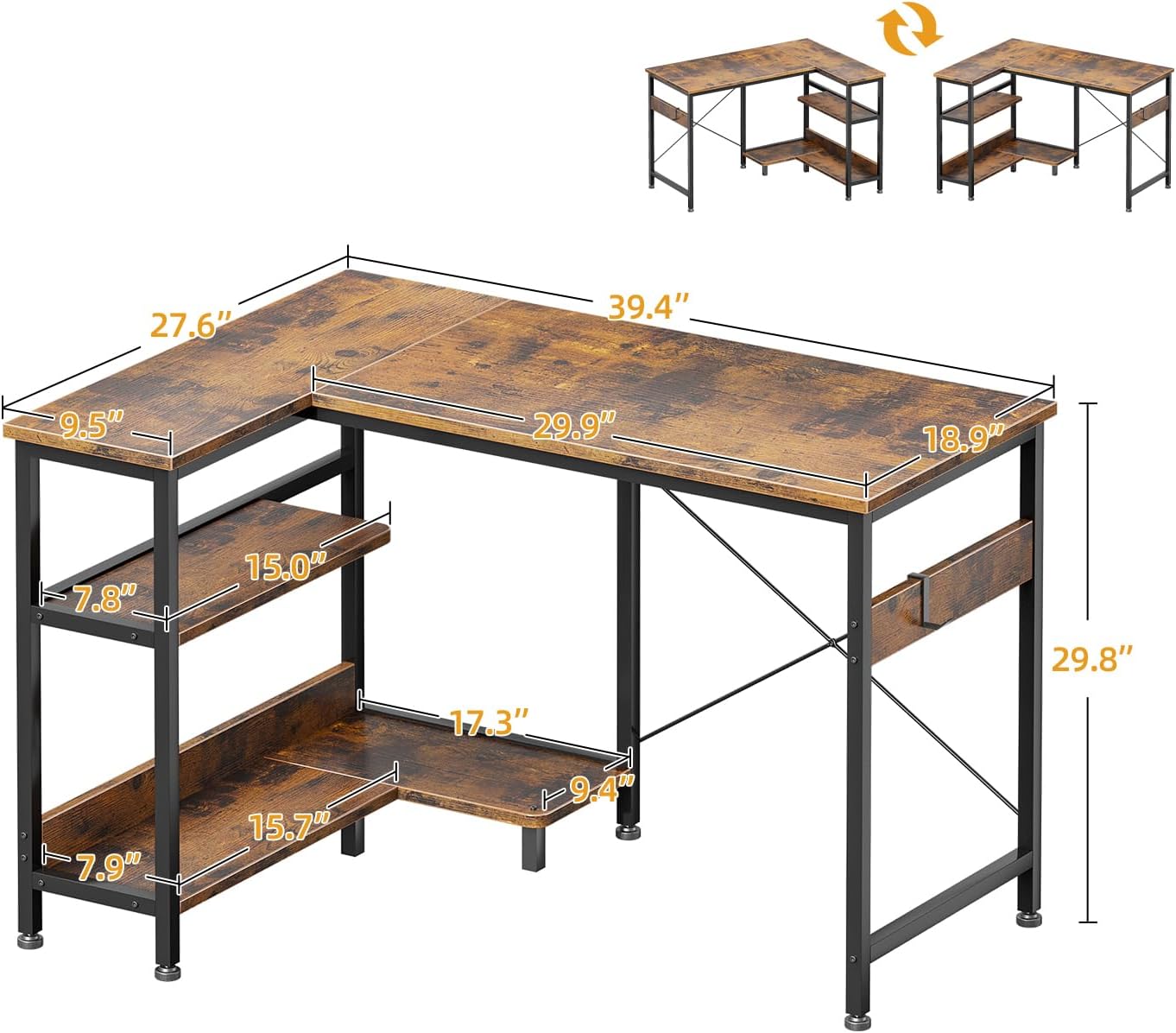
Image: Detailed dimensions of the ODK L-shaped desk, illustrating its overall size and the measurements of its various components, including the reversible shelves.

Image: A visual representation of the desk's reversible design, showing how the storage shelves can be configured on either the left or right side.
Assembly Video:
Video: An official ODK video demonstrating the assembly process and key features of the L-shaped computer desk with a removable monitor stand. This video provides a visual guide to help with setup.
Operating Instructions
The ODK L-shaped desk is designed for versatile use in various settings. Here are some tips for optimal operation:
- Workstation Setup: Utilize the L-shape to create distinct zones for different tasks, such as a primary computer area and a secondary writing or reading space.
- Monitor Stand: Place your monitor on the elevated stand to reduce neck and eye strain. The stand can also be used for a laptop or tablet.
- Storage Shelves: Organize books, files, and office supplies on the two under-desk shelves. An additional PC stand is provided for your computer tower, ensuring it does not occupy valuable shelf space.
- Legroom: The desk is designed with ample legroom, ensuring comfort even with the under-desk storage.
- Headphones Hook: Use the integrated hook to keep your headphones easily accessible and off the desk surface.
- Multi-Desk Configuration: Two ODK L-shaped desks can be placed together to form a larger, modern writing table suitable for two people or an extended workspace.

Image: A detailed view of the desk's storage shelves, highlighting the dedicated space for a PC tower and additional room for books and storage bins.
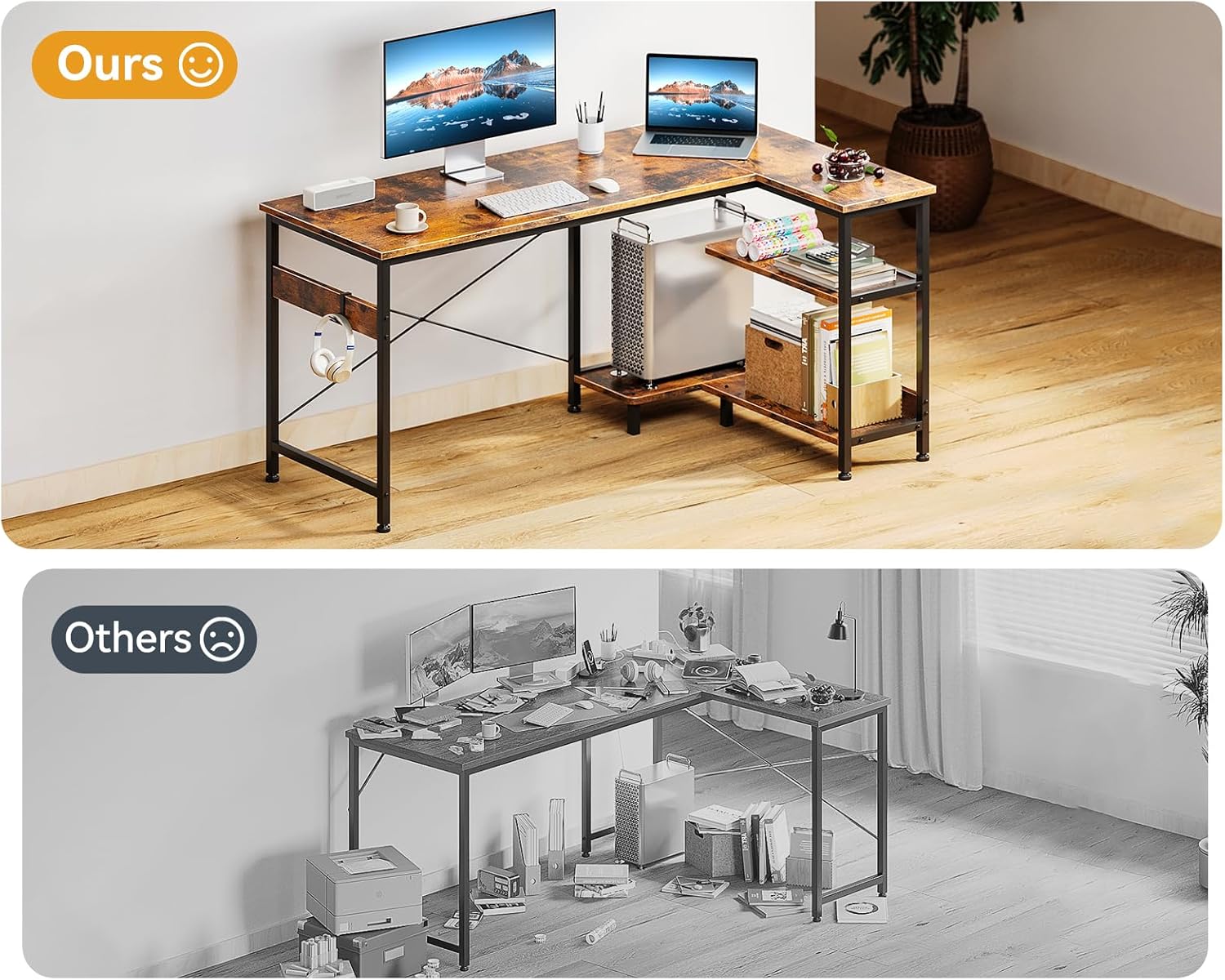
Image: A visual comparison demonstrating how the ODK desk's design promotes an organized and spacious workspace compared to a typical cluttered desk.
Maintenance
- Cleaning: Wipe surfaces with a soft, damp cloth. Avoid harsh chemicals or abrasive cleaners that could damage the finish.
- Spills: Promptly clean up any spills to prevent staining or damage to the engineered wood.
- Stability Check: Periodically check all screws and connections to ensure they remain tight. Re-tighten if necessary to maintain desk stability.
- Weight Distribution: Distribute weight evenly across the desk surface and shelves. Avoid placing excessively heavy items on one side or on the monitor stand.
- Environmental Conditions: Avoid prolonged exposure to direct sunlight or extreme humidity, which can affect the wood material.
Troubleshooting
Common Issues and Solutions:
- Screws Not Tightening / Stripping:
Ensure you are using the correct screws for each part as indicated in the manual. Avoid over-tightening, which can strip the wood or screw threads. If a screw spins freely, it may be stripped; try a slightly larger screw if available, or contact support.
- Parts Not Aligning / Gaps:
During assembly, ensure components are firmly pushed together before tightening screws. Sometimes, slight adjustments or loosening adjacent screws can help align parts. Refer to the manual's diagrams carefully for correct orientation.
- Monitor Stand Instability:
The monitor stand is designed to rest on the desk surface using rubber feet. Ensure these feet are properly positioned and that the stand is placed on a flat, stable part of the desk. It is not designed to be screwed in.
- Desk Wobbles:
Check that all screws are fully tightened. Ensure the desk is on a level surface. Many desks include adjustable feet at the bottom of the legs; adjust these to compensate for uneven floors.
Warranty and Support
ODK offers a 1-year no-reason return policy and lifetime customer service for this product.
Contact Information:
- Email Support: support@odkfurniture.com
- Amazon Customer Support: For queries related to your Amazon order, you can directly reach out to Amazon Customer Support.
- Social Media: Find ODK on social media platforms like Instagram (@odkhome, @furniture_odk) for additional information and updates.
Each ODK product includes a unique code for verification before shipping, ensuring product authenticity.
Related documentsB010115SPD00USDF

Ask a question about this manual
Ask about setup, troubleshooting, compatibility, parts, safety, or missing instructions. Manuals+ will review the question and use this page’s manual context to help answer it.