
1. Important Safety Information
Before using the ANCHEER Hydraulic Rowing Machine, please read and understand all safety instructions. Failure to follow these instructions may result in injury or damage to the equipment.
- Consult your physician before starting any exercise program.
- Keep children and pets away from the equipment during use.
- Ensure the rowing machine is placed on a flat, stable surface.
- Inspect the equipment for loose parts or damage before each use. Do not use if damaged.
- The maximum user weight capacity for this machine is 220 lbs (100 kg). Do not exceed this limit.
- Wear appropriate exercise clothing and footwear.
- Maintain proper form during exercise to prevent injury.
2. Product Overview
The ANCHEER Hydraulic Rowing Machine B-168 is designed to provide an effective full-body workout in the comfort of your home. It features a dual hydraulic cylinder resistance system with 12 adjustable levels, a comfortable seat, anti-slip foot pedals, and an LCD monitor to track your progress.

This image displays the ANCHEER Hydraulic Rowing Machine B-168, highlighting its compact design and the adjustable hydraulic resistance mechanism.
3. Package Contents
Please check the package to ensure all components are present:
- ANCHEER Hydraulic Rowing Machine (main frame and pre-assembled parts)
- Assembly Hardware (bolts, nuts, washers, tools)
- User Manual
4. Assembly Instructions
Assembly of the ANCHEER Hydraulic Rowing Machine is straightforward. Follow these general steps:
- Unpack Components: Carefully remove all parts from the packaging and lay them out on a clean, flat surface.
- Identify Parts: Refer to the included assembly diagram to identify each component and hardware piece.
- Assemble Frame: Connect the main frame sections using the provided bolts and tools. Ensure all connections are secure.
- Attach Seat and Pedals: Install the seat onto the rail and attach the foot pedals according to the diagram.
- Install Handles and Resistance Cylinders: Secure the rowing handles and connect the hydraulic resistance cylinders.
- Final Check: Once assembled, double-check all bolts and nuts to ensure they are tightened securely.
Note: Specific assembly steps and diagrams are provided in the printed manual included with your product.
5. Operating Instructions
5.1 Getting Started
- Sit on the comfortable seat with your feet securely placed in the adjustable foot pedals. Fasten the straps over your feet.
- Grasp the rubber handles firmly with both hands.
5.2 Rowing Motion
The rowing motion consists of four phases: Catch, Drive, Finish, and Recovery.
- Catch: Knees bent, shins vertical, arms extended forward, back straight, shoulders relaxed.
- Drive: Push off with your legs, then lean back slightly from your hips, and finally pull the handles towards your abdomen.
- Finish: Legs extended, body leaning back slightly, handles at your abdomen, elbows past your body.
- Recovery: Extend arms forward, then pivot forward from your hips, and finally bend your knees to slide the seat forward to the catch position.
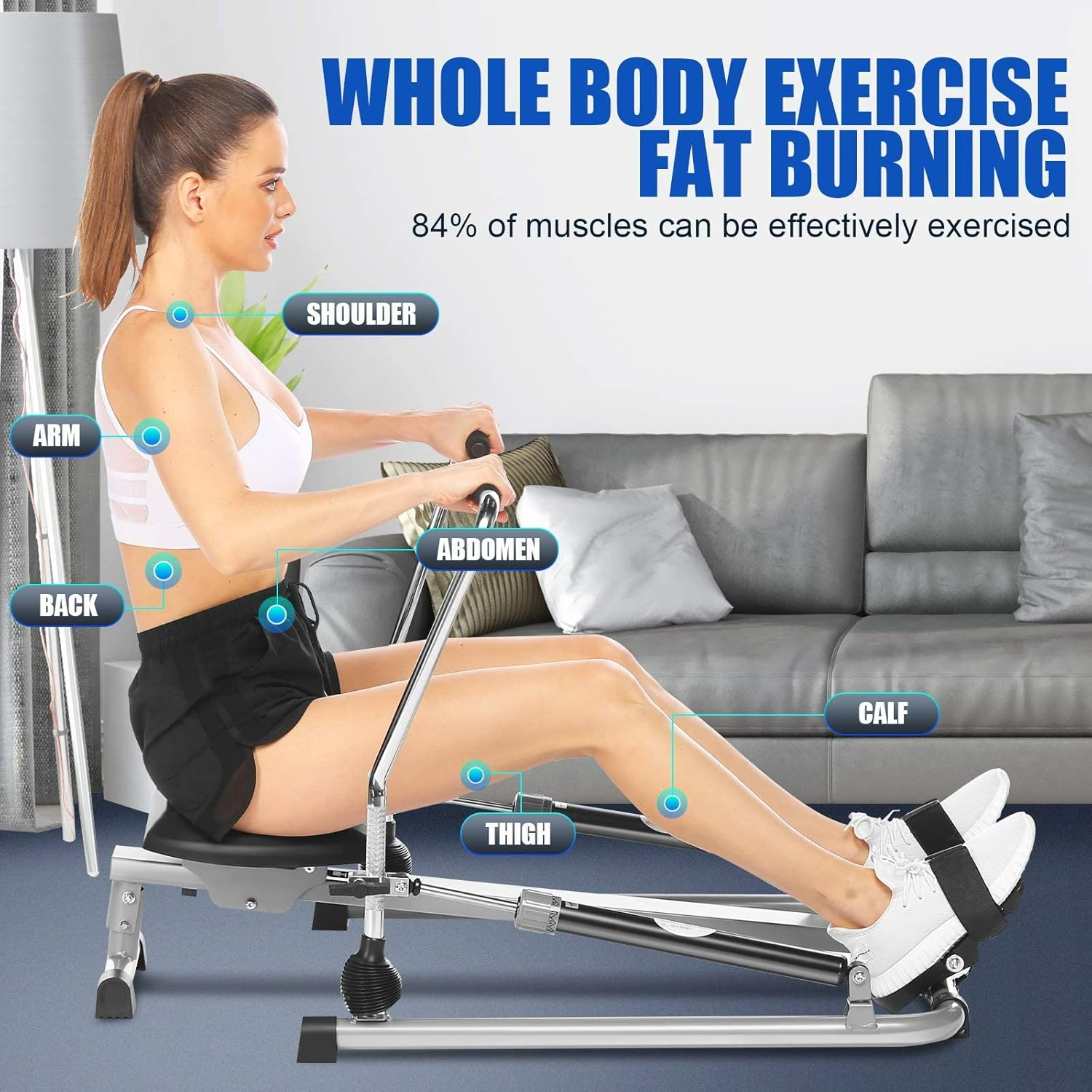
This image illustrates the correct posture and muscle engagement during a rowing exercise on the ANCHEER B-168, targeting shoulders, arms, back, abdomen, calves, and thighs.

This image details the comfortable, padded handle bar and the slip-resistant, adjustable foot pedals designed for secure and effective workouts.
6. Adjusting Resistance
The ANCHEER B-168 features 12 levels of hydraulic resistance, allowing you to customize your workout intensity. Each hydraulic cylinder has an adjustment knob.
- To increase resistance, turn the adjustment knob on each hydraulic cylinder clockwise towards a higher number.
- To decrease resistance, turn the adjustment knob on each hydraulic cylinder counter-clockwise towards a lower number.
- Ensure both cylinders are set to the same resistance level for a balanced workout.

This diagram explains how to adjust the hydraulic cylinders to select one of the 12 resistance levels, ranging from light (1-4) to heavy (9-12).
7. Using the LCD Monitor
The integrated LCD monitor tracks your workout data to help you monitor your progress.
- Display Functions: The monitor typically displays:
- TIME: Duration of your current workout.
- COUNT: Number of rowing strokes during the current workout.
- DISTANCE: Estimated distance covered.
- CALORIES: Estimated calories burned.
- Mode Button: Press the 'MODE' button to cycle through the display functions.
- Reset Button: Press and hold the 'RESET' button to clear all workout data.
- Battery: The LCD monitor is typically powered by AAA batteries. If the display is dim or not working, replace the batteries.
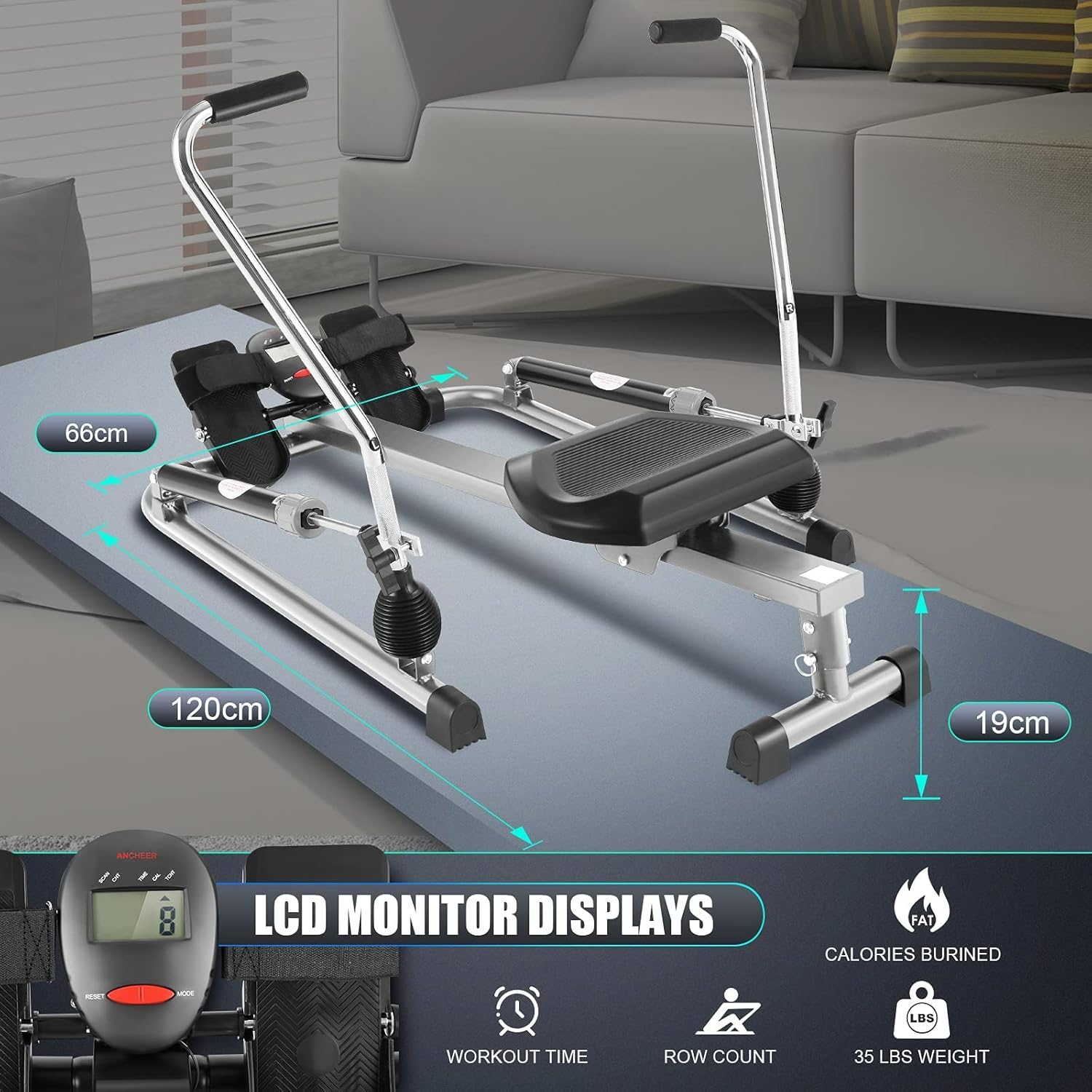
This image shows the LCD monitor, which tracks essential workout data such as workout time, total row count, and estimated calories burned, alongside the machine's dimensions.
8. Storage
The ANCHEER Hydraulic Rowing Machine is designed for compact storage. Its flat design allows it to be stored in small spaces.
- After use, you can fold down the metal rods (handles) to reduce the overall height.
- With a height of approximately 15-20 cm (6-8 inches) when folded, it can easily be stored under most beds or upright against a wall.
- Ensure the machine is clean and dry before storing.
9. Maintenance
Regular maintenance will ensure the longevity and optimal performance of your rowing machine.
- Cleaning: Wipe down the machine with a damp cloth after each use to remove sweat and dust. Avoid abrasive cleaners.
- Check Connections: Periodically check all bolts, nuts, and screws. Tighten any loose connections to prevent squeaking and ensure stability.
- Hydraulic Cylinders: The hydraulic cylinders are generally sealed and require no lubrication. If you notice a decrease in resistance or unusual noise, refer to the troubleshooting section.
- LCD Monitor Batteries: Replace the batteries in the LCD monitor as needed (typically AAA batteries).
10. Troubleshooting
Here are solutions to common issues you might encounter:
| Problem | Possible Cause | Solution |
|---|---|---|
| Squeaking or unusual noises | Loose bolts or connections | Check and tighten all bolts and nuts on the frame and moving parts. |
| Resistance feels uneven or too low/high | Hydraulic cylinders not set to the same level or internal issue | Ensure both hydraulic cylinders are set to the same resistance level. If the issue persists, contact customer support. |
| LCD monitor not displaying or dim | Dead batteries or loose connection | Replace the AAA batteries in the LCD monitor. Check the battery compartment for secure connection. |
| Machine feels unstable | Uneven surface or loose frame components | Place the machine on a flat, level surface. Check and tighten all frame bolts. |
11. Specifications
| Feature | Specification |
|---|---|
| Brand | ANCHEER |
| Model Name | B-168 |
| Resistance Mechanism | Hydraulic |
| Resistance Levels | 1-12 |
| Display Type | LCD |
| Display Functions | Time, Count, Distance, Calories |
| Max User Weight | 220 lbs (100 kg) |
| Product Dimensions (L x W x H) | 120 cm x 66 cm x 19 cm (approx. 47.2 x 26 x 7.5 inches) |
| Item Weight | 16 kg (approx. 35.3 lbs) |
| Frame Material | Alloy Steel |
| UPC | 194349005236 |
| Part Number | 5768G |
12. Warranty and Support
12.1 Warranty Information
The ANCHEER Hydraulic Rowing Machine B-168 comes with a 1-year limited warranty from the date of purchase. This warranty covers manufacturing defects in materials and workmanship under normal use.
The warranty does not cover:
- Normal wear and tear.
- Damage caused by improper assembly, maintenance, or storage.
- Damage resulting from misuse, abuse, accident, or unauthorized modifications.
Please retain your proof of purchase for warranty claims.
12.2 Customer Support
If you have any questions, require assistance with assembly, operation, or maintenance, or need to make a warranty claim, please contact ANCHEER customer support through the retailer where you purchased the product or visit the official ANCHEER website for contact information.
Please have your model number (B-168) and proof of purchase ready when contacting support.