
1. Introduction
Thank you for choosing the FEZIBO 55" Electric Standing Desk with Shelves, Model SDE. This desk is designed to provide a versatile and ergonomic workspace, allowing you to easily switch between sitting and standing positions. It features a spacious desktop, integrated shelves for storage, and an intelligent control panel for height adjustment. This manual provides essential information for assembly, operation, maintenance, and troubleshooting to ensure safe and efficient use of your new desk.

Image 1: FEZIBO 55" Electric Standing Desk with Shelves in a home office setting.
2. Safety Instructions
- Always ensure the desk is placed on a stable, level surface.
- Do not overload the shelves or desktop. The maximum weight capacity is 176 lbs (80 kg).
- Exercise caution when adjusting the desk height to prevent injury or damage to objects placed on or near the desk. Ensure no obstacles are in the path of the desk's movement.
- Keep children and pets away from the desk during operation.
- Do not sit or stand on the desk.
- Ensure all electrical connections are secure and properly installed. Avoid exposing electrical components to moisture.
- Follow all assembly instructions carefully. If you are unsure about any step, seek professional assistance.
- Regularly inspect the desk for any signs of wear or damage. Discontinue use and contact customer support if any issues are found.
3. Package Contents
Before beginning assembly, verify that all components listed below are present and undamaged. All components are well-labeled in one package.
- Desktop surface (55"W x 24"D)
- Adjustable height desk frame (Alloy Steel)
- Under-table shelves (2 units)
- Adjustable desk monitor shelf
- Intelligent control panel
- Assembly hardware (screws, bolts, tools)
- Power adapter and cables
- Desk hooks
- Lockable casters (optional, if included)
4. Assembly Instructions (Setup)
Assembly of the FEZIBO Electric Standing Desk requires careful attention to detail. While it can be assembled by one person, two people are recommended for easier handling of larger components. An electric drill may be needed for certain steps. Please refer to the detailed graphical instructions provided in your package for step-by-step guidance.
- Unpack and Identify Parts: Lay out all components and hardware. Match them against the parts list in your included manual.
- Assemble the Desk Frame: Attach the lifting columns to the foot supports. Ensure all connections are secure.
- Attach Crossbar and Side Brackets: Connect the crossbar between the lifting columns and secure the side brackets.
- Mount the Desktop: Carefully place the desktop onto the assembled frame and secure it using the provided screws.
- Install Shelves and Monitor Stand: Attach the under-table shelves and the monitor shelf to the desktop as per the instructions.
- Connect Electrical Components: Install the intelligent control panel and connect all motor and power cables. Ensure cables are routed safely to avoid pinching or damage during height adjustment.
- Final Checks: Verify all screws are tightened and the desk is stable. Plug in the power adapter.
Important Note: The electrical components and lifting mechanism require precise installation. If you are not confident in assembling the electrical parts, it is recommended to seek assistance from someone experienced in such installations to ensure proper function and safety.

Image 2: An illustration demonstrating the assembly process of the standing desk frame and desktop.
5. Operating Instructions
Your FEZIBO Electric Standing Desk is equipped with an intelligent control panel for easy and precise height adjustments.
5.1 Control Panel Overview

Image 3: Detailed view of the intelligent control panel.
- Up/Down Arrows (▲ / ▼): Press and hold to continuously adjust the desk height. Release to stop at your desired position. The desk can adjust from 27.5" to 47.3".
- Memory Buttons (1, 2, 3): These buttons allow you to save and recall up to three preferred height settings.
- Setting Button (S): Used to program your memory height settings.
5.2 Setting Memory Presets
- Adjust the desk to your desired height using the Up/Down arrows.
- Press the 'S' (Setting) button. The display will flash 'S'.
- Within 3 seconds, press one of the memory buttons (1, 2, or 3) to save the current height. The display will show 'S-' followed by the number you pressed (e.g., 'S-1') to confirm.
- Repeat for other desired height settings.
5.3 Recalling Memory Presets
To move the desk to a saved height, simply press the corresponding memory button (1, 2, or 3). The desk will automatically move to that preset height.
5.4 Quiet and Smooth Operation

Image 4: The desk's motor operates quietly, typically below 50dB, ensuring minimal disturbance.
6. Maintenance
Proper maintenance ensures the longevity and optimal performance of your FEZIBO Electric Standing Desk.
- Cleaning: Clean the desktop and frame with a damp cloth and dry thoroughly. Avoid using harsh chemicals or abrasive cleaners that could damage the finish.
- Cable Management: Periodically check and organize cables to prevent tangling or interference with the desk's movement.
- Inspection: Regularly inspect all screws and connections to ensure they remain tight. Tighten any loose fasteners as needed.
- Motor Care: The electric motor is designed for durability. Avoid continuous operation for extended periods without rest. If the motor makes unusual noises or struggles, discontinue use and consult the troubleshooting section or customer support.
7. Troubleshooting
If you encounter any issues with your FEZIBO Electric Standing Desk, please refer to the following common troubleshooting steps:
| Problem | Possible Cause | Solution |
|---|---|---|
| Desk does not move or respond to controls. | Power cable disconnected; motor overload; control panel error. | Check power connections. Unplug and replug the desk after 10 minutes. Reduce weight on the desk. Perform a reset (refer to your detailed manual for specific reset procedures). |
| Desk moves unevenly or makes unusual noises. | Uneven weight distribution; loose connections; obstruction. | Ensure weight is evenly distributed. Check and tighten all assembly screws. Remove any obstructions. |
| Height presets are not saving or recalling correctly. | Incorrect programming sequence. | Review Section 5.2 on 'Setting Memory Presets' and follow the steps precisely. |
| Desk stops mid-movement. | Overload protection activated; anti-collision feature triggered. | Reduce weight on the desk. Check for any objects obstructing the desk's path. |
If these steps do not resolve the issue, please contact FEZIBO customer support for further assistance.
8. Specifications
Key technical specifications for the FEZIBO 55" Electric Standing Desk, Model SDE:
- Brand: FEZIBO
- Model Number: SDE
- Product Dimensions: 24"D x 55"W x 27.7"H
- Minimum Height: 27.7 Inches
- Maximum Height: 47.3 Inches
- Color: Rustic Brown
- Top Material Type: Engineered Wood
- Base Material: Alloy Steel
- Lifting Mechanism: Electric
- Maximum Weight Recommendation: 176 lbs (80 kg)
- Number of Shelves: 2 (Under-table shelves)
- Included Components: Under-table Shelves, Adjustable Desk Monitor Shelf, Intelligent Control Panel
- Assembly Required: Yes
- Item Weight: Approximately 80 Pounds
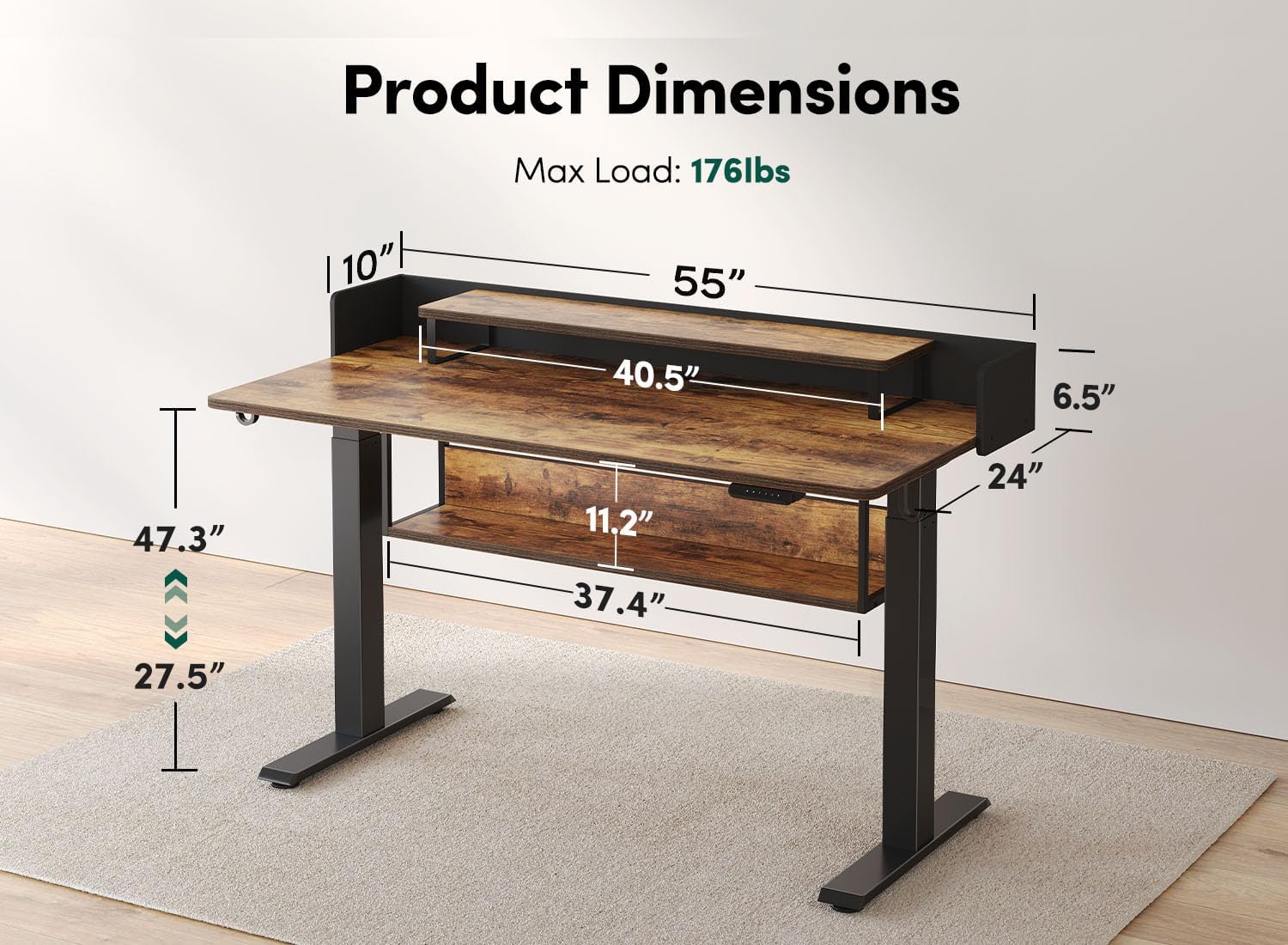
Image 5: Diagram illustrating the key dimensions and maximum load capacity of the desk.

Image 6: The desk's robust construction ensures stability even under its maximum load capacity of 176 lbs.
9. Warranty
The FEZIBO 55" Electric Standing Desk, Model SDE, comes with a limited warranty. For specific details regarding warranty coverage, duration, and terms, please refer to the warranty information included in your product packaging or contact FEZIBO customer support.
10. Customer Support
For any questions, concerns, or technical assistance regarding your FEZIBO Electric Standing Desk, please contact our customer support team. We offer friendly technical support 24 hours a day online.
Please visit the official FEZIBO website or refer to the contact information provided in your product packaging for the most up-to-date support options.


